

【VRChat】ハートめメーカー - 目をハート・ぐるぐる・ジト目に切り替えられるようにする
- 日本語Digital700 JPY
- EnglishDigital700 JPY
- 한국어Digital700 JPY
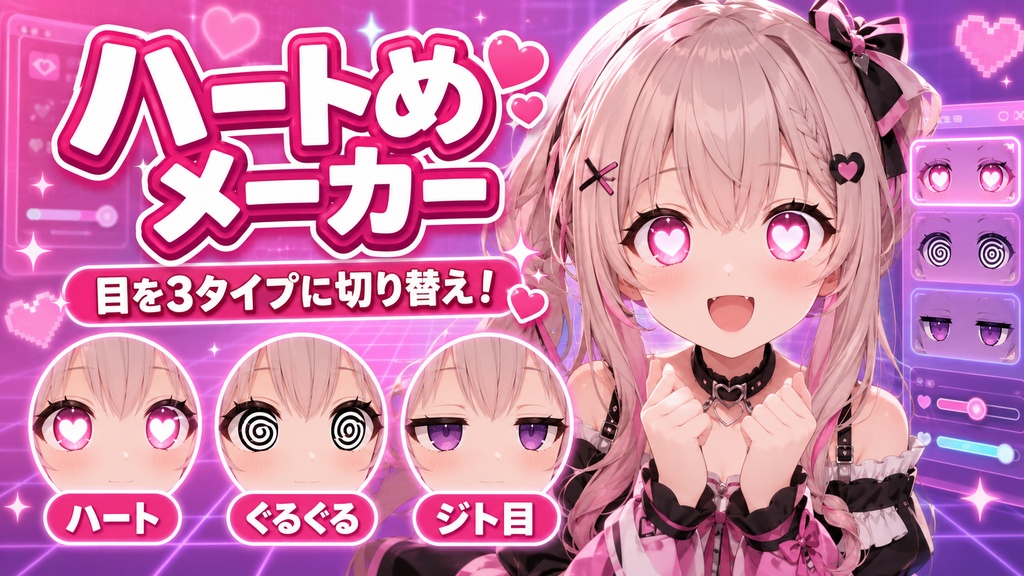
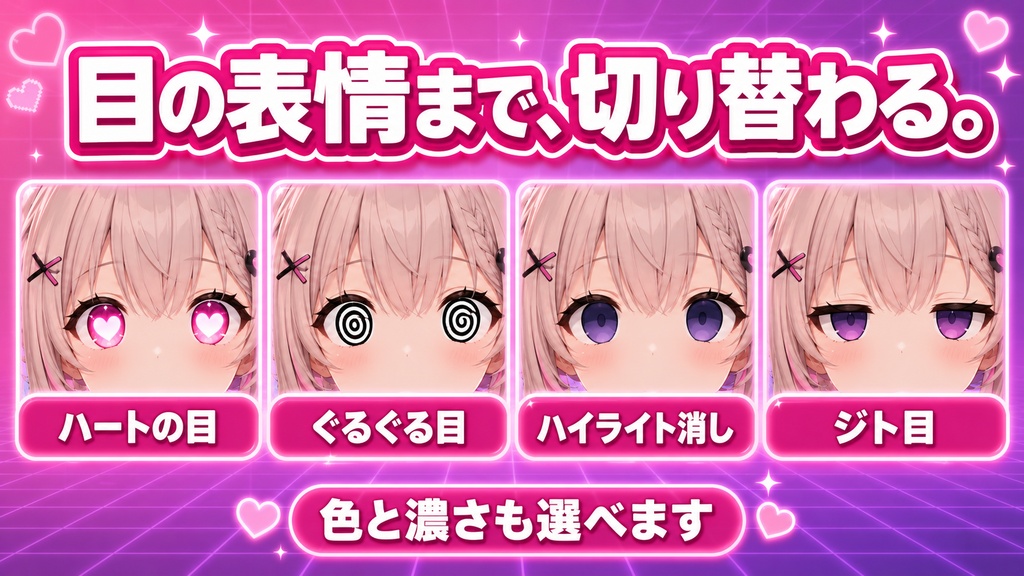
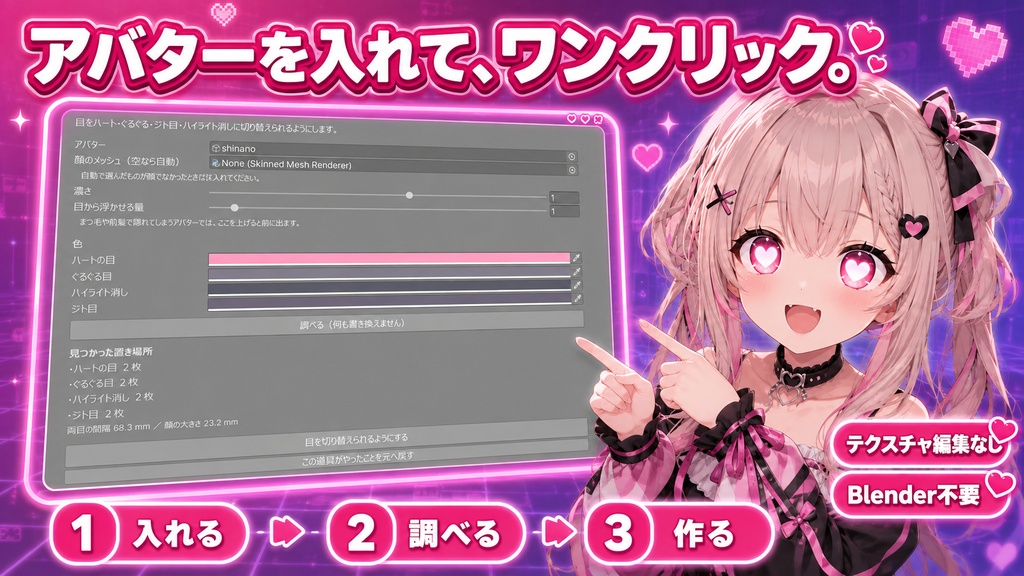


目だけは、ずっと同じ。 口の形も眉も表情で変えられるのに、瞳の中身だけは最初から最後まで同じままです。まんがなら、好きなものを見たら目がハートになるし、混乱したらぐるぐるになる。ハートめメーカーは、それを切り替えられるようにするツールです。 目の中を差し替えるには、ふつうテクスチャを描き替えます。アバター専用の目テクスチャを探すか、自分で描くか。どちらも簡単ではありません。 「目がハートになってほしいだけなのに…」——そんなときのためのツールです。アバターを入れてボタンを押すだけ。メニューから切り替えます。Blenderもいりません。 ◆ 切り替えられるもの ・ハートの目 好きなものを見たとき。中に白い光が入っています ・ぐるぐる目 混乱したとき。白目の下地つきで、元の瞳が透けません ・ハイライト消し 感情が抜けた目。中心ほど暗く沈みます ・ジト目 上まぶたから落ちる影 メニューから1つずつ。色と濃さは、作る前に自分で決められます。 ◆ 目線と一緒に動きます 目のボーンにぶら下げるので、目が動けばハートも一緒に動きます。目の玉の上に貼り付いたまま動くので、目線を外しても取り残されません。 手元の3体で、目の頂点が目のボーンに乗っていることを数えてから作りました(重み655〜1301)。 ◆ ここがうれしい ・アバターを入れてワンクリック ・アバター専用の目テクスチャは要りません ・元のテクスチャもマテリアルもメッシュも書き換えません。足すのは子オブジェクトだけです ・瞳の大きさは両目の間隔から決めるので、どの顔でも同じ大きさで乗ります ・「元へ戻す」ボタンひとつで、足したものが全部消えます ・Ctrl+Z でも戻せます ・2回押しても増えません ・メニューの枠が満杯のアバターでは、空いている下の階層へ入れます ◆ まつ毛で隠れてしまうときは まつ毛や前髪が目の手前にあるアバターでは、絵がそこに隠れることがあります。画面の「目から浮かせる量」を上げると前に出ます。 ◆ 使い方はシンプル 1. メニュー Tools/tool/ハートめメーカー を開く 2. アバターを入れる 3.「調べる」でどこに置けるか確認(この時点では何も変わりません) 4. 色と濃さを決めて「目を切り替えられるようにする」を押すだけ ◆ 動作環境 ・Unity 2022.3 系(VRChat SDK3 - Avatars 環境を推奨) ・Humanoid に設定され、目のボーン(LeftEye / RightEye)があるアバターが対象です ※ 目のボーンが無いアバターには入れません。目線と一緒に動かせないので、途中で止まります。 ※ メニューの数値ひとつ(8ビット)を同期の枠から使います。 ※ 実際の見え方は、VRChatにアップロードしてからご確認ください。 ※ アバター本体、衣装、VRChat SDKは付属しません。 --- English --- Title Heart Eyes Maker - Switch the eyes to hearts, spirals or a half-lidded look [JA,En,Ko] Description The eyes never change. The mouth and the brows move with your expressions, but the inside of the eye stays exactly the same from start to finish. In manga, seeing something you love turns your eyes into hearts, and confusion turns them into spirals. Heart Eyes Maker lets you switch between those. Normally, changing what is inside the eye means repainting a texture -- finding one made for your avatar, or drawing it yourself. Neither is easy. "I just want my eyes to turn into hearts..." That is what this is for. Drop in your avatar, press a button, switch from the menu. No Blender. What you can switch to - Heart eyes, with a white glint inside - Spiral eyes, on a white base so the original iris does not show through - Highlight off, sinking darkest at the centre - Half-lidded, a shadow falling from the upper lid One at a time from the menu. Colour and strength are yours to pick before it is built. They move with your gaze Because they hang off the eye bone, the hearts move when the eyes move. They stay stuck to the eyeball, so looking away does not leave them behind. Before building it, the eye vertices were counted on 3 avatars to confirm they really are weighted to the eye bones (weights 655 to 1301). What's nice - Drop in your avatar and click once - No avatar-specific eye texture needed - The original texture, material and mesh are never written to -- only child objects are added - The iris size comes from the eye-to-eye distance, so it lands the same on any face - One undo button removes everything it added - Ctrl+Z works too - Running it twice does not stack up - If the menu is full, the entry goes into a sub-menu that still has room When the lashes hide it On avatars whose lashes or fringe sit in front of the eye, the art can end up behind them. Raise Lift off the eye in the window and it comes forward. How to use 1. Open Tools/tool/Heart Eyes Maker 2. Drop in your avatar 3. Press Scan to see where it can go (nothing changes yet) 4. Pick the colour and strength, then press Make the eyes switchable Requirements - Unity 2022.3 (VRChat SDK3 - Avatars recommended) - The avatar must be Humanoid and must have LeftEye / RightEye bones Note: avatars without eye bones are refused, because the marks could not follow the gaze. One integer (8 bits) is taken from the synced parameter budget. Please check the final look after uploading to VRChat. Avatar, outfit and VRChat SDK are not included. Age rating All ages Category 3D Model / VRChat --- 한국어 --- 제목 하트눈 메이커 - 눈을 하트·소용돌이·째린 눈으로 바꿀 수 있게 합니다 [JA,En,Ko] 설명 눈만은 계속 똑같습니다. 입 모양도 눈썹도 표정으로 바뀌는데, 눈동자 안쪽만은 처음부터 끝까지 그대로입니다. 만화라면 좋아하는 것을 보면 눈이 하트가 되고, 혼란하면 소용돌이가 됩니다. 하트눈 메이커는 그것을 바꿀 수 있게 하는 툴입니다. 눈 안쪽을 바꾸려면 보통 텍스처를 다시 그립니다. 아바타 전용 눈 텍스처를 찾거나, 직접 그리거나. 둘 다 쉽지 않습니다. "눈이 하트가 되면 좋겠을 뿐인데…" -- 그럴 때를 위한 툴입니다. 아바타를 넣고 버튼을 누르기만 하면 됩니다. 메뉴에서 바꿉니다. Blender도 필요 없습니다. 바꿀 수 있는 것 - 하트 눈: 좋아하는 것을 봤을 때. 안에 흰 빛이 들어 있습니다 - 소용돌이 눈: 혼란할 때. 흰자 바탕이 있어 원래 눈동자가 비치지 않습니다 - 하이라이트 제거: 감정이 빠진 눈. 중심일수록 어둡게 가라앉습니다 - 째린 눈: 윗눈꺼풀에서 떨어지는 그림자 메뉴에서 하나씩. 색과 진하기는 만들기 전에 직접 정합니다. 시선과 함께 움직입니다 눈 본에 매달리므로 눈이 움직이면 하트도 함께 움직입니다. 눈알 위에 붙은 채로 움직여서 시선을 돌려도 남겨지지 않습니다. 만들기 전에 3체에서 눈 정점이 눈 본에 실려 있는지 세어 확인했습니다(가중치 655~1301). 좋은 점 - 아바타를 넣고 원클릭 - 아바타 전용 눈 텍스처가 필요 없습니다 - 원본 텍스처도 머티리얼도 메시도 쓰지 않습니다. 추가하는 것은 자식 오브젝트뿐입니다 - 눈동자 크기는 양눈 간격에서 정하므로 어떤 얼굴에서도 같은 크기로 얹힙니다 - 「되돌리기」 버튼 하나로 추가한 것이 전부 사라집니다 - Ctrl+Z로도 되돌릴 수 있습니다 - 두 번 눌러도 늘어나지 않습니다 - 메뉴가 가득 찬 아바타에서는 비어 있는 아래 단계에 넣습니다 속눈썹에 가려질 때는 속눈썹이나 앞머리가 눈 앞에 있는 아바타에서는 그림이 가려질 수 있습니다. 화면의 「눈에서 띄우는 양」을 올리면 앞으로 나옵니다. 사용법 1. 메뉴 Tools/tool/하트눈 메이커 열기 2. 아바타 넣기 3. 「조사」로 어디에 놓을 수 있는지 확인 (이 시점에서는 아무것도 바뀌지 않습니다) 4. 색과 진하기를 정하고 「눈을 바꿀 수 있게 하기」 누르기 동작 환경 - Unity 2022.3 (VRChat SDK3 - Avatars 권장) - Humanoid이며 눈 본(LeftEye / RightEye)이 있는 아바타가 대상입니다 ※ 눈 본이 없는 아바타에는 넣지 않습니다. 시선과 함께 움직일 수 없기 때문입니다. ※ 동기화 슬롯에서 정수 하나(8비트)를 씁니다. ※ 실제로 보이는 모습은 VRChat에 업로드한 뒤 확인해 주세요. ※ 아바타 본체, 의상, VRChat SDK는 포함되지 않습니다. 연령 제한 전체 연령 카테고리 3D 모델 / VRChat