

Nyrex Drone Latex Suit|Novabeast用 ラテックスドローンスーツ / 4 Designs & Shader
- Digital1,060 JPY
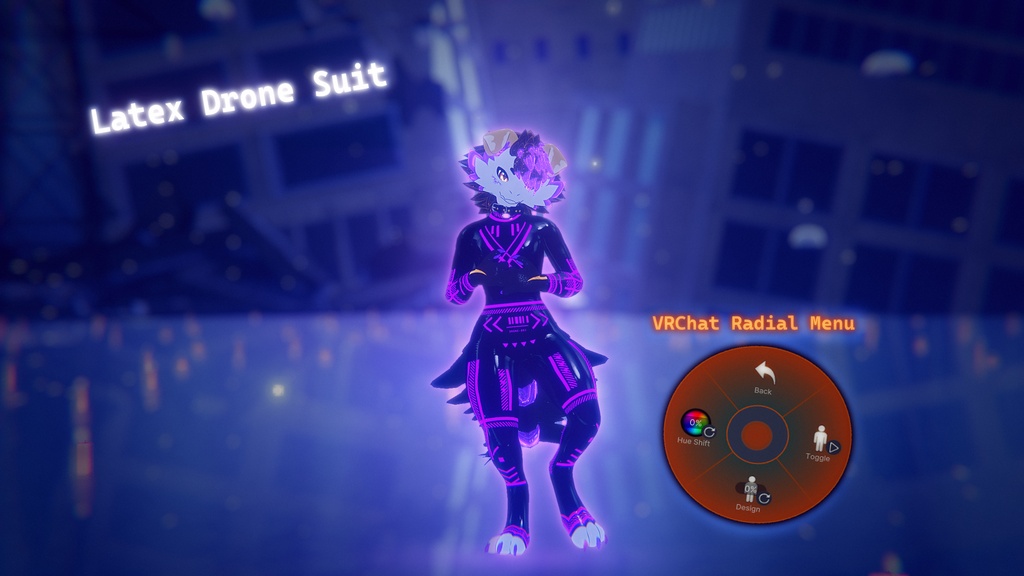
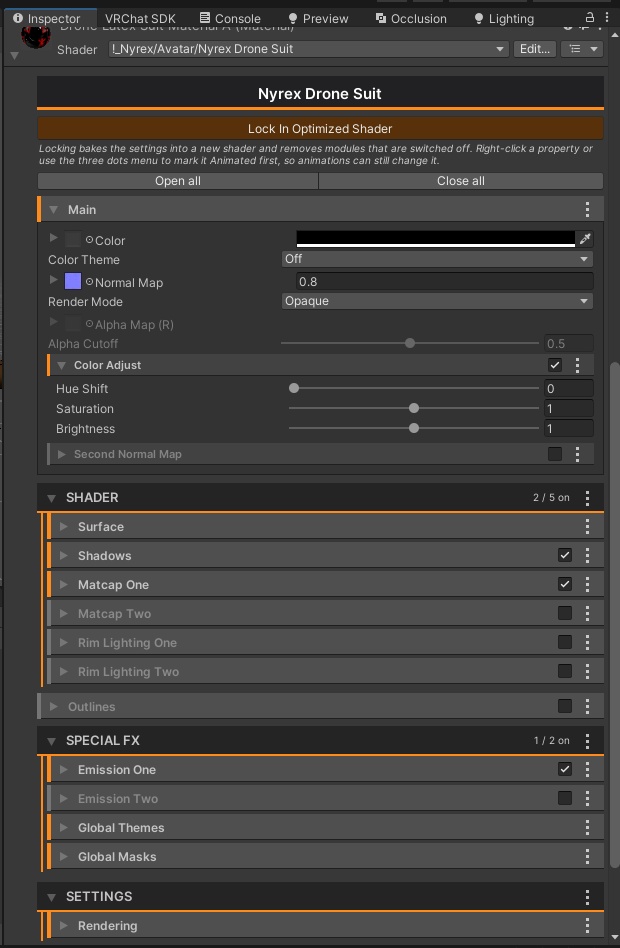


Nyrex Drone Latex Suit – Glossy Latex-Look Drone Suit for the Novabeast with 4 Designs and Shader for VRChat A glossy black drone suit made for the Novabeast avatar. Seams and panel details are baked into 4K normal maps, and the glowing drone lines are white emission masks that you can recolor freely in the included Nyrex Drone Suit Shader. Pick one of 3 drone designs or the clean plain version. ■ Preview video https://youtu.be/79YiTYThFeE ■ Features - Suit model with the Novabeast UV layout, made to fit the Novabeast body (head and paws stay free) - 4 designs: A Mask, B Stripes, C Harness, D Clean (plain suit without glow lines) - 4K textures (4096 x 4096) for every design: color, normal map and metallic/smoothness map, plus masks for designs A to C - White emission masks (designs A to C): recolor them with Color Theme or Hue Shift in the shader - Black latex matcap included - Ready-made materials for all 4 designs - Nyrex Drone Suit Shader with a clean, collapsible Inspector: color and normal maps (with a second normal map), surface (metallic, smoothness, occlusion, specular, reflections), shadows, 2 matcaps, 2 rim lights, 2 emissions (center out, blink, scroll, color adjust with hue shift), 4 global color themes, 4 global masks and outlines - Every texture slot has its own panning, UV channel and pixel mode - All shader modules are switched off by default, so you only use what you turn on - "Lock In Optimized Shader" button: bakes your settings into a lean shader and removes unused modules for better performance ■ Included - FBX: the suit model - Material: ready-made materials - Prefab: the suit prefab - Shader: Nyrex Drone Suit Shader (!_Nyrex/Avatar/Nyrex Drone Suit) and its Inspector file - Textures: all designs and the matcap ■ Requirements - Novabeast avatar (not included) - Unity 2022.3 (the version for the current VRChat SDK), Built-in Render Pipeline - VRChat SDK – Avatars - PC only ■ How to use 1. Import the package into your Novabeast project. 2. Put the suit prefab into the scene and onto your Novabeast. Merge it with the avatar's armature, for example with Modular Avatar. 3. Choose a design by assigning one of the 4 materials (A to D) to the suit. 4. For the glowing lines, switch on Emission One in the shader Inspector and pick your color or hue. 5. Optional: press "Lock In Optimized Shader" in the Inspector before uploading. Press "Unlock Shader" to edit again. ■ Please note - This is an outfit made for the Novabeast. The avatar is not included. Position and scale may need adjusting to fit your setup. - The Nyrex Drone Suit Shader is for PC. Quest/Android only allows VRChat mobile shaders. The model and textures work with any shader. - The look depends on your avatar, lighting and shader settings. - The textures and the shader were created with custom scripts (AI-assisted). No image-generation models were used. - Please follow the VRChat Terms of Service and Community Guidelines. ■ Terms of Use OK: Use on your own avatars, including avatars you sell or upload, and edit the files for your own use. NOT OK: Redistributing or reselling the files (original or modified), or sharing them publicly. ―――――――――― Nyrex Drone Latex Suit – Novabeast用の、光沢のあるラテックス調ドローンスーツです。縫い目やパネルのディテールは4Kノーマルマップに焼き込み済み。光るドローンラインは白いエミッションマスクになっていて、付属の専用シェーダー「Nyrex Drone Suit Shader」で自由に色を変えられます。3種類のドローンデザインと、シンプルなクリーン版から選べます。 ■ プレビュー動画 https://youtu.be/79YiTYThFeE ■ 特徴 - NovabeastのUVレイアウトに合わせたスーツモデル(頭と肉球は覆いません) - 4デザイン:A Mask、B Stripes、C Harness、D Clean(光るラインなしのシンプル版) - 全デザインに4Kテクスチャ(4096 x 4096):カラー、ノーマルマップ、メタリック/スムースネスマップ(A〜Cはマスク付き) - 白いエミッションマスク(A〜C):シェーダーのColor ThemeやHue Shiftで色を変更可能 - ブラックラテックス用マットキャップ付き - 4デザイン分のマテリアル付き - 専用シェーダー Nyrex Drone Suit Shader:折りたたみ式のわかりやすいインスペクター。カラーとノーマルマップ(セカンドノーマルマップ付き)、サーフェス(メタリック、スムースネス、オクルージョン、スペキュラー、リフレクション)、シャドウ、マットキャップ2つ、リムライト2つ、エミッション2つ(センターアウト、点滅、スクロール、Hue Shift付き色調整)、グローバルカラーテーマ4つ、グローバルマスク4つ、アウトライン - すべてのテクスチャスロットにパンニング、UVチャンネル、ピクセルモードを用意 - シェーダーのモジュールはすべて初期状態でオフ。使いたいものだけオンにできます - 「Lock In Optimized Shader」ボタン:設定を焼き込み、使っていないモジュールを取り除いた軽量シェーダーを作成します ■ 内容 - FBX:スーツのモデル - Material:マテリアル - Prefab:スーツのプレハブ - Shader:Nyrex Drone Suit Shader(!_Nyrex/Avatar/Nyrex Drone Suit)とインスペクター用ファイル - Textures:全デザインのテクスチャとマットキャップ ■ 動作環境 - Novabeastアバター(同梱されていません) - Unity 2022.3(現行のVRChat SDKが対応するバージョン)、Built-in Render Pipeline - VRChat SDK – Avatars - PC専用 ■ 使い方 1. パッケージをNovabeastのプロジェクトにインポートします。 2. スーツのプレハブをシーンに置き、Novabeastに取り付けます。アバターのアーマチュアとMerge(例:Modular Avatar)してください。 3. スーツにマテリアル(AからD)のいずれかを割り当ててデザインを選びます。 4. 光るラインを使うには、シェーダーのインスペクターでEmission Oneをオンにして、色や色相を選びます。 5. 任意:アップロード前にインスペクターの「Lock In Optimized Shader」を押します。再編集は「Unlock Shader」で行えます。 ■ ご注意 - Novabeast用の衣装です。アバター本体は同梱されていません。環境によって位置やスケールの調整が必要な場合があります。 - Nyrex Drone Suit ShaderはPC向けです。Quest/AndroidではVRChatのモバイル用シェーダーしか使えません。モデルとテクスチャはどのシェーダーでも使えます。 - 見え方はアバター、ライティング、シェーダー設定によって変わります。 - テクスチャとシェーダーは自作スクリプトで作成しています(AI支援)。画像生成AIモデルは使用していません。 - VRChatの利用規約とコミュニティガイドラインを守ってご利用ください。 ■ 利用規約 OK:ご自身のアバターでの使用(販売・アップロードするアバターへの使用を含む)、自分用のファイル改変 NG:ファイルの再配布・転売(改変物を含む)、公開での共有
Terms of Service
Terms of Use / 利用規約 You MAY / OK: - Use this product on your own VRChat avatars, including avatars you sell or upload (the uploaded avatar contains the files in a built form). - Modify the model, materials, textures and shader settings for your own projects. - Show the product in videos, streams and screenshots. You MAY NOT / NG: - Redistribute, resell or share the original or modified files (FBX, prefab, shader, materials, textures, scripts, the .unitypackage), for free or for money. This includes avatar bases, templates and public repositories or Discord servers. - Upload the files as an extractable asset (for example an avatar or world that lets others take the raw files). - Claim the product as your own work. - Use the files to train AI models. - Use the product for anything illegal or harmful to others, or against the rules of the platform you use. The product is provided as is, without warranty. The look depends on your avatar, lighting and settings. This is a digital product: please read the description and requirements before buying. Support is available through BOOTH messages. OK: - ご自身のVRChatアバターでの使用(販売・アップロードするアバターへの使用を含む。アップロードされたアバターにはビルド済みの形で含まれます) - ご自身のプロジェクトのためのモデル・マテリアル・テクスチャ・シェーダー設定の改変 - 動画・配信・スクリーンショットでの紹介 NG: - 元データ・改変データ(FBX、プレハブ、シェーダー、マテリアル、テクスチャ、スクリプト、.unitypackage)の再配布・転売・共有(無償・有償を問わず)。アバターベース、テンプレート、公開リポジトリやDiscordサーバーへの掲載も含みます - 他の人が元ファイルを取り出せる形でのアップロード - 自作と偽ること - AIモデルの学習への使用 - 違法な用途、他者に害を与える用途、利用するプラットフォームの規則に反する用途での使用 本製品は現状有姿で提供され、動作の保証はありません。見え方はアバター、ライティング、設定によって異なります。デジタル商品のため、購入前に説明と動作環境をご確認ください。サポートはBOOTHのメッセージで対応します。
Update information
v1.0.0 (2026-11-16) Initial release