

Nyrex Hypno Paws|Novabeast用 渦巻き肉球 / Animated Paw Pads & Shader
- Digital527 JPY
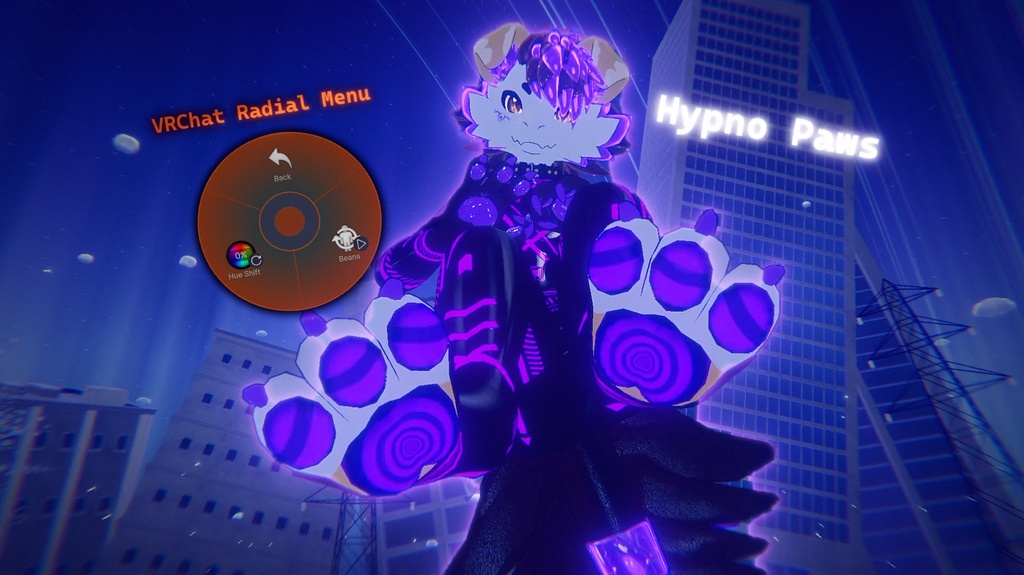
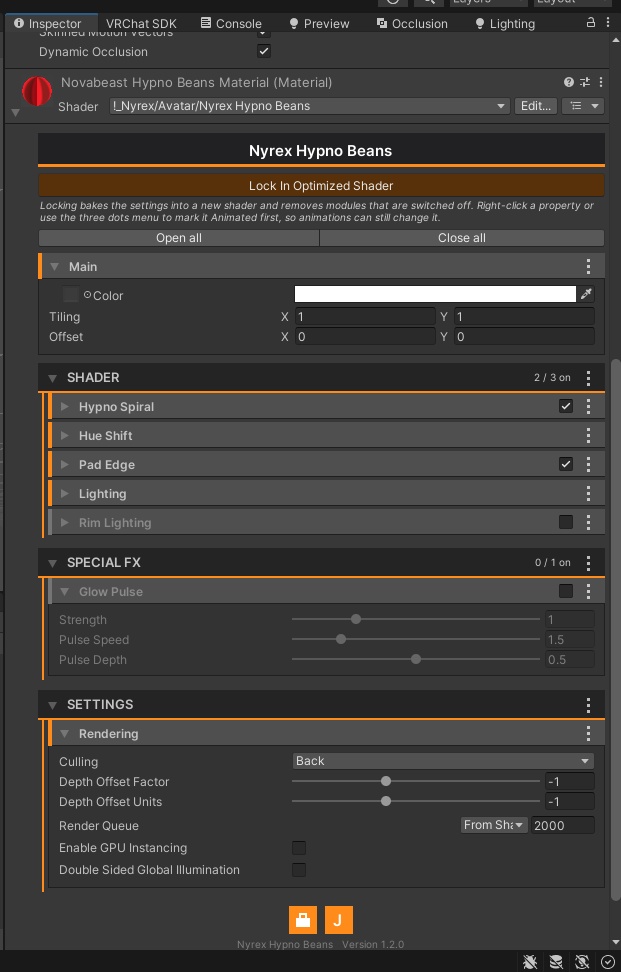
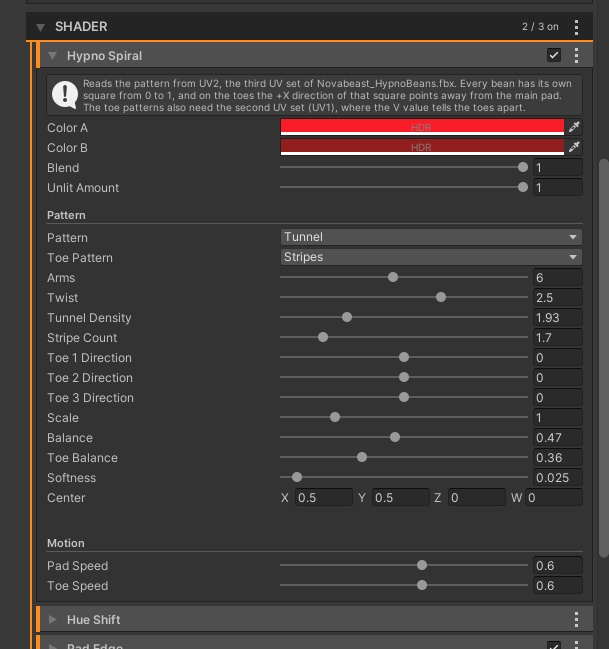


【Novabeast向け / Made for the Novabeast】 ■ Overview Nyrex Hypno Paws puts animated paw pads on your Novabeast. A very thin mesh sits exactly on the purple paw pads of both feet - the big main pad and the three toe pads of each foot - and plays a moving pattern: tunnel rings on the main pad and stripes on the toes. Colors, patterns, speed and direction are set in the included Nyrex Hypno Beans Shader, which has a foldable orange inspector. The Novabeast avatar itself is not included. ■ Preview video https://youtu.be/eHiXCniR6Sk ■ Features - Made for the Novabeast feet: covers the purple pad areas, 8 pads in one mesh (4 per foot), about 10,400 triangles in total, one material - Weighted to the Novabeast's own foot and toe bones, so it follows toe movement and PhysBones on those bones - Animated patterns: Spiral, Rings, Rays, Stripes and Tunnel. The toes can use a different pattern than the main pad - Separate Pad Speed and Toe Speed (negative values run backwards) and a direction setting for each of the three toe pads - Two colors (HDR) with blend, softness, balance, scale, tunnel density and more - Hue Shift: one value turns the colors of the whole look. It can be animated, for example for a menu slider - Pad Edge (darkened edge), lighting (shadow tint, light wrap), rim lighting and Glow Pulse - "Lock In Optimized Shader" button: bakes your settings into a lighter shader and removes unused modules - All shader modules are off by default, so you only switch on what you need ■ Included - FBX: the paw pad mesh with the Novabeast skeleton - Material - Prefab (VRCFury Armature Link set up) - Shader: Nyrex Hypno Beans Shader (!_Nyrex/Avatar/Nyrex Hypno Beans) and its inspector files ■ Requirements - The Novabeast avatar (not included) - Unity 2022.3 (the version supported by the current VRChat SDK), Built-in Render Pipeline - VRChat SDK - Avatars - VRCFury (the prefab uses its Armature Link) - PC only ■ How to use 1. Import the package into your Novabeast project. 2. Put the prefab under the root of your Novabeast avatar. The included VRCFury Armature Link merges it with the avatar's skeleton when you upload. 3. In the material, check that "Enable Hypno Spiral" is on (all modules start off), then choose pattern, colors and speed. 4. Optional: set the direction of the toe stripes with Toe 1 to 3 Direction. A negative Toe Speed runs them the other way. 5. Optional: press "Lock In Optimized Shader" before uploading. "Unlock Shader" lets you edit again. ■ Please note - This is an accessory made for the Novabeast. The avatar is not included. Position and scale may need adjusting to fit your setup. - Use the included FBX together with the included shader. The pattern is read from extra UV sets of the mesh. - The shader is for PC. Quest / Android only allows VRChat's mobile shaders. - The look depends on your avatar, lighting and shader settings. - The radial menu in the preview images (Hue Shift, Beans) is an example. The package does not include menu toggles. Hue Shift is a shader value that you can animate yourself. - Please follow the VRChat Terms of Service and Community Guidelines. ■ Terms of Use OK: Use on your own avatars, including avatars you sell or upload, and edit the files for your own use. NOT OK: Redistributing or reselling the files (original or modified), or sharing them publicly. ―――――――――― Nyrex Hypno Paws – Novabeastの肉球に重ねる、動くパターンのメッシュです。両足の紫色の肉球(大きなメインパッドと、各足の指3つ分)にぴったり重なる極薄のメッシュで、メインパッドにはトンネル状の同心円、指にはストライプが動きます。色・パターン・速度・向きは、付属の専用シェーダー「Nyrex Hypno Beans Shader」で調整できます。インスペクターは折りたたみ式のオレンジ色です。Novabeastアバター本体は同梱されていません。 ■ プレビュー動画 https://youtu.be/eHiXCniR6Sk ■ 特徴 - Novabeastの足専用:紫色の肉球部分を覆う形状。1つのメッシュに8つの肉球(左右4つずつ)、合計約10,400ポリゴン、マテリアル1つ - Novabeast自身の足と指のボーンにウェイトを設定済みなので、指の動きや、そのボーンのPhysBoneにもついてきます - 動くパターン:Spiral、Rings、Rays、Stripes、Tunnel。指にはメインパッドと別のパターンを設定できます - メインパッドと指で別々の速度(マイナス値で逆向き)、指3つそれぞれのストライプの向き - 2色(HDR対応)、ブレンド、ソフトネス、バランス、スケール、トンネル密度など - Hue Shift:1つの値で全体の色相を回転。メニューのスライダーなどのアニメーションにも使えます - Pad Edge(縁の暗がり)、ライティング(シャドウカラー、ライトラップ)、リムライト、Glow Pulse - 「Lock In Optimized Shader」ボタン:設定を焼き込み、使っていないモジュールを取り除いた軽量シェーダーを作成します - シェーダーのモジュールはすべて初期状態でオフ。使いたいものだけオンにできます ■ 内容 - FBX:Novabeastのスケルトン付き肉球メッシュ - Material:マテリアル - Prefab:プレハブ(VRCFuryのArmature Link設定済み) - Shader:Nyrex Hypno Beans Shader(!_Nyrex/Avatar/Nyrex Hypno Beans)とインスペクター用ファイル ■ 動作環境 - Novabeastアバター(同梱されていません) - Unity 2022.3(現行のVRChat SDKが対応するバージョン)、Built-in Render Pipeline - VRChat SDK – Avatars - VRCFury(プレハブでArmature Linkを使用) - PC専用 ■ 使い方 1. パッケージをNovabeastのプロジェクトにインポートします。 2. プレハブをNovabeastアバターのルートの下に置きます。付属のVRCFury Armature Linkが、アップロード時にアバターのスケルトンと結合します。 3. マテリアルで「Enable Hypno Spiral」がオンになっているか確認し(モジュールは初期状態でオフ)、パターン・色・速度を選びます。 4. 任意:指のストライプの向きはToe 1〜3 Directionで調整します。Toe Speedをマイナスにすると逆向きに動きます。 5. 任意:アップロード前に「Lock In Optimized Shader」を押します。再編集は「Unlock Shader」で行えます。 ■ ご注意 - Novabeast用のアクセサリーです。アバター本体は同梱されていません。環境によって位置やスケールの調整が必要な場合があります。 - 付属のFBXと付属のシェーダーを一緒に使ってください。パターンはメッシュの追加UVから読み取ります。 - シェーダーはPC向けです。Quest/AndroidではVRChatのモバイル用シェーダーしか使えません。 - 見え方はアバター、ライティング、シェーダー設定によって変わります。 - プレビュー画像のラジアルメニュー(Hue Shift、Beans)は設定例です。メニューのトグルは同梱されていません。Hue Shiftはシェーダーの値なので、ご自身でアニメーションにできます。 - VRChatの利用規約とコミュニティガイドラインを守ってご利用ください。 ■ 利用規約 OK:ご自身のアバターでの使用(販売・アップロードするアバターへの使用を含む)、自分用のファイル改変 NG:ファイルの再配布・転売(改変物を含む)、公開での共有
Terms of Service
■ Terms of Use YOU MAY - Use the files on your own avatars and upload those avatars to VRChat (private or public) - Edit and adjust the files (mesh, material, shader settings) for your own use - Post and stream screenshots and videos of your avatar with this product YOU MAY NOT - Redistribute, resell, share or upload the original or edited files (FBX, material, prefab, shader), for free or for money, by any means - Put avatars that contain this product on public pedestals or other setups that let other people copy them - Extract the files from your avatar to share or sell them - Claim this product as your own work or remove the author name - Use it for anything illegal or against the VRChat Terms of Service OTHER - One purchase = one license (one person). If friends or team members want to use it, each person needs their own purchase - Credit to NyrexStore is appreciated but not required - The Novabeast is not included. You are responsible for having a legal copy of it and for following its terms - Provided "as is". Compatibility with every setup or future version is not guaranteed, and the creator is not liable for any damage or loss from using it - This is a digital product. Refunds follow BOOTH's rules ―――――――――― ■ 利用規約 【OK】 - ご自身のアバターへの使用、およびVRChatへのアップロード(プライベート・パブリックどちらも可) - 自分用のファイル改変(メッシュ、マテリアル、シェーダー設定の調整) - この商品を使用したアバターのスクリーンショットや動画の投稿・配信 【NG】 - 元のファイルおよび改変したファイル(FBX、マテリアル、プレハブ、シェーダー)の再配布・転売・共有・アップロード(無料・有料を問わず、いかなる方法でも) - この商品を含むアバターを、他の人がコピーできるパブリックなペデスタルなどに設置すること - アバターからファイルを取り出して配布・販売すること - 自作と偽ること、制作者名を削除すること - 違法な目的、またはVRChat利用規約に反する使用 【その他】 - 1購入につき1ライセンス(購入者ご本人のみ)です。友人やチームで使う場合は、それぞれが購入してください - NyrexStoreのクレジット表記は歓迎しますが、必須ではありません - Novabeast本体は同梱されていません。正規に入手し、その利用規約を守るのは購入者の責任です - 本商品は現状のまま提供されます。すべての環境や将来のバージョンでの動作は保証せず、使用による損害について制作者は責任を負いません - デジタル商品のため、返金はBOOTHのルールに従います
Update information
v1.0.0 (2026-11-16) Initial release