

OutFitter - Retarget outfits to another avatar inside Unity (no Blender / batch / direct mode)
- OutFitter (main)ダウンロード商品¥ 2,500
- License (free - read before you buy)ダウンロード商品¥ 0
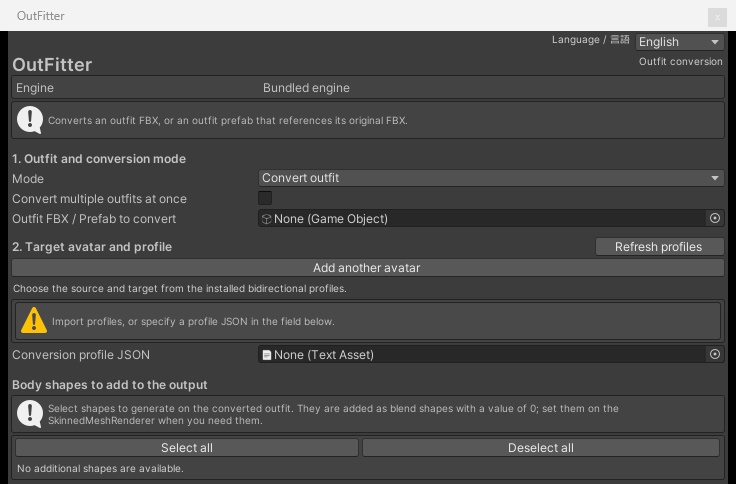


A Unity Editor extension that converts an outfit made for one avatar so it fits another avatar. OutFitter reads avatar conversion profiles (JSON / NPZ) and deforms the outfit mesh, rebuilds the weights and merges the armature, all inside the Unity Editor. Pick the outfit, pick the avatar it was made for, pick the avatar you want to wear it. That is it. For outfits that do not support your avatar, for trying clothes on a different base, for preparing an edit. VARIATIONS - OutFitter (main) - the tool (OutFitter_v2.4.zip) - License (free - read before you buy) - the license and README only, so you can check the terms first WHAT IT DOES - Convert an outfit (FBX, or a Prefab that references its original FBX) to another avatar. The source avatar can be detected automatically from the outfit's bones - Batch conversion - convert several outfits made for the same avatar in one run. Choose to continue or stop on failure; a result and failure reason is kept for each outfit - Direct mode - give it the source avatar, the target avatar and the outfit. It builds the internal profile, converts the outfit and connects the bones. Can add the result to the scene and save the dressed Prefab (requires OutFitter Profile Maker in the same project) - Add body shape keys - add shape keys from the avatar's body (chest, heels and so on) to the outfit, with your own output name and strength - Reads Modular Avatar Shape Changer settings on the outfit (the body shape the outfit expects) - Advanced settings - reference a body-adjusted target for weight transfer, clearance (how far the outfit floats off the body), per-part scale, normal recalculation, deformation range, per-mesh exclude / keep-shape, quality DESIGN - The conversion engine is bundled. No Blender, no Python, no extra runtime to install - Output goes into a new folder. Your original assets are never modified - Prefab parts are carried over and matched, but outfit-specific gimmicks are not guaranteed to keep working REQUIREMENTS - Windows / Unity 2022.3 - Avatars must be Humanoid rigs - A profile for each avatar you convert between. Create profiles for your own avatars with OutFitter Profile Maker (sold separately). The tool reads the JSON / NPZ profile format that some avatar creators distribute with their avatars - Unity package com.unity.nuget.newtonsoft-json (usually already in VRChat projects) - About 20 GB of free disk space - VRChat SDK, Modular Avatar and so on must be installed in your project by you SETUP 1. Extract the ZIP and import OutFitter.unitypackage into your project 2. Open Tools > OutFitter > Open 3. Choose the outfit, the avatar it was made for, and the target avatar 4. Pick an output folder in Assets and run IMPORTANT NOTES - Conversion quality depends on the quality of the profiles you use - Large body differences may need shape key adjustments (especially chest and hips) - Back up your Unity project before trying it - Made and tested for VRChat avatars and outfits. Other platforms are untested - UI in English / Japanese (follows your OS language, can be switched) - This is an independent product. It is not affiliated with any other company's tools, and we cannot answer questions about other companies' tools UPDATES - v2.4 (2026-09-20): Outfit prefabs with empty (unused) bone slots no longer fail with "Bone correspondence between the mesh and the original FBX is ambiguous". Added "Keep shape and rotation" per mesh, for parts you do not want tilted to the target's foot angle. Profile Maker: generation no longer stops when the target lacks one of the source's body shapes - v2.3 (2026-09-20): Fixed "Keep shape" meshes being slightly squeezed where they span two bones (e.g. the instep band of a sandal). Each connected part now gets a single move + rotation, so its shape and size stay exactly as in the original. v2.2 users can update by importing over the old version - v2.2 (2026-09-20): Added "Keep shape" per mesh for the bundled engine (Advanced settings -> Per-mesh settings; in Direct mode, under Details). Shoes, hats, bags and other parts set to "Keep shape" keep their original shape and size and follow the converted bones (e.g. feet). v2.1 users can update by importing over the old version - v2.1 (2026-09-19): Fixed outfits with Modular Avatar Object Toggle / Shape Changer (or other components that point at objects inside the outfit) finishing without saving the converted prefab. Fixed conversions stopping with "Another process is running: Unity" while another Unity editor, or Unity's own import workers, were running. v2.0 users can update by importing over the old version - v2.0 (2026-09-19): first English release CONTENTS - OutFitter.unitypackage - the tool - README_EN.txt - how to use - LICENSE_EN.txt - end user license agreement - Third party license notices are inside the package (Assets/AvatarCraft/Editor/Notices) LICENSE (EULA) - Downloading or using this product means you accept LICENSE_EN.txt - Allowed: installing it in your own environment and using it for commercial or non-commercial work, backups, and distributing or selling outfits and avatars you converted with it (without bundling the tool itself), and offering conversion services with it (without handing the tool to your client) - Prohibited: redistributing, reselling, transferring, lending or sharing the tool in whole or in part, uploading it anywhere (GitHub, file sharing, cloud share links, social media and so on), bundling it into other software or assets, using it as training data for AI / machine learning, and publishing software that reuses its implementation - Rights to profile data belong to their respective providers. Follow each avatar's terms when you use or distribute profiles - Disclaimer: the author is not liable for any damage arising from the use of this tool - You can download the full license for free from the "License" variation. Please read it before buying