
[Unity] Texture Color Tool 1.1.2 Update
- Digital590 JPY
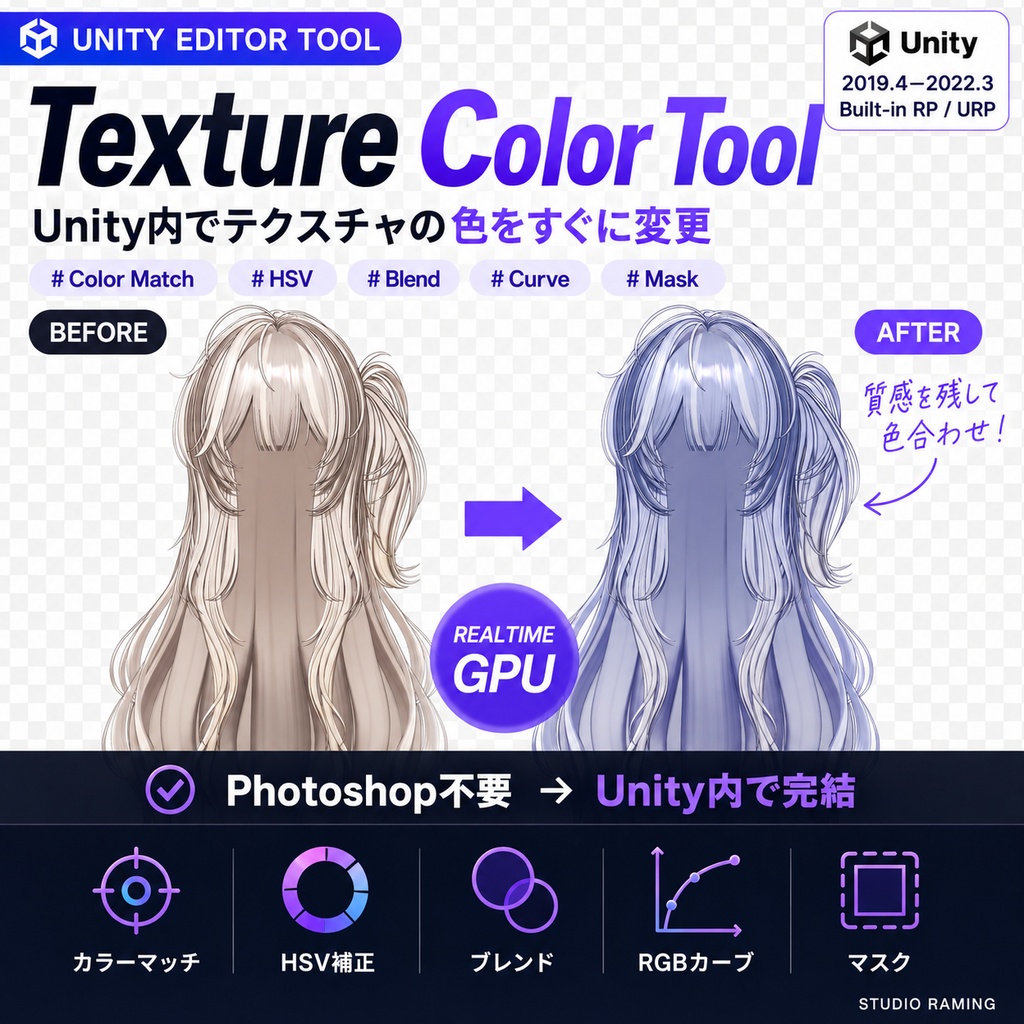


【日本語 / ENGLISH / 한국어】 ━━━━━━━━━━━━━━━━━━━━ 【日本語】 ━━━━━━━━━━━━━━━━━━━━ Texture Color Tool v1.1.2 Unity Editor Tool — Color Match / HSV / Blend / Curve / Mask Photoshopを開かずにUnity Editor内でテクスチャの色をGPUリアルタイム補正し、別PNGとして書き出すツールです。元テクスチャと元マテリアルは変更しません。 https://studioraming-jp.imweb.me/shop_view?idx=46 ◆ v1.1.2 アップデート:色相基準の色範囲、元ファイル解像度での保存、Unity 6.3 対応ほか。v1.1.1・v1.1.0 を含む詳細は下の「更新履歴」をご覧ください。 ◆ 主な機能 ・クイック補正 — 暖色 / 寒色 / 鮮やか / やわらか / モノクロの開始ルック、色相・彩度・明度・ガンマ・ティント・反転 ・カラーマッチング — スポイト / 全体平均 / 主要色の抽出、リファレンステクスチャからの色取得 ・詳細調整 — Color / Hue / Glaze / Multiply / Screen / Overlay / Soft Light ブレンド、RGBカーブ ・適用範囲 — マスクテクスチャ(sRGB / Linear 自動判別)、似た色だけ変更(RGB 距離 / 明暗を無視する色相基準) ・プレビュー — パン・ズーム、元画像比較、別ウィンドウ、SceneViewリアルタイムプレビュー ・作業管理 — テクスチャごとの設定記憶、30段階Undo / Redo、未保存状態の復元、自動保存 ◆ 対応環境 Unity 2019.4 ~ Unity 6.3(6000.3) / Built-in Render Pipeline / URP Unity Editor専用(プレイヤービルドには含まれません)。元データはPNG / JPG推奨。 確認した範囲:Unity 2022.3.22f1 の新規プロジェクトへのインポート、ウィンドウの生成、ストア版 1.1.0 の上への上書きインポート。2019.4・2021.3・Unity 6.3 はコンパイルと API の確認まで(実インポートは未実施)。補正結果の見た目は目視未確認。 ◆ 導入 受け取った TextureColorTool_v1.1.2.zip を展開し、中の TextureColorTool_v1.1.2.unitypackage をImportして、StudioRaming > Texture Color Toolから起動します。ストア版 1.1.0 の上にそのままImportできます。1.0 ソース版のプロジェクトでは旧 .cs 3 ファイルが空ファイルに置き換わります。保存は元ファイルを上書きせず<元の名前>+接尾辞.pngを新規作成し、元のインポート設定を引き継ぎます。使い方は各タブ内蔵ガイドで確認できます(日本語 / English / 한국어)。 本製品は、コード生成AIの支援を受けて制作されています。 ◆ 注意事項 非商用・商用配信、および調整したテクスチャを用いた個人デジタルコンテンツの利用可。ファイル、DLL、シェーダー、コードの再配布・再販売・流出、UnityプロジェクトやUnityパッケージへの同梱配布は禁止です。コミッション等でプロジェクトを共有する場合は本ツールを取り除くか、関係者全員の購入が必要です。ダウンロード後の返金はできません。 ━━━━━━━━━━━━━━━━━━━━ 【ENGLISH】 ━━━━━━━━━━━━━━━━━━━━ Texture Color Tool v1.1.2 Unity Editor Tool — Color Match / HSV / Blend / Curve / Mask Adjust texture colors on the GPU in real time inside the Unity Editor, without Photoshop, and export the result as a separate PNG. Source textures and materials are never modified. https://studioraming-en.imweb.me/shop_view?idx=46 ◆ v1.1.2 update: hue-based color range, saving at the source file resolution, Unity 6.3 support and more. Details, including v1.1.1 and v1.1.0, are in the Update history below. ◆ Features ・Quick correction — Warm / Cool / Vivid / Soft / Monochrome looks, plus hue, saturation, value, gamma, tint and invert ・Color matching — eyedropper, texture average or dominant color, and pickup from a reference texture ・Detailed adjustment — Color / Hue / Glaze / Multiply / Screen / Overlay / Soft Light blending and RGB curves ・Application range — mask textures with automatic sRGB / Linear detection, "only similar colors" (RGB distance or a hue basis that ignores shading) ・Preview — pan and zoom, original comparison, detached window, live Scene View preview ・Session management — per-texture settings memory, 30-step Undo / Redo, unsaved-state recovery, auto save ◆ Compatibility Unity 2019.4 through Unity 6.3 (6000.3) / Built-in Render Pipeline / URP Unity Editor only (never included in player builds). PNG / JPG sources recommended. Checked on: Unity 2022.3.22f1 clean-project import, creating the window, importing over store 1.1.0. 2019.4, 2021.3 and Unity 6.3: compile and API checks only (no real import). Color results were not eyeballed. ◆ Installation Unzip the downloaded TextureColorTool_v1.1.2.zip, import the TextureColorTool_v1.1.2.unitypackage inside, then open StudioRaming > Texture Color Tool. You can import straight over store 1.1.0. In a project with the 1.0 source edition, its 3 old .cs files are replaced by empty files. Saving never overwrites the original; it creates <SourceName>+suffix.png alongside it and carries over the source import settings. Usage instructions are built into every tab (日本語 / English / 한국어). This product was developed with the help of code-generation AI. ◆ Notes Permitted for commercial/non-commercial broadcasts and personal digital content using the adjusted textures. Redistribution, resale or leaking of files, DLLs, shaders or code is prohibited, including bundling the tool inside a Unity project or package. If you share a project for a commission, remove this tool or require every party to purchase a license. No refunds after download. ━━━━━━━━━━━━━━━━━━━━ 【한국어】 ━━━━━━━━━━━━━━━━━━━━ Texture Color Tool v1.1.2 Unity Editor Tool — Color Match / HSV / Blend / Curve / Mask Photoshop 없이 Unity Editor 안에서 텍스처 색을 GPU로 실시간 보정하고 별도 PNG로 저장하는 도구입니다. 원본 텍스처와 머티리얼은 수정하지 않습니다. https://studioraming.com/25/?idx=46 ◆ v1.1.2 업데이트: 색조 기준 색상 범위, 원본 해상도 저장, Unity 6.3 지원 등. v1.1.1·v1.1.0을 포함한 자세한 내용은 아래 "업데이트 내역"을 보세요. ◆ 주요 기능 ・빠른 보정 — 따뜻하게 / 차갑게 / 선명하게 / 부드럽게 / 흑백 시작 룩, 색조·채도·명도·감마·틴트·반전 ・색상 맞추기 — 스포이드, 전체 평균, 대표색 추출, 레퍼런스 텍스처에서 색 가져오기 ・세부 조정 — Color / Hue / Glaze / Multiply / Screen / Overlay / Soft Light 블렌드, RGB 커브 ・적용 범위 — sRGB / Linear 자동 판별 마스크, 비슷한 색만 변경(RGB 거리 또는 명암을 무시하는 색조 기준) ・프리뷰 — 팬·줌, 원본 비교, 별도 팝업, Scene View 실시간 프리뷰 ・작업 관리 — 텍스처별 설정 기억, 30단계 Undo / Redo, 미저장 상태 복원, 자동 저장 ◆ 지원 환경 Unity 2019.4 ~ Unity 6.3(6000.3) / Built-in Render Pipeline / URP Unity Editor 전용(플레이어 빌드에 포함되지 않습니다). 원본은 PNG / JPG 권장. 확인한 범위: Unity 2022.3.22f1 새 프로젝트에 임포트, 창 생성, 스토어 1.1.0 위에 덮어 임포트. 2019.4·2021.3·Unity 6.3은 컴파일과 API 확인까지(실제 임포트 안 함). 보정 결과의 화면 모습은 눈으로 확인하지 않음. ◆ 설치 받은 TextureColorTool_v1.1.2.zip을 풀고 안의 TextureColorTool_v1.1.2.unitypackage를 Import한 뒤 StudioRaming > Texture Color Tool에서 실행합니다. 스토어 1.1.0 위에는 그대로 Import하면 됩니다. 1.0 소스 판 프로젝트에서는 옛 .cs 3개가 빈 파일로 바뀝니다. 저장은 원본을 덮어쓰지 않고 <원본명>+접미사.png를 새로 만들며 원본 임포트 설정을 이어받습니다. 사용법은 각 탭 내장 안내에서 확인할 수 있습니다(日本語 / English / 한국어). 이 제품은 코드 생성 AI의 도움을 받아 제작되었습니다. ◆ 주의 사항 비상업·상업 방송 및 보정한 텍스처를 사용한 개인 디지털 콘텐츠 이용 가능. 파일, DLL, 셰이더, 코드의 재배포·재판매·유출과 Unity 프로젝트·패키지에 포함한 배포는 금지합니다. 커미션 등으로 프로젝트를 공유할 경우 본 툴을 제거하거나 관계자 전원의 구매가 필요합니다. 다운로드 후 환불은 불가합니다. お問い合わせ / Support / 문의 BOOTHメッセージ / BOOTH message / BOOTH 메시지 © Studio Raming
추가 FAQ / Additional FAQ / 追加FAQ
자주 묻는 질문 · Texture Color Tool Q. 텍스처 창에서 맞춘 색과 SceneView에서 보이는 색이 달라요. A. 조명과 색 공간의 영향으로 화면에서 보이는 색이 달라질 수 있습니다. v1.1.0의 Scene Render Compensation은 SceneView에 보이는 색을 기준으로 맞추기 위한 기능입니다. 텍스처 자체의 색을 맞추는 작업인지, 현재 씬에서 보이는 색을 맞추는 작업인지 구분해 사용해 주세요. Q. 저장하면 원본 텍스처와 머티리얼이 덮어써지나요? A. 보정 결과는 <원본명>+접미사.png 형태의 별도 PNG로 저장됩니다. 원본 텍스처와 머티리얼은 변경하지 않습니다. 원본과 결과를 비교할 때는 새로 저장된 파일을 확인해 주세요. Q. 마스크로 일부 영역만 보정하고 싶어요. A. 적용 범위를 마스크 텍스처로 제한할 수 있습니다. 이 도구의 마스크 입력과 별도 상품 Mask Maker의 마스크 제작 기능은 구분해 주세요. 찾는 기능이 마스크 적용인지 제작인지 확인하고, 구매한 상품명과 해당 화면을 기준으로 문의해 주세요. ━━━━━━━━━━━━━━━━━━━━ FAQ · Texture Color Tool Q. A color matched in the texture preview looks different in SceneView. A. Lighting and color space can change the displayed color. Scene Render Compensation in v1.1.0 is designed to match the color visible in SceneView. Decide whether you want to match the texture's own color or its appearance in the current scene. Q. Does saving overwrite the original texture or material? A. The adjusted result is saved as a separate <SourceName>+suffix.png. The original texture and material are unchanged. When comparing the result with the original, check the newly saved file. Q. Can I limit correction to part of a texture using a mask? A. A mask texture can limit the affected area. Mask input in this tool and mask creation in the separate Mask Maker product are different features. If you cannot find a feature, tell us whether you want to apply or create a mask, along with the product you purchased and the relevant screen. ━━━━━━━━━━━━━━━━━━━━ よくある質問 · Texture Color Tool Q. テクスチャのプレビューで合わせた色が、SceneViewでは違って見えます。 A. ライティングや色空間によって表示色が変わる場合があります。v1.1.0のScene Render Compensationは、SceneViewに見えている色を基準に合わせるための機能です。テクスチャ自体の色を合わせたいのか、現在のシーンでの見え方を合わせたいのかを分けてご利用ください。 Q. 保存すると元のテクスチャやマテリアルが上書きされますか? A. 補正結果は<元の名前>+接尾辞.pngという別のPNGに保存されます。元のテクスチャとマテリアルは変更しません。比較時は新しく保存されたファイルをご確認ください。 Q. マスクで一部だけ色を補正できますか? A. マスクテクスチャで適用範囲を制限できます。本ツールのマスク入力と、別製品Mask Makerのマスク制作機能は区別してください。機能が見つからない場合は、マスクを適用したいのか作りたいのか、購入した商品名と該当画面を添えてお問い合わせください。
更新履歴 / Update history / 업데이트 내역
【日本語】 ◆ v1.1.2 アップデート ・スポイトで読む「結果」の色が DX11 などで上下反転していた問題を修正 ・ヘルプとツールチップの文言を機能の説明中心に整理 ◆ v1.1.1 アップデート ・色の適用範囲に比較基準を追加。RGB 距離、または明暗を無視する色相基準(影まで同じ布を拾えます) ・保存は元ファイルの解像度で行います(長辺 8192 まで)。黒と 0 のチャンネルを保ち、sRGB 変換が正確になりました ・元テクスチャを再インポートすると新しいピクセルを読み直します。Undo は 1 段階にまとまり、Undo 後にシーンのプレビュー用マテリアルが元に戻ります ・プリセットと設定をプロジェクトごとに保存。プリセット名の「:」で壊れる問題を修正 ・Unity 6.3 まで対応。2021.3 以降は、保存せずにウィンドウを閉じると保存を確認します ◆ v1.1.0 アップデート ・プレビューの遅延を解消。スライダー操作もワンクリックのカラーマッチングも待ち時間なしで反映 ・カラーマッチングの適用方式を3種に整理。HSV補正(質感維持)/ カラーレイヤー(確実な一致)/ グレーズ(陰影を保った鮮やかな着色) ・シーンレンダー補正を新搭載。ライティングと色空間による色のズレを逆算し、「SceneViewに見えている色」を基準にマッチング ・UI再構成。固定領域を縮小してプレビューを拡大し、ツールバー・プリセット・保存バーを1行に集約 【ENGLISH】 ◆ v1.1.2 update ・Fixed the result eyedropper reading a flipped color on DX11 and some other graphics APIs ・Help and tooltip wording now focuses on describing the feature ◆ v1.1.1 update ・Color range gets a comparison basis: RGB distance, or a hue basis that ignores shading (picks the same cloth through its shadows) ・Saving uses the source file resolution (up to 8192 on the long side). Black and zero channels are kept and the sRGB conversion is exact ・Reimporting the source texture reads the new pixels again. Undo is grouped into one step and the Scene preview material is restored after Undo ・Presets and settings are stored per project. Preset names containing ":" no longer break ・Supports up to Unity 6.3. On 2021.3 and later, closing the window with unsaved work asks to save ◆ What's new in v1.1.0 ・Preview delay removed. Slider edits and one-click color matching apply with no waiting ・Three color match modes: HSV (keeps texture detail), Color Layer (exact hue and saturation) and Glaze (vivid coating that preserves shading) ・New Scene Render Compensation. It inverts the shift lighting and color space introduce, so matching targets the color actually visible in the Scene View ・Rebuilt UI. Reduced fixed chrome for a larger preview canvas; toolbar, presets and save bar each fit one row 【한국어】 ◆ v1.1.2 업데이트 ・결과 스포이드가 DX11 등에서 뒤집혀 읽히던 문제 수정 ・도움말과 툴팁 문구를 기능 설명 위주로 정리 ◆ v1.1.1 업데이트 ・색상 범위에 비교 기준 추가. RGB 거리, 또는 명암을 무시하는 색조 기준(그림자까지 같은 천으로 잡아요) ・저장은 원본 파일 해상도로 해요(긴 변 8192까지). 검정·0 채널이 유지되고 sRGB 변환이 정확해졌어요 ・원본 텍스처를 다시 임포트하면 새 픽셀을 다시 읽어요. Undo는 한 단계로 묶이고, Undo 뒤 씬 프리뷰 머티리얼이 복구돼요 ・프리셋·설정이 프로젝트별로 저장돼요. 프리셋 이름의 ":" 때문에 깨지던 문제 수정 ・Unity 6.3까지 지원해요. 2021.3 이상에서는 저장하지 않고 창을 닫으면 저장 여부를 물어요 ◆ v1.1.0 업데이트 ・프리뷰 지연 제거. 슬라이더 조작도 원클릭 색상 매칭도 대기 없이 즉시 반영 ・색상 매칭 적용 방식 3종. HSV 보정(질감 유지) / 색상 레이어(확실한 색 일치) / 글레이즈(음영을 살린 선명한 착색) ・씬 렌더 보정 신규. 조명과 색공간 때문에 생기는 색 차이를 역산해 Scene View에 보이는 색을 기준으로 매칭 ・UI 재구성. 고정 영역을 줄여 프리뷰를 넓히고 툴바·프리셋·저장 바를 각각 한 줄로 압축
