

【VRChat】Goguma Motion for VRChat (Early Access) — Photo to pose|Poses to motion|Add to the VRChat menu
- ダウンロード商品¥ 680
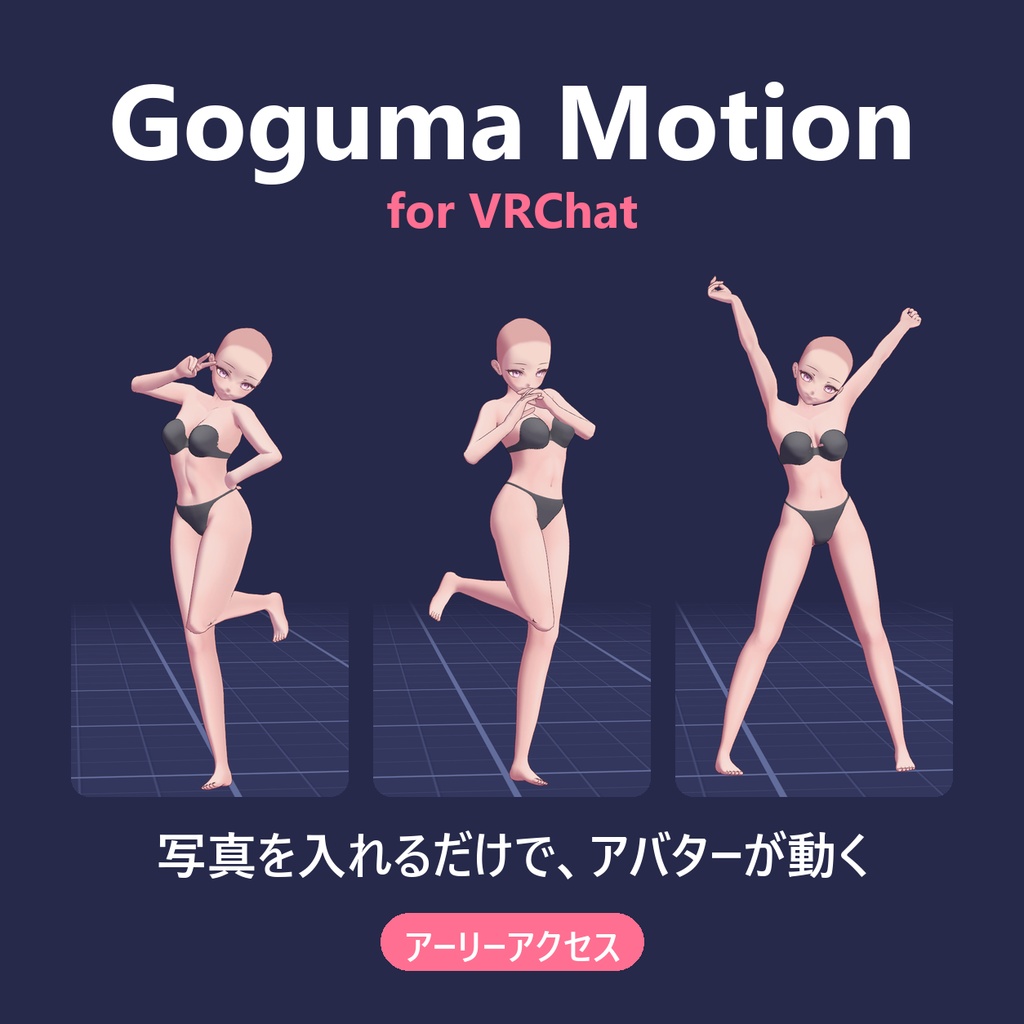
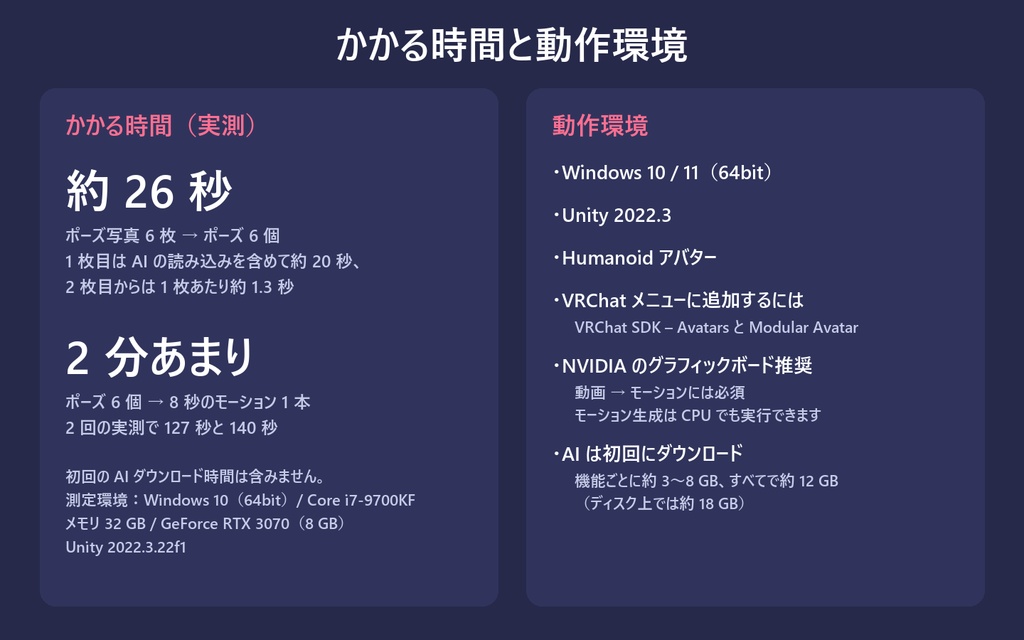
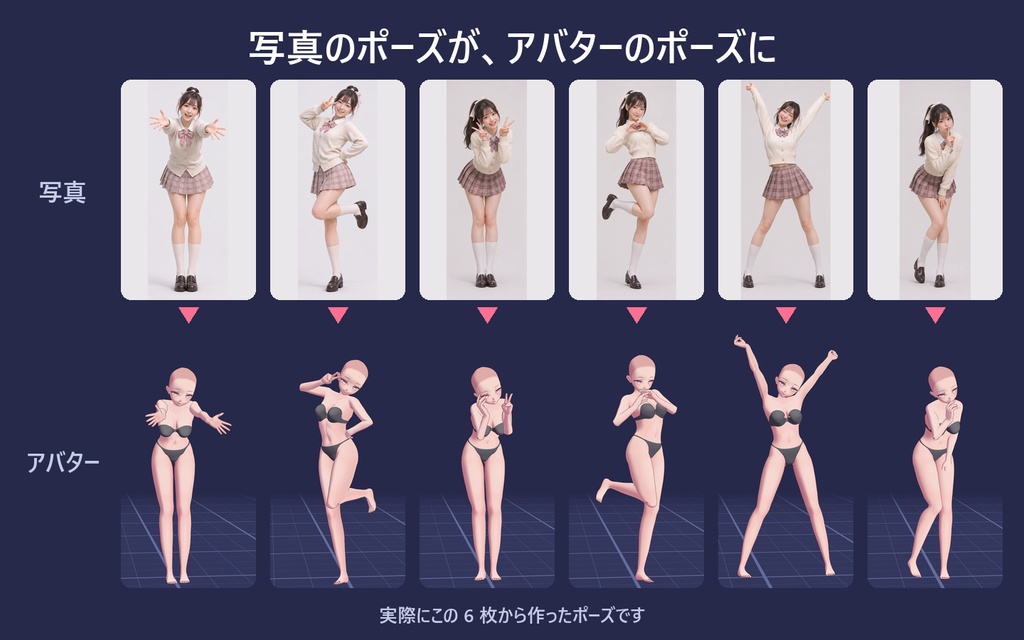
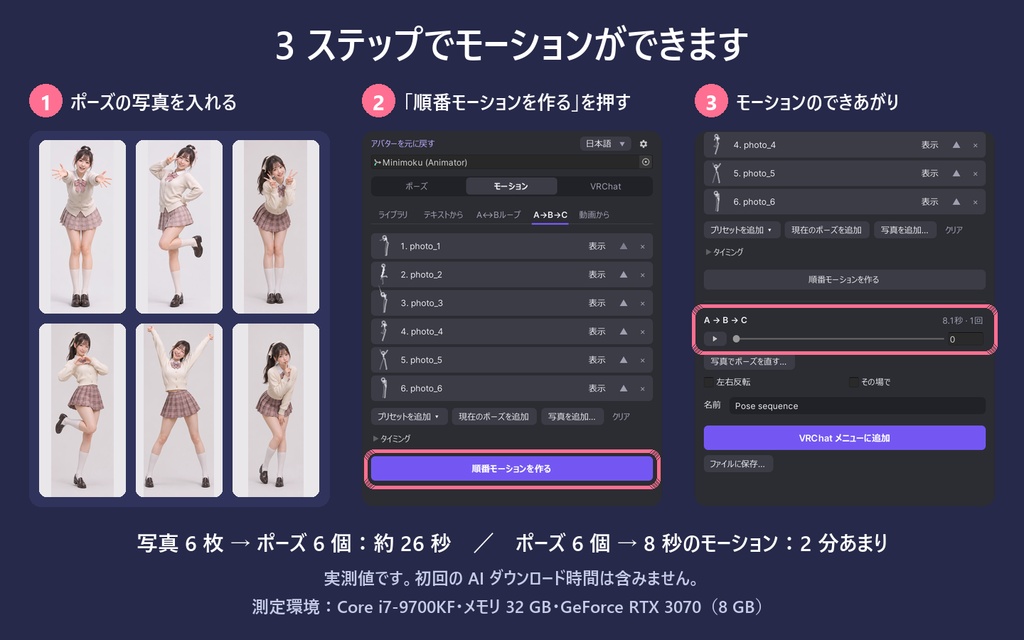
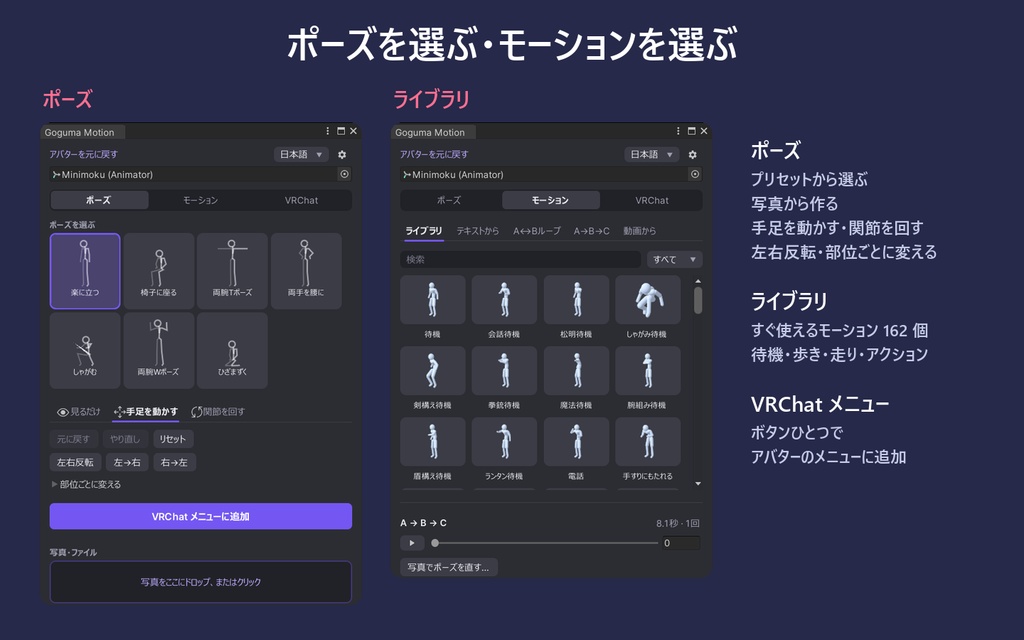
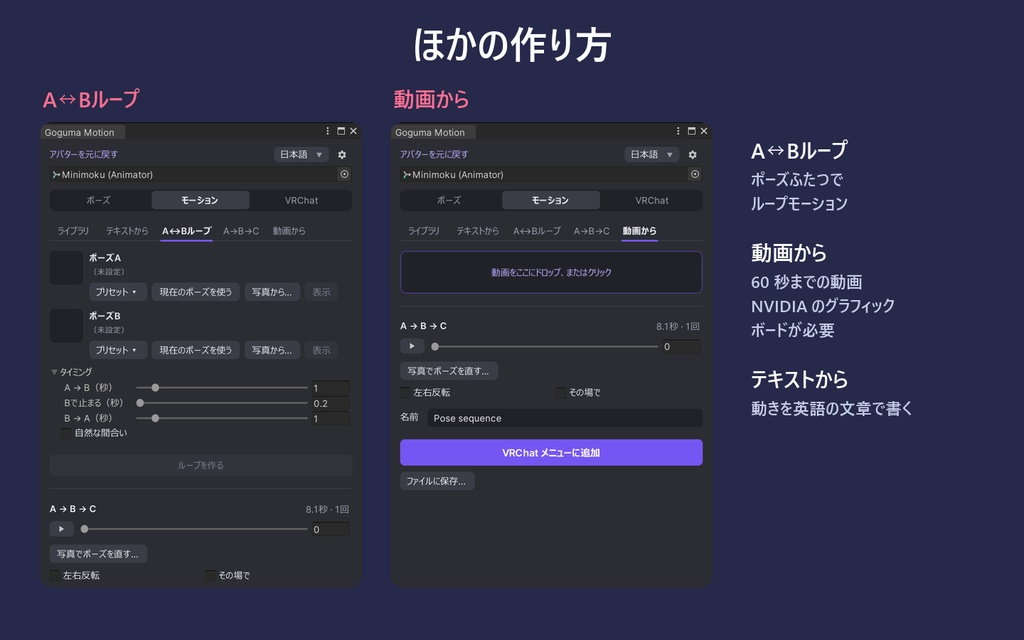


Goguma Motion for VRChat — アーリーアクセス版 本商品はアーリーアクセス版です。そのぶん安く提供しています。 ポーズの写真を入れてボタンを押すだけで、アバターが動きます。 Unity の中で、自分の VRChat アバター用のポーズとモーションを作れます。アニメーションの知識は要りません。 作ったものは、ボタンひとつでアバターの VRChat メニューに追加できます。 Goguma Motion for VRChat は、Humanoid アバターの上で直接ポーズとモーションを作る Unity エディター拡張です。デスクトップアプリ「Goguma Studio」とは別の商品です。 VRChat 公式の製品ではありません。 ■ できること ・写真 → ポーズ:人物の写真を入れると、アバターがそのポーズになります ・順番モーション(A → B → C …):ポーズを並べると、順番に動くひとつのモーションになります ・A ↔ B ループ:ふたつのポーズからループモーションを作ります ・テキスト → モーション:動きを文章で書きます(英語のみ) ・動画 → モーション:60 秒までの動画からモーションを作ります ・モーションライブラリ:すぐ使えるモーション 162 個(待機・歩き・走り・アクション) ・ポーズ編集:プリセット、手足を動かす、関節を回す、左右反転、部位ごとの変更 ・VRChat メニュー:作ったポーズとモーションを Modular Avatar 経由でアバターのメニューに追加します ・ツールの画面は日本語・英語・韓国語に対応しています ■ かかる時間(実測) ・ポーズ写真 6 枚 → ポーズ 6 個:約 26 秒(1 枚目は AI の読み込みを含めて約 20 秒、2 枚目からは 1 枚あたり約 1.3 秒) ・ポーズ 6 個 → 8 秒のモーション 1 本:2 分あまり(2 回の実測で 127 秒と 140 秒) ・初回の AI ダウンロード時間は含みません 測定環境:Windows 10(64bit)、Core i7-9700KF、メモリ 32 GB、GeForce RTX 3070(8 GB)、Unity 2022.3.22f1 ■ アーリーアクセスについて 写真から読み取るポーズの精度、特に指の形は、まだ目標に届いておらず、改善を続けています。そのため、このバージョンはアーリーアクセス版として安く提供しています。 ■ 動作環境 ・Windows 10 / 11(64bit) ・Unity 2022.3(2022.3.22f1 で確認) ・Humanoid アバター ・VRChat メニューに追加するには:VRChat SDK – Avatars と Modular Avatar(3.10.5 と 1.18.7 で確認) ・NVIDIA のグラフィックボードを推奨します。動画 → モーションには必須です。モーション生成は CPU でも実行できます。 ・AI のファイルは、各機能を初めて使うときにダウンロードされます。機能ごとに約 3〜8 GB、すべて合わせて約 12 GB(ディスク上では約 18 GB)です。ダウンロードにはインターネット接続が必要です。 ■ 導入方法 1. ZIP の中の GogumaMotion フォルダーを、プロジェクトの Assets フォルダーにコピーします 2. Tools > Goguma Motion を開きます 3. アバターを選び、ポーズを選ぶかモーションを作ります 4. 「VRChat メニューに追加」を押します ■ 内容物 ・GogumaMotion フォルダー(Unity エディター拡張、モーションライブラリ、AI インストーラー) ・README(English / 日本語 / 한국어) ・TERMS(English / 日本語 / 한국어) ・CHANGELOG ■ 利用規約・お問い合わせ ・このツールで作ったポーズとモーションは、個人・商用を問わず自由に利用できます。 ・ツール本体の再配布・転売は禁止です。 ・ライブラリの一部のモーションは 100STYLE データセット(CC BY 4.0)に基づきます。これを元にしたモーションデータを公開する場合は「100STYLE dataset — Ian Mason, CC BY 4.0」とクレジットしてください。 ・Built with Meta Llama 3. 第三者ライセンスはパッケージに同梱しています。 ・アバターは含まれません。画像・動画のアバターは Minimoku 氏の「Anime Base Mesh - Female Character」です。 ・ご質問・不具合のご報告は BOOTH のメッセージからお願いします。 このページの画像と動画は、ツールの実際の画面と結果です。動画内の待ち時間は短縮し、その旨を表示しています。 Goguma Motion for VRChat — Early Access This is an early-access release, offered at a lower price. Drop pose photos, press one button, and your avatar moves. Make poses and motions for your own VRChat avatar inside Unity — no animation skills needed. Add what you made to the avatar's VRChat menu with one button. Goguma Motion for VRChat is a Unity editor tool that makes poses and motions directly on your Humanoid avatar. It is a separate product from the desktop app Goguma Studio. This is not an official VRChat product. ■ What you can do ・Photo → pose: drop a photo of a person and the avatar takes that pose ・Pose sequence (A → B → C …): line up poses and get one continuous motion that moves through them ・A ↔ B loop: two poses become a looping motion ・Text → motion: describe the movement in a sentence (English only) ・Video → motion: turn up to 60 seconds of footage into a motion ・Motion library: 162 ready-made motions (idle, walk, run, actions) ・Pose editing: presets, drag hands and feet, rotate joints, mirror left/right, change one body part at a time ・VRChat menu: adds your poses and motions to the avatar's menu through Modular Avatar ・The tool window is available in English, Japanese and Korean ■ How long it takes (measured) ・Six pose photos → six poses: about 26 seconds (about 20 seconds for the first photo while the AI loads, then about 1.3 seconds per photo) ・Six poses → one 8-second motion: a little over 2 minutes (127 and 140 seconds in two runs) ・The first-time AI download is not included in these times Measured on Windows 10 (64-bit), Core i7-9700KF, 32 GB memory, GeForce RTX 3070 (8 GB), Unity 2022.3.22f1. ■ Early access The pose read from a photo is not yet as precise as we want, finger shapes in particular, and this is still being improved. That is why this version is offered as early access at a lower price. ■ System requirements ・Windows 10 / 11 (64-bit) ・Unity 2022.3 (tested with 2022.3.22f1) ・A Humanoid avatar ・To add motions to the VRChat menu: VRChat SDK – Avatars and Modular Avatar (tested with 3.10.5 and 1.18.7) ・An NVIDIA graphics card is recommended. Video → motion requires one. Motion generation can also be set to run on the CPU. ・The AI files are downloaded the first time you use each feature: about 3 to 8 GB per feature, about 12 GB for all of them (about 18 GB on disk). An internet connection is needed for this download. ■ Getting started 1. Copy the GogumaMotion folder from the ZIP into your project's Assets folder 2. Open Tools > Goguma Motion 3. Select your avatar, then choose a pose or make a motion 4. Press "Add to VRChat menu" ■ Contents ・GogumaMotion folder (the Unity editor tool, the motion library and the AI installer) ・README (English / 日本語 / 한국어) ・TERMS (English / 日本語 / 한국어) ・CHANGELOG ■ Terms and contact ・Poses and motions you make with the tool are yours to use, for personal and commercial purposes. ・Do not redistribute or resell the tool itself. ・Some library motions are based on the 100STYLE dataset (CC BY 4.0). When you publish motion data derived from them, credit "100STYLE dataset — Ian Mason, CC BY 4.0". ・Built with Meta Llama 3. Third-party licenses are included in the package. ・No avatar is included. The avatar in the images and video is "Anime Base Mesh - Female Character" by Minimoku. ・For questions and bug reports, use the BOOTH message. The images and video on this page are actual screens and results of the tool. Waiting time in the video is shortened and labelled.