

シューフィットラボ - 非対応の靴が履けない・大きさが合わない・素足がはみ出るを足の実寸から自動で合わせるUnityツール【VRChat】【JA,EN,KO】
- 日本語Digital700 JPY
- EnglishDigital700 JPY
- 한국어Digital700 JPY
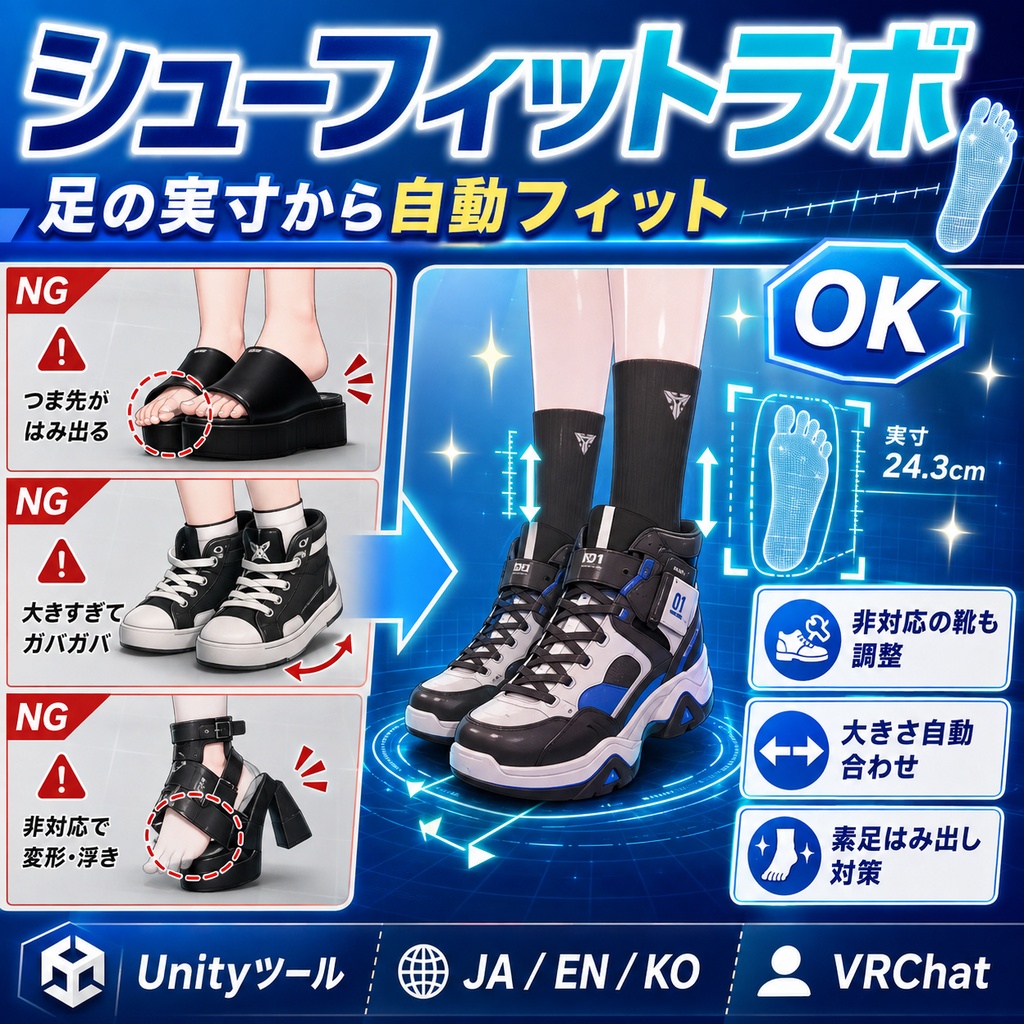
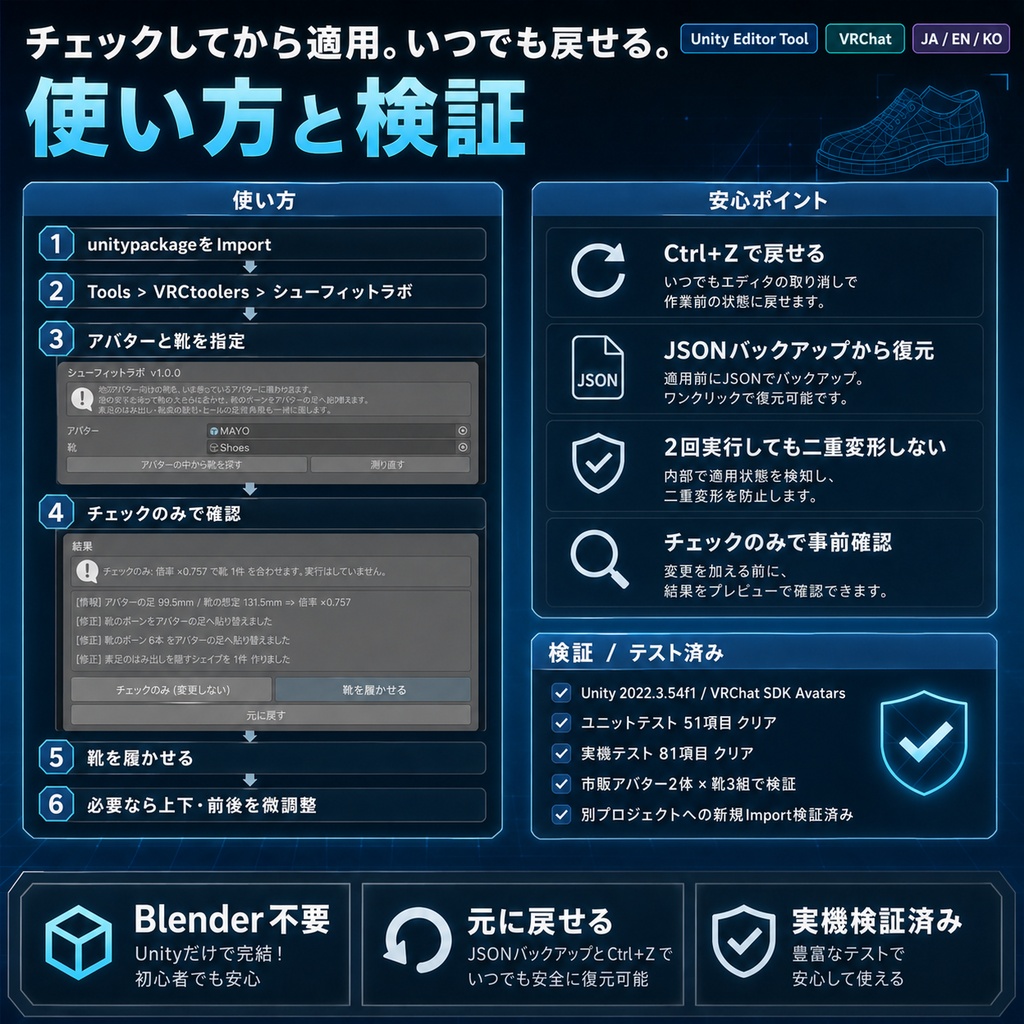
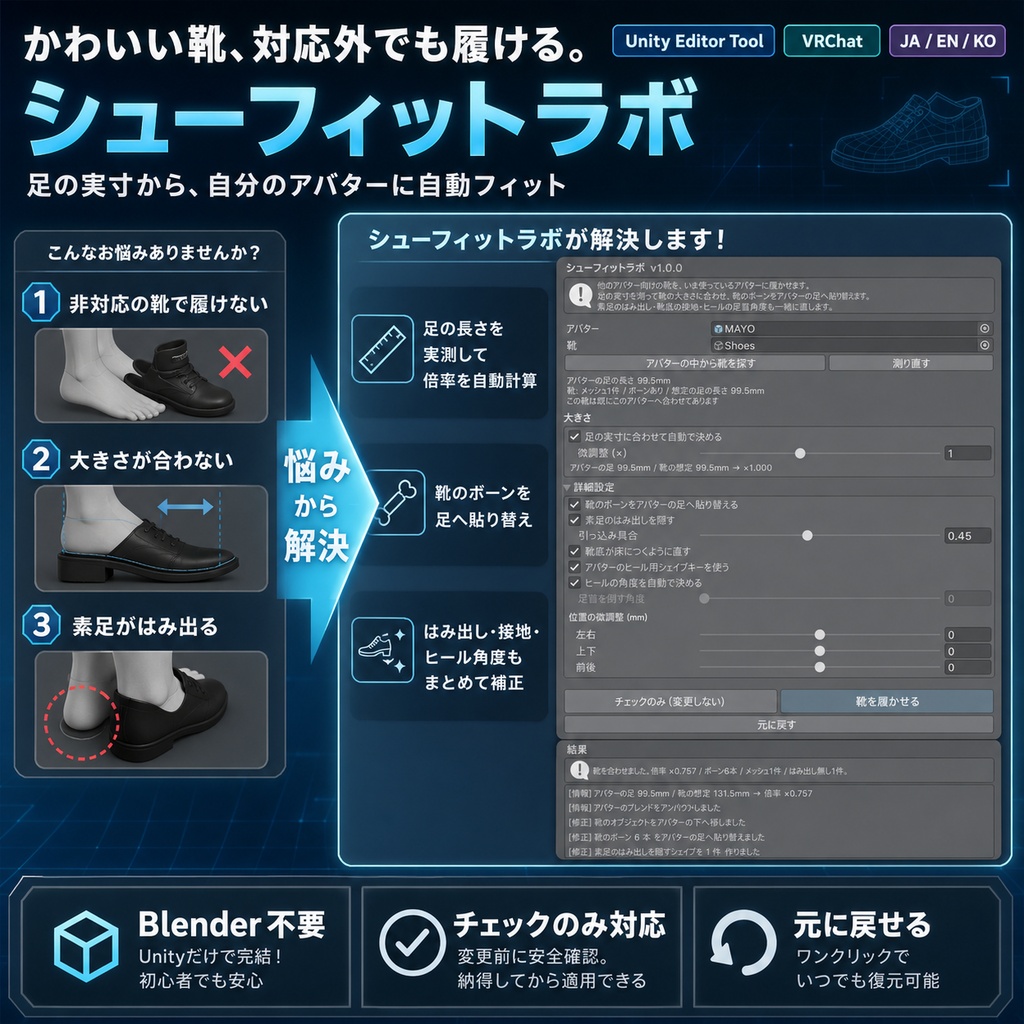
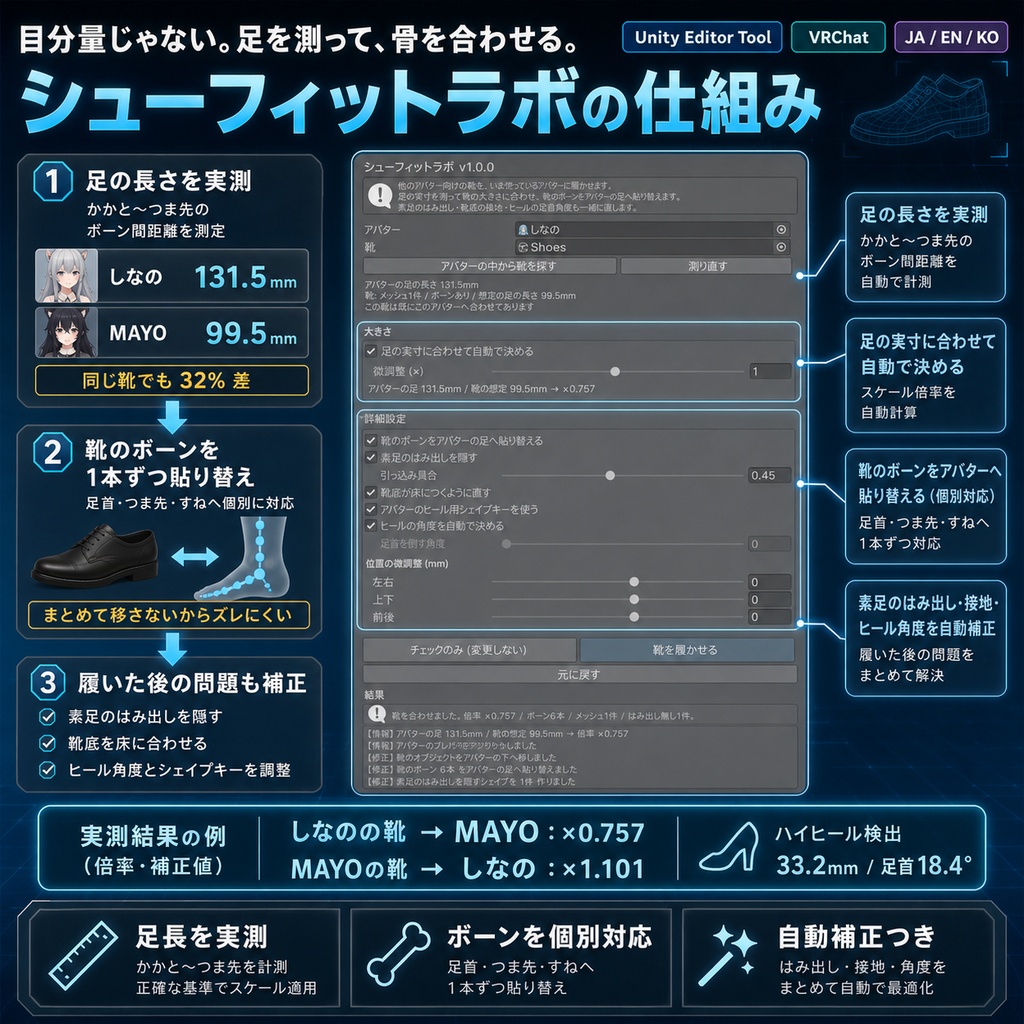


「かわいい靴を見つけたのに、自分のアバターは対応してない」。 シューフィットラボは、他のアバター向けに作られた靴を、いま使っているアバターに履かせるUnity Editorツールです。Blenderは使いません。 ◆ 足を実測して、靴の大きさを合わせます VRChatの靴は、作られた時点で「元アバターの足の大きさ」に固定されています。実測すると、しなのの足は131.5mm、まよは99.5mm。同じ靴を入れると32%も大きさが違います。 このツールは、かかと〜つま先のボーン間距離をアバターと靴の両方で測り、必要な倍率を出してから履かせます。目分量ではありません。 ◆ 靴のボーンを、アバターの足へ1本ずつ貼り替えます 靴は衣装の全身アーマチュア(288本など)に紐づいていますが、実際にウェイトが乗っているのは足まわりの数本だけです。そこだけを取り出して、アバターの足首・つま先・すねへ個別に貼り替えます。 まとめて移すのではなく1本ずつ合わせるのが要点です。元アバターとすねの長さが違っても、靴が足からずれた位置に付きません。 ◆ 靴を履くと壊れるものを、まとめて直します ・素足のはみ出し … 靴から突き出る素足をBlendShapeで内側へ引っ込めます ・靴底の接地 … 靴のぶん浮いたり埋まったりする足元を、元の床の高さに戻します ・ヒールの足首角度 … 靴底の前後の高さ差からヒールを見つけ、足首を倒します ・ヒール用シェイプキー … アバターが持っていれば自動でONにします ◆ 元に戻せます ・「チェックのみ」で、何がどう変わるかを実行前に全部確認できます ・Ctrl+Zで戻せます ・「元に戻す」で、ボーン・メッシュ・足首・アバターの位置をJSONバックアップから復元します ・2回実行しても足が二重に細くなりません(毎回、素のメッシュを基準にやり直します) ◆ 使い方 1. unitypackageをImport 2. Tools > VRCtoolers > シューフィットラボ 3. アバターと靴を指定(「アバターの中から靴を探す」で候補も出せます) 4.「チェックのみ」で変更内容を確認 5.「靴を履かせる」を実行 6. ずれていたら「前後」「上下」で微調整 ◆ 検証 Unity 2022.3.54f1 / VRChat SDK Avatars。ユニットテスト51項目、実SDK環境で市販アバター2体(しなの / まよ)に「そのアバター用ではない靴」を3組履かせる実機テスト81項目、出品ZIP同梱のunitypackageを別プロジェクトへ新規Importする検証、いずれも全項目クリアしています。 実機の実測: しなのの靴→まよ 倍率×0.757 / まよの靴→しなの ×1.101 / しなののハイヒール→まよ はヒール33.2mmを検出して足首を18.4度。3件とも靴の足首がアバターの足首と0.0mmで重なり、足元の高さも0.0mmで保たれました。使い方ガイドを同梱。 ※ 靴のボーン名がアバターと大きく違う場合は自動で対応付けできません。その場合は倍率と位置を手動で合わせてください。 ※ すべての靴・すべてのアバターの組み合わせで完璧な見た目を保証するものではありません。最終確認は購入者環境で行ってください。 ※ 靴の形そのものは変えません。足の形が極端に違う場合は隙間が残ることがあります。 ※ アバター本体、靴、衣装、VRChat SDK、Modular Avatarは付属しません。 ※ デジタル商品のため、購入後の返品・返金はできません。 内容物: ・シューフィットラボ unitypackage ・README ・TEST_REPORT ・CHANGELOG ・LICENSE --- English --- You found a pair of shoes you love, and your avatar is not on the supported list. Shoe Fit Lab is a Unity Editor tool that puts shoes made for another avatar onto the one you are using. No Blender needed. The foot is measured, not guessed A pair of VRChat shoes is locked to the foot size of the avatar it was built for. Measured: Shinano's foot is 131.5mm, MAYO's is 99.5mm - a 32% difference for the same pair. This tool measures the heel-to-toe bone distance on both the avatar and the shoes, works out the scale, and only then fits them. Shoe bones are re-bound one at a time Shoes are skinned to the outfit's whole armature - often 288 bones - but only a handful around the foot actually carry weight. Those are picked out and re-bound individually onto your ankle, toes and shin. Moving them as one block is what leaves shoes floating off the foot when the source avatar has a different shin length; matching bone for bone does not. It fixes what wearing shoes breaks - Bare feet poking through are pulled inside with a blend shape - The sole is put back on the floor you were standing on - Heels are detected from the front-to-back drop of the sole and the ankle is tilted - If your avatar ships a heel blend shape, it is switched on for you Everything is reversible - "Check only" shows exactly what would change before anything happens - Ctrl+Z works - "Undo changes" restores bones, meshes, the ankle and the avatar position from a JSON backup - Running it twice does not shrink the foot twice; each run starts from the untouched mesh How to use Import the unitypackage, open Tools > VRCtoolers > Shoe Fit Lab, set the avatar and the shoes, review with "Check only", then press "Put the shoes on". Verification Unity 2022.3.54f1 / VRChat SDK Avatars. 51 unit tests, 81 checks on a real-avatar run putting three shoe sets on the two commercial avatars they were not made for, and a fresh import of the shipped unitypackage into a separate project. All passed. Measured: Shinano's shoes on MAYO x0.757, MAYO's on Shinano x1.101, Shinano's heels on MAYO detected at 33.2mm and the ankle tilted 18.4 degrees. In all three the shoe ankle met the avatar ankle within 0.0mm and the floor level was held within 0.0mm. Notes: Shoes whose bone names differ wildly from the avatar cannot be matched automatically; set the scale and position by hand. This does not guarantee a perfect look for every shoe and every avatar - please check in your own environment. The shape of the shoe itself is not changed, so a very different foot shape can leave a gap. Avatar, shoes, outfit, VRChat SDK and Modular Avatar are not included. --- 한국어 --- "귀여운 신발을 찾았는데 내 아바타는 대응하지 않는다." 슈 핏 랩은 다른 아바타용으로 만들어진 신발을 지금 쓰는 아바타에 신기는 Unity Editor 툴입니다. Blender는 사용하지 않습니다. 발을 실측해서 신발 크기를 맞춥니다 VRChat의 신발은 만들어진 시점의 "원래 아바타의 발 크기"에 고정되어 있습니다. 실측하면 Shinano의 발은 131.5mm, MAYO는 99.5mm로 같은 신발이어도 32% 차이가 납니다. 이 툴은 발뒤꿈치~발끝 본 거리를 아바타와 신발 양쪽에서 측정해 필요한 배율을 낸 뒤 신깁니다. 눈대중이 아닙니다. 신발 본을 아바타의 발에 하나씩 옮겨 붙입니다 신발은 의상의 전신 아마추어(288개 등)에 연결되어 있지만, 실제로 웨이트가 실린 것은 발 주변의 몇 개뿐입니다. 그것만 뽑아내어 아바타의 발목·발가락·정강이에 개별로 옮겨 붙입니다. 한꺼번에 옮기지 않고 하나씩 맞추는 것이 핵심입니다. 원래 아바타와 정강이 길이가 달라도 신발이 발에서 어긋난 위치에 붙지 않습니다. 신발을 신으면 망가지는 것을 함께 고칩니다 - 맨발 삐져나옴: 신발 밖으로 나오는 맨발을 BlendShape로 안쪽에 넣습니다 - 밑창 접지: 신발 때문에 뜨거나 묻히는 발밑을 원래 바닥 높이로 되돌립니다 - 힐의 발목 각도: 밑창의 앞뒤 높이 차이로 힐을 찾아 발목을 기울입니다 - 힐용 셰이프키: 아바타가 가지고 있으면 자동으로 켭니다 되돌릴 수 있습니다 - "확인만"으로 실행 전에 변경 내용을 모두 볼 수 있습니다 - Ctrl+Z로 되돌릴 수 있습니다 - "되돌리기"로 본·메쉬·발목·아바타 위치를 JSON 백업에서 복원합니다 - 두 번 실행해도 발이 이중으로 가늘어지지 않습니다(매번 원본 메쉬를 기준으로 다시 계산합니다) 사용 방법 unitypackage를 Import → Tools > VRCtoolers > 슈 핏 랩 → 아바타와 신발 지정 → "확인만"으로 확인 → "신발을 신긴다" 실행. 검증 Unity 2022.3.54f1 / VRChat SDK Avatars. 유닛 테스트 51항목, 실제 SDK 환경에서 시판 아바타 2체에 "그 아바타용이 아닌 신발" 3세트를 신기는 실기 테스트 81항목, 출품 ZIP의 신규 Import 검증 모두 통과했습니다. 실측: Shinano의 신발→MAYO 배율 x0.757 / MAYO의 신발→Shinano x1.101 / Shinano의 하이힐→MAYO는 힐 33.2mm를 검출해 발목을 18.4도. 3건 모두 신발의 발목이 아바타의 발목과 0.0mm로 겹쳤고, 발밑 높이도 0.0mm로 유지되었습니다. 주의: 신발의 본 이름이 아바타와 크게 다르면 자동으로 대응시킬 수 없습니다. 그 경우 배율과 위치를 직접 맞춰 주세요. 모든 신발과 모든 아바타의 조합에서 완벽한 외형을 보장하지는 않습니다. 최종 확인은 구매자 환경에서 해주세요. 신발의 형태 자체는 바꾸지 않으므로 발 모양이 극단적으로 다르면 틈이 남을 수 있습니다. 아바타 본체, 신발, 의상, VRChat SDK, Modular Avatar는 포함되지 않습니다.