
皆勤スタンプ|わんコメ出席カード(OBSのキャッシュを消しても残る・ドック付き)【無料体験版あり】
- 製品版ダウンロード商品¥ 800
- 無料体験版ダウンロード商品¥ 0
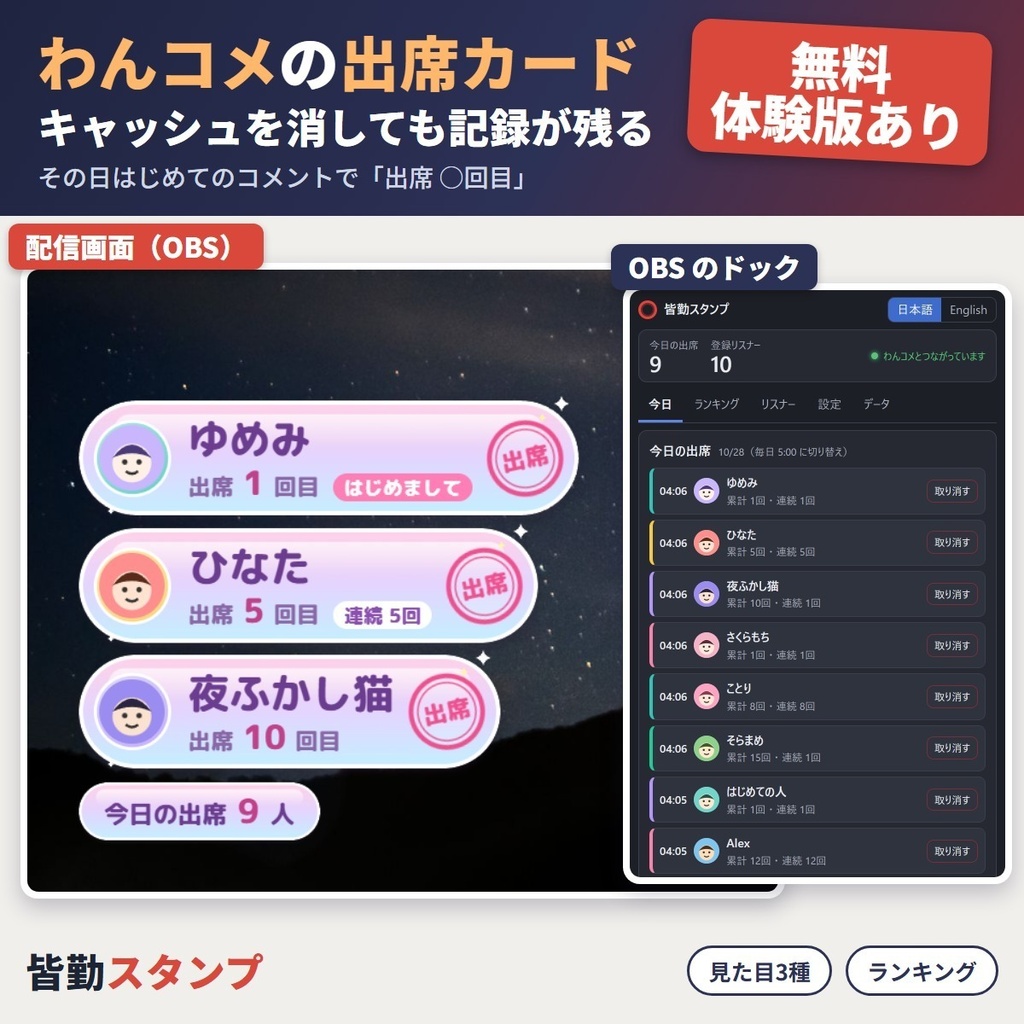
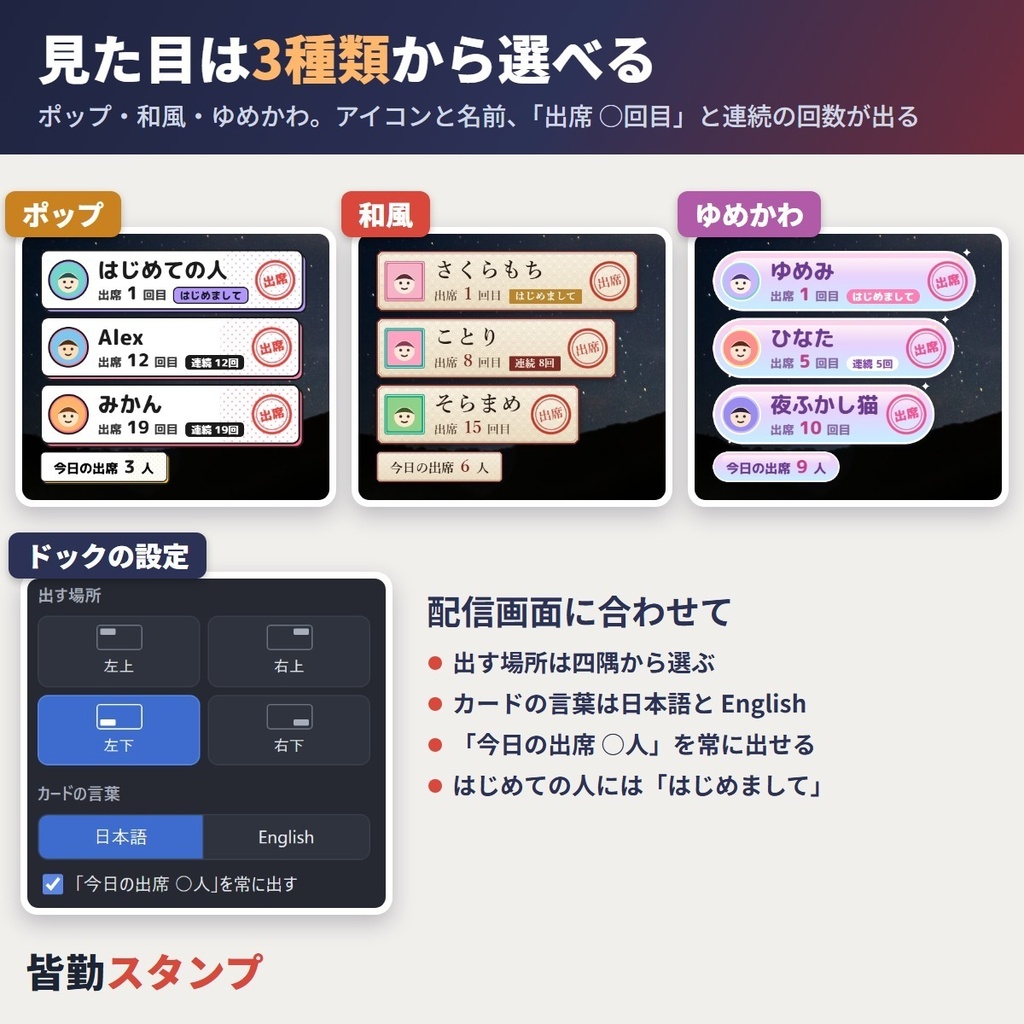
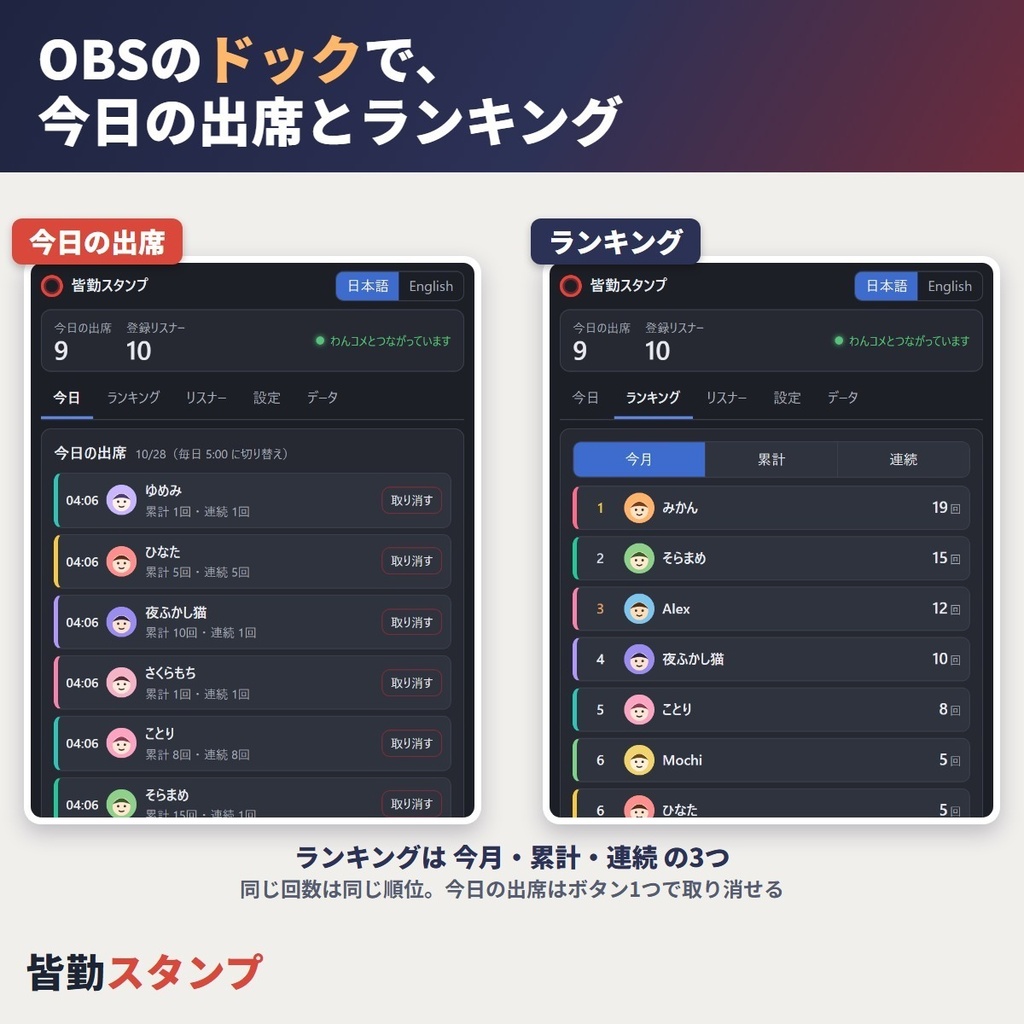
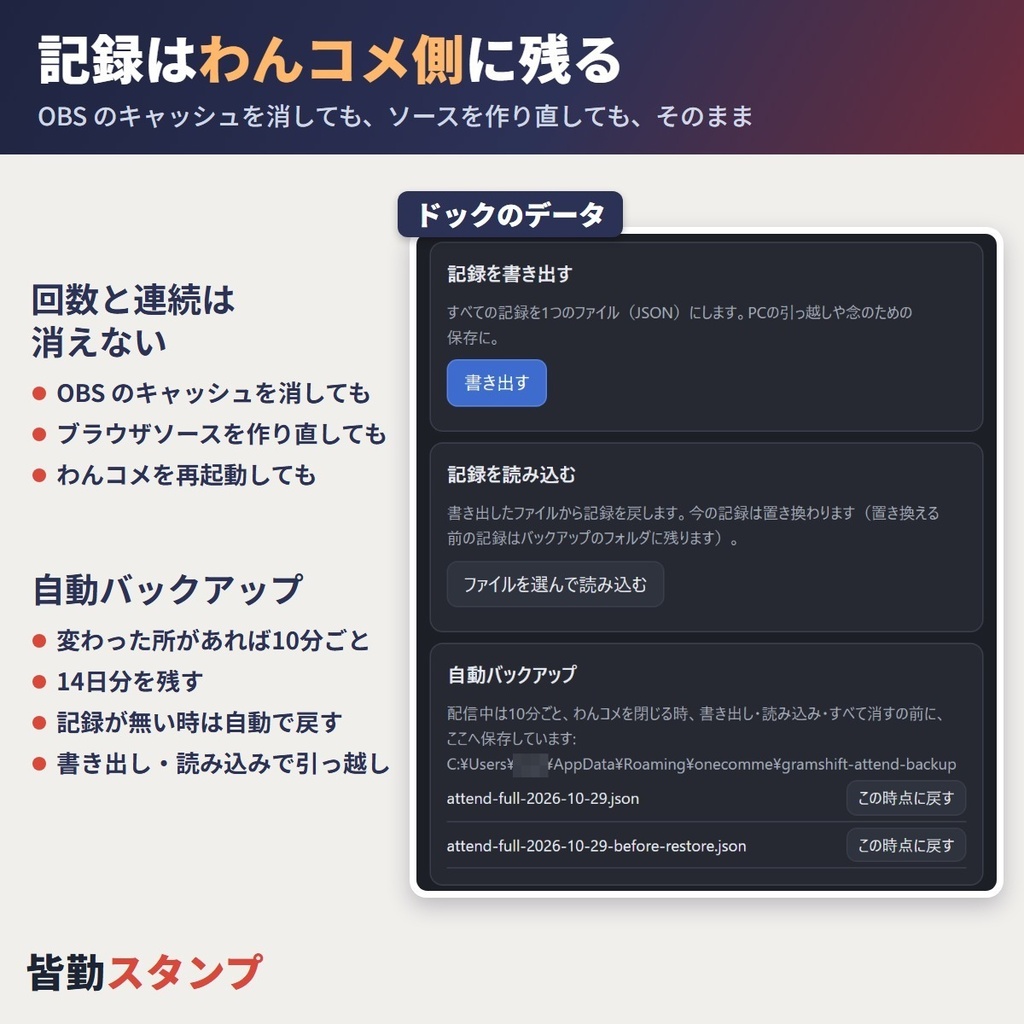
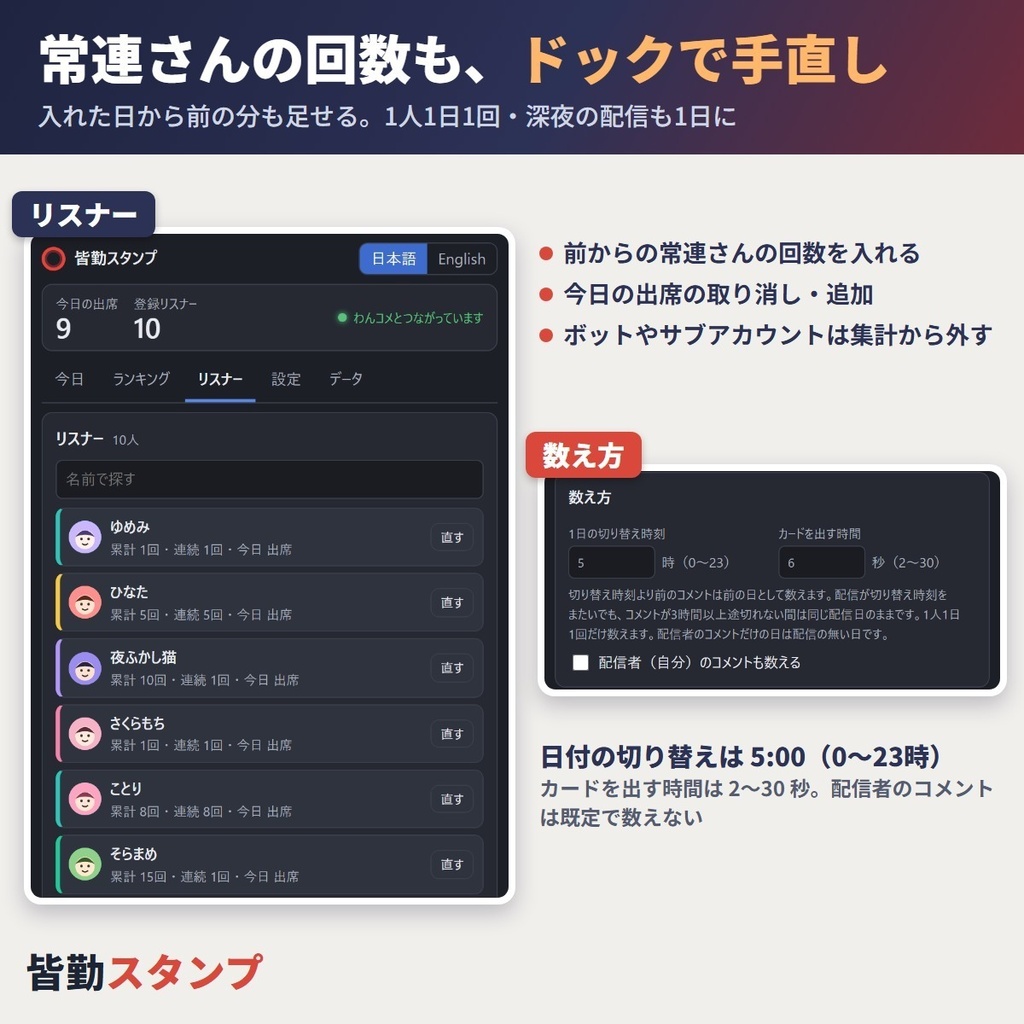
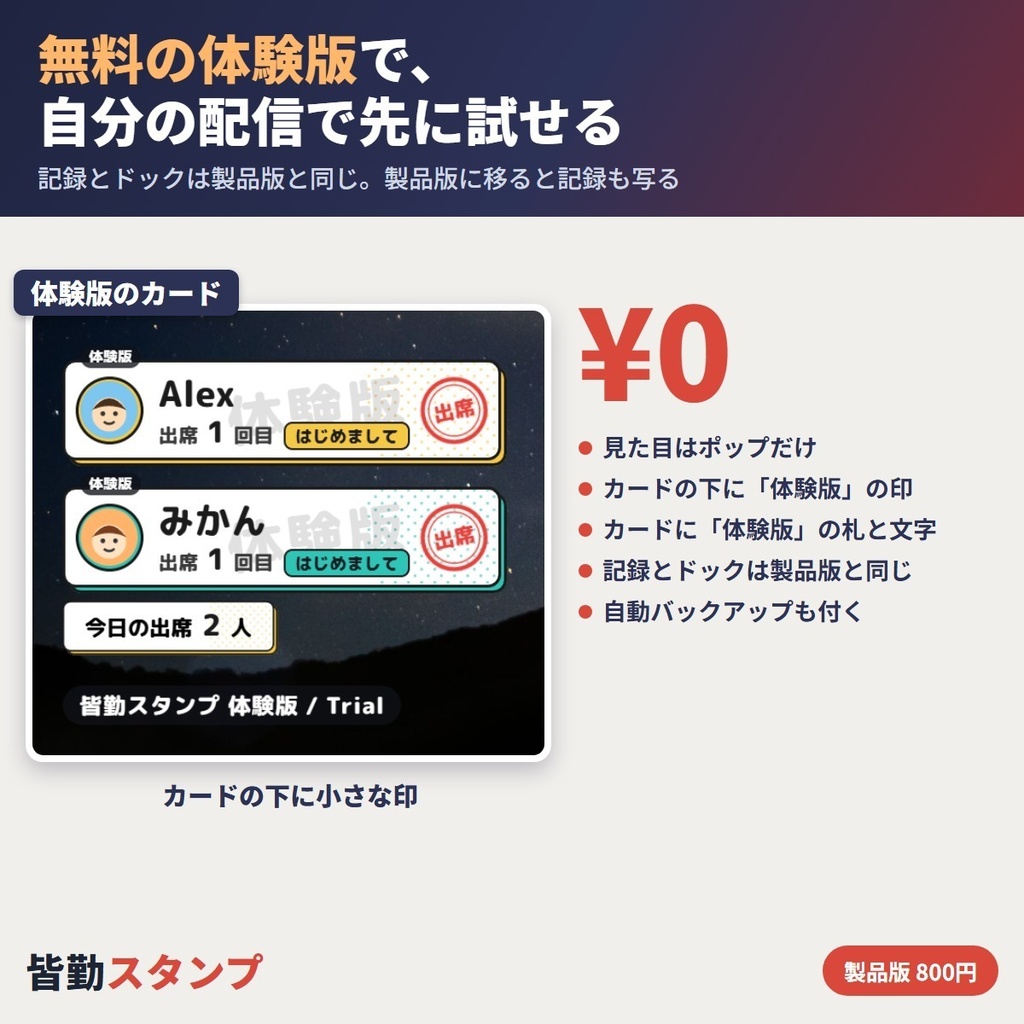


その日はじめてコメントしたリスナーに「出席 ○回目」「連続 ○回」のカードを配信画面へ出す、わんコメのプラグインです。来てくれた回数が画面に出るので、常連さんへの「いつもありがとう」がそのまま伝わります。記録はわんコメ側に残り、OBS のキャッシュを消しても、ソースを作り直してもそのままです。今日の出席・ランキング・リスナーごとの回数は、OBS の中に置くドックで見て、その場で直せます。 ■ まずは無料の体験版を、自分の配信で 体験版(0円)で、出席の記録・ドック・ランキング・自動バックアップを、製品版と同じ形で自分の配信で試せます。製品版に替えると、体験版の記録がそのまま写ります(手順は同梱の README.html)。 ■ できること ・その日はじめてのコメントで出席を1回数える(1人1日1回だけ) ・カードにアイコン・名前・「出席 ○回目」。はじめての人には「はじめまして」、続けて来ている人には「連続 ○回」 ・連続は「配信した日」で数える:配信のない日があっても連続は切れません ・深夜の配信も1日に:毎日 5:00 に日付を切り替え(0〜23時で変えられる)。切り替えの時刻をまたいでも、コメントの間が3時間空かなければ、始まった日の配信として数えます ・カードの見た目3種(ポップ・和風・ゆめかわ)。出す場所は四隅から選べる ・配信画面に「今日の出席 ○人」をずっと出すこともできる ・ドックの「今日」:今日来た人の一覧。取り消し・テスト表示(記録に残さず1枚出して位置を確かめる) ・ドックの「ランキング」:今月・累計・連続。同じ回数は同じ順位 ・ドックの「リスナー」:名前で探して、累計と連続を手で直す・今日の出席にする。ボットやサブアカウントは集計から外せる ・カードを出す時間(2〜30秒)。配信者のコメントは数えない(数える設定もある) ・記録はわんコメのプラグインのフォルダに。わんコメを再起動しても残ります ・自動バックアップ:変わった所があれば10分ごとと、わんコメを閉じた時。1日1ファイルで14日分。プラグインを入れ直して記録が無い時は、一番新しいバックアップから自動で戻ります ・書き出し・読み込み(ファイル)で、新しい PC へ引っ越せる ・ドックとカードの言葉は日本語と English から選べる ■ 使い方 1. zip を展開し、わんコメの「…」→「プラグイン」→「プラグインフォルダ」で開いたフォルダへ、KaikinStamp フォルダをフォルダごとコピー 2. プラグインの画面で「再読み込み」を押し、「皆勤スタンプ」のスイッチをオン 3. OBS にブラウザソースを足し、カードの URL を貼る(「ローカルファイル」のチェックは外す・幅 1920・高さ 1080) 4. OBS の「ドック → カスタムブラウザドック」にドックの URL を貼る URL と画像つきの手順は同梱の README.html にあります。配信の前にわんコメを起動しておいてください。 ■ 動作を確かめた環境 ・Windows 11・わんコメ 9.1.5・OBS Studio 33.0(64bit)のブラウザソースとカスタムブラウザドック ・YouTube のライブのコメント(わんコメで受け取った物)で、出席の数え方とカードを確かめました ■ 利用規約(要約) ・配信(収益化を含む)・動画・アーカイブ・切り抜き・サムネイルに自由に使えます。個人・法人どちらでも。クレジットの表記はいりません ・自分の配信に合わせて CSS で色などを変えるのは自由です ・ファイルの再配布・転売はできません(改変した物を含む)。自作として公開することもできません ・リスナーの名前・アイコン・回数の記録を、本人の了解なく配信の外へ公開しないでください ・書体は同梱の OFL.txt に従います。ほかは同梱の terms.txt が正です ■ できないこと(Limitations) ・Twitch・ニコニコなど YouTube 以外のサービスのコメント、macOS、9.1.5 以外のわんコメ、33.0 以外の OBS は未確認です。この環境の方は、無料の体験版で動くかを先にお確かめください ・同じ人でも、サービスが違えば(YouTube と Twitch など)別のリスナーとして数えます ・わんコメを起動していない間に来たコメントは数えません(その間はカードもドックも動きません) ・配信者のコメントや、集計から外したリスナーのコメントだけの日は、「配信した日」になりません ・自動で戻るのは最後のバックアップ(最大10分前)まで。記録が有る時と「すべて消す」の後は自動で戻りません(ドックの「この時点に戻す」で戻せます) ・ドックのランキングは各上位50人、リスナーの一覧は200人まで(ほかは名前で探せます) ・ほかの出席の道具の記録をファイルから読み込むことはできません(回数はリスナーごとに手で直せます) ・体験版は見た目がポップだけで、「体験版」の印・札・文字が出ます。OBS の CSS などで隠すと、カードは出ずに「体験版の印が隠れています」と出ます(製品版は3種類で、印・札・文字なし) ■ AI の使用について プログラムとカードの形は AI(Claude)を使って作りました。画像生成 AI は使っていません。カードの文字は Rounded Mplus 1c ExtraBold(SIL Open Font License 1.1)です。 ■ 応援のお願い 気に入ってもらえたら、この商品ページの♡(スキ)を押してもらえるとうれしいです。 ■ 困った時は うまく動かない時は BOOTH のメッセージから気軽にお知らせください(わんコメと OBS のバージョン、コメントを受けているサービスがあると早く調べられます)。 --- ■ English Kaikin Stamp ("kaikin" means perfect attendance) is a OneComme plugin that shows a "Visit N" card with the viewer's streak on your stream at their first comment of the day. Regulars see their count grow on screen, a simple way to thank them for coming back. Records live on the OneComme side, so clearing the OBS cache or rebuilding the source does not touch them. See and fix today's visitors, rankings and each viewer's counts in a dock inside OBS. ■ Try the free trial first The free trial runs recording, the dock, rankings and auto backup on your own stream, and your trial records carry over to the full edition (steps in README.html). ■ Features - One visit per viewer per day; first-timers get a welcome line, regulars their streak - Streaks count stream days, so days off do not break them - The day changes at 5:00 (any hour 0-23); a stream running past it stays on its start day while comments are under 3 hours apart - 3 looks (Pop, Japanese, Dreamy), any corner, optional "here today" counter - Dock: Today (undo, test card), Ranking (month, total, in a row), Viewers (search, fix counts, leave out bots) - Card time 2-30 s; your own comments are not counted unless you turn it on - Auto backup every 10 minutes and on close, 14 days kept; a fresh install with no records restores the newest one - Export / import to move PCs; Japanese or English text ■ How to use Copy the KaikinStamp folder into OneComme's plugin folder (… > Plugins > plugin folder), reload and switch it on. Add the card URL as an OBS Browser source (untick "Local file", 1920x1080) and the dock URL under Docks > Custom Browser Docks. README.html has the URLs and screenshots. ■ Tested on Windows 11, OneComme 9.1.5, OBS Studio 33.0 (64-bit), with real YouTube live comments. ■ Terms (summary) Free for streams (monetized too), videos, clips and thumbnails, personal or company, no credit needed; restyling with CSS is fine. No redistribution or resale, and do not publish viewers' records outside your stream without consent. The font follows OFL.txt; terms.txt is authoritative for the rest. ■ Limitations - Not yet tested: services other than YouTube, macOS, other OneComme or OBS versions. Please check with the free trial first. - One person on two services counts as two viewers; comments while OneComme is closed are not counted. - Days with only your own or left-out viewers' comments are not stream days. - Auto restore goes back to the last backup (up to 10 minutes old) and does not run while records exist or after Delete all (use Go back to this under Automatic backups). - The dock lists the top 50 per ranking and 200 viewers (search for the rest). Records from other tools cannot be imported. - The trial has the Pop look only, with a "Trial" mark, tag and word; if custom CSS hides them, no card is shown. The full edition has 3 looks and none of these. ■ Use of AI The program and card shapes were made with AI (Claude). No image-generation AI was used. Font: Rounded Mplus 1c ExtraBold (SIL OFL 1.1). ■ A small favor If it helps your stream, a ♡ on this page would mean a lot. ■ Need help? If something does not work, feel free to send a message on BOOTH (your OneComme and OBS versions and the comment service help us check faster).
