

【無料】頭の小物を合わせる CrownFit|ほかのアバター用の髪飾り・帽子・メガネを今の頭に
- ダウンロード商品¥ 0
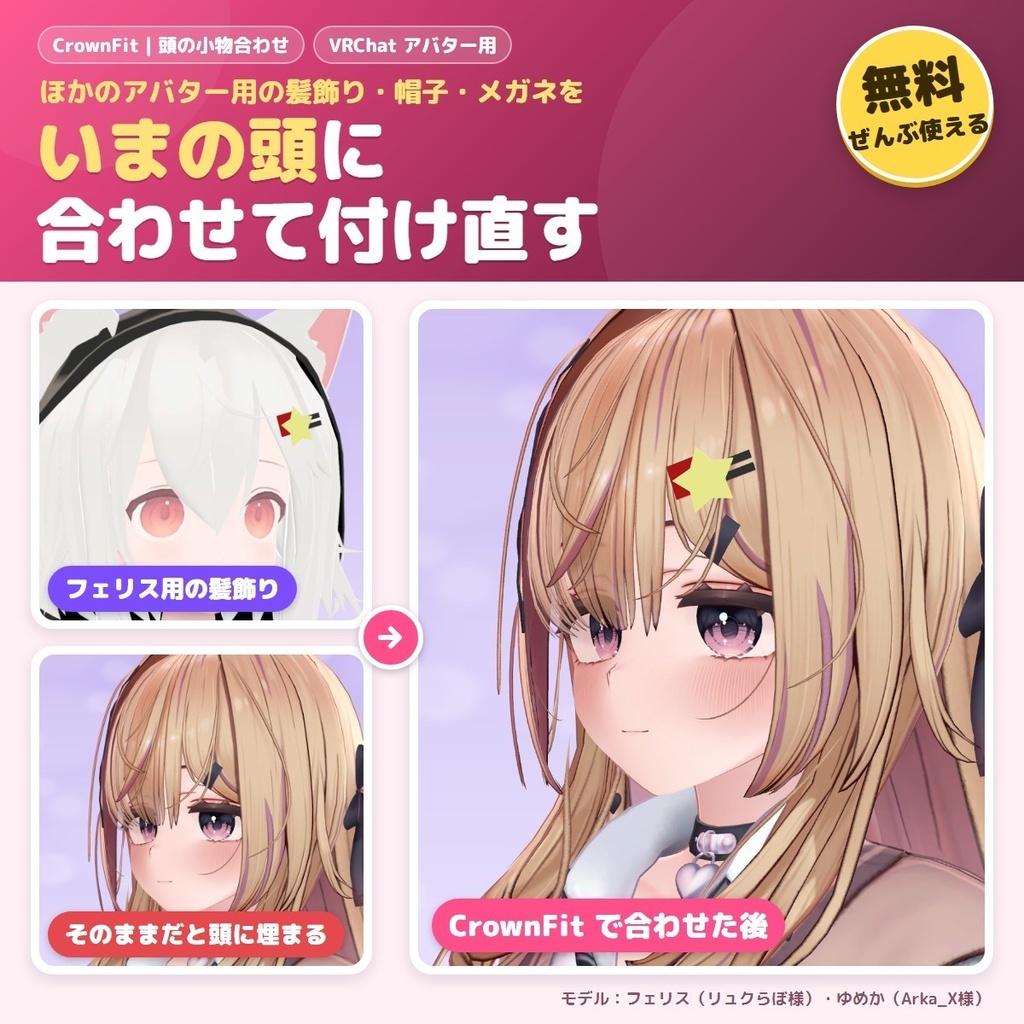
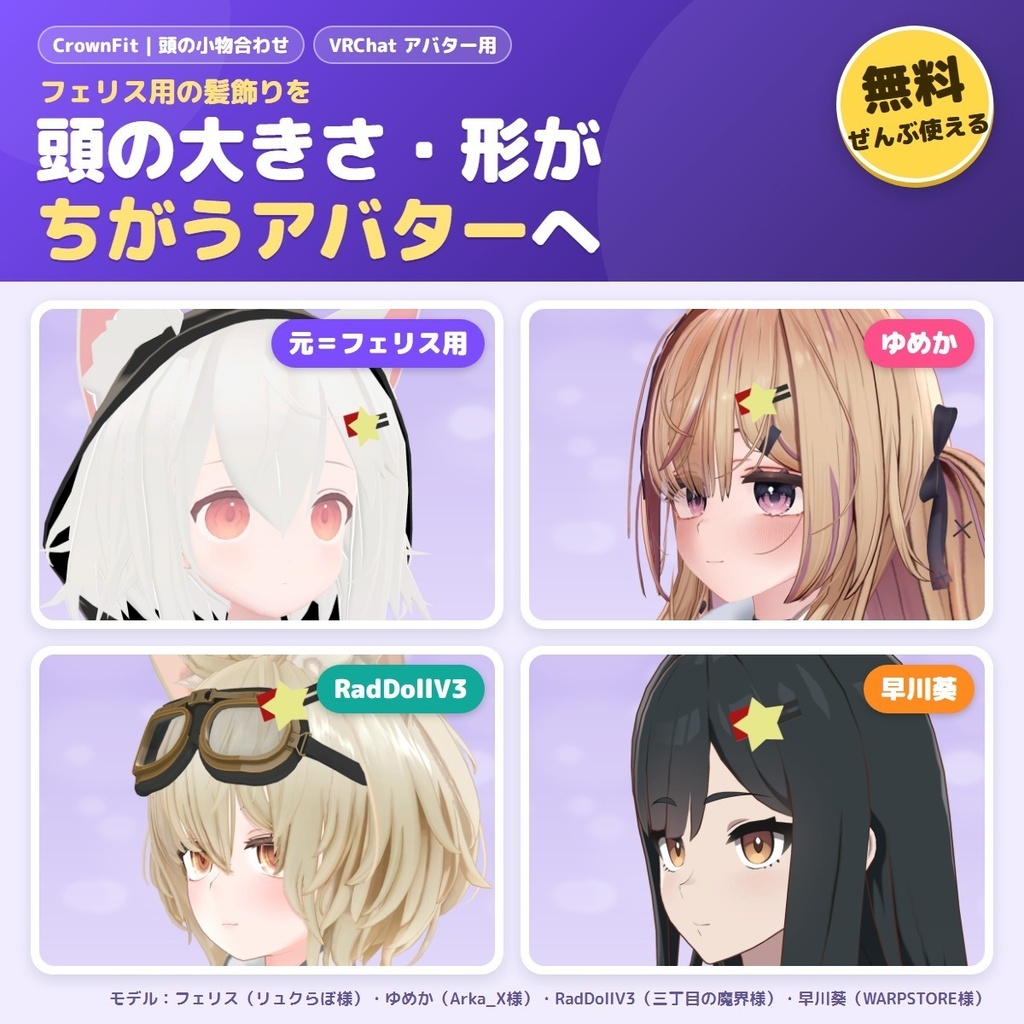
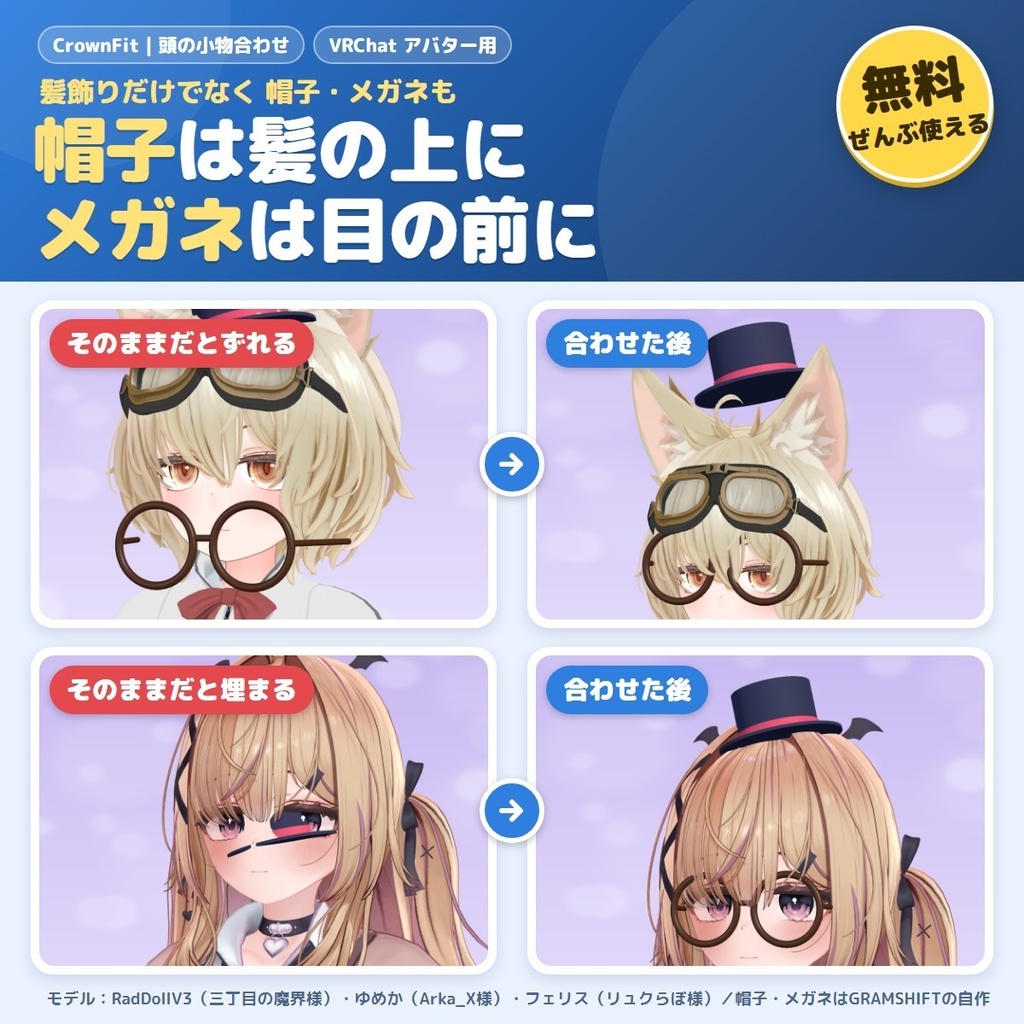
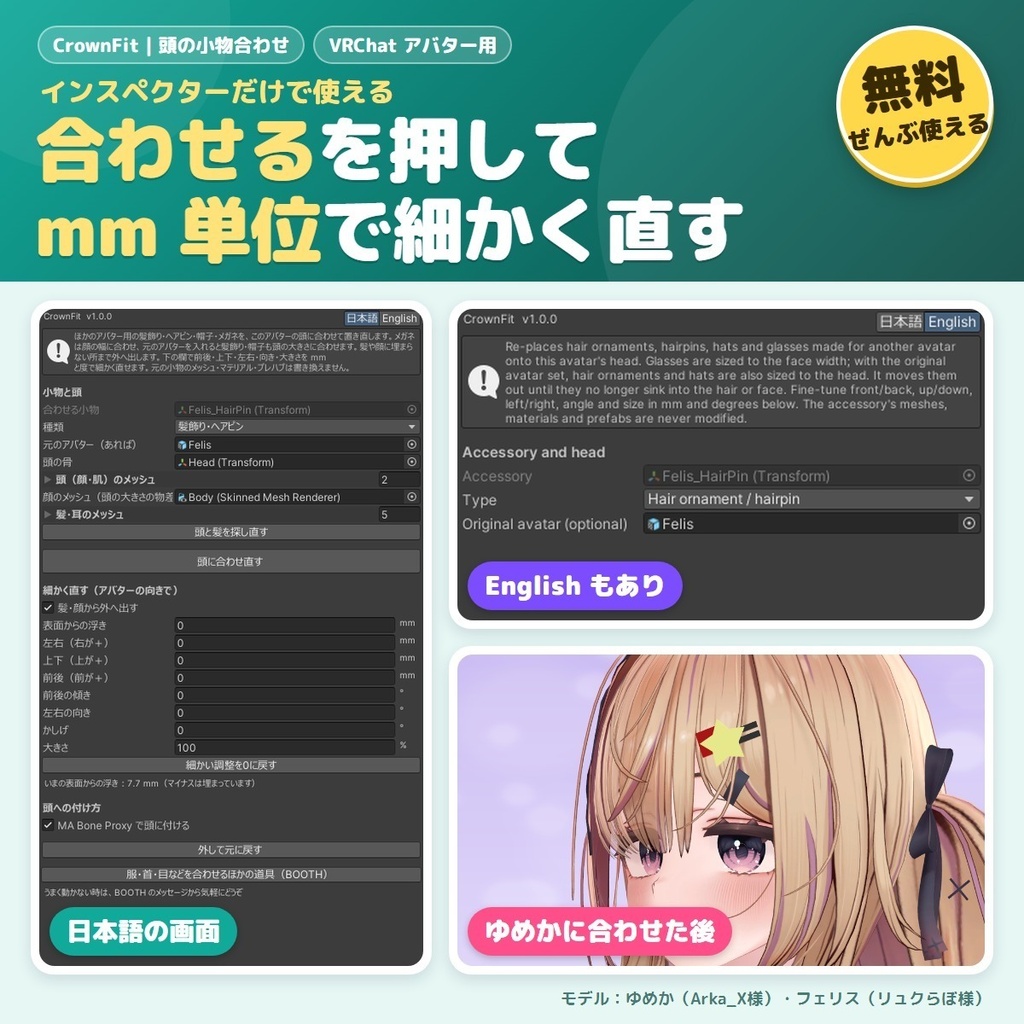


他のアバター用の髪飾り・ヘアピン・帽子・メガネ(頭のアクセサリー)を、今のアバターの頭に合わせて付け直す無料のツールです。非対応の小物が髪に埋まる・メガネがずれる、といった改変の悩みを Unity の中で直せます。 小物を選んで「頭に合わせる」を押すと、位置が今の頭に合い、髪や顔の外側に乗ります(帽子は頭の上、メガネは目の前へ)。メガネは顔の幅に合わせ、元のアバターを入れると髪飾り・帽子も頭の大きさに合わせます。 Blender は使わず Unity の中だけで完結し、小物のデータはそのままです。 English / 简体中文 / 한국어:下の段落に説明があります(descriptions below) ■ できること ・髪飾り・ヘアピン・帽子・メガネを、今のアバターの頭の骨と向きに合わせて置き直します ・小物が作られたアバターのプレハブを入れると、元の頭での位置関係と大きさを保ったまま今の頭へ移します(入れなくても合わせられます) ・髪・顔・肌に埋まっていれば外へ、離れすぎていれば頭へ寄せて、表面から少し浮いた所に置きます ・帽子はアホ毛のような細い毛先には乗らず、頭の形にかぶせます ・メガネは目の高さ・顔の幅に合わせ、頭の幅に合った大きさにします ・前後・上下・左右(mm)/傾き・向き・かしげ(度)/大きさ(%)/表面からの浮き(mm)の欄で細かく直せます。向きはアバター基準なので、アバターが回っていても「前」は顔の向きです ・ほかの小物と重なっていれば知らせ、「重ならない所までずらす」で外へずらせます ・自動で見つけた頭の骨・顔のメッシュ・髪のメッシュは欄に出て、違う時は手で選び直せます。見つからない時は「ここで選んでください」と出ます ・Modular Avatar があれば MA Bone Proxy で頭に付け、無ければ頭の骨の下へ入れます(どちらも頭と一緒に動きます) ・操作は Ctrl+Z で戻せ、「外して元に戻す」で合わせる前の場所に戻ります ・日本語/English 切り替え ■ 試した結果 作りの違う7体(ゆめか・フェリス・RadDollV3・早川葵 ほか3体)に、ヘアピン・角の髪飾り・帽子・メガネを合わせた27通りで、頭の表面からの距離を mm で測りました。 ・合わせる前:頭に 331mm 埋まる/1m 以上離れる などばらばら → 合わせた後:27通りすべて、決めた浮き(0.5〜23mm)どおり ・髪・顔に埋まった点:27通りすべて5%未満(24通りは0%) ・ヘアピン(フェリス用)を6体へ:頭の大きさが約3倍違うアバターまで、元の頭と同じ向き・同じ浮きの所へ大きさを合わせて付きました ・メガネ:目の骨のある4体で、レンズの中心と目の左右・高さの差 0.0mm ・帽子:頭の中心との左右の差 0.5mm ・アバターを回した・動かした所でも、合わせた位置の差 0.00mm。「外して元に戻す」で元の位置との差 0.000mm ・1つ合わせるのにかかる時間:0.8秒以内(作者の PC) ■ 使い方 1. unitypackage をプロジェクトに入れる 2. 小物のプレハブをアバターの中に入れる 3. ヒエラルキーで小物を右クリック → GRAMSHIFT → CrownFit(上のメニューの Tools → GRAMSHIFT → CrownFit でも可) 4. 「種類」(髪飾り・ヘアピン/帽子/メガネ)を確かめて「頭に合わせる」を押す。あとは欄で好みに直して、いつもどおりアップロード ■ 動作環境 ・Unity 2022.3 / VRChat SDK3 Avatars ・Modular Avatar 1.9 以上 2.0 未満(あれば MA Bone Proxy で付けます・無くても使えます) ・Humanoid のアバター(頭の骨を自動で見つけるため。見つからない時は欄で選べます) ・動作確認した版:Unity 2022.3.22f1 / SDK 3.10.5 / MA 1.18.7 / NDMF 1.14.8 ■ 使う前に ・小物の規約で、ほかのアバターに使うこと(改変)が許されているか確かめてください。アバターの規約にも従ってください ■ よくある質問 Q. ほかのアバター用の帽子やメガネを、自分のアバターに付けられますか? A. 付けられます。小物をアバターの中に入れて CrownFit を付け、「頭に合わせる」を押すと、頭の形に合わせて置き直します。メガネは顔の幅に合わせ、元のアバターを入れると髪飾り・帽子も頭の大きさに合わせます。 Q. 髪飾りを付けると髪に埋まってしまいます。 A. 「頭に合わせる」で、髪と顔に埋まらない所まで外へ出します。浮かせる量は「表面からの浮き」の欄で mm で決められます。 Q. 無料版と有料版はありますか? A. 無料で、機能の制限なく使えます。 Q. Blender は要りますか? A. 要りません。Unity の中だけで使えます。 ■ 制限 ・ピアス・イヤリングなど耳の小物は対象外です(髪飾り・ヘアピン・帽子・メガネが対象です) ・元のアバターが無い時、髪飾り・帽子は大きさをそのままにします。大きさは「大きさ」の欄か、元のアバターを入れて合わせてください ・目の骨が無いアバターでは、メガネの高さは頭の形から見当を付けます。ずれる時は「上下」の欄で直してください ・揺れる小物(PhysBone の付いた物)は置き場所だけを合わせます。揺れの設定は変えません ・頭と一緒に動く小物のための道具です。胸や腕など頭以外の小物には使えません ・小物ごとに CrownFit を1つずつ付けてください ■ 頭の小物が合ったら、衣装・指輪・首も:Fit シリーズ(合わない衣装・小物・顔を合わせる有料の道具) ・WearFit|非対応の衣装を着せる https://booth.pm/ja/items/9032442 ・BandFit|非対応の指輪・腕輪を付ける https://booth.pm/ja/items/9034318 ・MirrorFit|片耳のピアス・片側の飾りを反対側にも https://booth.pm/ja/items/9100264 ・NeckFit|首すげ替え https://booth.pm/ja/items/9020805 ・SkinFit|肌テクスチャを写す https://booth.pm/ja/items/9034575 ・LidFit|改変した目のまばたき https://booth.pm/ja/items/9014545 ・IrisFit|瞳テクスチャ合わせ https://booth.pm/ja/items/9016322 ・DecoFit|衣装変換でゆがんだボタン・金具を元の形に https://booth.pm/ja/items/9043331 ・MouthFit|口を改変してもリップシンクが崩れない https://booth.pm/ja/items/9049948 ・TongueFit|舌を上下左右に動かす https://booth.pm/ja/items/9061168 ■ まとめセットもあります ・合わせる道具6本(非対応の衣装・指輪・肌テクスチャ・頭など)を、1つのアバターに同時に入れて使える「FitSet」(4,200円・1本ずつより1,650円お得)もあります ・https://gramshift.booth.pm/items/9104894 ・Also available as a set: FitSet (six fitting tools — unsupported outfits, rings, skin textures, heads and more — used together on one avatar, 4,200 yen, 1,650 yen less than buying each) ・也有合集:FitSet(6款适配工具:非对应服装・戒指・皮肤贴图・头部等,可同时用于一个模型,4,200日元,比单买便宜1,650日元) ・세트도 있습니다: FitSet(맞춤 도구 6종: 비대응 의상・반지・피부 텍스처・머리 등, 한 아바타에 함께 사용, 4,200엔, 하나씩 사는 것보다 1,650엔 저렴) ■ 困った時は うまく動かない時はショップへのお問い合わせから気軽にどうぞ(小物とアバターの名前、表示された文を添えてください)。
利用規約
・VRChat などで使うアバターの改変に、個人・法人・商用を問わず無料で使えます ・このツールを使って作ったアバター・改変データの公開・販売に、このツール側の制限はありません(髪飾り・帽子・メガネなどの小物とアバターのそれぞれの規約に従ってください) ・ツールのファイルの再配布・転売・共有はできません(配る時はこの商品ページを案内してください) ・同梱の「利用規約_Terms.txt」が正です Terms (summary): free to use for modifying avatars for VRChat etc., for personal, corporate or commercial use; this tool puts no limit on publishing or selling avatars or edit data made with it (follow the terms of the accessory and of your avatar); you may not redistribute, resell or share the tool files (point people to this page instead). The included "利用規約_Terms.txt" is authoritative.
更新履歴
1.0.0(2026-11)公開 1.0.0 (2026-11) released
English
CrownFit is a free tool that fits hair ornaments, hairpins, hats and glasses (head accessories) made for another avatar to your VRChat avatar's head. It fixes the usual problems with unsupported accessories — sinking into the hair, glasses sitting in the wrong place — right inside Unity. Select the accessory and press "Fit to the head": it moves to the right place on your head and sits on the outside of the hair and face (hats on top of the head, glasses in front of the eyes). Glasses are sized to the face width, and with the original avatar dropped in, hair ornaments and hats are sized to the head too. Everything happens inside Unity with no Blender, and the accessory's own files stay as they are. ■ Features - Re-places hair ornaments, hairpins, hats and glasses to fit your avatar's head bone and facing - Drop in the prefab of the avatar the accessory was made for, and it keeps the place and size it had on that head as it moves to yours (fitting also works without it) - If the accessory sinks into the hair, face or skin it is moved out; if it floats too far it is brought closer; it ends just above the surface - Hats do not sit on thin hair tips such as an ahoge; they rest on the shape of the head - Glasses are fitted to the eye height and face width, at a size that suits the head width - Fine-tune with front/back, up/down, left/right (mm), tilt, turn, roll (degrees), size (%) and gap from the surface (mm). Directions follow the avatar, so "front" is where the face looks even when the avatar is rotated - It tells you when it overlaps other accessories, and "Move until it no longer overlaps" moves it outward - The head bone, face mesh and hair meshes it finds are shown in fields, and you can pick them by hand if they are wrong. If one is not found, it asks you to pick it there - With Modular Avatar it attaches the accessory to the head with MA Bone Proxy; without it, the accessory goes under the head bone (it follows the head either way) - Steps can be undone with Ctrl+Z, and "Remove and restore" puts the accessory back where it was before fitting - Japanese / English UI ■ Results On 7 avatars with different builds (Yumeka, Felis, RadDollV3, Hayakawa Aoi and 3 more), we fitted a hairpin, a horn hair ornament, a hat and glasses — 27 combinations — and measured the distance from the head surface in mm. - Before fitting: sunk 331 mm into the head, or more than 1 m away, and so on → after fitting: all 27 combinations at the set gap (0.5 to 23 mm) - Points sunk into the hair or face: under 5% in all 27 combinations (0% in 24) - A hairpin made for Felis on 6 avatars: up to heads about 3 times larger, it went on in the same direction and at the same gap as on the original head, resized to fit - Glasses: on the 4 avatars with eye bones, 0.0 mm left/right and height difference between the lens centers and the eyes - Hat: 0.5 mm left/right offset from the head center - With the avatar rotated or moved, 0.00 mm difference in the fitted place; "Remove and restore" returns it within 0.000 mm of the original place - Time to fit one accessory: within 0.8 seconds (on the author's PC) ■ How to use 1. Import the unitypackage into your project 2. Put the accessory prefab inside the avatar 3. Right-click the accessory in the Hierarchy → GRAMSHIFT → CrownFit (or Tools → GRAMSHIFT → CrownFit in the top menu) 4. Check "Type" (Hair ornament / hairpin, Hat, Glasses) and press "Fit to the head". Fine-tune in the fields if you like, then upload as usual ■ Requirements - Unity 2022.3 / VRChat SDK3 Avatars - Modular Avatar 1.9 or later, below 2.0 (optional; used for MA Bone Proxy) - A Humanoid avatar (to find the head bone; you can pick it in the field if it is not found) - Versions confirmed to work: Unity 2022.3.22f1 / SDK 3.10.5 / MA 1.18.7 / NDMF 1.14.8 ■ Before you use it - Check that the accessory's terms allow using it on another avatar (modification), and follow your avatar's terms too ■ FAQ Q. Can I put a hat or glasses made for another avatar on my avatar? A. Yes. Put the accessory inside the avatar, add CrownFit and press "Fit to the head". It re-places it to fit the shape of the head. Glasses are sized to the face width, and with the original avatar dropped in, hair ornaments and hats are sized to the head too. Q. My hair ornament sinks into the hair. A. "Fit to the head" moves it out until it no longer sinks into the hair or face. Set how far it floats in mm with "Gap from the surface". Q. Is there a free and a paid version? A. It is free, with no feature limits. Q. Do I need Blender? A. No. It works inside Unity only. ■ Limitations - Ear accessories such as piercings and earrings are not covered (hair ornaments, hairpins, hats and glasses are) - Without the original avatar, hair ornaments and hats keep their size. Set the size with "Size", or fit with the original avatar - On avatars without eye bones, the glasses' height is estimated from the head shape. Adjust it with "Up/down" if needed - For accessories with PhysBones, only the placement is fitted; the PhysBone settings are not changed - It is for accessories that move with the head; not for accessories on the chest, arms and so on - Add one CrownFit to each accessory ■ Head accessories done? Outfits, rings and heads next: Fit series (paid tools that fit outfits, accessories and faces) - WearFit | wear unsupported outfits https://booth.pm/ja/items/9032442 - BandFit | wear unsupported rings and bracelets https://booth.pm/ja/items/9034318 - MirrorFit | put a one-sided earring or ornament on the other side too https://booth.pm/ja/items/9100264 - NeckFit | head swap https://booth.pm/ja/items/9020805 - SkinFit | copy skin textures https://booth.pm/ja/items/9034575 - LidFit | blinking for edited eyes https://booth.pm/ja/items/9014545 - IrisFit | fit iris textures https://booth.pm/ja/items/9016322 - DecoFit | restore buttons and metal parts warped by outfit conversion https://booth.pm/ja/items/9043331 - MouthFit | keep lip sync working after editing the mouth https://booth.pm/ja/items/9049948 - TongueFit | move the tongue up, down, left and right https://booth.pm/ja/items/9061168 ■ Need help? If something does not work, feel free to message us with "Contact this Shop" (the names of the accessory and the avatar and any message shown help).
简体中文
CrownFit 是一款免费工具,可以把为其他模型制作的发饰、发夹、帽子和眼镜(头部配饰)适配到你的 VRChat 模型的头部。不支持的配饰陷进头发、眼镜位置偏移等改模烦恼,都能在 Unity 中解决。 选中配饰并点击“Fit to the head”后,位置会与当前头部吻合,并贴在头发和脸部的外侧(帽子戴在头顶,眼镜戴在眼睛前方)。眼镜会按脸宽调整大小,放入原模型后,发饰和帽子也会按头部大小调整。 全程只在 Unity 内完成,无需 Blender,配饰本身的文件保持原样。 ■ 功能 - 按你的模型的头部骨骼和朝向,重新放置发饰、发夹、帽子和眼镜 - 放入配饰原本所属模型的预制件后,会保持它在原头部上的位置关系和大小,移到你的头部(没有预制件也可以适配) - 配饰嵌入头发、脸部或皮肤时会向外移出;离得太远时会向头部靠近;最终停在表面稍稍上方的位置 - 帽子不会被呆毛这类细发梢顶起,而是贴合头部的形状戴上 - 眼镜会按眼睛高度和脸宽适配,尺寸与头部宽度相称 - 可通过前后、上下、左右(mm),倾斜、朝向、侧倾(度),大小(%)以及与表面的间距(mm)进行微调。方向以模型为基准,因此即使模型被旋转,“前”也始终是脸朝向的方向 - 与其他配饰重叠时会提示,点击“Move until it no longer overlaps”即可向外移开 - 自动找到的头部骨骼、脸部网格和头发网格会显示在栏位中,如有错误可手动重新选择。找不到时,会提示你在此处选择 - 有 Modular Avatar 时,通过 MA Bone Proxy 把配饰挂到头部;没有时,则把配饰放到头部骨骼之下(两种方式都会跟随头部移动) - 操作可以用 Ctrl+Z 撤销,点击“Remove and restore”可让配饰回到适配之前的位置 - 日语 / 英语界面 ■ 实测结果 我们在 7 个体型各异的模型(Yumeka、Felis、RadDollV3、Hayakawa Aoi 等,另有 3 个)上,适配了发夹、角形发饰、帽子和眼镜,共 27 种组合,并以 mm 为单位测量了与头部表面的距离。 - 适配前:嵌入头部 331 mm,或远离 1 m 以上等,参差不齐 → 适配后:27 种组合全部达到设定的间距(0.5 至 23 mm) - 嵌入头发或脸部的点:27 种组合全部低于 5%(其中 24 种为 0%) - 为 Felis 制作的发夹适配到 6 个模型:即使头部大小相差约 3 倍,也能按原头部上相同的方向和间距调整尺寸后戴上 - 眼镜:在有眼睛骨骼的 4 个模型上,镜片中心与眼睛的左右、高度偏差均为 0.0 mm - 帽子:与头部中心的左右偏差为 0.5 mm - 即使旋转或移动模型,适配位置的偏差也是 0.00 mm;“Remove and restore”后与原位置的偏差在 0.000 mm 以内 - 适配一件配饰所需的时间:0.8 秒以内(作者的电脑) ■ 使用方法 1. 将 unitypackage 导入项目 2. 把配饰预制件放入模型中 3. 在 Hierarchy 中右键点击配饰 → GRAMSHIFT → CrownFit(也可以使用顶部菜单的 Tools → GRAMSHIFT → CrownFit) 4. 确认“Type”(发饰、发夹 / 帽子 / 眼镜),然后点击“Fit to the head”。之后可在栏位中按喜好微调,再像往常一样上传 ■ 运行环境 - Unity 2022.3 / VRChat SDK3 Avatars - Modular Avatar 1.9 及以上、2.0 以下(可选;用于 MA Bone Proxy) - Humanoid 模型(用于查找头部骨骼;找不到时可在栏位中选择) - 已确认可用的版本:Unity 2022.3.22f1 / SDK 3.10.5 / MA 1.18.7 / NDMF 1.14.8 ■ 使用前请注意 - 请确认配饰的使用条款是否允许用于其他模型(改造),同时也请遵守你的模型的使用条款 ■ 常见问题 Q. 可以把为其他模型制作的帽子或眼镜戴到我的模型上吗? A. 可以。把配饰放入模型中,添加 CrownFit 并点击“Fit to the head”,就会按头部的形状重新放置。眼镜会按脸宽调整大小,放入原模型后,发饰和帽子也会按头部大小调整。 Q. 发饰会嵌进头发里。 A. “Fit to the head”会把它向外移动,直到不再嵌入头发和脸部。悬浮的距离可以在“Gap from the surface”栏中以 mm 设定。 Q. 有免费版和付费版之分吗? A. 完全免费,没有功能限制。 Q. 需要 Blender 吗? A. 不需要。只在 Unity 内即可使用。 ■ 限制 - 耳钉、耳环等耳部配饰不在适用范围内(适用对象为发饰、发夹、帽子和眼镜) - 没有原模型时,发饰和帽子保持原来的大小。请在“Size”栏中设定尺寸,或放入原模型后再适配 - 在没有眼睛骨骼的模型上,眼镜的高度会根据头部形状估算。如有偏差,请用“Up/down”栏调整 - 对于带有 PhysBone 的配饰,只会适配放置位置,不会更改 PhysBone 的设置 - 本工具适用于随头部一起移动的配饰;不适用于胸部、手臂等位置的配饰 - 请为每件配饰各添加一个 CrownFit ■ 头部配饰搞定后,服装、戒指和头部也交给它们:Fit 系列(用于适配服装、配饰和脸部的付费工具) - WearFit | 穿上不支持的服装 https://booth.pm/ja/items/9032442 - BandFit | 戴上不支持的戒指和手镯 https://booth.pm/ja/items/9034318 - MirrorFit | 把单侧的耳饰或饰品也戴到另一侧 https://booth.pm/ja/items/9100264 - NeckFit | 换头 https://booth.pm/ja/items/9020805 - SkinFit | 复制皮肤贴图 https://booth.pm/ja/items/9034575 - LidFit | 为改造后的眼睛制作眨眼 https://booth.pm/ja/items/9014545 - IrisFit | 适配瞳孔贴图 https://booth.pm/ja/items/9016322 - DecoFit | 将因服装转换而变形的纽扣和金属配件恢复原状 https://booth.pm/ja/items/9043331 - MouthFit | 改造嘴部后口型同步依然正常 https://booth.pm/ja/items/9049948 - TongueFit | 让舌头上下左右移动 https://booth.pm/ja/items/9061168 ■ 需要帮助时 如果无法正常使用,欢迎通过「咨询」联系本店(请附上配饰和模型的名称,以及显示的提示信息)。
한국어
CrownFit은 다른 아바타용으로 만들어진 머리 장식, 헤어핀, 모자, 안경(머리 액세서리)을 내 VRChat 아바타의 머리에 맞춰 다시 달아 주는 무료 도구입니다. 비대응 소품이 머리카락에 파묻히거나 안경이 어긋나는 개변 고민을 Unity 안에서 해결합니다. 소품을 선택하고 "Fit to the head"를 누르면 위치가 지금의 머리에 맞춰지고, 머리카락과 얼굴의 바깥쪽에 놓입니다(모자는 머리 위, 안경은 눈 앞으로). 안경은 얼굴 폭에 맞추고, 원래 아바타를 넣으면 머리 장식·모자도 머리 크기에 맞춥니다. Blender 없이 Unity 안에서 모두 끝나며, 소품 자체의 파일은 그대로입니다. ■ 기능 - 머리 장식, 헤어핀, 모자, 안경을 내 아바타의 머리 본과 방향에 맞게 다시 배치합니다 - 소품이 만들어진 아바타의 프리팹을 넣으면 원래 머리에서의 위치 관계와 크기를 유지한 채 내 머리로 옮깁니다(없어도 맞출 수 있습니다) - 소품이 머리카락, 얼굴, 피부에 파묻혀 있으면 바깥으로 옮기고, 너무 떠 있으면 가까이 당겨서 표면 바로 위에 놓습니다 - 모자는 바보털 같은 가는 머리끝에 걸려 뜨지 않고, 머리 모양에 맞춰 씌웁니다 - 안경은 눈 높이와 얼굴 폭에 맞추고, 머리 폭에 어울리는 크기로 조절합니다 - 앞/뒤, 위/아래, 좌/우(mm), 기울기, 회전, 롤(도), 크기(%), 표면과의 간격(mm)으로 세밀하게 조정할 수 있습니다. 방향은 아바타 기준이라 아바타가 회전해 있어도 "앞"은 얼굴이 향하는 쪽입니다 - 다른 소품과 겹치면 알려 주며, "Move until it no longer overlaps"로 바깥쪽으로 옮길 수 있습니다 - 찾아낸 머리 본, 얼굴 메쉬, 머리카락 메쉬가 필드에 표시되며, 잘못되었으면 직접 다시 선택할 수 있습니다. 찾지 못하면 그 필드에서 선택하라고 안내합니다 - Modular Avatar가 있으면 MA Bone Proxy로 소품을 머리에 붙이고, 없으면 머리 본 아래에 넣습니다(어느 쪽이든 머리와 함께 움직입니다) - 작업은 Ctrl+Z로 되돌릴 수 있고, "Remove and restore"로 맞추기 전의 위치로 되돌립니다 - 일본어 / English UI ■ 테스트 결과 체형이 다른 아바타 7종(Yumeka, Felis, RadDollV3, Hayakawa Aoi 외 3종)에 헤어핀, 뿔 모양 머리 장식, 모자, 안경을 맞춘 27가지 조합에서 머리 표면과의 거리를 mm 단위로 측정했습니다. - 맞추기 전: 머리에 331mm 파묻히거나 1m 이상 떨어지는 등 제각각 → 맞춘 후: 27가지 조합 모두 설정한 간격(0.5~23mm) 그대로 - 머리카락이나 얼굴에 파묻힌 점: 27가지 조합 모두 5% 미만(24가지는 0%) - Felis용 헤어핀을 6종의 아바타에: 머리 크기가 약 3배 다른 아바타까지, 원래 머리와 같은 방향·같은 간격에 크기를 맞춰 달렸습니다 - 안경: 눈 본이 있는 4종에서 렌즈 중심과 눈의 좌우·높이 차이 0.0mm - 모자: 머리 중심과의 좌우 차이 0.5mm - 아바타를 회전하거나 움직인 상태에서도 맞춘 위치의 차이 0.00mm, "Remove and restore"로 원래 위치와의 차이 0.000mm 이내로 복원 - 소품 하나를 맞추는 데 걸리는 시간: 0.8초 이내(제작자의 PC 기준) ■ 사용 방법 1. unitypackage를 프로젝트에 임포트합니다 2. 소품 프리팹을 아바타 안에 넣습니다 3. Hierarchy에서 소품을 오른쪽 클릭 → GRAMSHIFT → CrownFit (상단 메뉴의 Tools → GRAMSHIFT → CrownFit도 가능) 4. "Type"(머리 장식 / 헤어핀, 모자, 안경)을 확인하고 "Fit to the head"를 누릅니다. 필드에서 취향대로 세밀하게 조정한 뒤 평소처럼 업로드하세요 ■ 동작 환경 - Unity 2022.3 / VRChat SDK3 Avatars - Modular Avatar 1.9 이상 2.0 미만(선택 사항, MA Bone Proxy에 사용) - Humanoid 아바타(머리 본을 찾기 위해 필요하며, 찾지 못하면 필드에서 선택할 수 있습니다) - 동작을 확인한 버전: Unity 2022.3.22f1 / SDK 3.10.5 / MA 1.18.7 / NDMF 1.14.8 ■ 사용 전에 - 소품의 이용 약관에서 다른 아바타에 사용하는 것(개변)이 허용되어 있는지 확인해 주세요. 아바타의 이용 약관도 지켜 주세요 ■ 자주 묻는 질문 Q. 다른 아바타용으로 만들어진 모자나 안경을 내 아바타에 착용시킬 수 있나요? A. 가능합니다. 소품을 아바타 안에 넣고 CrownFit을 추가한 뒤 "Fit to the head"를 누르면 머리 형태에 맞게 다시 배치합니다. 안경은 얼굴 폭에 맞추고, 원래 아바타를 넣으면 머리 장식·모자도 머리 크기에 맞춥니다. Q. 머리 장식이 머리카락에 파묻힙니다. A. "Fit to the head"가 머리카락이나 얼굴에 파묻히지 않는 위치까지 바깥으로 옮겨 줍니다. 띄우는 정도는 "Gap from the surface"에서 mm 단위로 정할 수 있습니다. Q. 무료 버전과 유료 버전이 있나요? A. 무료이며 기능 제한 없이 사용할 수 있습니다. Q. Blender가 필요한가요? A. 아니요. Unity 안에서만 사용할 수 있습니다. ■ 제한 사항 - 피어싱, 귀걸이 같은 귀 소품은 대상이 아닙니다(머리 장식, 헤어핀, 모자, 안경이 대상입니다) - 원래 아바타가 없을 때 머리 장식·모자는 크기를 그대로 둡니다. "Size"로 크기를 정하거나 원래 아바타를 넣고 맞춰 주세요 - 눈 본이 없는 아바타에서는 안경의 높이를 머리 모양으로 추정합니다. 어긋나면 "Up/down"으로 조정해 주세요 - PhysBone이 달린 소품은 배치만 맞추며 PhysBone 설정은 바꾸지 않습니다 - 머리와 함께 움직이는 소품용입니다. 가슴이나 팔 등에 다는 소품에는 사용할 수 없습니다 - 소품마다 CrownFit을 하나씩 추가해 주세요 ■ 머리 소품을 맞췄다면 의상·반지·머리도: Fit 시리즈(의상, 소품, 얼굴을 맞춰 주는 유료 도구) - WearFit | 비대응 의상 입히기 https://booth.pm/ja/items/9032442 - BandFit | 비대응 반지·팔찌 착용하기 https://booth.pm/ja/items/9034318 - MirrorFit | 한쪽 귀걸이·한쪽 장식을 반대쪽에도 달기 https://booth.pm/ja/items/9100264 - NeckFit | 머리 교체 https://booth.pm/ja/items/9020805 - SkinFit | 피부 텍스처 복사 https://booth.pm/ja/items/9034575 - LidFit | 개변한 눈의 눈 깜빡임 https://booth.pm/ja/items/9014545 - IrisFit | 눈동자 텍스처 맞추기 https://booth.pm/ja/items/9016322 - DecoFit | 의상 변환으로 뒤틀린 단추와 금속 장식을 원래 모양으로 https://booth.pm/ja/items/9043331 - MouthFit | 입을 개변해도 립싱크가 무너지지 않게 https://booth.pm/ja/items/9049948 - TongueFit | 혀를 위아래 좌우로 움직이기 https://booth.pm/ja/items/9061168 ■ 도움이 필요할 때는 제대로 작동하지 않으면 부담 없이 「문의」로 연락해 주세요(소품과 아바타의 이름, 표시된 메시지를 함께 알려 주시면 도움이 됩니다).