

ついてくキー!|素体のシェイプキー(胸・体型)を衣装に転送して、めり込みを外へ押し出す【Blenderアドオン・4.2以降】(ShapeFollow)
- ダウンロード商品¥ 1,200
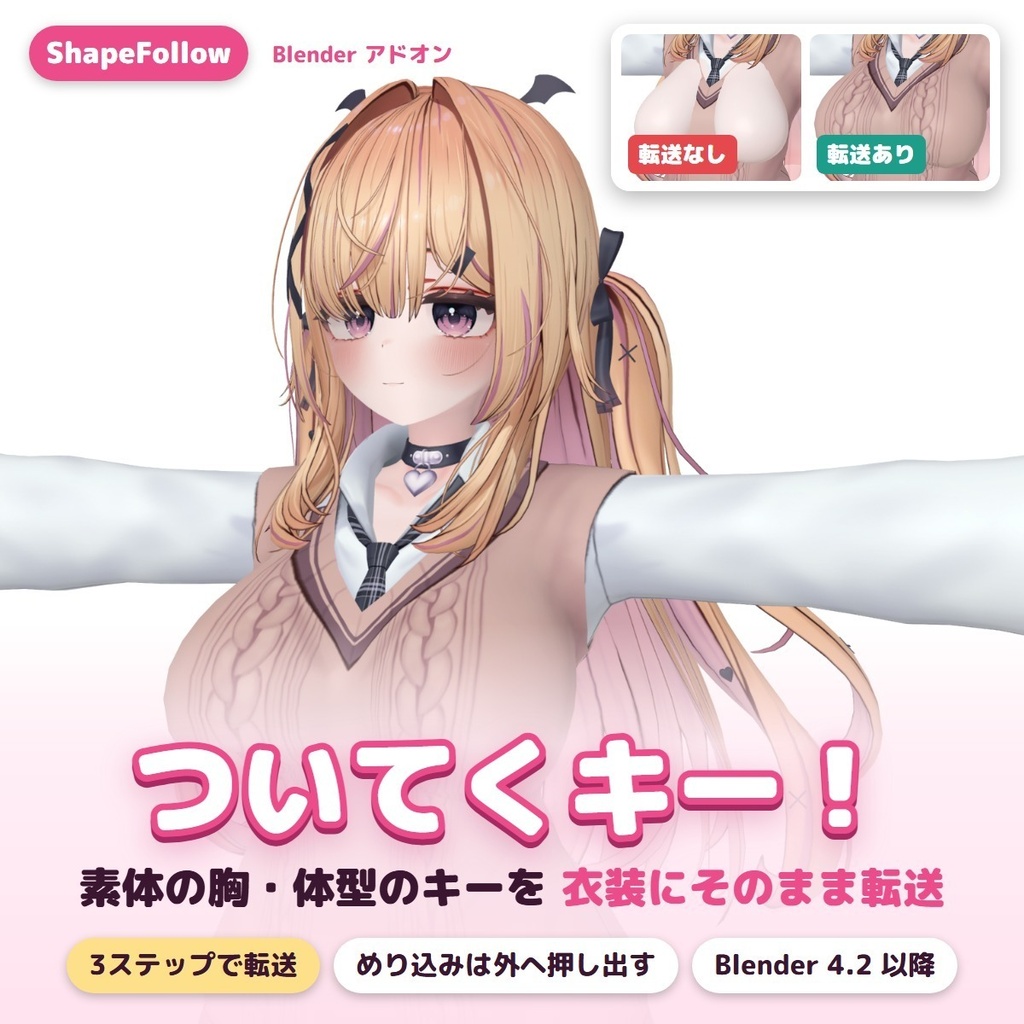
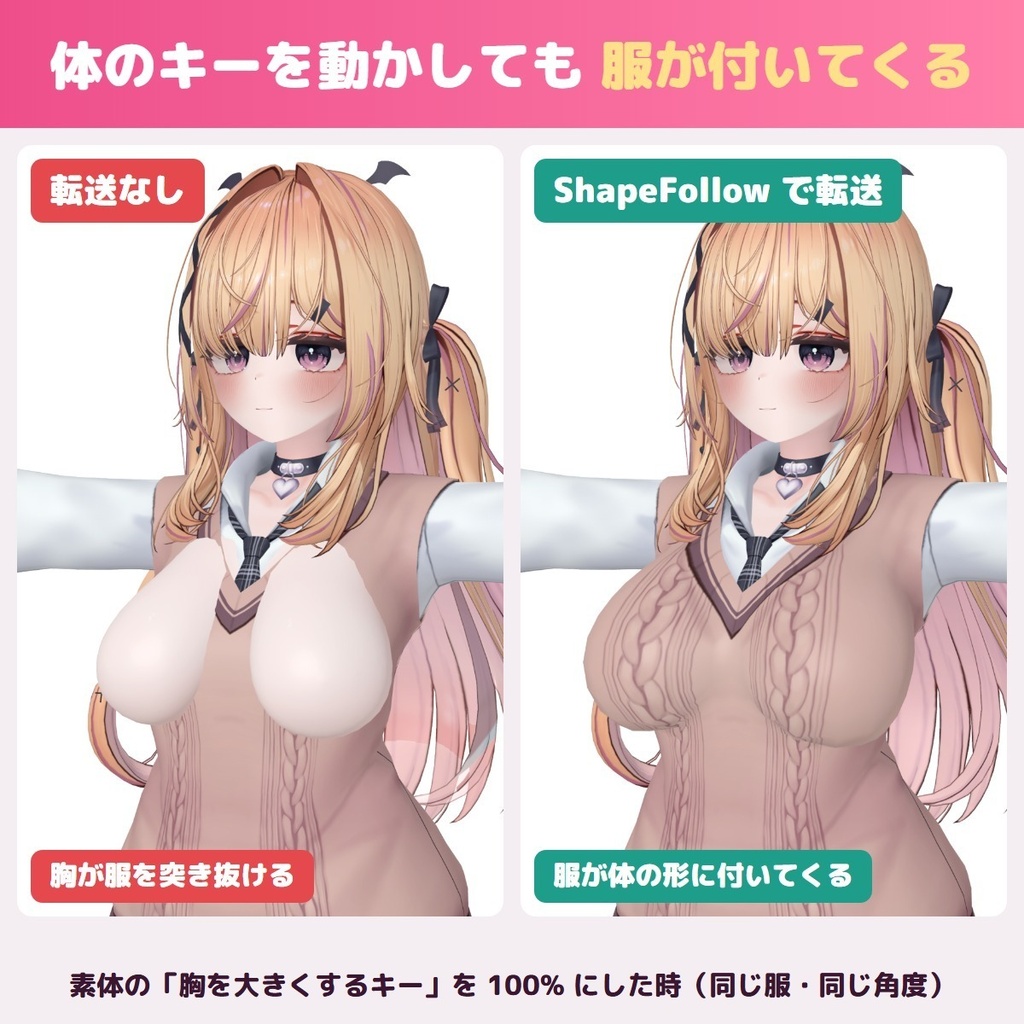
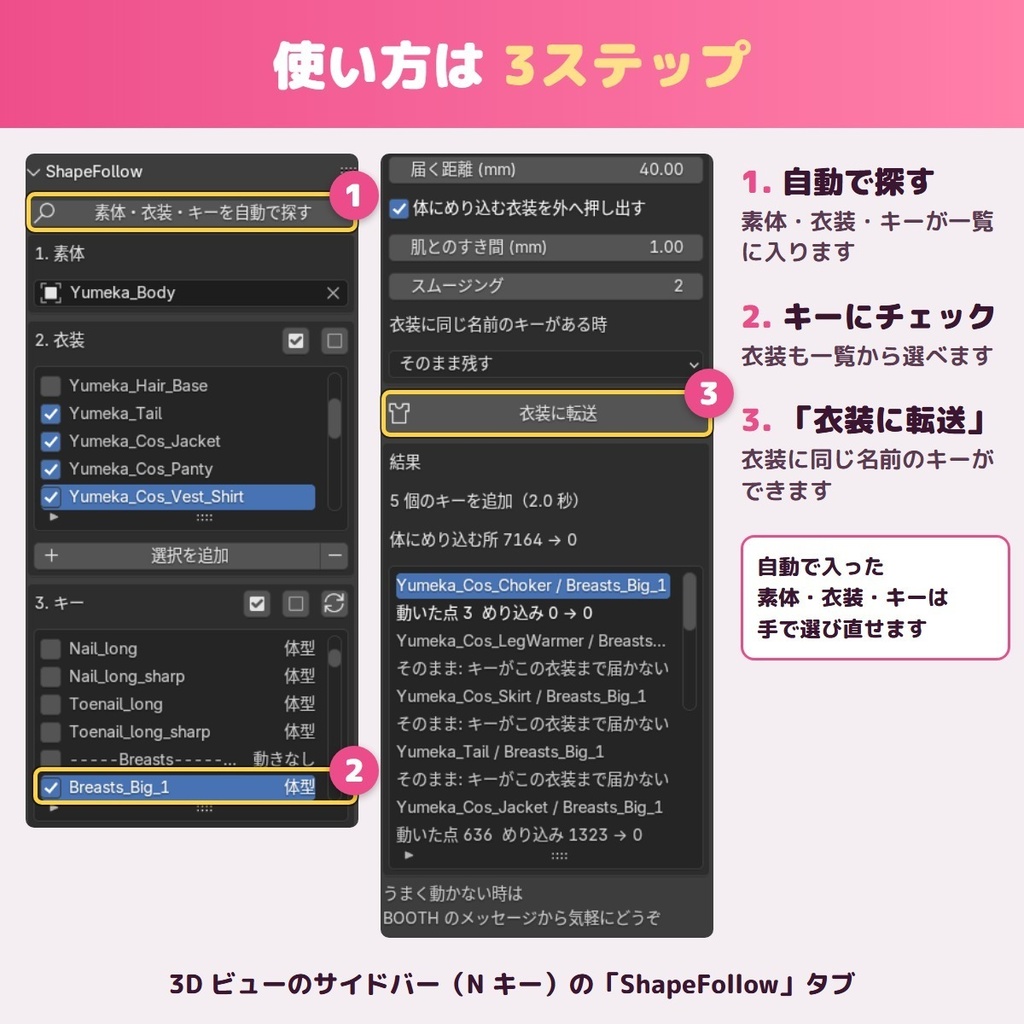
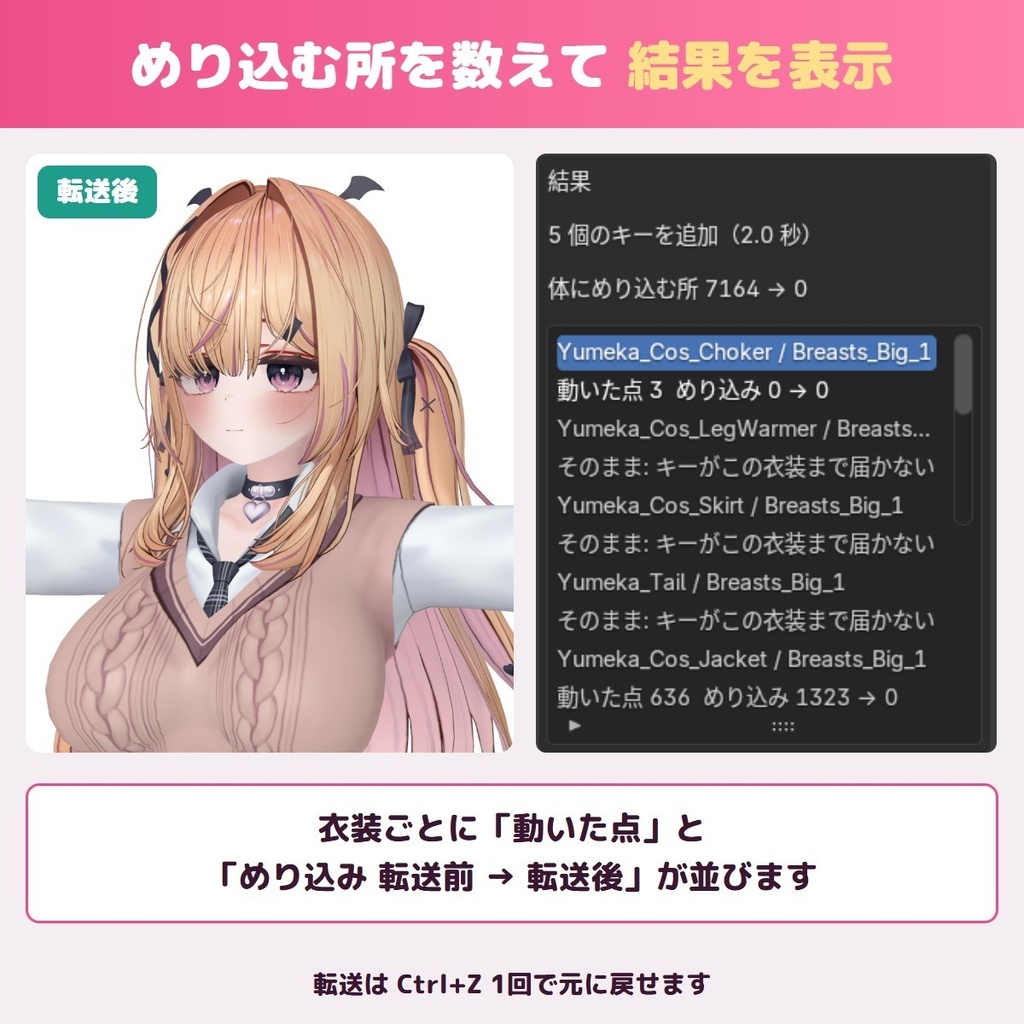
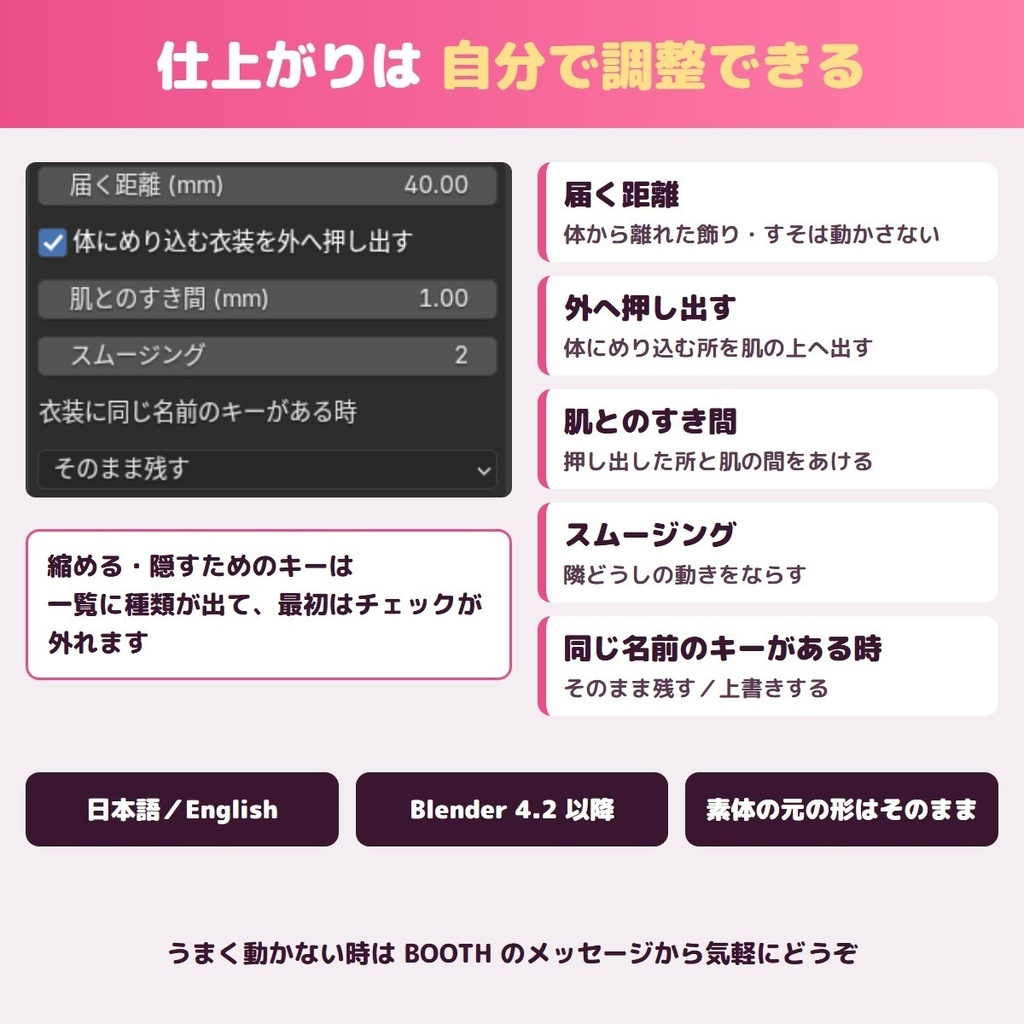


素体にある体型のシェイプキー(胸の大きさ・体型の変更など)を、Blender の中でボタン2つで VRChat 向けの衣装へ移すアドオンです。体型を変えたら肌が服を突き抜ける衣装にも、同じ名前のキーが入り、体と一緒に服が動くようになります。 ■ こんな時に ・胸を大きくするキーを動かすと、服から肌が出てしまう ・買った衣装に、素体と同じ体型キーが入っていない ・キーを1本ずつ手で作り直す時間がない ・頂点の数も形も違う服へ、体のキーを移したい ■ できること ・「素体・衣装・キーを自動で探す」→「衣装に転送」の2つのボタンで終わります ・移した後もまだ埋まっている所を、肌の外へ押し出します(すき間は mm で選べます) ・複数の衣装・複数のキーをまとめて移せます ・重ね着(下着・シャツ・上着など)をまとめて移すと、内側の服が外側の服から出ないように整えます ・結果を表で出します(服ごとに、埋まっていた点の数が 前→後 で見えます) ・自動で選んだ素体・衣装・キーは、全部パネルの欄で選び直せます ・顔のキーや、体を縮める・隠すためのキーは最初から対象の外に置きます(欄で入れ直せます) ・同じ名前のキーが服にもうある時は「残す/上書きする」を選べます ・Ctrl+Z で元に戻せます ・画面は日本語と英語 ■ 使い方 1. Blender の「プリファレンス → エクステンションを入手 → ディスクからインストール」で zip を選ぶ 2. アバターと衣装を読み込み、3Dビューの N パネルの「ShapeFollow」タブを開く 3. 「素体・衣装・キーを自動で探す」を押し、一覧を確かめる 4. 「衣装に転送」を押す 5. 衣装のシェイプキーに同じ名前のキーができています。FBX に書き出して Unity へ ■ 動く環境 ・Blender 4.2 LTS 以降(Windows / macOS / Linux) ・FBX で読み込んだ VRChat 向けのアバターと衣装 ・素体に体型のシェイプキーが入っていること(そのキーを衣装へ移します) ■ よくある質問 Q. 素体のシェイプキーを服に転送するには? A. 素体と服を同じ Blender のファイルに読み込み、ShapeFollow のパネルで「自動で探す」→「衣装に転送」を押します。服に同じ名前のシェイプキーができます。 Q. 頂点の数が違う服でも使えますか? A. はい。体と服で頂点の数や並びが違っていても移せます。 Q. Unity でも同じ名前で動きますか? A. キーの名前は素体と同じにします。Unity 側で素体と服のキーを同じ値にすれば一緒に動きます。 Q. 元の衣装のデータは変わりますか? A. 衣装にシェイプキーを足します。元の形(Basis)には触れません。Ctrl+Z で戻せます。 Q. うまく動かない時は? A. BOOTH のメッセージか、ショップのお問い合わせから気軽にどうぞ。アバター名・衣装名・Blender の版を書いていただけると早く答えられます。 ■ ご要望 要望の多いものから次の版に入れていきます。BOOTH のメッセージからお寄せください。 ■ Limitations ・体からとても離れた飾り(大きなスカートのすそ、浮いた小物)は、体の動きが届かないことがあります。届く距離はパネルで変えられます。 ・体を細くする・縮めるキーは最初は対象の外です。
利用規約
- 商用・個人を問わず使えます。この道具で作った衣装・アバターのデータは、元の衣装・アバターの規約に従ってください。 - アドオン本体の再配布・転売はできません(GPL-3.0-or-later のソースは同梱の表示に従います)。
更新履歴
1.0.0 (2026-11) 公開
English
ShapeFollow is a Blender add-on that copies the body's shape keys (bust size, body shape and so on) onto your outfits with two buttons. Outfits that the skin pokes through when you change the body shape get a key with the same name, so the clothes move together with the body. ■ When it helps ・The skin comes through the clothes when you raise a bust key ・An outfit you bought has no matching body shape keys ・You have no time to rebuild keys one by one ・The outfit has a different vertex count and shape from the body ■ What it does ・Two buttons: "Find body, outfits and keys" → "Transfer to outfits" ・Pushes parts that are still buried back outside the skin (gap in mm) ・Several outfits and several keys in one run ・Layered outfits (underwear, shirt, jacket) transferred together keep their order: the inner cloth stays under the outer one ・A result table: buried points before → after, per outfit ・Everything picked automatically can be re-picked in the panel ・Face keys and keys that shrink or hide the body start unchecked (you can check them) ・Keep or overwrite when the outfit already has a key with that name ・Ctrl+Z to undo ・Japanese / English interface ■ How to use 1. Blender: Preferences → Get Extensions → Install from Disk, choose the zip 2. Import your avatar and outfit, open the "ShapeFollow" tab in the N panel 3. Press "Find body, outfits and keys" and check the lists 4. Press "Transfer to outfits" 5. The outfit now has keys with the same names. Export as FBX for Unity ■ Requirements ・Blender 4.2 LTS or later (Windows / macOS / Linux) ・Avatars and outfits for VRChat imported from FBX ・The body already has the shape keys (they are copied to the outfits) ■ FAQ Q. How do I transfer a body shape key to clothes in Blender? A. Load the body and the clothes into one Blender file, press "Find" and then "Transfer to outfits" in the ShapeFollow panel. The clothes get a shape key with the same name. Q. Does it change my original outfit? A. It adds shape keys to the outfit. The base shape (Basis) is left as it is, and Ctrl+Z undoes it. Q. Something does not work? A. Feel free to send a BOOTH message or use the shop's contact form. The avatar name, outfit name and Blender version help us answer quickly. ■ Requests The most requested features go into the next versions. Send them by BOOTH message. ■ Limitations ・Decorations far from the body (wide skirt hems, floating accessories) may be out of reach. The reach distance can be changed in the panel. ・Keys that slim or shrink the body start unchecked.
中文
ShapeFollow 是一款 Blender 插件,只需两个按钮,就能把素体的形态键(胸部大小、体型变化等)转移到衣服上。改变体型后皮肤会穿出的衣服,也会得到同名的形态键,衣服会跟着身体一起变化。 ■ 适用场景 ・调大胸部的形态键后,皮肤从衣服里露出来 ・买来的衣服没有和素体对应的体型形态键 ・没有时间一个一个手动重做形态键 ・衣服的顶点数和形状与身体不同 ■ 功能 ・两个按钮:「自动查找素体・衣服・形态键」→「转移到衣服」 ・转移后仍然埋在皮肤里的部分,会向皮肤外侧推出(间隙以 mm 设置) ・可一次处理多件衣服、多个形态键 ・叠穿的衣服(内衣・衬衫・外套等)一起处理时,会保持里外顺序,里层不会从外层露出来 ・结果表:每件衣服埋入的点数 前→后 ・自动选择的素体・衣服・形态键,都可以在面板里重新选择 ・面部的形态键,以及缩小・隐藏身体用的形态键,默认不勾选(可手动勾选) ・衣服已有同名形态键时,可选择「保留/覆盖」 ・Ctrl+Z 可撤销 ・界面为日语和英语 ■ 运行环境 ・Blender 4.2 LTS 及以上(Windows / macOS / Linux)・以 FBX 导入的 VRChat 角色和衣服 ■ 常见问题 Q. 遇到问题怎么办? A. 请通过 BOOTH 的消息或店铺的咨询表单随时联系。附上角色名、衣服名和 Blender 版本,我们能更快答复。 ■ 功能愿望 呼声高的功能会优先加入后续版本,请通过 BOOTH 消息告诉我们。 ■ Limitations ・离身体很远的装饰(宽大的裙摆、悬浮的小物件)可能跟不上身体的变化。作用距离可在面板里调整。 ・让身体变细・缩小的形态键默认不勾选。
한국어
ShapeFollow는 소체의 셰이프 키(가슴 크기, 체형 변경 등)를 버튼 두 개로 의상에 옮겨 주는 Blender 애드온입니다. 체형을 바꾸면 피부가 옷을 뚫고 나오는 의상에도 같은 이름의 키가 들어가, 옷이 몸과 함께 움직입니다. ■ 이런 때에 ・가슴을 키우는 키를 올리면 옷 밖으로 피부가 나온다 ・구입한 의상에 소체와 같은 체형 키가 없다 ・키를 하나씩 손으로 다시 만들 시간이 없다 ・의상의 버텍스 수와 모양이 몸과 다르다 ■ 할 수 있는 것 ・버튼 두 개: 「소체・의상・키 자동 찾기」→「의상에 전송」 ・옮긴 뒤에도 묻혀 있는 부분을 피부 바깥으로 밀어냅니다(간격은 mm로 선택) ・여러 의상, 여러 키를 한 번에 처리 ・겹쳐 입은 의상(속옷・셔츠・재킷 등)을 함께 처리하면 안쪽 옷이 바깥 옷 밖으로 나오지 않게 정리합니다 ・결과 표: 의상별로 묻힌 점의 수 전→후 ・자동으로 고른 소체・의상・키는 모두 패널에서 다시 고를 수 있습니다 ・얼굴 키와 몸을 줄이거나 숨기는 키는 처음에는 체크 해제 상태입니다(직접 체크 가능) ・의상에 같은 이름의 키가 이미 있으면 「남기기/덮어쓰기」를 선택 ・Ctrl+Z로 되돌리기 ・화면은 일본어와 영어 ■ 동작 환경 ・Blender 4.2 LTS 이상 (Windows / macOS / Linux)・FBX로 불러온 VRChat용 아바타와 의상 ■ 자주 묻는 질문 Q. 잘 되지 않을 때는? A. BOOTH 메시지나 숍의 문의 양식으로 편하게 연락해 주세요. 아바타 이름, 의상 이름, Blender 버전을 적어 주시면 빨리 답할 수 있습니다. ■ 요청 요청이 많은 것부터 다음 버전에 넣어 갑니다. BOOTH 메시지로 보내 주세요. ■ Limitations ・몸에서 많이 떨어진 장식(넓은 치맛자락, 떠 있는 소품)은 몸의 움직임이 닿지 않을 수 있습니다. 닿는 거리는 패널에서 바꿀 수 있습니다. ・몸을 가늘게 하거나 줄이는 키는 처음에는 대상에서 빠져 있습니다. Made by GRAMSHIFT with the help of AI tools.