

ぬれシアー WetSheer|VRChat lilToon の服を濡れ透けに【NDMF・非破壊・つまみで調整】
- ダウンロード商品¥ 1,180
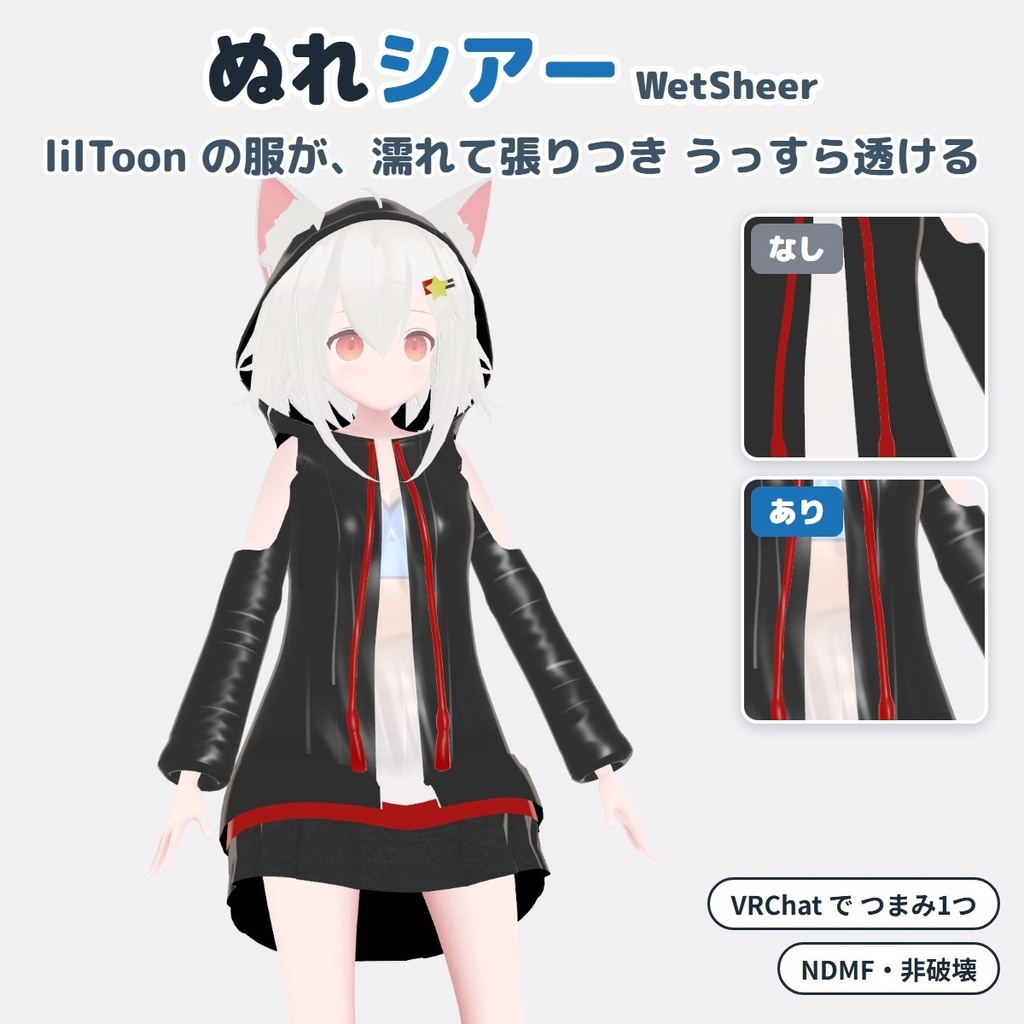
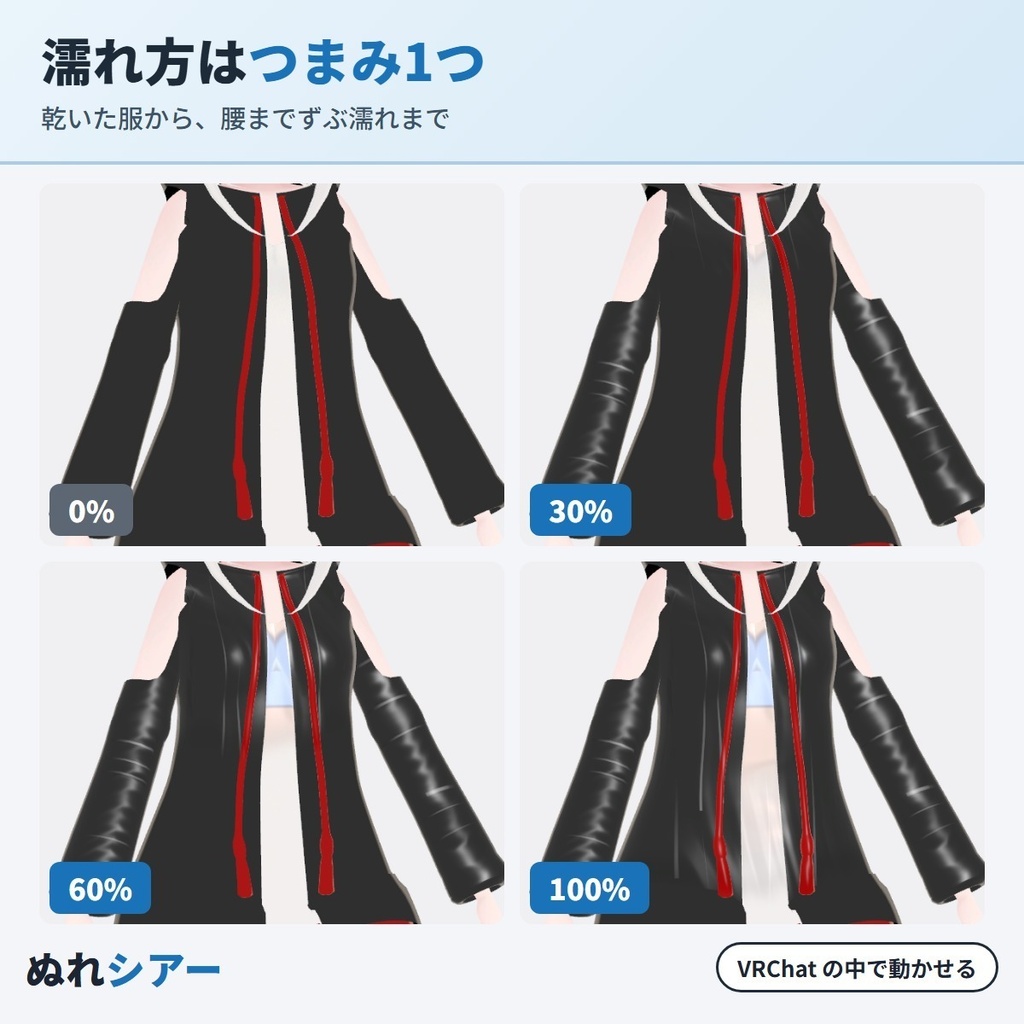
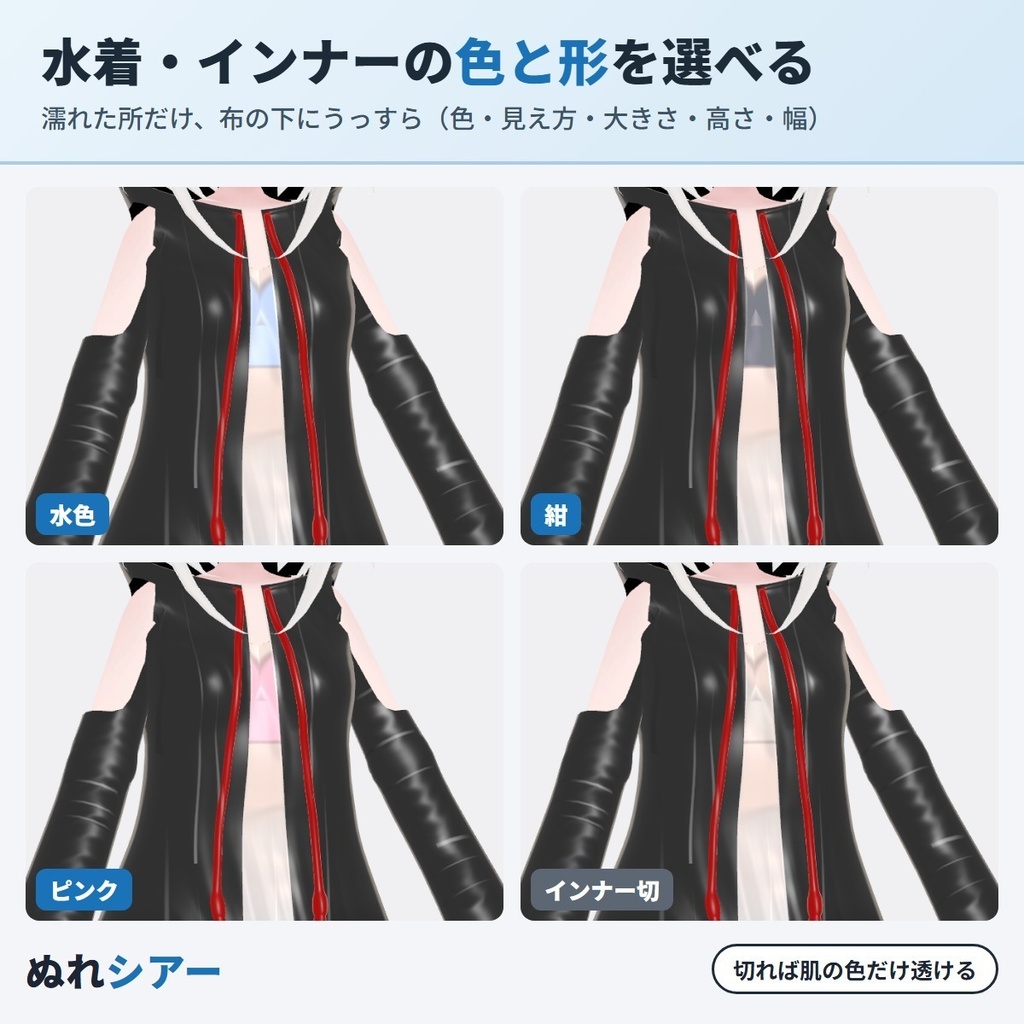
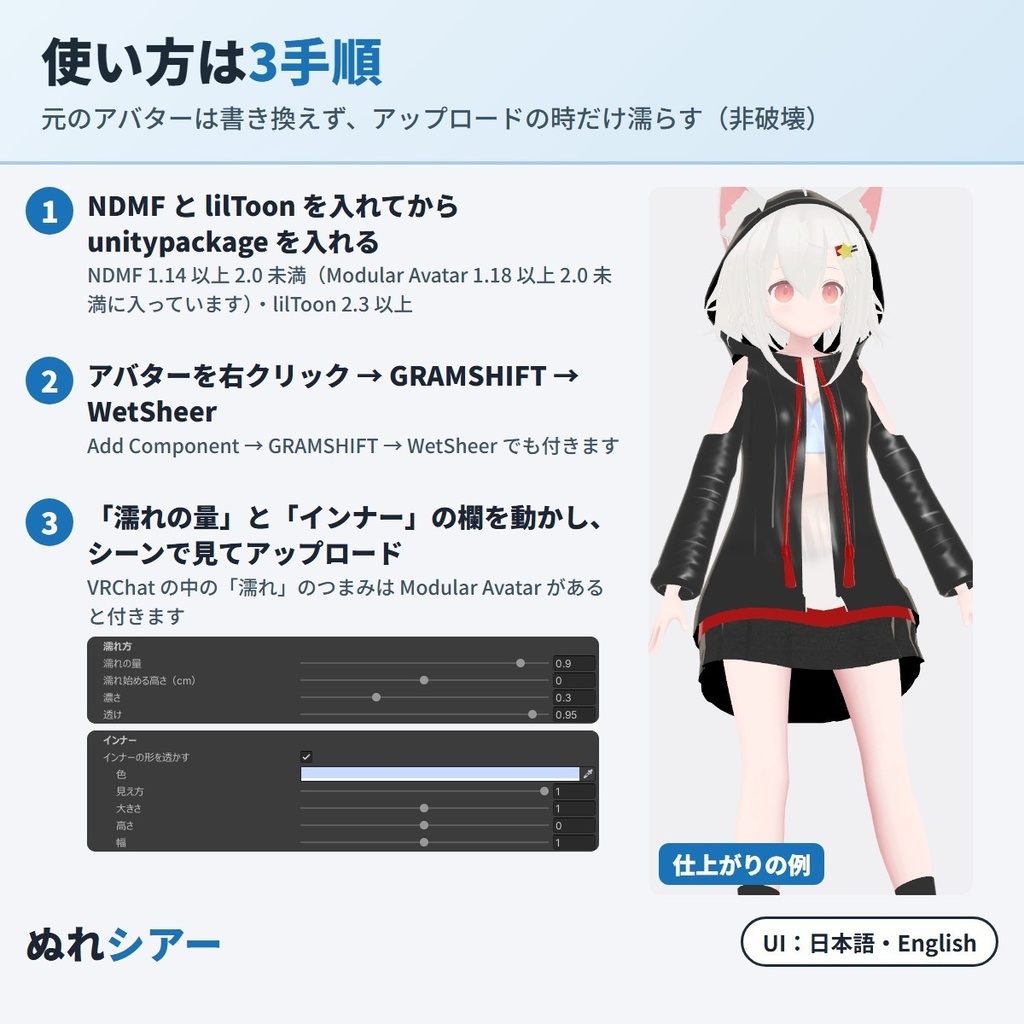
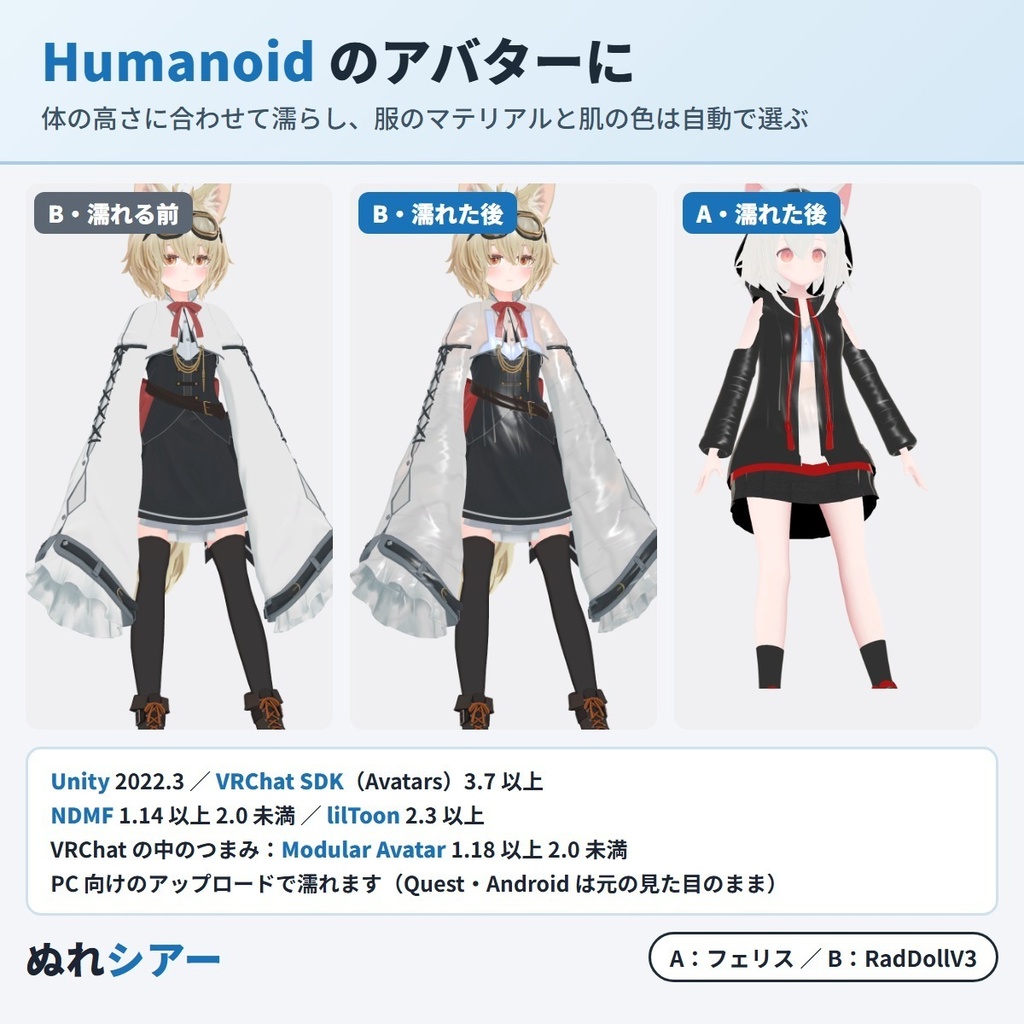


VRChat アバターの lilToon の服を「濡れ透け」にできる Unity エディタ拡張です(NDMF 対応・非破壊)。 服が上から濡れて肌に張りつき、薄い色の服ほど肌の色と水着・インナーの形がうっすら透けます。 濡れ具合は「濡れ」のつまみ1つで、乾いた服から腰までずぶ濡れまで、VRChat の中で動かせます。アバターに付けてつまみを動かすと、シーンのアバターがその場で濡れて見えます。元のアバター・マテリアルは書き換えません。 雨の日・プール・水遊び・水着の上に羽織ったシャツの写真や配信に。 English:下の段落に説明があります(description below) ■ できること ・上から濡れる:濡れの量を上げるほど、肩の少し上から胸・お腹・腰へと濡れた所が下がっていきます。濡れ始める高さも変えられます ・肌に張りつく:濡れた所は布が暗く濃くなり、つやが出て、体に張りついた見た目になります。水の筋も入ります ・うっすら透ける:薄い色の服ほど、濡れた所に肌の色が透けます(濃い色の服は濃くなるだけ)。布は不透明のままです ・体に沿う所だけ透ける:大きな袖・ケープ・広がったスカートなど体から離れた所は、濡れて濃くなり、つやが出ます。肌の色とインナーが透けるのは体に沿った所です ・水着・インナーの形を透かす:肩ひもや胸元・背中の帯の形を、濡れた所だけ布の下にうっすら見せます。色・見え方・大きさ・高さ・幅を変えられます。切ることもできます ・VRChat の中でつまみで変えられる:Expression Menu に「濡れ」のつまみを足します(Modular Avatar が入っている時) ・服は自動で選ぶ:胸から腰の前にある服のマテリアルを自動で選びます(目・髪・肌は選びません)。一覧で1つずつ入り切りでき、全部自分で選ぶこともできます ・肌の色も自動で選ぶ:透ける肌の色は自動で選びます。違う時は自分で選び直せます ・細かく決められる:濃さ・透け・張りつき・鮮やかさ・つや・水の筋 ・Play を押さずに見られる:シーンのアバターに、アップロード後の見た目に近い濡れ方が見えます ・非破壊:アップロードの時だけ濡れた見た目にします。元のアバター・マテリアル・メッシュ・テクスチャは変わりません ・日本語/English 切り替え ■ 使い方 1. NDMF 1.14 以上 2.0 未満(Modular Avatar 1.18 以上 2.0 未満に入っています)と lilToon 2.3 以上を入れてから、unitypackage をプロジェクトに入れる 2. ヒエラルキーでアバターを右クリック →「GRAMSHIFT → WetSheer」(Add Component → GRAMSHIFT → WetSheer でも付きます) 3. 「濡れの量」のつまみと「インナー」の欄を動かしてシーンで確かめ、いつもどおりアップロードする(VRChat の中の「濡れ」のつまみには Modular Avatar が要ります) ■ 動作環境 ・Unity 2022.3 / VRChat SDK(Avatars)3.7 以上 / NDMF 1.14 以上 2.0 未満(Modular Avatar 1.18 以上 2.0 未満に含まれます) / lilToon 2.3 以上 ・Humanoid のアバター(PC 向けのアップロード) ・VRChat の中のつまみには Modular Avatar 1.18 以上 2.0 未満が要ります ・試したアバター:ゆめか(Arka_X 様)・フェリス(リュクらぼ 様)・RadDollV3(三丁目の魔界 様)・ゆがちゃん(vrcreative-pr 様)・HAOLAN(かなリぁ 様) ・アバター・衣装の規約で改変が許されているか、先にご確認ください ■ よくある質問 Q. VRChat で服を濡れて透けた見た目にできますか? A. できます。lilToon の服が上から濡れて肌に張りつき、薄い色の服ほど肌の色と水着・インナーの形がうっすら透けます。透けるのは肌の色とインナーの形だけで、布は不透明のままです。 Q. VRChat の中で濡れ具合を変えられますか? A. 変えられます。Expression Menu の「濡れ」のつまみで、乾いた服から腰までずぶ濡れまで動かせます(Modular Avatar が要ります。同期するパラメーターを 8 bit 使います)。Modular Avatar が無い時は、決めた濡れの量のままアップロードされます。 Q. 対応アバターの一覧に自分のアバターが無いのですが、使えますか? A. Humanoid のアバターで、服が lilToon なら使えます(濡らせない種類は下の「制限」にあります)。アバターの体の高さに合わせて濡れる所を決め、服のマテリアルと肌の色は自動で選びます。違う時は欄で選び直せます。 Q. Quest・スマホ向けのアバターでも濡れますか? A. 濡れるのは PC 向けのアップロードです。VRChat の決まりで Quest・スマホでは lilToon を使えないため、Quest・スマホ向けのアップロードは元の見た目のままです。 Q. 大きな袖やケープも透けますか? A. 体から離れた所は、濡れて濃くなり、つやが出ます。肌の色とインナーが透けるのは、体に沿った所です。 Q. 透けて見えるインナーの形は変えられますか? A. 色・見え方・大きさ・高さ・幅を変えられます。「インナーの形を透かす」を切ると、肌の色だけが透けます。 Q. 濃い色の服でも透けますか? A. 濃い色の服は、濡れた所が暗く濃くなり、つやが出ます。透けて見えるのは主に白・水色など薄い色の服です。 Q. 元のアバターやマテリアルは変わりますか? A. 変わりません。アップロードの時だけ濡れた見た目にします。WetSheer を外せば元のままアップロードできます。 ■ 制限 ・濡れるのは服だけです(髪・肌はそのままです) ・濡らせるのは lilToon のマテリアルです。lilToon の Lite・Fur・Gem・屈折・テッセレーション・Overlay・FakeShadow・輪郭線だけ、と lilToon でない服はそのままです(どれをそのままにしたかはアップロードの時に知らせます) ・lilToon の ID Mask などの設定をメッシュに持たせている一部の服は、元の見た目を守ってそのままにします(アップロードの時に知らせます) ・Quest・スマホ向けのアップロードでは何も足しません(VRChat の決まりでこれらに lilToon を使えないため。PC 向けのアップロードで濡れます) ・WetSheer はアバター1体に1つだけ付けてください ■ 次の版について 要望の多いものから次の版に入れていきます。ほかの濡れ方・服の要望も、下のお問い合わせからどうぞ。 ■ 困った時は うまく動かない時は、このページの「ショップへのお問い合わせ」から気軽にどうぞ(アバター名と、表示された文があると早く調べられます)。 Made by GRAMSHIFT with the help of AI tools.
利用規約
・VRChat などで使うアバターの改変に、個人・法人・商用を問わず使えます ・このツールで濡れた見た目にしたアバター・改変データの公開や販売に、このツール側の制限はありません(元のアバター・衣装の規約に従ってください) ・濡れた見た目を、スクリーンショット・動画・配信に使えます。クレジット表記は不要です ・ツールのファイル(改変した物を含む)の再配布・転売・共有、購入した人以外への譲渡はできません ・公序良俗に反する用途、VRChat などの利用規約・コミュニティガイドラインに反する用途には使えません ・同梱の「利用規約_Terms.txt」が正です Terms (summary): you may use it to modify avatars for VRChat etc., for personal, corporate or commercial use; this tool puts no limit on publishing or selling avatars and edit data made wet with it (follow the original avatar's and clothing's terms); the wet look may appear in screenshots, videos and streams, and no credit is required; the tool files (including modified versions) may not be redistributed, resold, shared or transferred to anyone other than the buyer; it may not be used against public order and morals or against the terms and community guidelines of VRChat and other platforms. The included "利用規約_Terms.txt" is authoritative.
更新履歴
1.0.0(2026-11)公開 1.0.0 (2026-11) released
English
A Unity editor extension that makes your VRChat avatar's lilToon clothing look wet and see-through (NDMF, non-destructive). The cloth gets soaked from above and clings to the skin, and on light-colored clothing the skin tone and the shape of a swimsuit or inner layer show through faintly. One Wet dial changes it in VRChat, from dry to soaked down to the waist. Add it to your avatar and move the Wetness slider; the avatar in the Scene gets wet right away. Your avatar and materials are not changed. For rain, pool and water-play photos and streams, or a shirt over a swimsuit. Features: wet from above (as Wetness goes up, the wet area moves down from just above the shoulders to the chest, belly and waist; the wet line height can be moved); clings to the skin (wet cloth gets darker and glossier and looks stuck to the body, with water streaks); slightly see-through (light-colored cloth shows the skin tone where it is wet; dark cloth only gets darker; the fabric stays opaque); see-through only where the cloth follows the body (wide sleeves, capes and flared skirts get darker and glossier); show a swimsuit or inner layer (the straps, top and back band show faintly under the wet cloth only, with color, visibility, size, height and width, or turn it off); a Wet dial in VRChat (added to the Expression Menu when Modular Avatar is installed); clothing picked automatically (clothing materials on the front of the chest to the waist; eyes, hair and skin are not picked; turn each one on or off, or choose all yourself); skin tone picked automatically, or choose it yourself; Darkening, See-through, Cling, Saturation, Gloss and Streaks; see a look close to your upload in the Scene without Play mode; non-destructive (the wet look is added only at upload; your avatar, materials, meshes and textures are not changed); JA/EN UI. How to use: install NDMF 1.14 or later and below 2.0 (included in Modular Avatar 1.18 to below 2.0) and lilToon 2.3 or later → import the unitypackage → right-click the avatar in the Hierarchy → GRAMSHIFT → WetSheer (or Add Component → GRAMSHIFT → WetSheer) → move the "Wetness" slider and the "Inner layer" settings and check the Scene → upload as usual (the Wet dial in VRChat needs Modular Avatar). Requirements: Unity 2022.3, VRChat SDK (Avatars) 3.7 or later, NDMF 1.14 or later and below 2.0, lilToon 2.3 or later, a Humanoid avatar (PC uploads). The Wet dial in VRChat needs Modular Avatar 1.18 or later and below 2.0. Tested avatars: Yumeka (Arka_X), Felis (リュクらぼ), RadDollV3 (三丁目の魔界), Yuga-chan ゆがちゃん (vrcreative-pr), HAOLAN (かなリぁ). Check that your avatar's and clothing's terms allow modification. FAQ Q. Can I make clothes look wet and see-through in VRChat? A. Yes. lilToon clothing gets soaked from above and clings to the skin, and light-colored clothing shows the skin tone and the shape of a swimsuit or inner layer faintly. Only the skin tone and the inner layer shape show through; the fabric stays opaque. Q. Can I change how wet it is in VRChat? A. Yes. The Wet dial in the Expression Menu goes from dry to soaked down to the waist (needs Modular Avatar; uses 8 bits of synced parameters). Without Modular Avatar the avatar is uploaded with the wetness you set. Q. My avatar is not on any supported list. Can I use it? A. Yes, if it is a Humanoid avatar with lilToon clothing (see Limitations for the kinds that stay as they are). The wet area follows your avatar's height, and the clothing materials and skin tone are picked automatically; you can change them in the fields. Q. Does it work on Quest / mobile avatars? A. The wet look is added to PC uploads. Quest and mobile cannot use lilToon under VRChat's rules, so Quest / mobile uploads keep the original look. Q. Do wide sleeves and capes show through too? A. Parts that stand away from the body get darker and glossier. The skin tone and inner layer show through where the cloth follows the body. Q. Can I change the inner layer that shows through? A. Yes: color, visibility, size, height and width. Turn off "Show the inner layer" to show only the skin tone. Q. Does dark clothing become see-through? A. Dark clothing gets darker and glossier where it is wet. See-through mostly shows on light colors such as white and light blue. Q. Are my avatar and materials changed? A. No. The wet look is added only at upload. Remove WetSheer to upload the original. Limitations: Only clothing gets wet (hair and skin stay as they are). Wet looks are added to lilToon materials; lilToon Lite, Fur, Gem, Refraction, Tessellation, Overlay, FakeShadow, Outline Only and non-lilToon clothing are left as they are (you are told which at upload). Some clothing that keeps lilToon settings such as ID Mask in its mesh is left as it is to keep its look (you are told at upload). Nothing is added to Quest / mobile uploads (they cannot use lilToon under VRChat's rules; the wet look is added to PC uploads). One WetSheer per avatar. Requests: the most requested features go into the next versions; tell us the wet looks and clothing you want with "Contact this Shop" on this page. Need help? If something does not work, feel free to contact us with "Contact this Shop" on this page (your avatar name and any message shown). Made by GRAMSHIFT with the help of AI tools.