

話すとたまに舌が出る TongueSlip|てへぺろ・舌ぺろを自動で・アバター専用の設定なし【VRChat・NDMF・非破壊】【無料お試し版あり】
- 製品版ダウンロード商品¥ 450
- 無料お試し版ダウンロード商品¥ 0
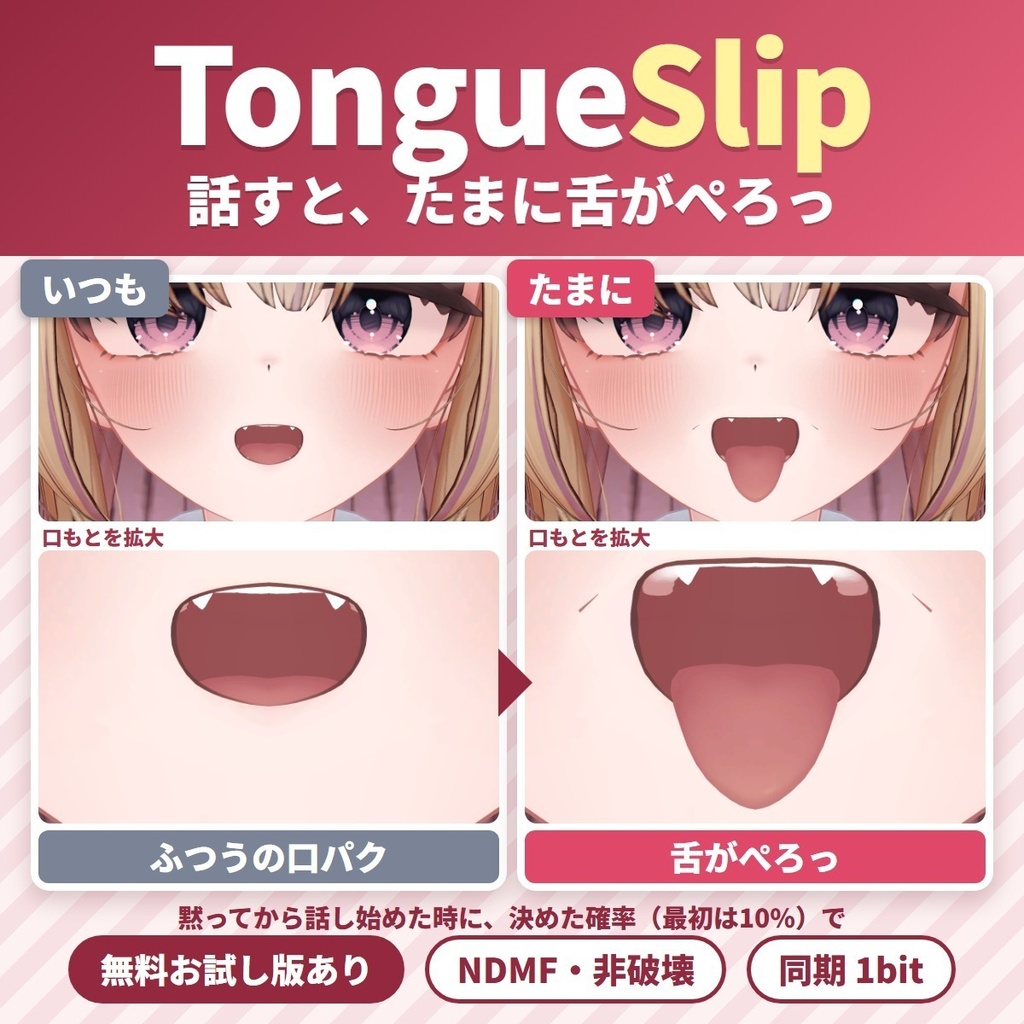
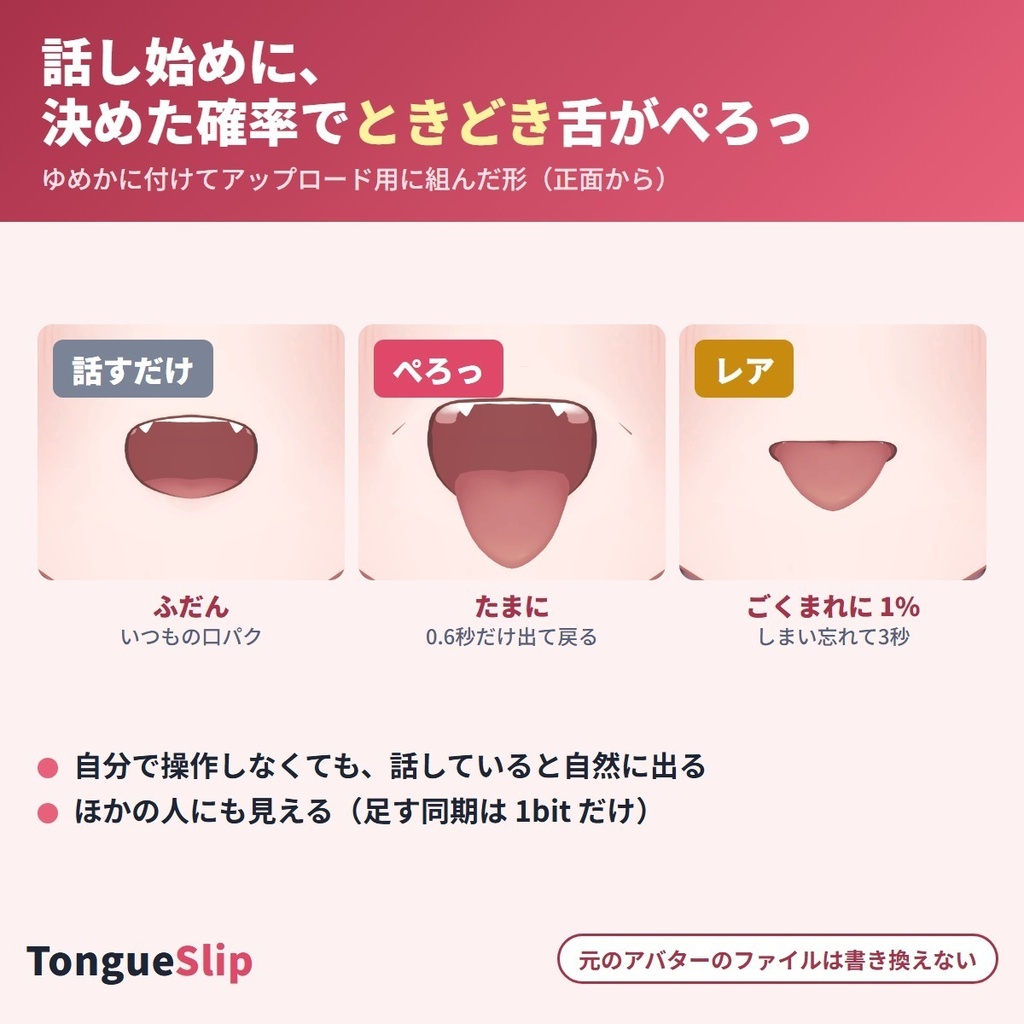
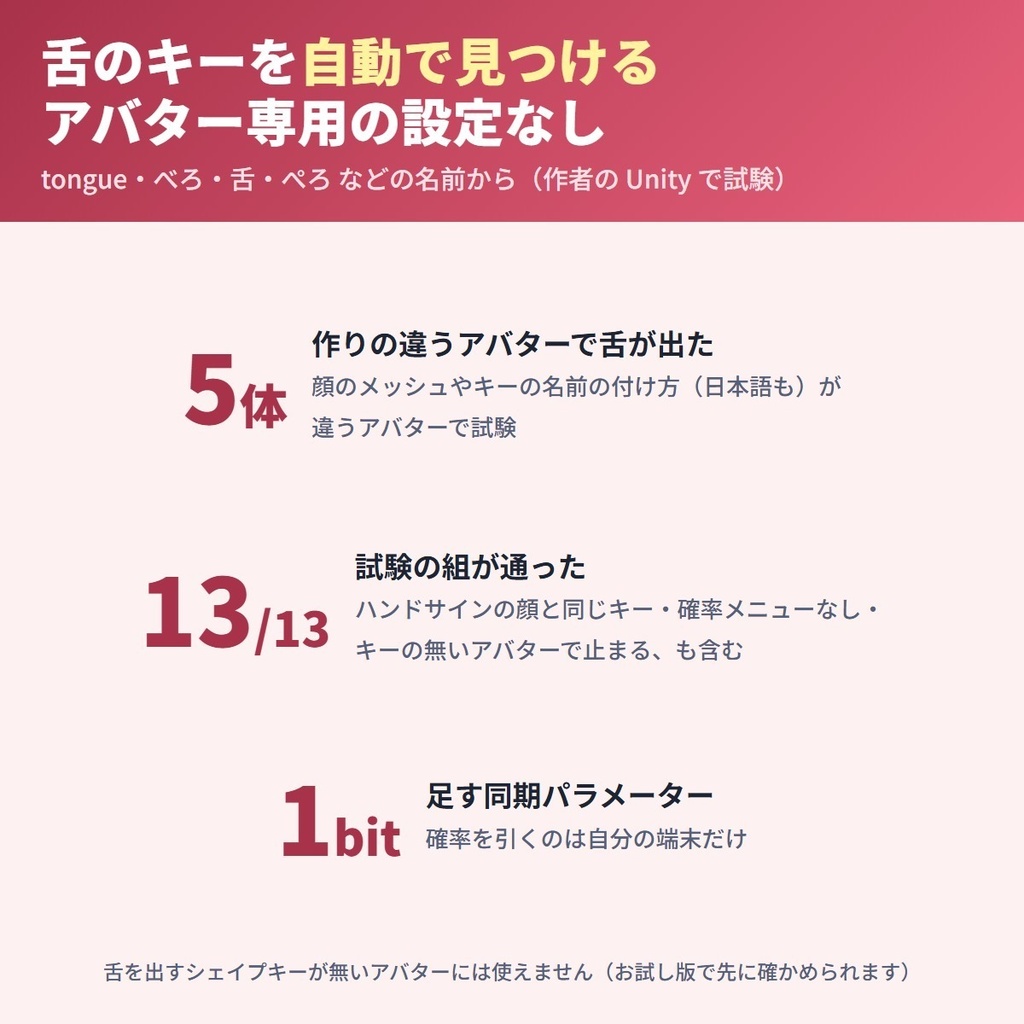
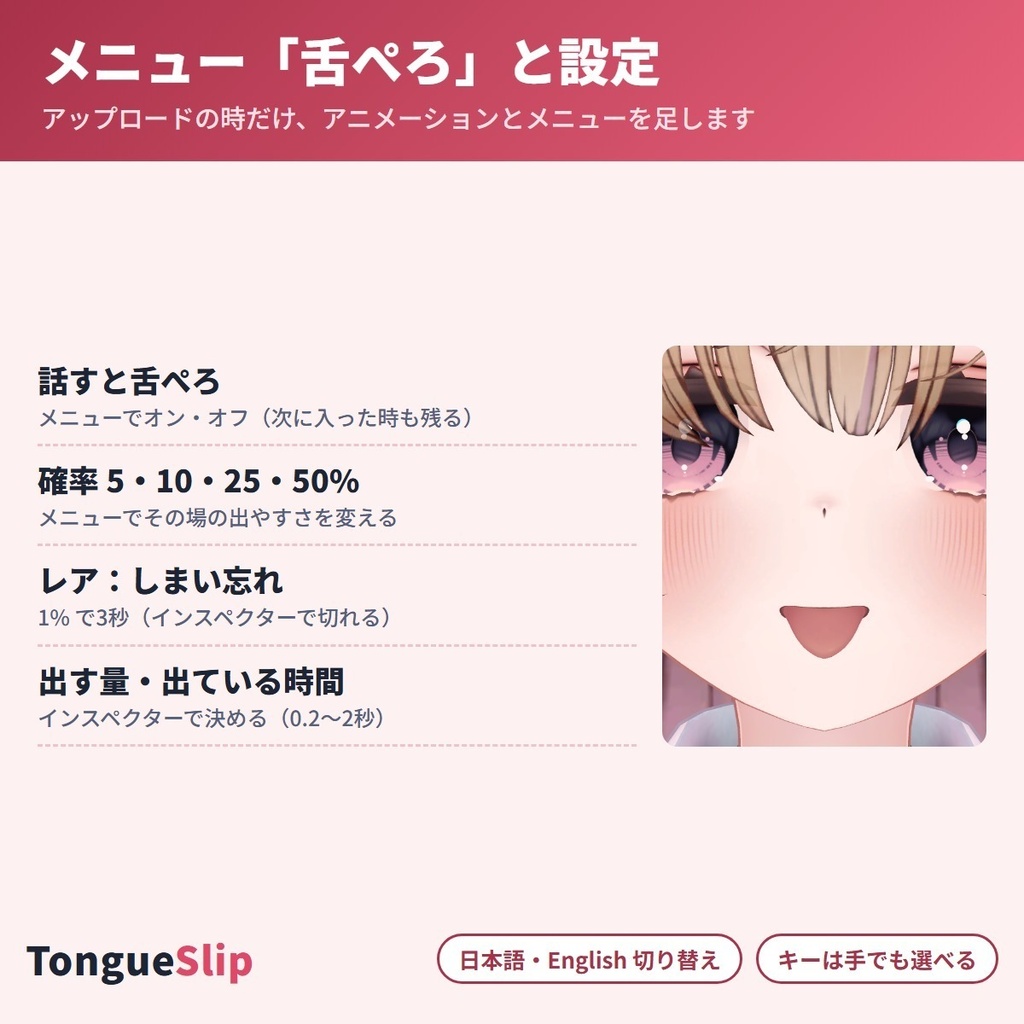
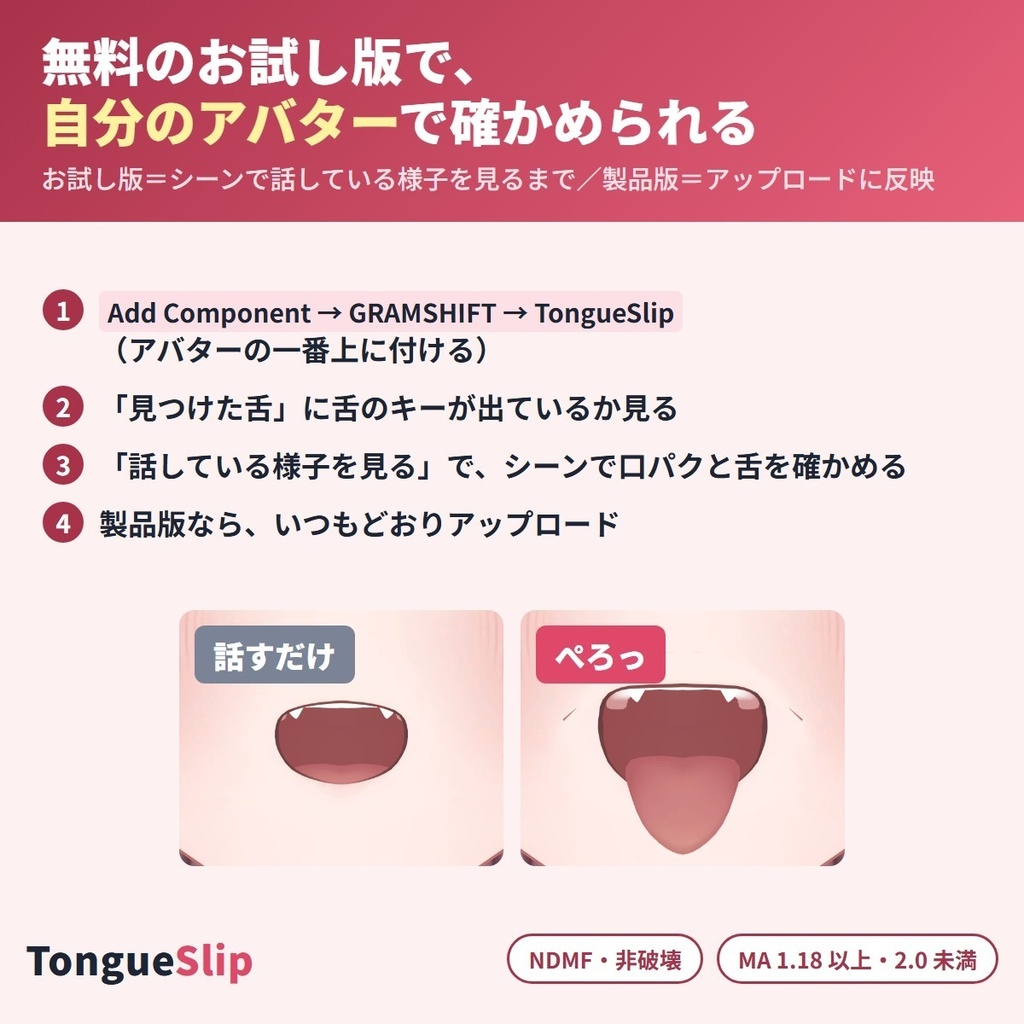


VRChat で話している時に、たまに舌がぺろっと出るようにする Unity エディタ拡張です。話し始めるたびに決めた確率(5・10・25・50%)で、少しの間だけ舌が出ます。 アバター専用の設定は要らず、顔にある「舌を出す」シェイプキーを自動で見つけて使います。同期パラメーターは 1 ビットだけ、元のアバターのファイルは書き換えません(NDMF 対応・非破壊)。 English / 简体中文 / 한국어:下の段落に説明があります(descriptions below) ■ まずは無料お試し版で、自分のアバターを確かめる ・お試し版(無料):舌のキーが見つかるかと、話している時の様子をシーンで確かめる。アップロードしたアバターには入りません ・製品版(450円):上に加えて、アップロードしたアバターの Expression メニューに「舌ぺろ」が入り、VRChat で使えます。製品版はお試し版の上から入れます ■ できること ・話し始めるたびに、決めた確率で舌が出る(0.5秒以上黙ってから話し始めた時に1回だけ引く=話し続けても何度も出ない) ・レア:確率とは別に 1% で、舌をしまい忘れて長め(3秒)に出しっぱなし(設定で切れます) ・メニュー「舌ぺろ」:話すと舌ぺろ(オン・オフ)/確率 5%・10%・25%・50%(オン・オフと確率は次に入った時も残る) ・舌を出す量(0〜100%)と出ている時間(0.2〜2秒)を変えられる ・舌のシェイプキー(tongue・べろ・舌・ぺろ など)を自動で見つけ、違う時は「手で選ぶ」で選べる ・「シーンで確かめる」→「話している様子を見る」で、口が話す様に動き、決めた確率で舌が出るのをアップロード前に見られる(「次の話し始めで、必ず1回出す」もあり・NDMF のプレビューが入っている時・保存されない) ・同期パラメーターは「舌が出ている」の 1 ビットだけ。確率を引くのは自分の端末だけで、オン・オフと確率は同期の数に入らない ・舌が出ている間だけ舌のキーを動かす。それ以外の時はアバターの元の表情(ハンドサインの顔など)のまま ・ほかのギミックとぶつからない名前でメニュー・パラメーターを足す ・日本語/English 切り替え ■ 確かめた結果(作者の Unity の中での試験) 作りの違う5体のアバターで、アップロードの時と同じ組み立てをした形を、話し始めの合図を送って確かめました。 ・5体とも舌のキーを自動で見つけ、話し始めに当たると舌が出て、決めた時間(最初は0.6秒)で戻る(1.5秒にした組も確認) ・確率は 400回ずつ引いて 5%→13〜29回・10%→31〜45回・25%→85〜108回・50%→184〜216回 ・レア(1%)は約3秒出たまま ・「話している様子を見る」を押すと、シーンで口が話す様に動き、話し始めに舌が出るのを Unity の画面で確認 ・足す同期は 1 ビットだけ(試した5体で、足した後の合計 28〜74/256)。ほかの人の側は、自分では引かず届いた合図でだけ舌が出る ・舌のキーをハンドサインの顔が使っている時(3体で試験)も、ほかに誰も使っていない時(4体で試験)も、舌が戻ると元の量に戻る ・息つぎ程度の切れ目を入れて20秒話し続けても、舌が出るのは最初の1回だけ ・舌のキーが無いアバター・手で選んだキーが無い時は、何も足さずお知らせを出す ・お試し版は13通りとも、アップロードの形に何も足さない ・作者の試験 13 通り(5体+舌のキーが無い1体・確率・レア・ハンドサイン・舌のキーをほかが使わない形・メニューの設定違い・キーを手で選ぶ 等)がすべて通過 ■ 使う前に ・アバターの規約で、アニメーション・メニューを足す改変が許されているか確かめてください ・顔に「舌を出す」シェイプキーがあるアバター向けです(あるかどうかは、お試し版で先に確かめられます) ■ 使い方 1. Modular Avatar 1.18 以上 2.0 未満(NDMF が含まれます)を入れてから、unitypackage をプロジェクトに入れる 2. アバターの一番上(VRC Avatar Descriptor の付いた物)に「Add Component → GRAMSHIFT → TongueSlip」を付ける(ヒエラルキーの右クリック → GRAMSHIFT → TongueSlip でも付きます) 3. 「見つけた舌」を確かめ、「シーンで確かめる」→「話している様子を見る」で様子を見る 4. いつもどおりアップロードし、VRChat の Expression メニューの「舌ぺろ」から使う ■ 動作環境 ・Unity 2022.3 / VRChat SDK3 Avatars / Modular Avatar 1.18 以上 2.0 未満(NDMF が含まれます) ・作者が試した版:Unity 2022.3.22f1 / SDK 3.10.5 / MA 1.18.7 / NDMF 1.14.8 ・確認したアバター:ゆめか(Arka_X 様)・HAOLAN(かなリぁ 様)・RadDollV3(三丁目の魔界 様)ほか、作りの違う2体の計5体 ■ よくある質問 Q. 対応アバターは決まっていますか? A. アバター専用の設定はありません。顔に「舌を出す」シェイプキーがあれば、名前(tongue・べろ・舌・ぺろ など)から自動で見つけます。名前が違う時は「手で選ぶ」で選べます。舌を出すキーが無いアバターでは使えません。 Q. 同期パラメーターはいくつ使いますか? A. 1 ビット(「舌が出ている」の Bool 1つ)です。確率を引くのは自分の端末だけで、オン・オフと確率は自分の端末だけのパラメーターなので同期の数に入りません。 Q. ハンドサインの表情とぶつかりませんか? A. 舌が出ている間だけ、舌のキーをうちのアニメーションが動かします。それ以外の時は元の表情のままです。舌のキーをハンドサインの顔も使っている時は、舌が出ている間はこちらの量が優先されます。 Q. 話している間ずっと舌が出たり引っ込んだりしませんか? A. 引くのは、0.5秒以上黙ってから話し始めた時に1回だけです。話し続けている間は引き直しません(舌が戻った直後の1秒も引きません)。 Q. お試し版で何ができますか? A. 舌のキーが見つかるかと、話している時の様子をシーンで確かめられます。アップロードしたアバターには入りません。製品版をお試し版の上から入れると入ります。 ■ 制限 ・VRChat の中での見た目と実際のアップロードは、作者はまだ確かめていません(確かめたのは Unity の中だけです) ・舌を出すシェイプキーを動かすだけです。舌を上下左右に動かす・舌の形を変えることはしません ・顔に舌を出すシェイプキーが無いアバターでは使えません ・話し始めの合図に VRChat のリップシンク(Viseme)を使います。マイクがミュートの時・リップシンクを使わないアバターでは出ません ・ほかの人に見えるのは同期の合図が届いてからで、少し遅れて見えることがあります ・Modular Avatar 1.18 より前・2.0 以降では動かず、Console にお知らせが出ます(アップロードは止めません) ・お試し版はシーンの見た目だけで、アップロードしたアバターには入りません ■ 舌の上下左右を自分で動かしたい時は ・TongueFit(舌を上下左右に動かす・舌出し・ぺろぺろ)https://booth.pm/ja/items/9049591 ■ 困った時は うまく動かない時は、このページの「ショップへのお問い合わせ」から気軽にどうぞ(アバターの名前と、表示された文があると早く調べられます)。
利用規約
・VRChat などで使うアバターの改変に、個人・法人・商用を問わず使えます ・このツールを使って作ったアバター・改変データの公開・販売に、このツール側の制限はありません(元のアバターの規約に従ってください) ・ツール(製品版・お試し版)の改変・逆コンパイル・解析はできません ・ツールのファイルの再配布・転売・共有、買っていない人への譲渡はできません ・お試し版を製品版の形にして配ること、お試し版の制限を外すための改変はできません ・同梱の「利用規約_Terms.txt」が正です Terms (summary): you may use it to modify avatars for VRChat etc., for personal, corporate or commercial use; this tool puts no limit on publishing or selling avatars or edit data made with it (follow the original avatar's terms); you may not modify, decompile or analyze the tool (full or trial); the tool files may not be redistributed, resold, shared or given to people who did not buy it; you may not turn the trial into the full version or remove its limits. The included "利用規約_Terms.txt" is authoritative.
更新履歴
1.0.0(2026-10)公開 1.0.0 (2026-10) released
English
A Unity editor extension that makes your tongue slip out now and then while you talk in VRChat. Each time you start talking, your tongue sticks out for a moment with the chance you set (5, 10, 25 or 50%). No avatar-specific setup is needed. It automatically finds the "stick out tongue" shape key on the face and uses it. It adds only 1 synced bit and never rewrites your original avatar files (NDMF-compatible, non-destructive). ■ First, check your own avatar with the free trial version ・Trial version (free): Checks whether the tongue key is found and shows how it looks while talking, in the scene. It is not included in the uploaded avatar. ・Full version (450 yen): In addition to the above, "Tongue slip" is added to the Expressions menu of your uploaded avatar, so you can use it in VRChat. Import the full version over the trial version. ■ What it does ・Your tongue sticks out with the chance you set each time you start talking (it rolls only once when you start talking after at least 0.5 seconds of silence, so it does not pop out again and again while you keep talking) ・Rare: Separately from the chance, there is a 1% chance that you forget to put your tongue back and it stays out longer (3 seconds). You can turn this off in the settings. ・"Tongue slip" menu: Tongue slip when talking (on/off) / Chance 5%, 10%, 25%, 50% (the on/off setting and chance are kept the next time you join) ・You can change how far the tongue sticks out (0 to 100%) and how long it stays out (0.2 to 2 seconds) ・It automatically finds the tongue shape key (tongue, べろ, 舌, ぺろ, etc.). If it is wrong, you can pick one with "Choose by hand (if detection is wrong)". ・With "Check in the scene" → "Preview while talking", you can see the mouth move as if talking and the tongue come out with your chance before uploading ("Slip on the next phrase for sure" is also available; works when the NDMF preview is on; not saved) ・The only synced parameter is 1 bit for "tongue is out". Only your own device rolls the chance, and the on/off setting and chance are not counted in the synced parameters. ・The tongue key moves only while the tongue is out. At all other times, the avatar keeps its original expression (such as the hand sign face). ・Menu and parameters are added with names that do not clash with other gimmicks ・Japanese / English switch ■ Test results (the author's tests inside Unity) I tested five avatars with different structures, set up the same way as for an upload, by sending the talk-start signal. ・On all 5 avatars, the tongue key was found automatically, the tongue came out when the chance hit at the start of talking, and it went back after the set time (0.6 seconds by default; a 1.5-second setting was also checked) ・I rolled the chance 400 times each: 5% → 13 to 29 times, 10% → 31 to 45 times, 25% → 85 to 108 times, 50% → 184 to 216 times ・The rare case (1%) stayed out for about 3 seconds ・Pressing "Preview while talking" made the mouth move as if talking in the scene, and the tongue came out at the start of talking (checked on the Unity screen) ・Only 1 synced bit is added (on the 5 avatars tested, the total after adding was 28 to 74 / 256). On other people's side, the tongue comes out only from the signal that arrives, without rolling the chance there ・Whether a hand sign face uses the tongue key (tested on 3 avatars) or nothing else uses it (tested on 4 avatars), the key returns to its original amount when the tongue goes back ・Talking for 20 seconds with only short breaks for breath, the tongue came out only once, at the start ・For an avatar with no tongue key, or when the key you chose by hand does not exist, nothing is added and a notice is shown ・In all 13 cases, the trial version adds nothing to the uploaded avatar ・All 13 of the author's test cases (5 avatars + 1 without a tongue key, chances, rare, hand signs, a setup where nothing else uses the tongue key, different menu settings, choosing the key by hand, etc.) passed ■ Before you use it ・Check that the avatar's terms allow modifications that add animations and menus ・This is for avatars that have a "stick out tongue" shape key on the face (you can check whether yours has one first with the trial version). ■ How to use 1. Install Modular Avatar 1.18 or later, below 2.0 (NDMF is included), then import the unitypackage into your project 2. On the top object of the avatar (the one with the VRC Avatar Descriptor), add "Add Component → GRAMSHIFT → TongueSlip" (you can also add it by right-clicking in the Hierarchy → GRAMSHIFT → TongueSlip) 3. Check "Detected tongue", then see how it looks with "Check in the scene" → "Preview while talking" 4. Upload as usual, then use it from "Tongue slip" in the VRChat Expressions menu ■ Requirements ・Unity 2022.3 / VRChat SDK3 Avatars / Modular Avatar 1.18 or later, below 2.0 (NDMF is included) ・Versions the author tried: Unity 2022.3.22f1 / SDK 3.10.5 / MA 1.18.7 / NDMF 1.14.8 ・Avatars checked: Yumeka (by Arka_X), HAOLAN (by かなリぁ), RadDollV3 (by 三丁目の魔界), plus 2 other avatars with different structures, 5 in total ■ FAQ Q. Which avatars are supported? A. There is no avatar-specific setup. If the face has a "stick out tongue" shape key, it is found automatically from its name (tongue, べろ, 舌, ぺろ, etc.). If the name is different, you can pick it with "Choose by hand (if detection is wrong)". It cannot be used on avatars without a tongue key. Q. How many synced parameters does it use? A. 1 bit (one Bool for "tongue is out"). Only your own device rolls the chance, and the on/off setting and chance are parameters on your own device only, so they are not counted as synced. Q. Does it clash with hand sign expressions? A. Our animation moves the tongue key only while the tongue is out. At all other times, the original expression stays. If the hand sign face also uses the tongue key, our amount takes priority while the tongue is out. Q. Does the tongue keep going in and out while I talk? A. The chance is rolled only once, when you start talking after at least 0.5 seconds of silence. It is not rolled again while you keep talking (nor for 1 second right after the tongue goes back). Q. What can I do with the trial version? A. You can check whether the tongue key is found and see how it looks while talking, in the scene. It is not included in the uploaded avatar. If you import the full version over the trial version, it is included. ■ Limitations ・The author has not yet checked how it looks inside VRChat or the actual upload (only inside Unity) ・It only moves the stick out tongue shape key. It does not move the tongue up, down, left or right, or change its shape. ・It cannot be used on avatars without a stick out tongue shape key on the face ・It uses VRChat lip sync (Viseme) as the talk-start signal. It does not work when the mic is muted, or on avatars that do not use lip sync. ・Other people see it only after the synced signal arrives, so it may appear slightly late ・It does not work with Modular Avatar earlier than 1.18 or 2.0 and later, and a notice appears in the Console (upload is not blocked) ・The trial version only shows the look in the scene and is not included in the uploaded avatar ■ If you want to move the tongue up, down, left and right yourself ・TongueFit (move the tongue up, down, left and right, stick out the tongue, licking) https://booth.pm/ja/items/9049591 ■ Need help? If it doesn't work well, feel free to write to us with the "Contact the shop" (ショップへのお問い合わせ) button on this page. If you include your avatar's name and the message that was shown, we can look into it faster.
简体中文
这是一款 Unity 编辑器扩展,让你在 VRChat 里说话时偶尔“吐一下舌头”。每次开口说话时,会按设定的概率(5%、10%、25%、50%)短暂地吐出舌头。 无需针对特定模型进行设置,会自动找到脸部的“吐舌” shape key 并使用。同步参数只占 1 bit,也不会改写原模型的文件(支持 NDMF・非破坏性)。 ■ 先用免费试用版确认你的模型 ・试用版(免费):在场景中确认能否找到舌头的 key,以及说话时的效果。不会加入上传后的模型 ・正式版(450日元):在上述基础上,上传后模型的 Expressions 菜单中会加入 "Tongue slip"(吐舌),可在 VRChat 中使用。正式版直接在试用版之上导入即可 ■ 功能 ・每次开口说话时,按设定的概率吐舌(沉默 0.5 秒以上后开口时只抽一次=持续说话时不会反复吐舌) ・稀有:在概率之外另有 1% 几率“忘记收回舌头”,较长时间(3秒)吐着不收(可在设置中关闭) ・菜单 "Tongue slip"(吐舌):"Tongue slip when talking"(说话时吐舌,开/关)/"Chance 5%"(概率)・10%・25%・50%(开关和概率在下次进入时仍会保留) ・可调整吐舌量(0〜100%)和吐舌时长(0.2〜2秒) ・自动寻找舌头的 shape key(tongue・べろ・舌・ぺろ 等),不对时可用 "Choose by hand (if detection is wrong)"(手动选择)来选 ・通过 "Check in the scene"(在场景中确认)→ "Preview while talking"(预览说话效果),上传前就能看到嘴巴像说话一样动起来,并按设定概率吐舌(另有 "Slip on the next phrase for sure"(下次开口时必定吐舌一次)・需安装 NDMF 预览・不会保存) ・同步参数只有“舌头吐出中”的 1 bit。概率只在自己的设备上抽取,开关和概率不计入同步数量 ・只在吐舌期间驱动舌头的 key,其他时候保持模型原本的表情(手势表情等) ・用不会与其他机关冲突的名称添加菜单和参数 ・日本語/English 切换 ■ 测试结果(作者在 Unity 内的测试) 用 5 个结构不同的模型,在与上传时相同的构建结果上发送“开口”信号进行确认。 ・5 个模型都能自动找到舌头的 key,抽中时吐舌,并在设定时间(默认 0.6秒)后收回(设为 1.5秒的情况也已确认) ・概率各抽 400 次:5%→13〜29次・10%→31〜45次・25%→85〜108次・50%→184〜216次 ・稀有(1%)约吐出 3 秒 ・按下 "Preview while talking" 后,在场景中嘴巴像说话一样动起来,开口时吐舌(已在 Unity 画面上确认) ・新增的同步只有 1 bit(测试的 5 个模型添加后合计 28〜74/256)。其他玩家那边不会自己抽,只在收到信号时吐舌 ・无论手势表情是否也使用舌头 key(使用:测试了 3 个模型;没有其他地方使用:测试了 4 个模型),舌头收回后都会恢复到原来的数值 ・只留呼吸般的短暂停顿、连续说话 20 秒,舌头也只在开头吐出 1 次 ・模型没有舌头 key、或手动选择的 key 不存在时,不添加任何内容并给出提示 ・试用版在全部 13 种情况下都不会向上传结果添加任何内容 ・作者的 13 项测试(5 个模型+1 个没有舌头 key 的模型・概率・稀有・手势・没有其他地方使用舌头 key 的设置・菜单设置差异・手动选择 key 等)全部通过 ■ 使用前请注意 ・请确认模型的使用条款是否允许添加动画和菜单的改造 ・适用于脸部有“吐舌” shape key 的模型(有没有可先用试用版确认) ■ 使用方法 1. 先安装 Modular Avatar 1.18 以上、低于 2.0(已包含 NDMF),再将 unitypackage 导入项目 2. 在模型最顶层(带有 VRC Avatar Descriptor 的物体)上通过 "Add Component → GRAMSHIFT → TongueSlip" 添加(也可在 Hierarchy 右键 → GRAMSHIFT → TongueSlip 添加) 3. 确认 "Detected tongue"(检测到的舌头),再通过 "Check in the scene"(在场景中确认)→ "Preview while talking"(预览说话效果)查看效果 4. 照常上传,在 VRChat 的 Expressions 菜单中从 "Tongue slip"(吐舌)使用 ■ 运行环境 ・Unity 2022.3 / VRChat SDK3 Avatars / Modular Avatar 1.18 以上、低于 2.0(已包含 NDMF) ・作者测试的版本:Unity 2022.3.22f1 / SDK 3.10.5 / MA 1.18.7 / NDMF 1.14.8 ・已确认的模型:Yumeka (by Arka_X)・HAOLAN (by かなリぁ)・RadDollV3 (by 三丁目の魔界),以及另外 2 个结构不同的模型,共 5 个 ■ 常见问题 Q. 有指定的适用模型吗? A. 没有针对特定模型的设置。只要脸部有“吐舌” shape key,就会根据名称(tongue・べろ・舌・ぺろ 等)自动找到。名称不同时可用 "Choose by hand (if detection is wrong)"(手动选择)来选。没有吐舌 key 的模型无法使用。 Q. 占用多少同步参数? A. 1 bit(“舌头吐出中”的 1 个 Bool)。概率只在自己的设备上抽取,开关和概率是仅本地的参数,不计入同步数量。 Q. 会和手势表情冲突吗? A. 只在吐舌期间由本工具的动画驱动舌头 key,其他时候保持原本的表情。如果手势表情也使用了舌头 key,吐舌期间以本工具的数值为准。 Q. 说话期间舌头会不停地吐出、收回吗? A. 只在沉默 0.5 秒以上后开口时抽一次。持续说话期间不会重新抽(舌头刚收回后的 1 秒内也不会抽)。 Q. 试用版能做什么? A. 可以在场景中确认能否找到舌头的 key,以及说话时的效果。不会加入上传后的模型。在试用版之上导入正式版后即可加入。 ■ 限制 ・作者尚未确认 VRChat 内的实际效果和实际上传(只在 Unity 内确认过) ・只驱动吐舌的 shape key,不会让舌头上下左右移动或改变舌头形状 ・脸部没有吐舌 shape key 的模型无法使用 ・使用 VRChat 的口型同步(Viseme)作为开口信号。麦克风静音时、或不使用口型同步的模型不会触发 ・其他玩家要在收到同步信号后才能看到,可能会稍有延迟 ・在 Modular Avatar 1.18 之前或 2.0 及以后的版本中不会运行,并会在 Console 中显示提示(不会阻止上传) ・试用版只影响场景中的显示,不会加入上传后的模型 ■ 想自己控制舌头上下左右移动时 ・TongueFit(舌头上下左右移动・吐舌・舔舔)https://booth.pm/ja/items/9049591 ■ 遇到问题时 如果运行不正常,欢迎通过本页面的 "ショップへのお問い合わせ"(联系店铺)按钮随时咨询(附上模型名称和显示的提示信息,可以更快排查)。
한국어
VRChat에서 말하는 도중에 가끔 혀가 살짝 나오게 해 주는 Unity 에디터 확장입니다. 말을 시작할 때마다 정해 둔 확률(5·10·25·50%)로 잠깐 혀가 나옵니다. 아바타 전용 설정은 필요 없고, 얼굴에 있는 '혀 내밀기' shape key를 자동으로 찾아 사용합니다. 동기화 파라미터는 1비트뿐이고, 원본 아바타 파일은 수정하지 않습니다(NDMF 지원·비파괴). ■ 먼저 무료 체험판으로 내 아바타를 확인해 보세요 ・체험판(무료): 혀 shape key를 찾을 수 있는지, 말할 때의 모습은 어떤지 씬에서 확인합니다. 업로드한 아바타에는 들어가지 않습니다 ・정식판(450엔): 위 기능에 더해, 업로드한 아바타의 Expressions menu에 "Tongue slip"이 추가되어 VRChat에서 쓸 수 있습니다. 정식판은 체험판 위에 덮어서 설치합니다 ■ 기능 ・말을 시작할 때마다 정해 둔 확률로 혀가 나옵니다(0.5초 이상 조용하다가 말을 시작할 때 한 번만 추첨하므로, 계속 말해도 몇 번씩 나오지 않습니다) ・레어: 확률과는 별개로 1%의 확률로 혀를 넣는 걸 깜빡한 듯 길게(3초) 내밀고 있습니다(설정에서 끌 수 있습니다) ・메뉴 "Tongue slip": Tongue slip when talking(on/off) / Chance 5%·10%·25%·50% (on/off와 확률은 다음에 들어와도 유지됩니다) ・혀를 내미는 양(0~100%)과 나와 있는 시간(0.2~2초)을 바꿀 수 있습니다 ・혀 shape key(tongue·べろ·舌·ぺろ 등)를 자동으로 찾고, 다를 때는 "Choose by hand (if detection is wrong)"로 직접 고를 수 있습니다 ・"Check in the scene" → "Preview while talking"에서 입이 말하듯 움직이고 정해 둔 확률로 혀가 나오는 모습을 업로드 전에 볼 수 있습니다("Slip on the next phrase for sure"도 있음·NDMF 프리뷰가 들어 있을 때·저장되지 않음) ・동기화 파라미터는 "혀가 나와 있음" 1비트뿐입니다. 확률을 추첨하는 건 내 기기뿐이며, on/off와 확률은 동기화 수에 포함되지 않습니다 ・혀가 나와 있는 동안만 혀 shape key를 움직입니다. 그 외에는 아바타 원래 표정(핸드 사인 표정 등) 그대로입니다 ・다른 기믹과 겹치지 않는 이름으로 메뉴와 파라미터를 추가합니다 ・일본어/English 전환 ■ 확인 결과(제작자의 Unity 내 테스트) 구조가 서로 다른 아바타 5개로, 업로드할 때와 같은 구성을 만들어 말 시작 신호를 보내 확인했습니다. ・5개 모두 혀 shape key를 자동으로 찾았고, 말 시작 때 당첨되면 혀가 나온 뒤 정해 둔 시간(기본 0.6초)에 돌아갑니다(1.5초로 설정한 경우도 확인) ・확률은 각각 400번씩 추첨해서 5%→13~29회, 10%→31~45회, 25%→85~108회, 50%→184~216회 ・레어(1%)는 약 3초간 나와 있었습니다 ・"Preview while talking"을 누르면 씬에서 입이 말하듯 움직이고, 말 시작 때 혀가 나오는 것을 Unity 화면에서 확인했습니다 ・추가되는 동기화 파라미터는 1비트뿐입니다(테스트한 5개 아바타에서 추가 후 합계 28~74/256). 다른 사람 쪽에서는 직접 추첨하지 않고 도착한 신호로만 혀가 나옵니다 ・핸드 사인 표정이 혀 shape key를 쓰고 있을 때(3개 아바타로 테스트)도, 다른 곳에서 쓰지 않을 때(4개 아바타로 테스트)도 혀가 돌아가면 원래 값으로 돌아갑니다 ・숨 쉴 정도의 짧은 끊김만 두고 20초 동안 계속 말해도 혀는 처음에 한 번만 나왔습니다 ・혀 shape key가 없는 아바타나 직접 고른 key가 없을 때는 아무것도 추가하지 않고 알림을 표시합니다 ・체험판은 13가지 경우 모두 업로드 결과물에 아무것도 추가하지 않습니다 ・제작자의 테스트 13가지(5개 아바타+혀 key가 없는 1개·확률·레어·핸드 사인·혀 key를 다른 곳에서 쓰지 않는 구성·메뉴 설정 차이·key 직접 선택 등)를 모두 통과했습니다 ■ 사용 전에 ・아바타 이용 약관에서 애니메이션·메뉴를 추가하는 개변이 허용되는지 확인해 주세요 ・얼굴에 '혀 내밀기' shape key가 있는 아바타용입니다(있는지는 체험판으로 먼저 확인할 수 있습니다) ■ 사용 방법 1. Modular Avatar 1.18 이상 2.0 미만(NDMF 포함)을 설치한 뒤, unitypackage를 프로젝트에 넣습니다 2. 아바타 최상위(VRC Avatar Descriptor가 붙은 오브젝트)에 "Add Component → GRAMSHIFT → TongueSlip"을 추가합니다(Hierarchy에서 우클릭 → GRAMSHIFT → TongueSlip으로도 추가됩니다) 3. "Detected tongue"(감지된 혀)를 확인하고, "Check in the scene" → "Preview while talking"으로 모습을 확인합니다 4. 평소처럼 업로드하고, VRChat의 Expressions menu에 있는 "Tongue slip"에서 사용합니다 ■ 동작 환경 ・Unity 2022.3 / VRChat SDK3 Avatars / Modular Avatar 1.18 이상 2.0 미만(NDMF 포함) ・제작자가 테스트한 버전: Unity 2022.3.22f1 / SDK 3.10.5 / MA 1.18.7 / NDMF 1.14.8 ・확인한 아바타: Yumeka (by Arka_X)·HAOLAN (by かなリぁ)·RadDollV3 (by 三丁目の魔界) 외에 구조가 다른 2개, 총 5개 ■ 자주 묻는 질문 Q. 대응하는 아바타가 정해져 있나요? A. 아바타 전용 설정은 없습니다. 얼굴에 '혀 내밀기' shape key가 있으면 이름(tongue·べろ·舌·ぺろ 등)으로 자동으로 찾습니다. 이름이 다르면 "Choose by hand (if detection is wrong)"로 고를 수 있습니다. 혀를 내미는 key가 없는 아바타에서는 사용할 수 없습니다. Q. 동기화 파라미터는 몇 개 사용하나요? A. 1비트("혀가 나와 있음" Bool 1개)입니다. 확률을 추첨하는 건 내 기기뿐이고, on/off와 확률은 내 기기에서만 쓰는 파라미터라 동기화 수에 포함되지 않습니다. Q. 핸드 사인 표정과 겹치지 않나요? A. 혀가 나와 있는 동안만 이 제품의 애니메이션이 혀 shape key를 움직입니다. 그 외에는 원래 표정 그대로입니다. 핸드 사인 표정도 같은 혀 shape key를 쓰고 있다면, 혀가 나와 있는 동안은 이 제품의 값이 우선합니다. Q. 말하는 내내 혀가 나왔다 들어갔다 하지 않나요? A. 추첨은 0.5초 이상 조용하다가 말을 시작할 때 한 번만 합니다. 계속 말하는 동안에는 다시 추첨하지 않습니다(혀가 돌아간 직후 1초 동안도 추첨하지 않습니다). Q. 체험판으로 무엇을 할 수 있나요? A. 혀 shape key를 찾을 수 있는지, 말할 때의 모습은 어떤지 씬에서 확인할 수 있습니다. 업로드한 아바타에는 들어가지 않습니다. 정식판을 체험판 위에 설치하면 들어갑니다. ■ 제한 사항 ・VRChat 안에서의 모습과 실제 업로드는 제작자가 아직 확인하지 못했습니다(확인한 것은 Unity 안에서뿐입니다) ・혀를 내미는 shape key를 움직일 뿐입니다. 혀를 상하좌우로 움직이거나 혀 모양을 바꾸지는 않습니다 ・얼굴에 혀를 내미는 shape key가 없는 아바타에서는 사용할 수 없습니다 ・말 시작 신호로 VRChat의 립싱크(Viseme)를 사용합니다. 마이크가 뮤트일 때나 립싱크를 쓰지 않는 아바타에서는 혀가 나오지 않습니다 ・다른 사람에게는 동기화 신호가 도착한 뒤에 보이므로, 조금 늦게 보일 수 있습니다 ・Modular Avatar 1.18 미만이나 2.0 이상에서는 동작하지 않으며, Console에 알림이 표시됩니다(업로드는 막지 않습니다) ・체험판은 씬에서 보이는 모습만 확인할 수 있고, 업로드한 아바타에는 들어가지 않습니다 ■ 혀를 상하좌우로 직접 움직이고 싶다면 ・TongueFit(혀를 상하좌우로 움직임·혀 내밀기·낼름낼름) https://booth.pm/ja/items/9049591 ■ 문제가 있을 때는 잘 작동하지 않을 때는 이 페이지의 "ショップへのお問い合わせ"(Contact the shop) 버튼으로 편하게 문의해 주세요(아바타 이름과 표시된 메시지가 있으면 더 빨리 확인할 수 있습니다).