

ワールド用自転車ギミック【UDONギミック】
- Digital500 JPY
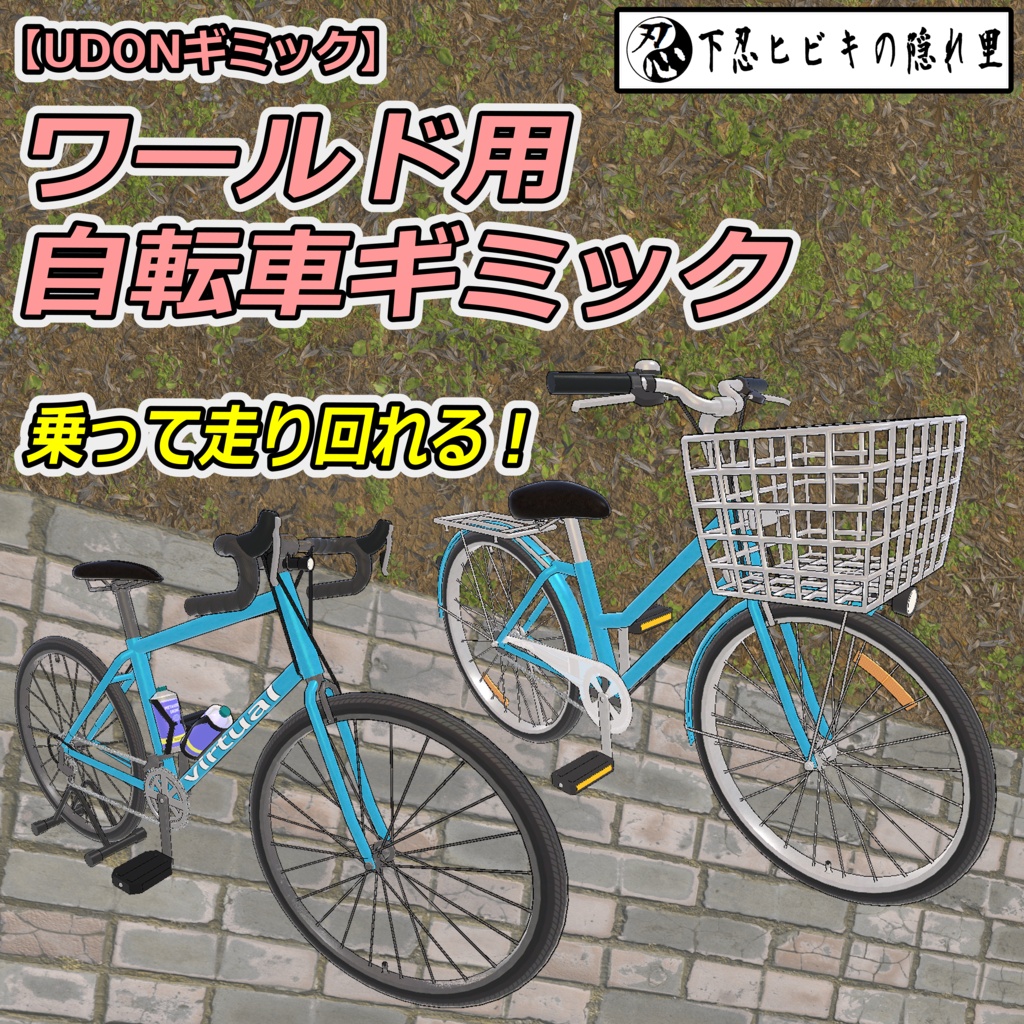
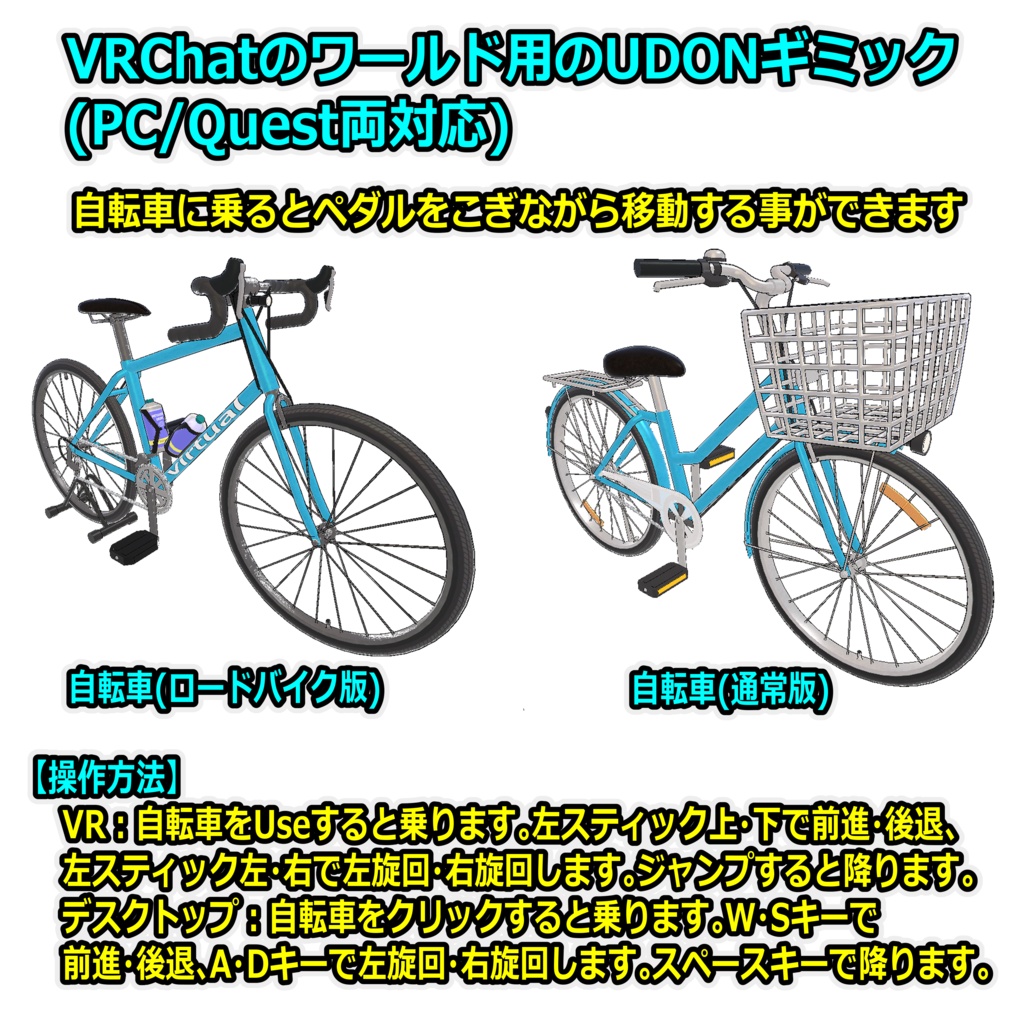
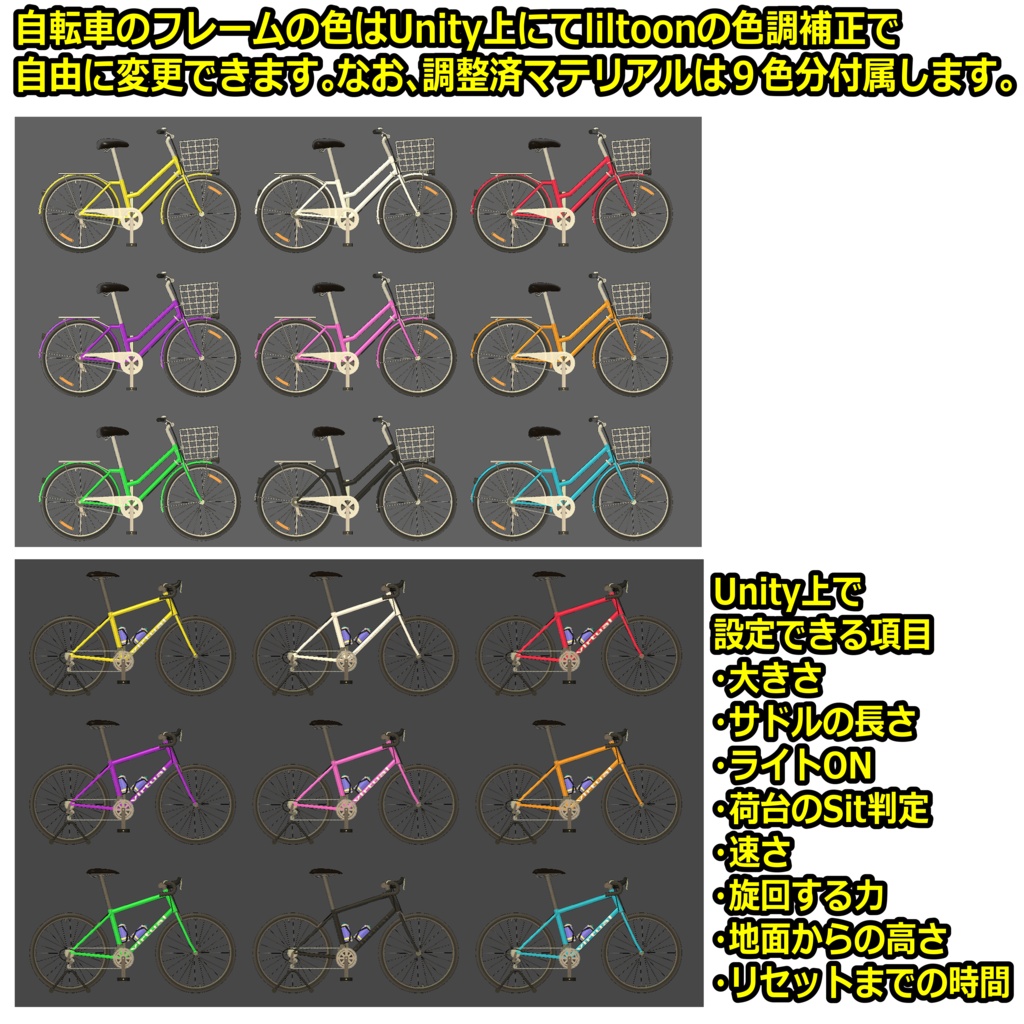
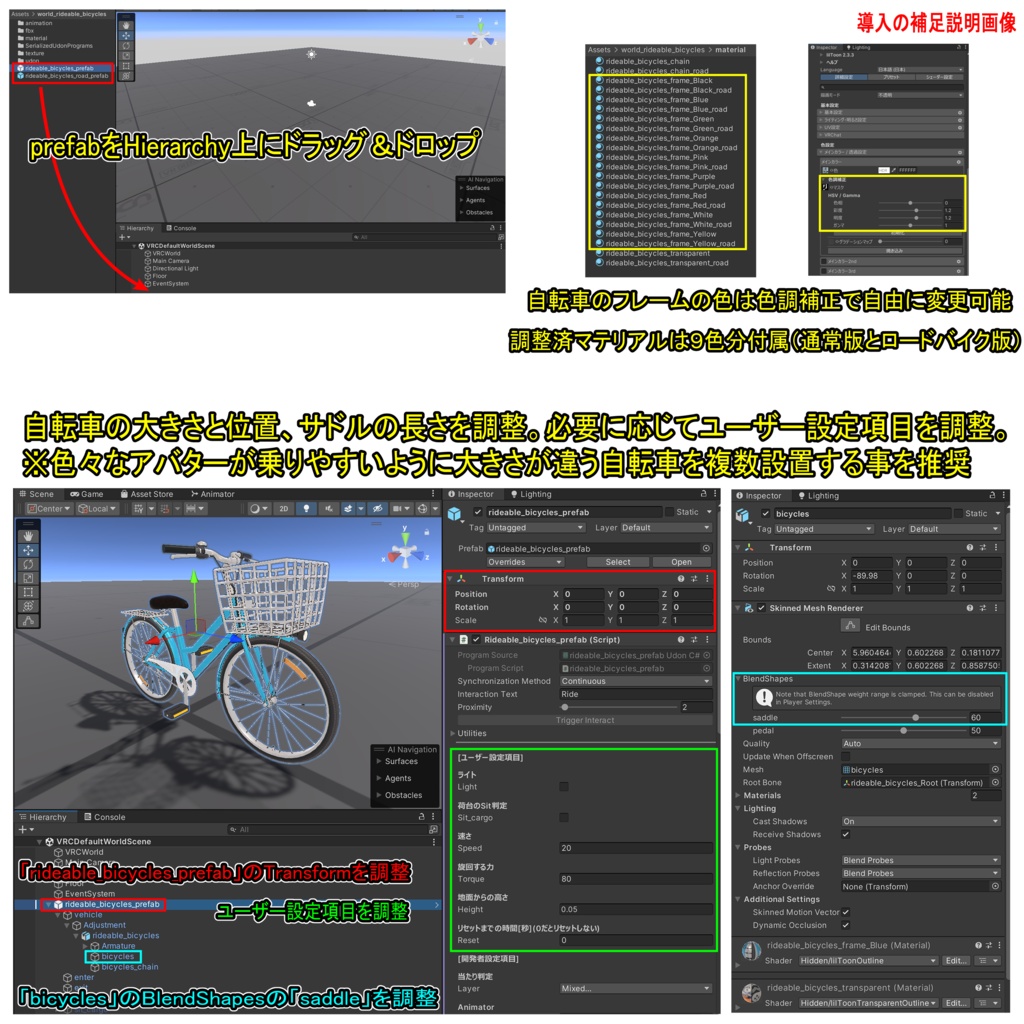


【商品名】 ワールド用自転車ギミック【UDONギミック】 【商品説明】 VRChatのワールド用のUDONギミックです(PC/Quest両対応)。自転車は通常版とロードバイク版の2種類があります。ワールドに設置して使って下さい。 自転車に乗るとペダルをこぎながら移動する事ができます。自転車は常に地面から少し浮いており傾斜の緩い坂は上れますが、段差を越える事は難しいです。 操作方法は以下の通りです。 VR:自転車をUseすると乗ります。左スティック上・下で前進・後退、左スティック左・右で左旋回・右旋回します。ジャンプすると降ります。 デスクトップ:自転車をクリックすると乗ります。W・Sキーで前進・後退、A・Dキーで左旋回・右旋回します。スペースキーで降ります。 Unity上にてライトON、荷台のSit判定、速さ、旋回する力、地面からの高さ、位置リセットまでの時間などを調整できます。自転車のフレームの色はliltoonの色調補正で自由に変更できます。なお、調整済マテリアルは9色分付属します。 【導入方法】※詳しくは導入の補足説明画像を参照 1.当セットを設置したいワールドのUnityプロジェクトにシェーダー(liltoon)をインポート https://booth.pm/ja/items/3087170 2.本商品(world_rideable_bicycles_1.0.unitypackage)をインポート 3.プロジェクト内(Assets/world_rideable_bicycles)にあるprefabをHierarchy上にドラッグ&ドロップ 自転車(通常版):rideable_bicycles_prefab 自転車(ロードバイク版):rideable_bicycles_road_prefab 4.自転車の大きさと位置、サドルの長さを調整 ・Hierarchy上のオブジェクト「rideable_bicycles_prefab」のTransformを調整 ・Hierarchy上のオブジェクト「bicycles」のBlendShapesを調整 ※色々なアバターが乗りやすいように大きさが違う自転車を複数設置する事を推奨します 5.必要に応じてユーザー設定項目を調整 Light:チェックすると自転車に乗った時にライトがONになります。 Sit_cargo:チェックすると自転車に乗った時に荷台のSit判定が出て他の人を乗せる事ができるようになります(ロードバイク版は無効)。 Speed:自転車で移動する時の速さです。 Torque:自転車を旋回する力です。 Height:自転車に乗った時の地面からの高さです。大きくすると段差を越えやすくなりますが、乗った時に常に地面から大きく浮いた状態になります。 Reset:自転車を降りてから位置をリセットするまでの時間[秒]です。なお、荷台に乗った人が降りずにリセット時間が経過するとその人も初期位置に移動するので、短すぎる時間は非推奨です。また、リセットを無効にする場合は0に設定して下さい。 6.通常の手順でVRChatにアップロード 【ポリゴン数】 通常版:△35316 ロードバイク版:△28686 【内容物】 Unitypackage readme FBX テクスチャ(PNG) 導入の補足説明画像 【利用規約】 改変可 商用利用可 再配布不可 再販売不可 公序良俗に反する使用を禁止 【免責事項】 制作者は本データを利用したことにより発生した損害、損失、その他の不利益に対して一切の責任を負いません。 【Quest対応について】 当ギミックはPC/Quest両対応です。ただしQuestでは下記の内容になります。 ・透明部分が不透明になります。 ・フレームの色は青になります。全体的に見た目は大きく劣化します。 ・チェーンが動かなくなります。 【更新履歴】 2026/6/30 リリース 【追記】 <関連商品について> アバターに装備させる自転車ギミックもあるので、興味のある人は下記のリンクからチェックしてみて下さい。 →乗れる自転車【ModularAvatar対応】 https://genin-hibiki.booth.pm/items/6853514 <よくある質問> ギミックが正常に機能しない場合 →VCC、VRChat SDKのバージョンを最新にしてください。 自転車に乗った時にアバターがペダルをこがない、または動きが大きく崩れる場合 →一般的なボーン構造のヒューマノイドアバターならペダルをこぐと思います。アバターを変更してみて下さい。 また、フルトラの場合は一時的に3点トラッキングに切り替えてください。なお、VRChatのメニューの「設定(歯車アイコン)」の「トラッキングとIK」の「フルボディトラッキングを許可」をOFFにすると切り替えできます。 他のツールやギミックなどと干渉して当ギミックが正常に機能しない場合 →それらを削除してお使い下さい。 設置した自転車が地面の下に落ちる(無くなる)場合 →地面(コライダー)より少し浮いた位置に設置して下さい。 リセット時間が経過しても位置がリセットされない場合 →再度自転車の乗り降りをしてみて下さい。 荷台に乗った時に荷台からずれた位置に座ってしまう場合 →自転車に乗っている人と荷台に乗っている人の身長が大きく異なるとずれます。近い身長のアバターに変更してみて下さい。 自転車に乗って移動している時に自転車がガクガク揺れる、または前に進まなくなる場合 →地面のコライダーの繋ぎ目の上を通る時に起きる事があるので、できるだけコライダーの数を少なくして繋ぎ目は減らして下さい。 地面のコライダーの繋ぎ目には微小でも段差があると前に進まなくなるので、できるだけ段差が少なくなるように調整して下さい。 それでも改善しない場合には自転車のユーザー設定項目「Height」の数値を大きくしてみて下さい。
English
[Product Name] Bicycle Gimmick for Worlds [UDON Gimmick] [Product Description] This is a Udon gimmick designed for VRChat worlds (compatible with both PC and Quest). Two versions of the bicycle are included: a standard model and a road bike model. Please place them in your world to use. When riding the bicycle, you can move while pedaling. The bicycle hovers slightly above the ground at all times; while it can climb gentle slopes, it struggles to cross over steps or curbs. Controls are as follows: VR: "Use" the bicycle to mount it. Move the left stick up/down to move forward/backward, and left/right to turn left/right. Jump to dismount. Desktop: Click the bicycle to mount it. Use the W/S keys to move forward/backward, and A/D keys to turn left/right. Press the Space key to dismount. In Unity, you can adjust settings such as the headlight status, the "Sit" trigger on the rear rack, speed, turning force, height above ground, and the time delay before the position resets. The bicycle frame color can be freely customized using lilToon's color correction settings; nine pre-configured material variations are included. [Setup Instructions] *Please refer to the supplementary setup images for details. 1. Import the shader (lilToon) into the Unity project for the world where you wish to place this asset. https://booth.pm/ja/items/3087170 2. Import this product (world_rideable_bicycles_1.0.unitypackage). 3. Drag and drop the prefab located in the project (Assets/world_rideable_bicycles) into the Hierarchy. Bicycle (Standard): rideable_bicycles_prefab Bicycle (Road Bike): rideable_bicycles_road_prefab 4. Adjust the bicycle's size, position, and saddle length. ・Adjust the Transform of the "rideable_bicycles_prefab" object in the Hierarchy. ・Adjust the BlendShapes of the "bicycles" object in the Hierarchy. *It is recommended to place multiple bicycles of different sizes to accommodate various avatar types. 5. Adjust user settings as needed. Light: Check this to turn the light on when riding the bicycle. Sit_cargo: Check this to enable a "Sit" trigger on the rear rack when riding, allowing others to ride along (disabled on the road bike version). Speed: Movement speed when riding the bicycle. Torque: Turning force of the bicycle. Height: Height from the ground when riding. Increasing this value makes it easier to clear obstacles or bumps, but it results in the rider being positioned significantly higher off the ground at all times. Reset: Time [seconds] until the bicycle resets its position after dismounting. Note that if a passenger on the rear rack does not dismount before the reset time elapses, they will also be moved to the initial position; therefore, setting this time too short is not recommended. Set to 0 to disable the reset function. 6. Upload to VRChat using standard procedures. [Polygon Count] Standard Version: △35316 Road Bike Version: △28686 [Contents] Unitypackage readme FBX Textures (PNG) Images with supplementary setup instructions [Terms of Use] Modification allowed Commercial use allowed Redistribution prohibited Resale prohibited Prohibition of use that violates public order and morals [Disclaimer] The creator assumes no responsibility for any damages, losses, or other disadvantages arising from the use of this data. [Quest Compatibility] This gimmick is compatible with both PC and Quest. However, the following applies to the Quest version: ・Transparent parts will become opaque. ・The frame color will change to blue. The overall appearance will be significantly degraded. ・The chain will stop moving. [Update History] 2026/6/30 release [Additional Note] <About Related Products> There is also a bicycle gimmick you can equip your avatar with, so if you're interested, please check out the link below → Rideable bicycles [Compatible with ModularAvatar] https://genin-hibiki.booth.pm/items/6853514 <Frequently Asked Questions> If the gimmick does not function correctly → Please update your VCC and VRChat SDK to the latest versions. If your avatar does not pedal or its movements become severely distorted when riding a bicycle → Avatars with a standard humanoid bone structure should pedal correctly. Please try using a different avatar. Also, if you are using FullBody Tracking, please temporarily switch to 3-point tracking. You can also switch to this mode by turning off "Allow FullBody Tracking FBT" under "Tracking & IK" in "Settings (gear icon)" in the VRChat menu. If the gimmick does not function correctly due to interference with other tools or gimmicks → Please remove those other items before use. If the placed bicycle falls through the ground (disappears) → Please place it at a position slightly above the ground (collider). If the position does not reset after the reset time has elapsed → Please try getting on and off the bicycle again. If you sit in a position misaligned from the cargo rack when riding on it → Misalignment occurs if there is a significant height difference between the person riding the bicycle and the person on the cargo rack. Please try using an avatar with a similar height. If the bicycle shakes violently or stops moving forward while riding: → This can occur when passing over the seams between ground colliders; please minimize the number of colliders to reduce the number of seams. Even a slight step or unevenness at a collider seam can prevent forward movement, so please adjust the layout to minimize such irregularities. If the issue persists, try increasing the value of the "Height" setting for the bicycle.