

乗れるタクシー【ModularAvatar対応】
- Digital500 JPY
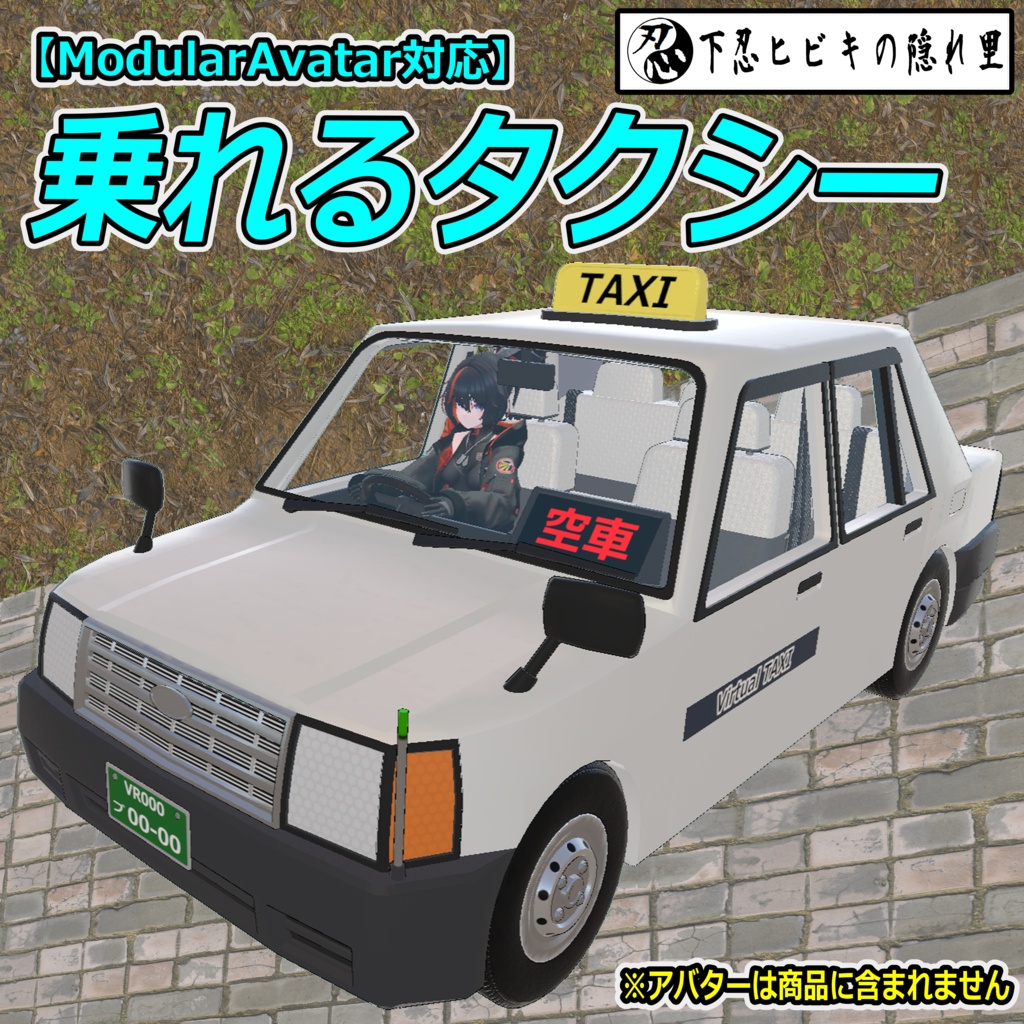
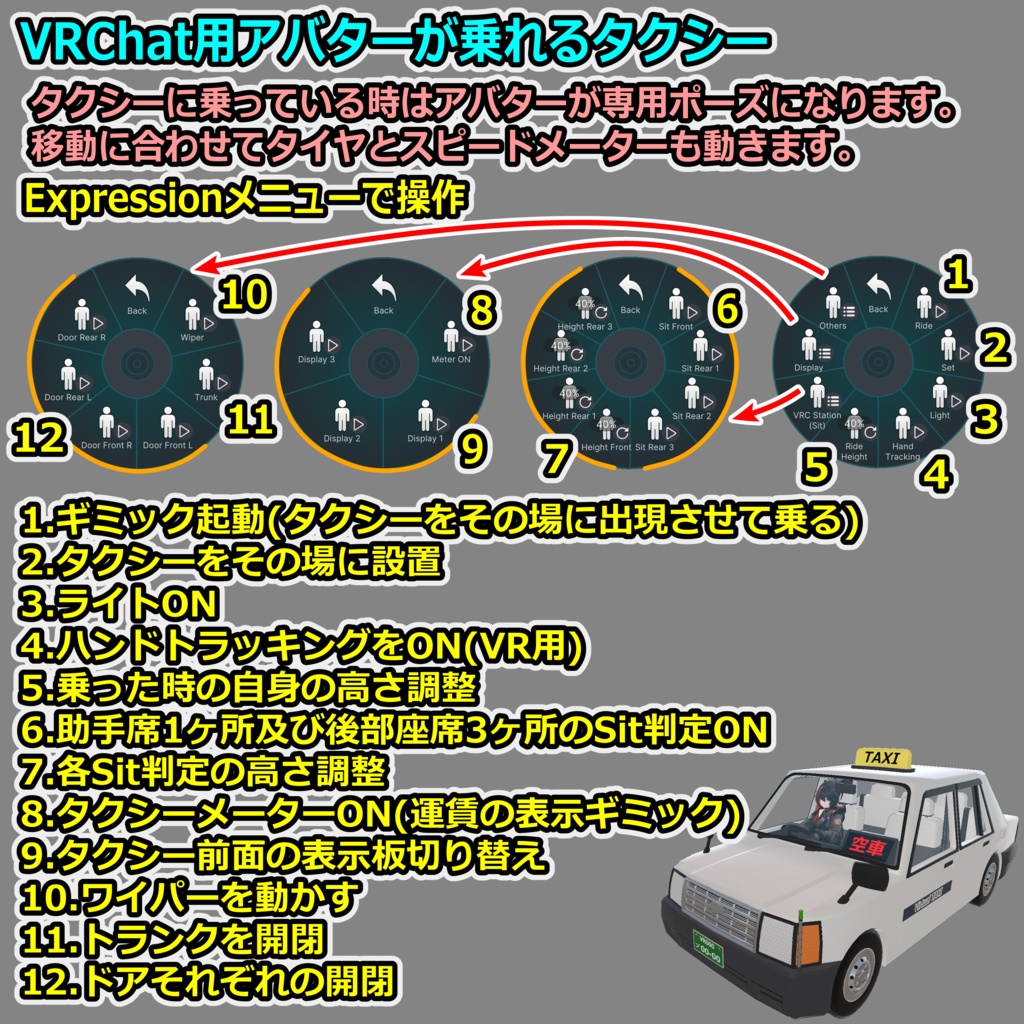
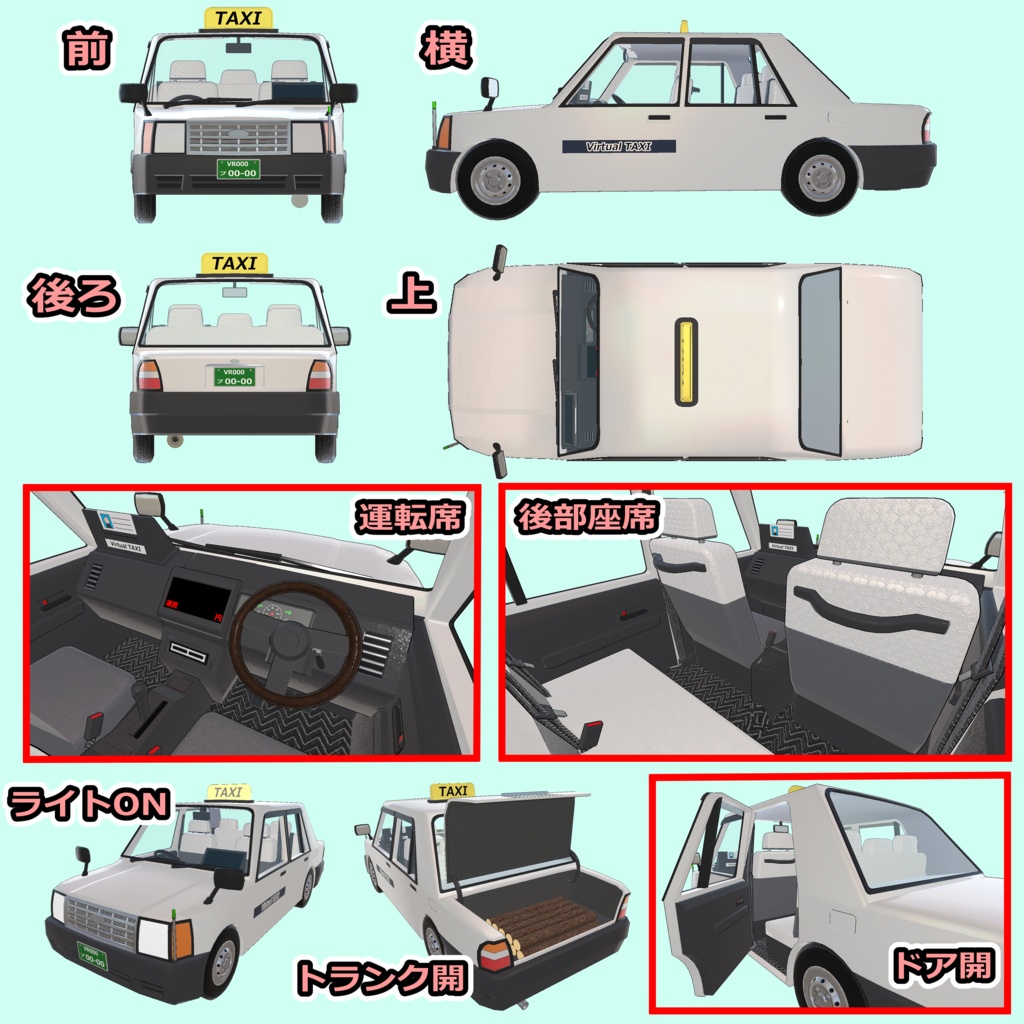
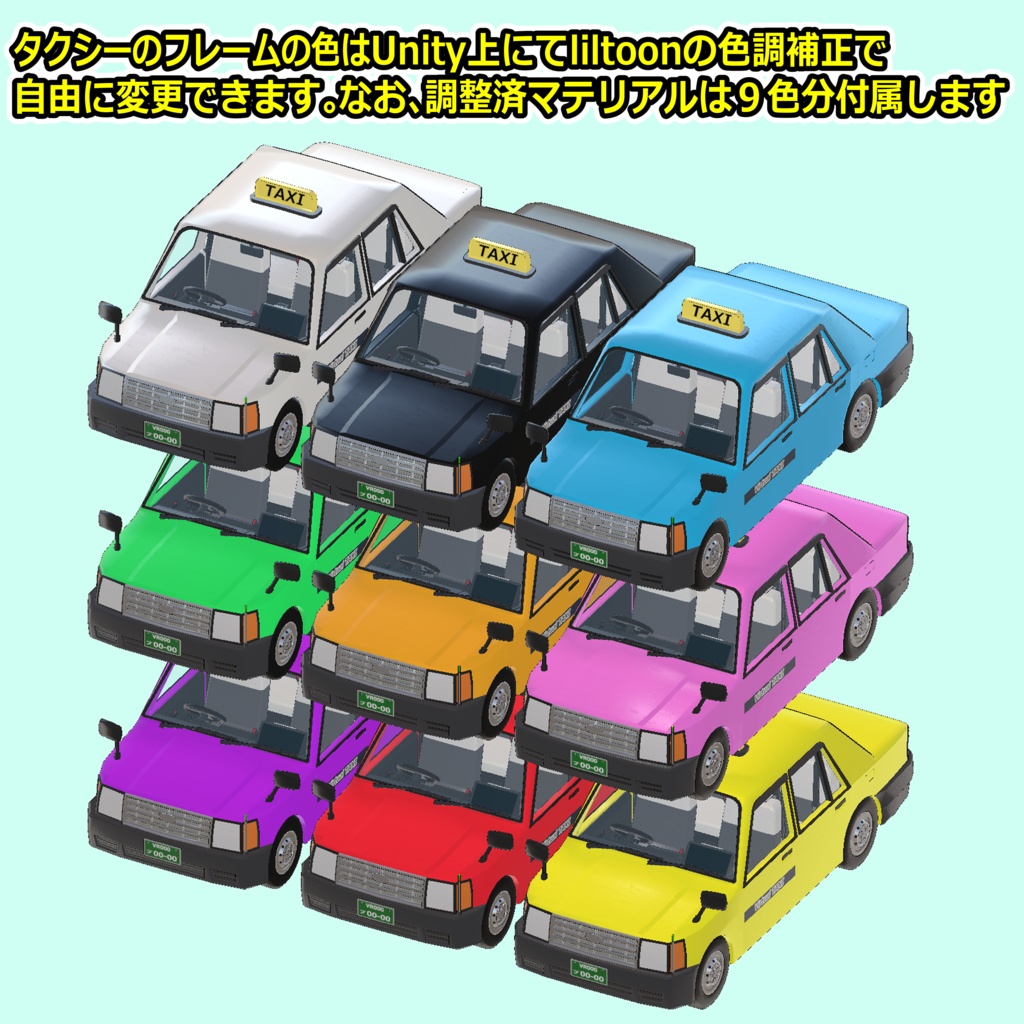
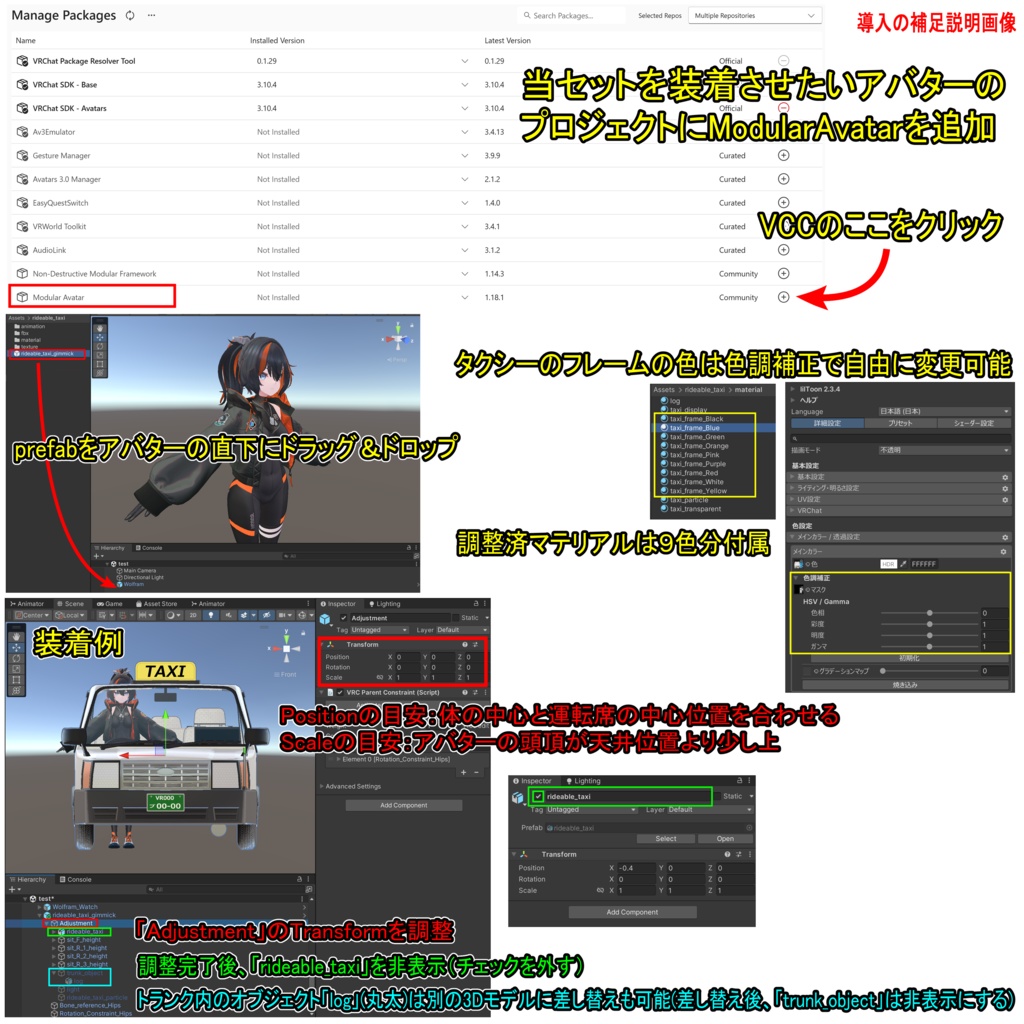


【商品名】 乗れるタクシー【ModularAvatar対応】 【商品説明】 VRChat用アバターが乗れるタクシーです。 VRChat内にてExpressionメニューでタクシーをその場に出現させて乗ることができます。移動に合わせてタイヤとスピードメーターも動きます。 タクシーに乗っている時はアバターが専用ポーズになりますが、ハンドトラッキングをONにすることもできます(VR用)。 ※アバターのポーズアニメーションは、一般的なボーン構造のヒューマノイドアバターなら使えると思います。なお、段差やジャンプでアニメーションが解除される場合があります。 また、タクシーをその場に設置、ライトON、乗った時の自身の高さ調整、助手席1ヶ所及び後部座席3ヶ所のSit判定ON、各Sit判定の高さ調整、タクシーメーターON(運賃の表示が1秒毎に100円増えるギミック)、タクシー前面の表示板切り替え(空車、賃走、貸切)、ワイパーを動かす、トランクを開閉、ドアそれぞれの開閉をする機能もあります。 タクシーのフレームのテクスチャは2種類(白色、青色)ですが、Unity上にてliltoonの色調補正で自由に変更できます。なお、調整済マテリアルは9色分付属します。 ※装着例のアバター「Wolfram( https://flastore.booth.pm/items/5769373 )」は商品に含まれません。 【VRChatへの導入方法】※詳しくは導入の補足説明画像を参照 1.ModularAvatarをVCCにダウンロード。 https://modular-avatar.nadena.dev/ja/ 2.当セットを装備させたいアバターのプロジェクトにModularAvatarを追加 3.シェーダー(liltoon)をインポート https://booth.pm/ja/items/3087170 4.本商品(rideable_taxi_1.0.unitypackage)をインポート 5.プロジェクト内(Assets/rideable_taxi)にあるrideable_taxi_gimmick.prefabをアバターの直下にドラッグ&ドロップ 6.タクシーの大きさと位置を調整 ・Hierarchy上のオブジェクト「Adjustment」のTransformを調整 ・調整完了後、Hierarchy上のオブジェクト「rideable_taxi」を非表示にする ※トランク内のオブジェクト(丸太)は別の3Dモデルに差し替えも可能です。 7.通常の手順でVRChatにアップロード(必ずPrivate 設定で) 【ポリゴン数】 タクシー:△28046 丸太:△1408 【内容物】 Unitypackage readme FBX テクスチャ(PNG) 導入の補足説明画像 【利用規約】 改変可 商用利用可 再配布不可 再販売不可 公序良俗に反する使用を禁止 【免責事項】 制作者は本データを利用したことにより発生した損害、損失、その他の不利益に対して一切の責任を負いません。 【Quest対応する方法】 ・マテリアル「log」と「taxi_display」と「taxi_frame_White」のシェーダーを「VRChat/Mobile/Toon Lit」に変更 ※フレームの色は白になります。全体的に見た目は大きく劣化します。 ・マテリアル「taxi_particle」のシェーダーを「VRChat/Mobile/Particles/Additive」に変更 ・Hierarchy上のオブジェクト「taxi_transparent」と「light」を削除 ※ガラス等の透明部分が非表示になります。ライトON機能は無くなります。 【更新履歴】 2026/8/12 リリース 【追記】 ギミックが正常に機能しない場合 →VCC、VRChat SDK、Modular Avatarのバージョンを最新にしてから【VRChatへの導入方法】の5.からやり直してください。 乗っている時にアバターの動きが大きく崩れたり移動速度が遅くなる場合 →VRで頭の位置が低いと起きる場合があります。姿勢を高くしてみて下さい。 フルトラで正常にアニメーションが動かない場合 →当ギミックを使用する場合は一時的に3点トラッキングに切り替えてください。なお、VRChatのメニューの「設定(歯車アイコン)」の「トラッキングとIK」の「フルボディトラッキングを許可」をOFFにすると切り替えできます。 他のツールやギミックなどと干渉して当ギミックが正常に機能しない場合 →それらを削除してお使い下さい。 Sit判定の数について →当ギミックでは「VRC Station」を4つ使っています。当ギミックのリリース時には問題無くアップロードできる事を確認していますが、もしもVRChat側に数が制限された場合はギミック内の「VRC Station」を減らしてからアップロードして下さい。
English
[Product Name] Rideable Taxi [Compatible with ModularAvatar] [Product Description] A taxi that VRChat avatars can ride. You can spawn the taxi on the spot using the VRChat Expression Menu and get in. The tires and speedometer move in sync with the vehicle's movement. Your avatar assumes a specific pose while riding, but you can also enable hand tracking (for VR). *The avatar pose animation should work with standard humanoid avatars using a typical bone structure. Please note that the animation may cancel if you go over bumps or jump. Additional features include: placing the taxi, toggling lights, adjusting your height when seated, enabling seating triggers (one front passenger seat, three rear seats) and adjusting their heights, toggling the taxi meter (fare increases by 100 yen every second), switching the front display sign (Vacant, Occupied, Chartered), operating wipers, opening/closing the trunk, and opening/closing individual doors. Two taxi body texture variations (white and blue) are included, but you can freely change the color using "liltoon" color correction in Unity. Nine pre-adjusted material variations are also included. *The avatar shown in the example ("Wolfram": https://flastore.booth.pm/items/5769373 ) is not included with the product. [How to Install in VRChat] *Please refer to the supplementary installation images for details. 1. Download ModularAvatar to VCC. https://modular-avatar.nadena.dev/ja/ 2. Add ModularAvatar to the project containing the avatar you wish to equip with this set. 3. Import the shader (liltoon). https://booth.pm/ja/items/3087170 4. Import this product (rideable_taxi_1.0.unitypackage). 5. Drag and drop rideable_taxi_gimmick.prefab from your project (Assets/rideable_taxi) directly below the avatar. 6. Adjust the taxi's size and position. ・Adjust the Transform of the "Adjustment" object in the Hierarchy. ・Once adjustments are complete, hide the "rideable_taxi" object in the Hierarchy. *Note: The object inside the trunk (the log) can be swapped for a different 3D model. 7. Upload to VRChat using the standard procedure (make sure to use the Private setting). [Polygon Count] Taxi: △28046 Log: △1408 [Contents] Unitypackage readme FBX Textures (PNG) Images with supplementary setup instructions [Terms of Use] Modifications permitted Commercial use permitted No redistribution No resale Prohibition of use that violates public order and morals [Disclaimer] The creator assumes no responsibility for any damages, losses, or other disadvantages arising from the use of this data. [How to make it Quest-compatible] ・Change the shaders for the materials "log," "taxi_display," and "taxi_frame_White" to "VRChat/Mobile/Toon Lit." *Note: The frame color will become white. The overall visual quality will be significantly reduced. ・Change the shader for the material "taxi_particle" to "VRChat/Mobile/Particles/Additive." ・Delete the objects "taxi_transparent" and "light" from the Hierarchy. *Note: Transparent parts (such as glass) will no longer be visible. The light-on function will be disabled. [Update History] 2026/8/12 release [Additional Note] If the gimmick isn't working properly → Update your VCC, VRChat SDK, and Modular Avatar to the latest versions, then start again from step 5 of the [How to install in VRChat]. If your avatar's movement becomes significantly disrupted or its movement speed slows while riding → This may occur if your head is positioned too low in VR. Try raising your posture. If it doesn't work properly with full tracking →When using this gimmick, temporarily switch to 3-point tracking. You can also switch to this mode by turning off "Allow FullBody Tracking FBT" under "Tracking & IK" in "Settings (gear icon)" in the VRChat menu. If this gimmick is interfering with other tools or gimmicks and isn't functioning properly →Delete them before using. Regarding the number of "Sit" components: → This gimmick utilizes four "VRC Station" components. While we confirmed that uploading was possible without issues at the time of release, should VRChat impose limits on the number of these components, please reduce the number of "VRC Stations" within the gimmick before uploading.