

押せる服メーカー - 押すと体はへこむのに服はそのまま、を直すUnityツール【VRChat】【JA,EN,KO】
- 日本語ダウンロード商品¥ 700
- Englishダウンロード商品¥ 700
- 한국어ダウンロード商品¥ 700
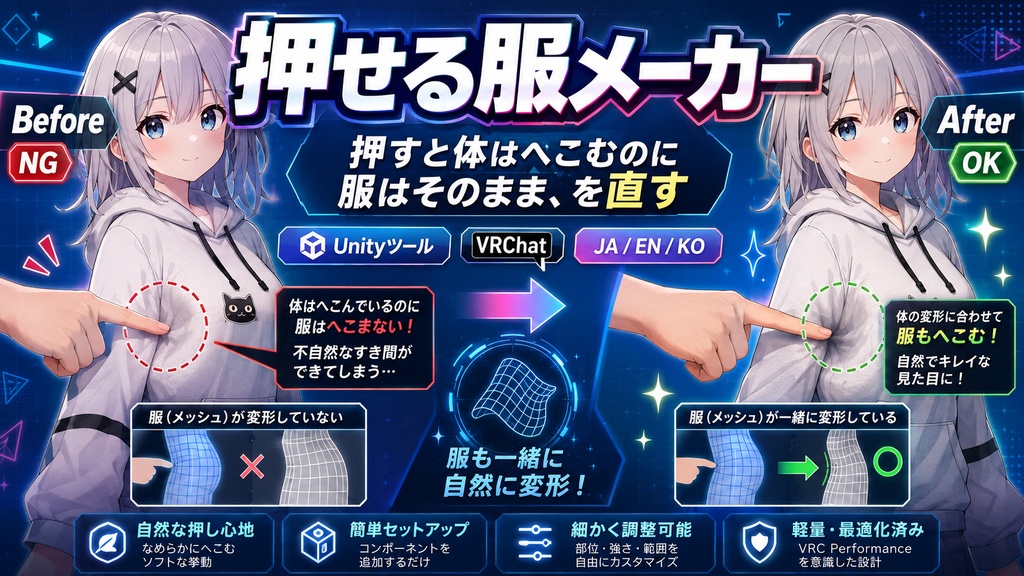
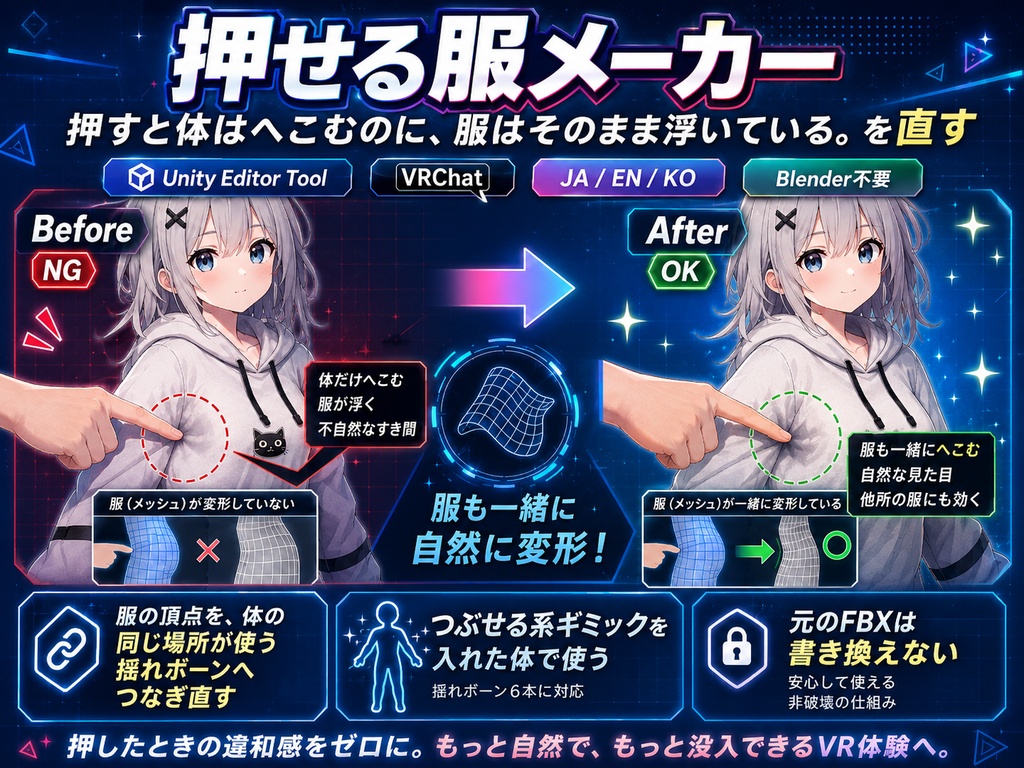
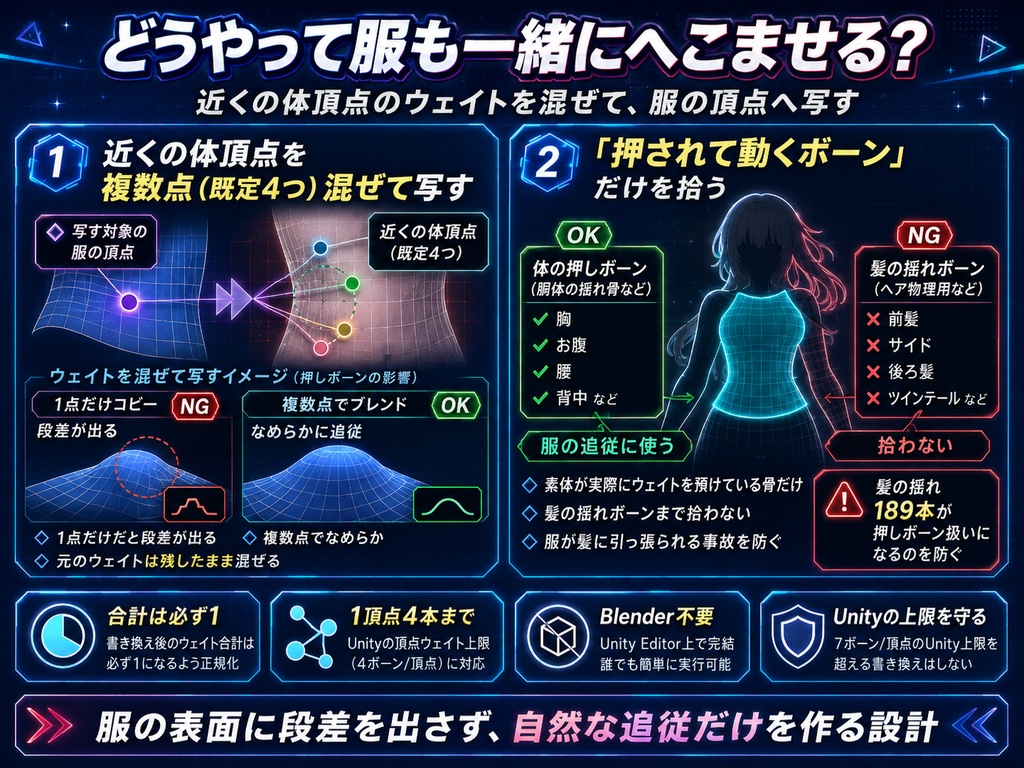
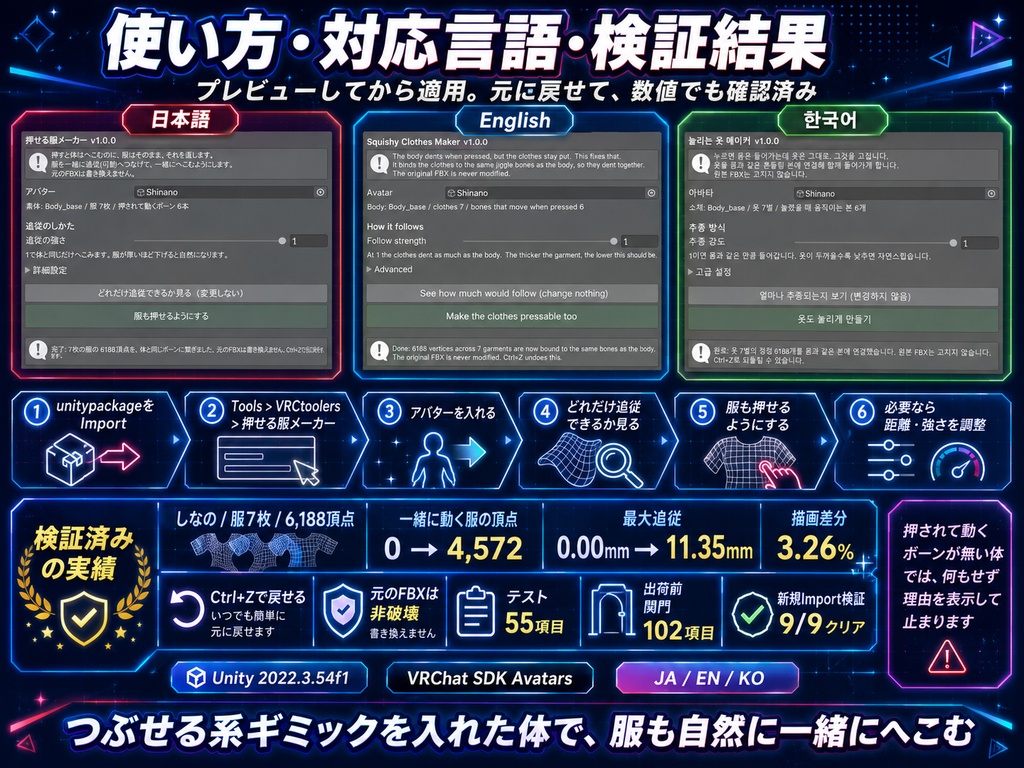


「押すと体はへこむのに、服はそのまま浮いている」。 つぶせる系のギミックを入れたのに、服だけが取り残される。体だけが沈んで、服がその上に浮いたままになる。押せる服メーカーは、服の頂点を「体の同じ場所が使っている揺れボーン」へ繋ぎ直して、服も一緒にへこむようにするUnity Editorツールです。Blenderは使いません。 ◆ 体の近くの頂点から、複数点を混ぜて写します 服の頂点ごとに、近くにある体の頂点を複数(既定4つ)取り、そこに乗っている揺れボーンのウェイトを距離の重みで写します。 1点だけを写すと駄目です。体のウェイトの継ぎ目がそのまま服に出て、服の表面に段差の線が走ります。複数点を混ぜているのはそのためです。 元のウェイトは残したまま混ぜます。合計は必ず1になり、1頂点あたり4本までというUnityの上限も守ります。 ◆ 「押されて動くボーン」の拾い方が要点です 素体が実際にウェイトを預けている骨だけを見ます。ボーン配列に入っているだけの骨まで拾うと、髪の揺れボーンが189本まとめて「押されて動く骨」に化けます(実測)。そうなると、服は髪の揺れに合わせて動く別物になります。 ◆ 効くのは「他所の服を着せたとき」です 素体に最初から付いている服は、作者自身が胸や尻の揺れボーンに繋いでいることがあります。その場合はもともと動きます。 買った人が困るのは、別の作家の服を着せたときです。揺れボーンのことを知らない服が来るので、体だけがへこみます。その状態を作って測りました。 骨を1cm押し込んだとき、一緒に動く服の頂点 0 → 4,572頂点 そのときの追従の大きさ(最大) 0.00mm → 11.35mm 押し込んだときの絵の変化 3.26% ◆ 先に必要なもの 体に「押されて動くボーン」が入っていること(ましゅまろPBのような、押すとへこむ揺れボーン)。 入っていない場合、このツールは何もせず、その理由を表示して止まります。勝手にボーンを足したりはしません。 ◆ 元に戻せます ・「どれだけ追従できるか見る」で、実行前に繋がる頂点数を確認できます ・元のFBXには書き込みません。メッシュを複製してから作業します ・Ctrl+Zで戻せます ◆ 使い方 1. unitypackageをImport 2. Tools > VRCtoolers > 押せる服メーカー 3. アバターを「アバター」欄へ入れる(素体と服は自動で探します) 4.「どれだけ追従できるか見る」で頂点数を確認 5.「服も押せるようにする」を実行 6. 追従しない服があれば「体を探す距離」を上げ、張り付いて見えるなら「追従の強さ」を下げる ◆ 検証 Unity 2022.3.54f1 / VRChat SDK Avatars。3本あわせてユニット+実機E2E 55項目、出荷前の関門 102項目、出品ZIP同梱のunitypackageを別プロジェクトへ新規Importする検証 9/9、いずれも全項目クリアしています。 実機の実測(既定値): しなの 服7枚 6,188頂点を体と同じボーンへ接続。Felis v0.8.1 は胴に押されて動く骨が無いため、何もせず理由を表示します。 効いていることは絵でも確かめています。骨を押し込んだ状態で適用前と適用後を描画して1画素ずつ比べ、3.26%が変化しました。 ※ このツールは「つぶせる系のギミックが先に入っている体」のための道具です。ギミック自体は含まれません。 ※ 体から大きく離れて浮いている服は「体を探す距離」を上げてください。 ※ アバター・衣装・VRChat SDKは付属しません。 ※ すべての服・すべてのアバターの組み合わせで完璧な追従を保証するものではありません。最終確認は購入者環境で行ってください。 ※ デジタル商品のため、購入後の返品・返金はできません。 内容物: ・押せる服メーカー unitypackage ・README ・TEST_REPORT ・CHANGELOG ・LICENSE ・ツール画面のスクリーンショット --- English --- "The body dents when pressed, but the clothes just float above it." You installed a squish gimmick, and only the clothes were left behind. Squishy Clothes Maker re-binds the vertices of your clothes to the same jiggle bones the body uses at that spot, so the clothes dent with it. A Unity Editor tool. No Blender needed. Several nearby body vertices are blended For each garment vertex it takes several nearby body vertices (4 by default) and copies the jiggle-bone weights sitting on them, weighted by distance. Copying from a single point does not work: the seams in the body weights carry straight onto the clothes and a visible ridge runs across the surface. The original weights are kept and the new share is blended in. The total is always 1, and Unity's limit of 4 bones per vertex is respected. How the pressed-moving bones are picked is the whole point Only bones the body actually puts weight on count. If bones that merely sit in the bone array are counted too, 189 hair jiggle bones turn into "bones that move when pressed" (measured), and the clothes end up riding the hair. Where it really bites: an outfit from another creator Clothes that ship with the body are sometimes already bound to the chest and hip jiggle bones by the author, so they already move. What bites the buyer is an outfit from another creator: it knows nothing about the jiggle bones, so only the body dents. We built that state and measured it. Garment vertices that move when a bone is pressed 1cm 0 -> 4,572 How far they follow (maximum) 0.00mm -> 11.35mm Change in the picture while pressed 3.26% What you need first Bones on the body that move when pressed (a squish gimmick such as a marshmallow-style PhysBone setup). With none present, this tool changes nothing and tells you why. It never adds bones on its own. Everything is reversible - Preview how many vertices would be bound before anything happens - The original FBX is never touched; the mesh is duplicated first, and Ctrl+Z works Verification Unity 2022.3.54f1 / VRChat SDK Avatars. Across the three tools: 55 unit and real-avatar tests, a 102-check pre-ship gate, and a fresh import of every shipped unitypackage into a new project (9/9). All passed. Measured at the defaults: Shinano, 7 garments, 6,188 vertices bound. Felis v0.8.1 has no pressed-moving bones on the torso, so the tool changes nothing and says so. Notes: this tool is for a body that already has a squish gimmick; the gimmick itself is not included. Clothes floating far from the body need a larger search distance. Avatars, outfits and the VRChat SDK are not included. --- 한국어 --- "누르면 몸은 들어가는데, 옷은 그 위에 떠 있는 그대로." 눌리는 계열 기믹을 넣었는데 옷만 남겨진다. 눌리는 옷 메이커는 옷의 정점을 '몸의 같은 자리가 쓰는 흔들림 본'에 다시 연결해, 옷도 함께 들어가게 만드는 Unity Editor 도구입니다. Blender는 쓰지 않습니다. 몸 가까이의 정점을 여러 개 섞어서 옮깁니다 옷의 정점마다 가까운 몸의 정점을 여러 개(기본 4개) 잡고, 거기에 실린 흔들림 본의 웨이트를 거리 가중치로 옮깁니다. 한 점만 옮기면 안 됩니다. 몸 웨이트의 이음매가 그대로 옷에 드러나 표면에 단차 선이 생깁니다. 원래 웨이트는 남긴 채 섞습니다. 합계는 반드시 1이 되고, 정점당 4개까지라는 Unity의 상한도 지킵니다. '눌렸을 때 움직이는 본'을 어떻게 줍는가가 핵심입니다 소체가 실제로 웨이트를 맡긴 본만 봅니다. 본 배열에 들어 있을 뿐인 본까지 주우면 머리카락 흔들림 본 189개가 통째로 '눌렸을 때 움직이는 본'으로 둔갑합니다(실측). 효과가 드러나는 것은 '다른 작가의 옷을 입혔을 때'입니다 소체에 처음부터 붙어 있는 옷은 작가가 이미 가슴·엉덩이 흔들림 본에 연결해 둔 경우가 있습니다. 구매자가 곤란한 것은 다른 작가의 옷을 입혔을 때입니다. 그 상태를 만들어 측정했습니다. 본을 1cm 눌렀을 때 함께 움직이는 옷의 정점 0 → 4,572개 그때 추종하는 크기(최대) 0.00mm → 11.35mm 눌렀을 때 그림의 변화 3.26% 먼저 필요한 것 몸에 '눌렸을 때 움직이는 본'이 들어 있을 것(마시멜로 계열 PhysBone 같은 눌리는 기믹). 없으면 이 도구는 아무것도 하지 않고 이유를 표시하고 멈춥니다. 되돌릴 수 있습니다 - 실행 전에 연결될 정점 수를 확인할 수 있습니다 - 원본 FBX에는 쓰지 않습니다. 메시를 복제한 뒤 작업하며 Ctrl+Z로 되돌릴 수 있습니다 검증 Unity 2022.3.54f1 / VRChat SDK Avatars. 3개 합쳐 유닛+실기 E2E 55항목, 출하 전 관문 102항목, 출품 ZIP에 든 unitypackage를 새 프로젝트에 임포트하는 검증 9/9, 모두 통과했습니다. ※ 이 도구는 눌리는 기믹이 먼저 들어 있는 몸을 위한 도구이며, 기믹 자체는 포함되지 않습니다. ※ 아바타·의상·VRChat SDK는 포함되지 않습니다. ※ 디지털 상품이므로 구매 후 반품·환불은 불가합니다.