

左右反転して付ける MirrorFit|片耳のピアス・サイドテール・片側の飾りを反対側にも【PhysBone も反転・VRChat・NDMF・非破壊】
- 製品版Digital450 JPY
- 無料お試し版Digital0 JPY
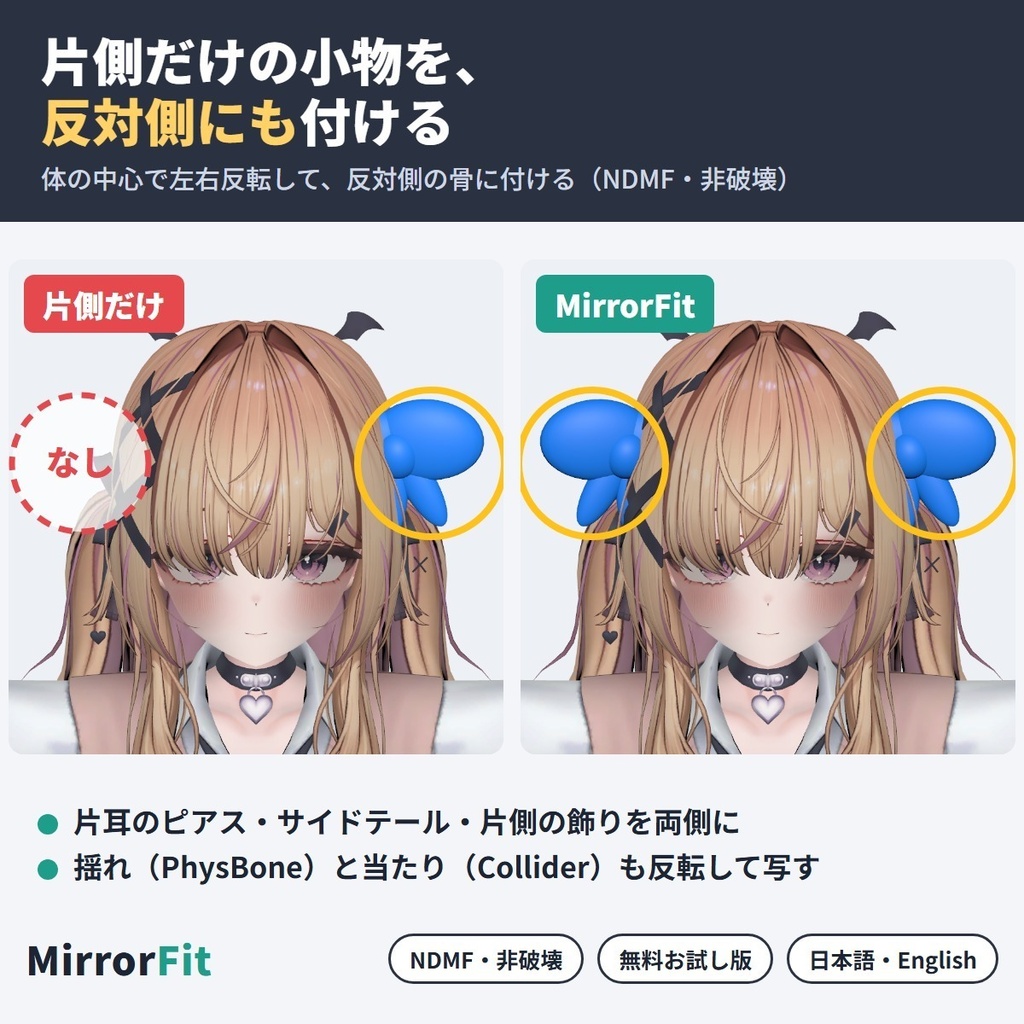
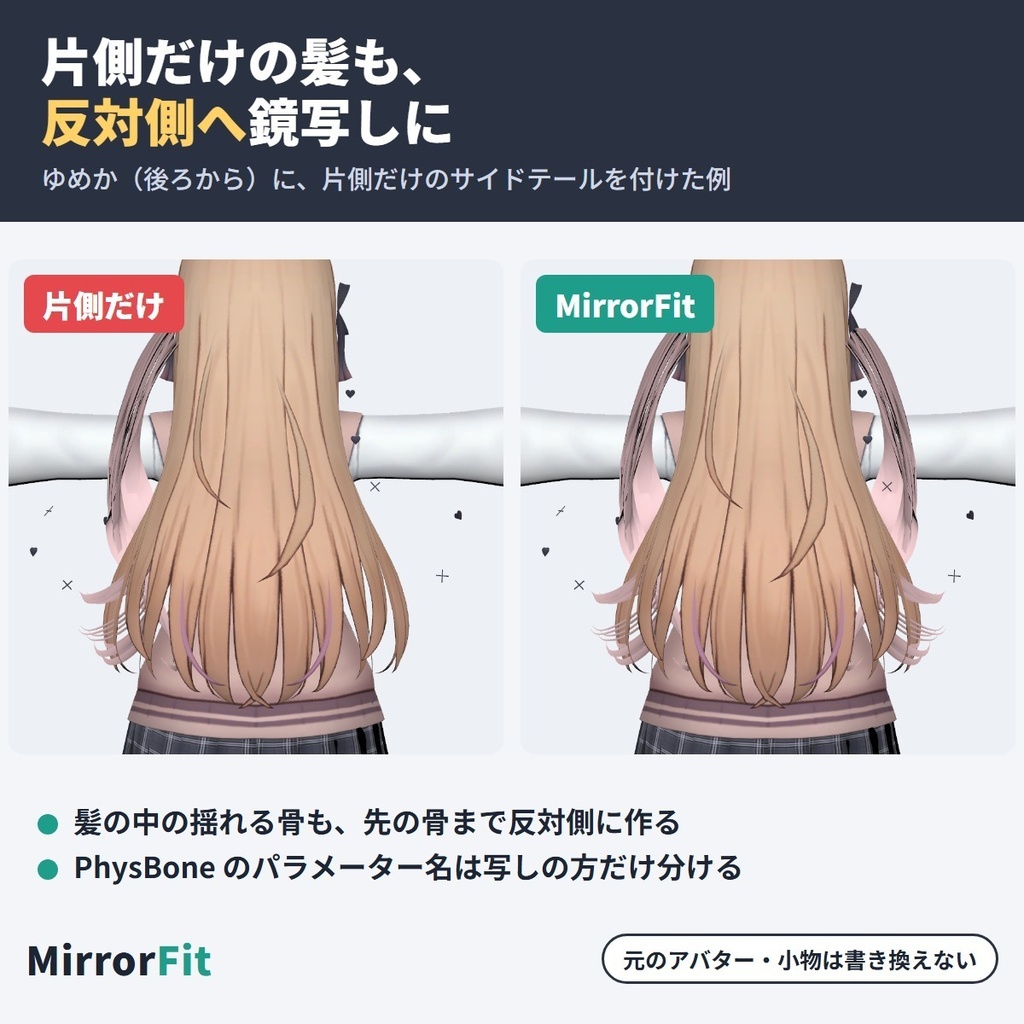
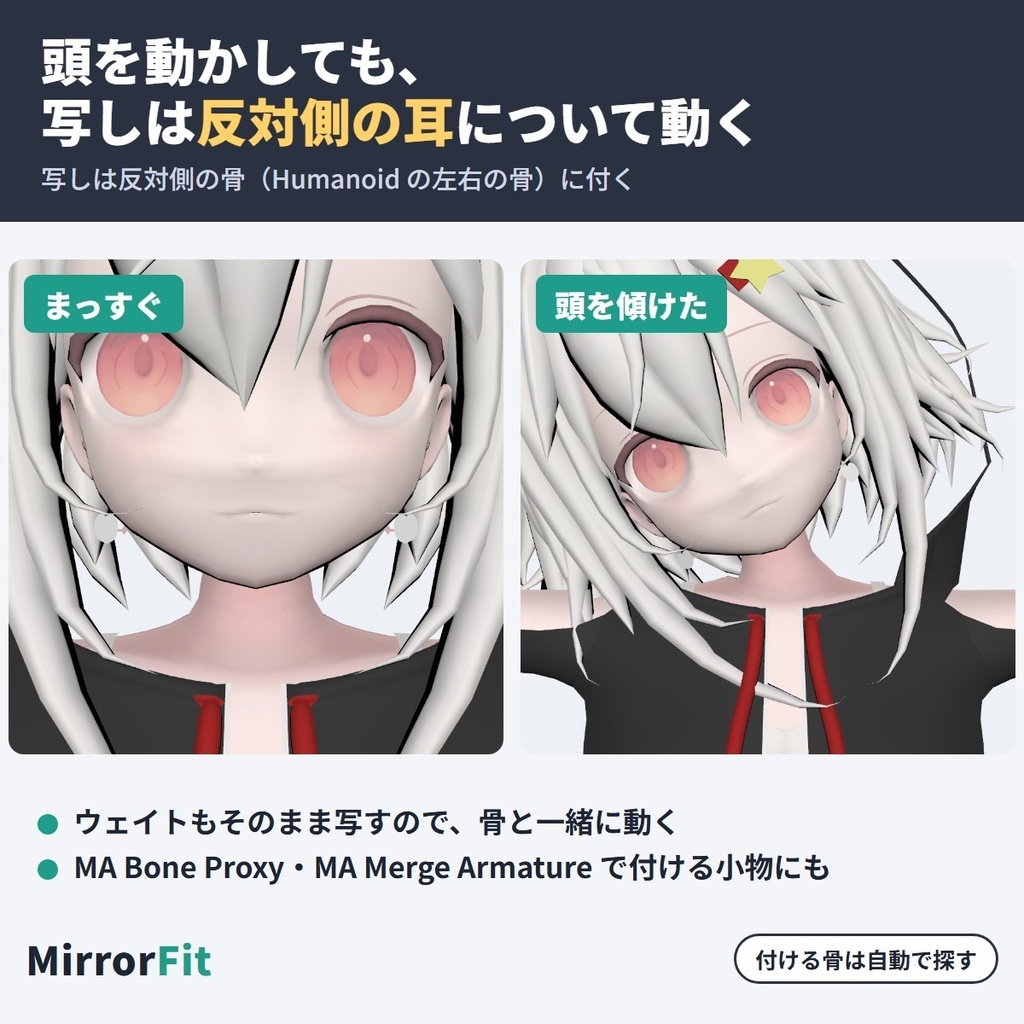
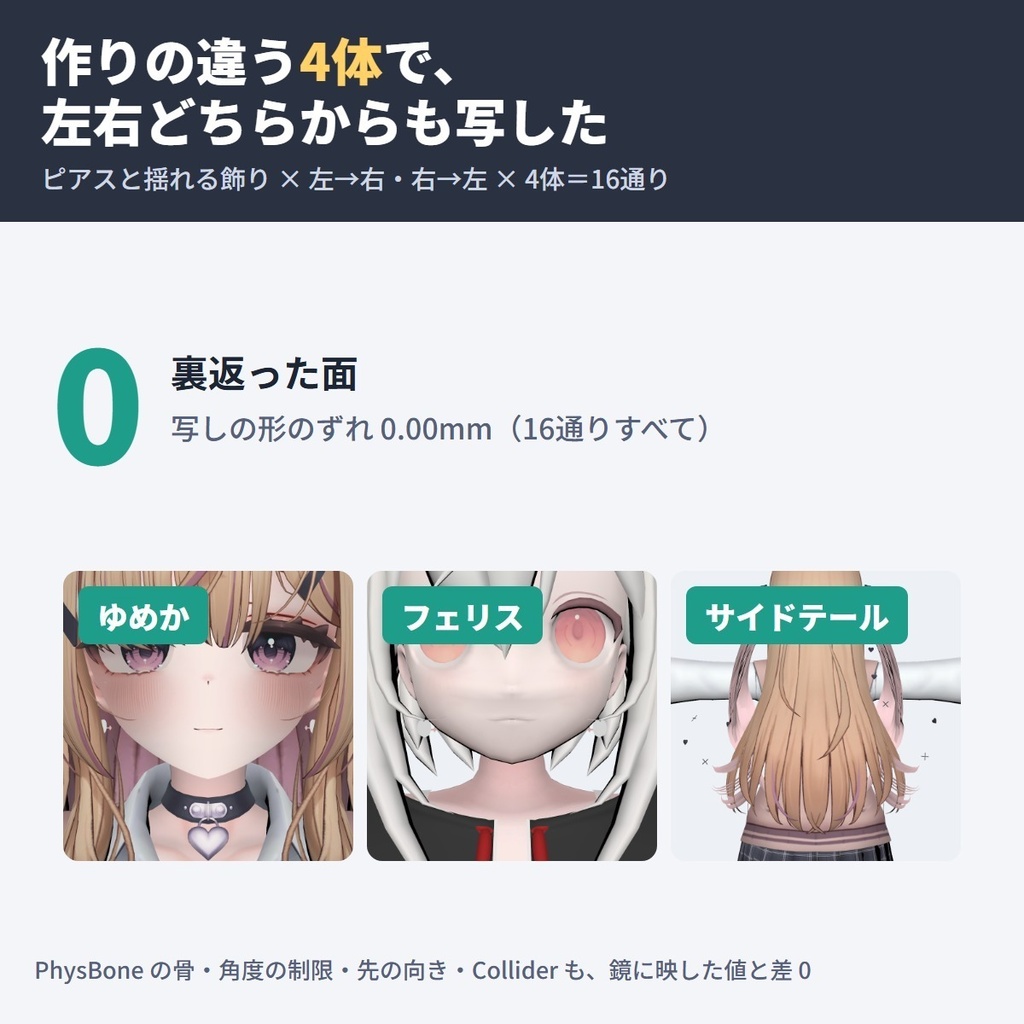
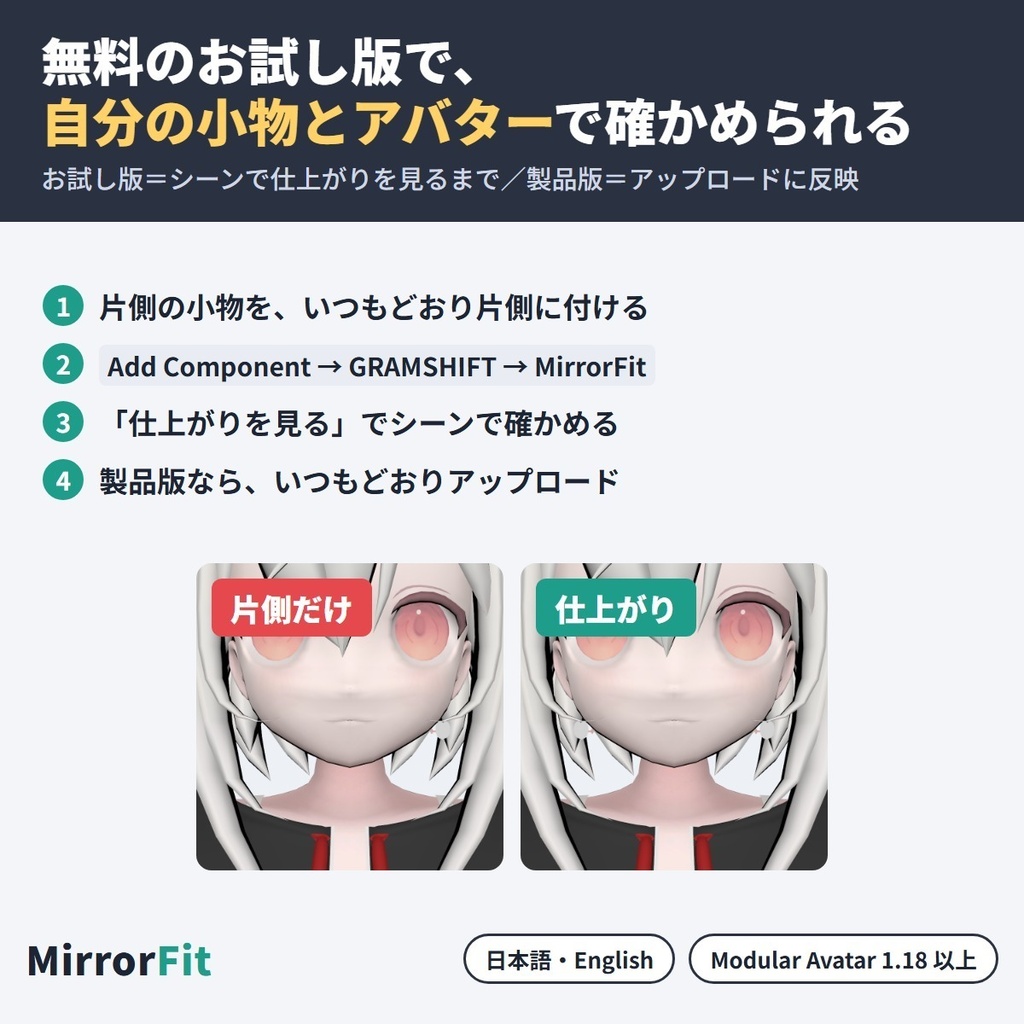


片側だけの小物(片耳のピアス・サイドテール・片側の髪飾りなど)を、体の中心で左右反転して、VRChat アバターの反対側にも付けるツールです。 小物に MirrorFit を付けるだけで、アップロードの時にメッシュを鏡の形にして反対側の骨に付け、揺れもの(PhysBone)の骨・角度の制限・当たり(Collider)の向きまで反転して写します。 Unity の中だけで完結します(NDMF・非破壊・Blender 不要)。 English / 简体中文 / 한국어:下の段落に説明があります(descriptions below) ■ まずは無料お試し版で、自分の小物とアバターを確かめる お試し版は無料です。「仕上がりを見る」で、反対側に付いた姿をシーンで確かめられます。アップロードに反映できるのは製品版で、お試し版の上から入れると切り替わります。 ■ できること ・小物のメッシュを、体の中心の面で鏡に映した形にします(面の表・法線・シェイプキーも反転するので、裏返りません) ・写しは反対側の骨(左右の Humanoid の骨)に付くので、腕や頭を動かすと反対側で一緒に動きます。ウェイトもそのまま ・揺れもの(PhysBone)も反転して写します:小物の中の骨(先の使われていない骨も)を反対側に作り、角度の制限・先の向き・小物の中の Collider の位置と向きを反転。パラメーター名は写しだけ「_Mirror」を付けて、左右で別の値にします ・MA Bone Proxy・MA Merge Armature で付ける小物も、そのまま使えます(Bone Proxy の付け先は反対側の骨に) ・左右(ふつう)と前後(胸と背中の飾りなど)を選べます ・「元の側も残す」を切ると、反対側への付け替えになります ・反対側の骨が見つからない骨は知らせが出て、インスペクターで反対側の骨を選べます。アバターの左右の骨の位置が違う時も知らせが出ます ・「仕上がりを見る」で、アップロード前にシーンで確かめられます(シーンだけの表示) ・日本語/English 切り替え ■ 試した結果 作りの違う4体(ゆめか・フェリス・HAOLAN・RadDollV3)に、片耳のピアスと、揺れる骨の鎖を入れた片側の飾りを、左→右・右→左それぞれ付けた16通りで測りました。 ・写しの形と、元を鏡に映した形との差:16通りすべて 0.00mm。裏返った面:0 ・腕と頭を左右反対に動かした姿勢でも、写しは鏡の位置に付いてくる(差 1.7mm 以内) ・PhysBone の骨・角度の制限・先の向き・Collider の位置と向き:鏡に映した値との差 0(制限と Collider をわざと傾けた飾りで) ・片側の髪(サイドテールの1房・作った骨7本):形・PhysBone とも差 0.00 ・MA Merge Armature で付ける髪留めは面 76 で裏返り 0。GogoLoco と一緒のアバター、小物2つ(ピアスと反対側の飾り)を同じアバターに付けた時も組み立て OK ・シェイプキーを動かした形も鏡に映した形と差 0.00mm、ウェイトは元と同じ ■ 使い方 1. Modular Avatar(1.18 以上 2.0 未満)を入れてから、unitypackage をプロジェクトに入れる 2. 片側の小物をアバターの中に入れ、いつもどおり片側に付ける 3. 小物の一番上に「Add Component → GRAMSHIFT → MirrorFit」を付ける(ヒエラルキーの右クリック → GRAMSHIFT → MirrorFit でも可) 4. 「仕上がりを見る」で確かめて、いつもどおりアップロードする ■ 動作環境 ・Unity 2022.3 / VRChat SDK3 Avatars / Modular Avatar 1.18 以上 2.0 未満(NDMF が一緒に入ります) ・Humanoid のアバター ・作者が試した版:Unity 2022.3.22f1 / SDK 3.10.5 / MA 1.18.7 / NDMF 1.14.8 ・元のアバター・小物・メッシュ・マテリアル・プレハブのファイルはそのまま残ります ■ 使う前に ・小物の規約で、改変(反転して使うこと)が許されているか確かめてください。アバターの規約にも従ってください ■ よくある質問 Q. 片耳だけのピアスを、両耳に付けられますか? A. 付けられます。ピアスに MirrorFit を付けると、アップロードの時に反対の耳にも鏡の形で付きます。 Q. 揺れる髪や飾りを反転すると、揺れ方がおかしくなりませんか? A. PhysBone の骨・角度の制限・先の向き・小物の中の Collider の位置と向きを、鏡に映した値で写します(試した飾りで差 0)。 Q. 買う前に、自分の小物とアバターで試せますか? A. 試せます。無料お試し版で、シーンの「仕上がりを見る」まで使えます(アップロードと Play モード〔Apply on Play〕には入りません)。 Q. Blender は要りますか? A. 要りません。Unity の中だけで使えます。 ■ 制限 ・元の形をそのまま鏡に映します。左右で形を変える・片側だけ位置をずらす・つながった小物を左右に切り分ける機能は入っていません ・VRC Contact は写しません(元の側だけに残ります)。パーティクル・トレイル・線も元の側だけです ・小物のメッシュに体の肌が一緒に入っている物(脚の肌まで入った靴など)は、肌の部分も一緒に反対側へ写ります ・アバターの左右の骨の位置が違う時は、写しはその骨に付くので、左右で少しずれて見えます(知らせが出ます) ・Humanoid のアバターが必要です ・小物ごとに MirrorFit を1つずつ付けてください ・写した分だけメッシュ・マテリアル・PhysBone の数が増えます ・写しの PhysBone のパラメーター名は別の名前(「_Mirror」付きなど・知らせに出ます)になるので、元の名前で動くアニメーターは元の側だけに効きます(写しにも効かせる時は知らせの名前も使ってください) ・メニューの出し入れ(GameObject のオン・オフ)は写しにも効きます。Renderer のオン・オフやシェイプキーを動かすアニメーションは元の側だけに効きます ・Modular Avatar が無い・範囲外の版の時は働かず、Console に案内が出ます(アバターのアップロードは止めません) ■ Fit シリーズ(Fit series) ・LidFit|改変した目のまばたき https://booth.pm/ja/items/9014545 ・IrisFit|瞳テクスチャ合わせ https://booth.pm/ja/items/9016322 ・NeckFit|首すげ替え https://booth.pm/ja/items/9020805 ・WearFit|非対応衣装を着せる https://booth.pm/ja/items/9032442 ・BandFit|非対応の指輪・腕輪を付ける https://booth.pm/ja/items/9034318 ・SkinFit|肌テクスチャを写す https://booth.pm/ja/items/9034575 ・DecoFit https://booth.pm/ja/items/9043331 ・MouthFit https://booth.pm/ja/items/9049948 ・TongueFit https://booth.pm/ja/items/9049591 ■ 困った時は うまく動かない時はショップへのお問い合わせから気軽にどうぞ(小物とアバターの名前、表示された文を添えてください)。
利用規約
・VRChat などで使うアバターの改変に、個人・法人・商用を問わず使えます ・このツールを使って作ったアバター・改変データの公開・販売に、このツール側の制限はありません(ピアス・髪・飾りなどの小物とアバターのそれぞれの規約に従ってください) ・ツールのファイル(製品版・お試し版とも)の改変・逆コンパイル・解析・再配布はできません。お試し版の制限を外す事も含みます ・ツールのファイルの転売・共有・購入した人以外への譲渡もできません ・同梱の「利用規約_Terms.txt」が正です Terms (summary): you may use it to modify avatars for VRChat etc., for personal, corporate or commercial use; this tool puts no limit on publishing or selling avatars or edit data made with it (follow the terms of the accessory and of your avatar); you may not modify, decompile, analyze or redistribute the tool files (full version and trial), including removing the trial's limits; the tool files may not be resold, shared or transferred. The included "利用規約_Terms.txt" is authoritative.
更新履歴
1.0.0(2026-11)公開 1.0.0 (2026-11) released
English
MirrorFit mirrors a one-sided accessory (a single earring, a side tail, a one-sided hair clip) across the body's center and puts it on the other side of your VRChat avatar too. Add MirrorFit to the accessory: at upload it mirrors the mesh, attaches it to the opposite bones, and mirrors the PhysBone bones, angle limits and collider directions as well. Everything stays inside Unity (NDMF, non-destructive, no Blender). ■ Try it free with your own accessory and avatar The free trial shows the mirrored accessory in the Scene ("Preview result"); uploads use the full version, imported on top of the trial. ■ Features - Mirrors the accessory's mesh across the body's center (faces, normals and blendshapes too, so nothing turns inside out) - The copy is attached to the opposite bones (Humanoid left/right bones), so it moves with the arm or head on that side; weights are kept - PhysBones are mirrored too: bones inside the accessory (including unused tip bones) are made on the other side, and angle limits, end direction and the positions and directions of colliders inside the accessory are mirrored. The copy's parameter gets "_Mirror" so each side has its own value - Works with accessories that use MA Bone Proxy or MA Merge Armature (Bone Proxy copies point at the opposite bone) - Left / right (usual) or front / back (such as chest and back decorations) - Turn off "Keep the original side" to move it to the other side instead - Bones with no opposite bone show a notice and can be paired in the Inspector; a notice also appears when the avatar's left and right bones differ - Scene preview before upload (scene-only) - Japanese / English UI ■ Test results 4 avatars with different builds (Yumeka, Felis, HAOLAN, RadDollV3) × a single earring and a one-sided decoration with a swinging bone chain × left-to-right and right-to-left = 16 cases. - Difference between the copy and the mirrored original: 0.00 mm in all 16; faces turned inside out: 0 - With the arms and head moved in opposite directions, the copy stays at the mirrored spot (within 1.7 mm) - PhysBone bones, angle limits, end direction, collider positions and directions: 0 difference from the mirrored values (on a decoration with deliberately tilted limits and colliders) - A one-sided hair strand (side tail, 7 bones made): 0.00 difference in shape and PhysBones - A hair clip attached with MA Merge Armature: 76 faces, 0 turned inside out. An avatar with GogoLoco, and two accessories (an earring and a decoration on the other side) on one avatar, also built fine - Blendshapes moved: 0.00 mm from the mirrored shape; weights are the same as the original ■ How to use 1. Install Modular Avatar (1.18 to below 2.0), then import the unitypackage 2. Put the one-sided accessory inside your avatar on one side as usual 3. On the top of the accessory: Add Component → GRAMSHIFT → MirrorFit (or right-click in the Hierarchy → GRAMSHIFT → MirrorFit) 4. Check with "Preview result", then upload as usual ■ Requirements Unity 2022.3, VRChat SDK3 Avatars, Modular Avatar 1.18 to below 2.0 (with NDMF). A Humanoid avatar. Tested: Unity 2022.3.22f1, SDK 3.10.5, MA 1.18.7, NDMF 1.14.8. Your avatar, accessory, mesh, material and prefab files stay as they are. ■ Before you start Check that the accessory's terms allow modifying it (mirroring), and follow your avatar's terms. ■ FAQ Q. Can I wear a single earring on both ears? A. Yes. Add MirrorFit to the earring and a mirrored copy is put on the other ear at upload. Q. Does the sway look wrong after mirroring hair or decorations? A. PhysBone bones, angle limits, end direction and the positions and directions of colliders inside the accessory are copied with mirrored values (0 difference on the tested decorations). Q. Can I try it with my own accessory and avatar before buying? A. Yes. The free trial shows the result in the Scene ("Preview result"); it is not applied to uploads. Q. Do I need Blender? A. No, Unity only. ■ Limitations - It mirrors the shape as it is; changing the shape per side, shifting only one side and splitting a connected accessory into left and right parts are not included - VRC Contacts are not copied (they stay on the original side); particles, trails and lines stay on the original side too - If the accessory mesh includes body skin (such as shoes with leg skin), the skin is mirrored to the other side too - If the avatar's left and right bones differ, the copy follows its bone and the sides look slightly different (a notice appears) - A Humanoid avatar is required - One MirrorFit per accessory - Mirroring adds meshes, materials and PhysBones to the counts - The copy's PhysBone parameter gets a different name (such as "_Mirror", shown in a notice), so animator logic that uses the original name affects the original side only (add the name from the notice to use it on the copy) - Menu toggles that turn GameObjects on and off also apply to the copy; animations that turn a Renderer on or off or move blendshapes affect the original side only - Without Modular Avatar (or outside the range) MirrorFit stays off with a Console notice (uploads are not stopped) ■ Need help? If something does not work, feel free to contact the shop from this page (accessory and avatar names and any message shown).
简体中文
MirrorFit 可以把单侧的配饰(单只耳环、侧马尾、单侧发饰)以身体中心为轴左右镜像,让你的 VRChat 头像的另一侧也戴上同样的配饰。 只要给配饰添加 MirrorFit,上传时就会把网格镜像,安装到对侧的骨骼上,并且连 PhysBone 的骨骼、角度限制和 Collider 的方向也一并镜像。 全部在 Unity 内完成(NDMF、非破坏性、无需 Blender)。 ■ 先用免费试用版,试试你自己的配饰和头像 试用版可在 Scene 中显示镜像后的配饰("Preview result");上传时使用完整版,导入到试用版之上即可。 ■ 功能 - 以身体中心为轴镜像配饰的网格(面、法线和 blendshape 也一并镜像,不会出现翻面) - 副本会安装到对侧的骨骼(Humanoid 的左右骨骼)上,因此会随该侧的手臂或头部一起活动;权重保持不变 - PhysBone 也会一并镜像:配饰内部的骨骼(包括未使用的末端骨骼)会在另一侧生成,角度限制、末端方向以及配饰内部 Collider 的位置和方向都会镜像。副本的参数会加上 "_Mirror",让左右两侧各有自己的值 - 支持使用 MA Bone Proxy 或 MA Merge Armature 的配饰(Bone Proxy 的副本会指向对侧的骨骼) - 可选左右(常用)或前后(如胸前和背后的装饰) - 关闭 "Keep the original side" 后,会改为移动到另一侧 - 找不到对侧骨骼的骨骼会显示提示,并可在 Inspector 中手动配对;头像左右骨骼不一致时也会显示提示 - 上传前可在 Scene 中预览(仅在 Scene 中显示) - 日语 / 英语界面 ■ 测试结果 4 个体型各异的头像(Yumeka、Felis、HAOLAN、RadDollV3)× 单只耳环和带有摆动骨骼链的单侧装饰 × 左到右和右到左 = 共 16 种情况。 - 副本与镜像后的原件之间的差异:16 种全部为 0.00 mm;翻面的面:0 - 手臂和头部向相反方向活动时,副本仍停留在镜像位置(误差 1.7 mm 以内) - PhysBone 的骨骼、角度限制、末端方向、Collider 的位置和方向:与镜像值的差异为 0(使用了刻意倾斜限制和 Collider 的装饰) - 单侧发束(侧马尾,生成了 7 根骨骼):形状和 PhysBone 的差异均为 0.00 - 用 MA Merge Armature 安装的发夹:76 个面,翻面 0。搭配 GogoLoco 的头像,以及在同一个头像上装两个配饰(耳环和另一侧的装饰),也都能正常构建 - 移动 blendshape 后的形状与镜像形状的差异为 0.00 mm;权重与原件相同 ■ 使用方法 1. 安装 Modular Avatar(1.18 以上、2.0 以下),然后导入 unitypackage 2. 像平常一样,把单侧的配饰放进头像中并装在一侧 3. 在配饰的最上层:Add Component → GRAMSHIFT → MirrorFit(也可以在 Hierarchy 中右键 → GRAMSHIFT → MirrorFit) 4. 用 "Preview result" 确认后,像平常一样上传 ■ 运行环境 Unity 2022.3、VRChat SDK3 Avatars、Modular Avatar 1.18 以上 2.0 以下(含 NDMF)。需要 Humanoid 头像。测试版本:Unity 2022.3.22f1、SDK 3.10.5、MA 1.18.7、NDMF 1.14.8。你的头像、配饰、网格、材质和预制件文件都会保持原样。 ■ 开始之前 请确认配饰的使用条款允许修改(镜像),并遵守你的头像的使用条款。 ■ 常见问题 Q. 单只耳环可以戴在两只耳朵上吗? A. 可以。给耳环添加 MirrorFit,上传时就会在另一只耳朵上戴上镜像的副本。 Q. 镜像头发或装饰后,摆动会不会不自然? A. PhysBone 的骨骼、角度限制、末端方向以及配饰内部 Collider 的位置和方向,都会以镜像后的值复制(测试的装饰上差异为 0)。 Q. 购买前可以用自己的配饰和头像试用吗? A. 可以。免费试用版可在 Scene 中显示结果("Preview result"),但不会应用到上传。 Q. 需要 Blender 吗? A. 不需要,只用 Unity 即可。 ■ 限制 - 只会按原样镜像形状;不包含左右分别改变形状、只偏移一侧、以及把相连的配饰拆成左右两部分的功能 - 不会复制 VRC Contact(保留在原来的一侧);粒子、拖尾和线条也只保留在原来的一侧 - 如果配饰网格中包含身体皮肤(例如带有腿部皮肤的鞋子),皮肤部分也会被镜像到另一侧 - 如果头像左右骨骼不一致,副本会跟随其骨骼,两侧看起来会略有不同(会显示提示) - 需要 Humanoid 头像 - 每个配饰只能添加一个 MirrorFit - 镜像的部分会增加网格、材质和 PhysBone 的数量 - 副本的 PhysBone 参数会改为其他名称(如加上 "_Mirror",会在提示中显示),因此使用原名称的动画控制器只对原来的一侧生效(如果也要作用于副本,请同时使用提示中的名称) - 菜单开关(GameObject 的开/关)也会作用于副本;开关 Renderer 或移动 blendshape 的动画只对原来的一侧生效 - 没有安装 Modular Avatar(或版本超出范围)时,MirrorFit 不会运行,并在 Console 中显示提示(不会中止上传) ■ 遇到问题时 如果无法正常使用,请随时通过本页面向店铺咨询(请附上配饰和头像的名称以及显示的提示内容)。
한국어
MirrorFit은 한쪽에만 있는 소품(한쪽 귀걸이, 사이드 테일, 한쪽 머리 장식 등)을 몸의 중심을 기준으로 좌우 반전해서, VRChat 아바타의 반대쪽에도 달아 주는 도구입니다. 소품에 MirrorFit을 추가하기만 하면, 업로드할 때 메쉬를 거울 모양으로 만들어 반대쪽 본에 붙이고, PhysBone 본·각도 제한·Collider 방향까지 반전해서 적용합니다. 모든 작업이 Unity 안에서 끝납니다 (NDMF, 비파괴, Blender 불필요). ■ 내 소품과 아바타로 무료 체험판을 먼저 사용해 보세요 체험판은 무료이며, Scene에서 반전된 소품의 모습을 확인할 수 있습니다("Preview result"). 업로드에는 제품 버전을 사용하며, 체험판 위에 덮어서 import하면 전환됩니다. ■ 기능 - 소품의 메쉬를 몸의 중심을 기준으로 거울처럼 반전합니다 (면, 노멀, 블렌드셰이프도 함께 반전하므로 뒤집히지 않습니다) - 복사본은 반대쪽 본(Humanoid의 좌우 본)에 붙기 때문에, 그쪽 팔이나 머리를 움직이면 함께 움직입니다. 웨이트는 그대로 유지됩니다 - PhysBone도 함께 반전합니다. 소품 안의 본(사용되지 않는 끝 본 포함)을 반대쪽에 만들고, 각도 제한, 끝 방향, 소품 안 Collider의 위치와 방향을 반전합니다. 복사본의 파라미터에는 "_Mirror"가 붙어서 좌우가 각각 다른 값을 가집니다 - MA Bone Proxy 또는 MA Merge Armature를 사용하는 소품도 그대로 사용할 수 있습니다 (Bone Proxy 복사본은 반대쪽 본을 가리킵니다) - 좌우(일반) 또는 앞뒤(가슴과 등 장식 등)를 선택할 수 있습니다 - "Keep the original side"를 끄면 복사하지 않고 반대쪽으로 옮깁니다 - 반대쪽 본이 없는 본은 알림이 표시되며 Inspector에서 짝을 지정할 수 있습니다. 아바타의 좌우 본이 서로 다를 때도 알림이 표시됩니다 - 업로드 전에 Scene에서 미리보기 (Scene에서만 표시) - 일본어 / English UI ■ 테스트 결과 체형이 서로 다른 아바타 4종(Yumeka, Felis, HAOLAN, RadDollV3) × 한쪽 귀걸이와 흔들리는 본 체인이 있는 한쪽 장식 × 왼쪽→오른쪽, 오른쪽→왼쪽 = 총 16가지 경우입니다. - 복사본과 원본을 거울 반전한 모양의 차이: 16가지 모두 0.00 mm, 뒤집힌 면: 0 - 팔과 머리를 서로 반대 방향으로 움직여도 복사본은 거울 위치에 유지됩니다 (1.7 mm 이내) - PhysBone 본, 각도 제한, 끝 방향, Collider의 위치와 방향: 반전한 값과의 차이 0 (제한과 Collider를 일부러 기울인 장식으로 측정) - 한쪽 머리카락(사이드 테일, 만든 본 7개): 모양과 PhysBone 모두 차이 0.00 - MA Merge Armature로 붙인 머리핀: 면 76개, 뒤집힌 면 0. GogoLoco를 사용한 아바타, 한 아바타에 소품 2개(귀걸이와 반대쪽 장식)를 단 경우도 빌드에 문제가 없었습니다 - 블렌드셰이프를 움직인 모양도 거울 반전한 모양과 차이 0.00 mm, 웨이트는 원본과 같습니다 ■ 사용 방법 1. Modular Avatar(1.18 이상 2.0 미만)를 설치한 다음 unitypackage를 import합니다 2. 한쪽 소품을 평소처럼 아바타 안의 한쪽에 배치합니다 3. 소품의 최상위에 Add Component → GRAMSHIFT → MirrorFit을 추가합니다 (Hierarchy에서 우클릭 → GRAMSHIFT → MirrorFit도 가능) 4. "Preview result"로 확인한 다음 평소처럼 업로드합니다 ■ 필요 환경 Unity 2022.3, VRChat SDK3 Avatars, Modular Avatar 1.18 이상 2.0 미만(NDMF 포함). Humanoid 아바타. 테스트한 버전: Unity 2022.3.22f1, SDK 3.10.5, MA 1.18.7, NDMF 1.14.8. 원본 아바타, 소품, 메쉬, 머티리얼, 프리팹 파일은 그대로 유지됩니다. ■ 사용 전에 소품의 이용 약관에서 개변(반전해서 사용하는 것)이 허용되어 있는지 확인해 주세요. 아바타의 이용 약관도 지켜 주세요. ■ FAQ Q. 한쪽 귀걸이를 양쪽 귀에 달 수 있나요? A. 네. 귀걸이에 MirrorFit을 추가하면 업로드할 때 반대쪽 귀에도 거울 모양의 복사본이 달립니다. Q. 머리카락이나 장식을 반전하면 흔들림이 이상해지지 않나요? A. PhysBone 본, 각도 제한, 끝 방향, 소품 안 Collider의 위치와 방향을 거울 반전한 값으로 복사합니다 (테스트한 장식에서 차이 0). Q. 구매하기 전에 내 소품과 아바타로 써 볼 수 있나요? A. 네. 무료 체험판으로 Scene에서 결과를 확인할 수 있습니다("Preview result"). 업로드에는 반영되지 않습니다. Q. Blender가 필요한가요? A. 아니요, Unity만 있으면 됩니다. ■ 제한 사항 - 원래 모양을 그대로 거울 반전합니다. 좌우로 모양을 다르게 바꾸기, 한쪽만 위치 이동, 이어진 소품을 좌우로 나누는 기능은 포함되어 있지 않습니다 - VRC Contact는 복사되지 않습니다 (원래 쪽에만 남습니다). 파티클, 트레일, 라인도 원래 쪽에만 남습니다 - 소품 메쉬에 몸의 스킨이 함께 포함된 경우(다리 스킨까지 포함된 신발 등), 스킨 부분도 반대쪽으로 함께 반전됩니다 - 아바타의 좌우 본이 서로 다르면 복사본은 해당 본을 따라가므로 좌우가 약간 다르게 보입니다 (알림이 표시됩니다) - Humanoid 아바타가 필요합니다 - 소품 하나당 MirrorFit은 하나만 사용할 수 있습니다 - 반전한 만큼 메쉬, 머티리얼, PhysBone의 수가 늘어납니다 - 복사본의 PhysBone 파라미터는 다른 이름("_Mirror" 추가 등, 알림에 표시됨)이 되므로, 원래 이름을 쓰는 애니메이터는 원래 쪽에만 적용됩니다 (복사본에도 적용하려면 알림의 이름도 사용해 주세요) - 메뉴의 켜기/끄기(GameObject 온/오프)는 복사본에도 적용됩니다. Renderer를 켜고 끄거나 블렌드셰이프를 움직이는 애니메이션은 원래 쪽에만 적용됩니다 - Modular Avatar가 없거나 범위 밖 버전이면 MirrorFit은 작동하지 않고 Console에 알림이 표시됩니다 (업로드는 중단되지 않습니다) ■ 도움이 필요하신가요? 제대로 작동하지 않을 때는 이 페이지의 "샵에 문의하기"로 편하게 문의해 주세요 (소품과 아바타 이름, 표시된 메시지를 알려 주시면 빠르게 확인할 수 있습니다).