
かがみえり - 前かがみになると、服の胸元がふわっとゆるむ【JA,EN,KO】
- 日本語版ダウンロード商品¥ 700
- Englishダウンロード商品¥ 700
- 한국어판ダウンロード商品¥ 700
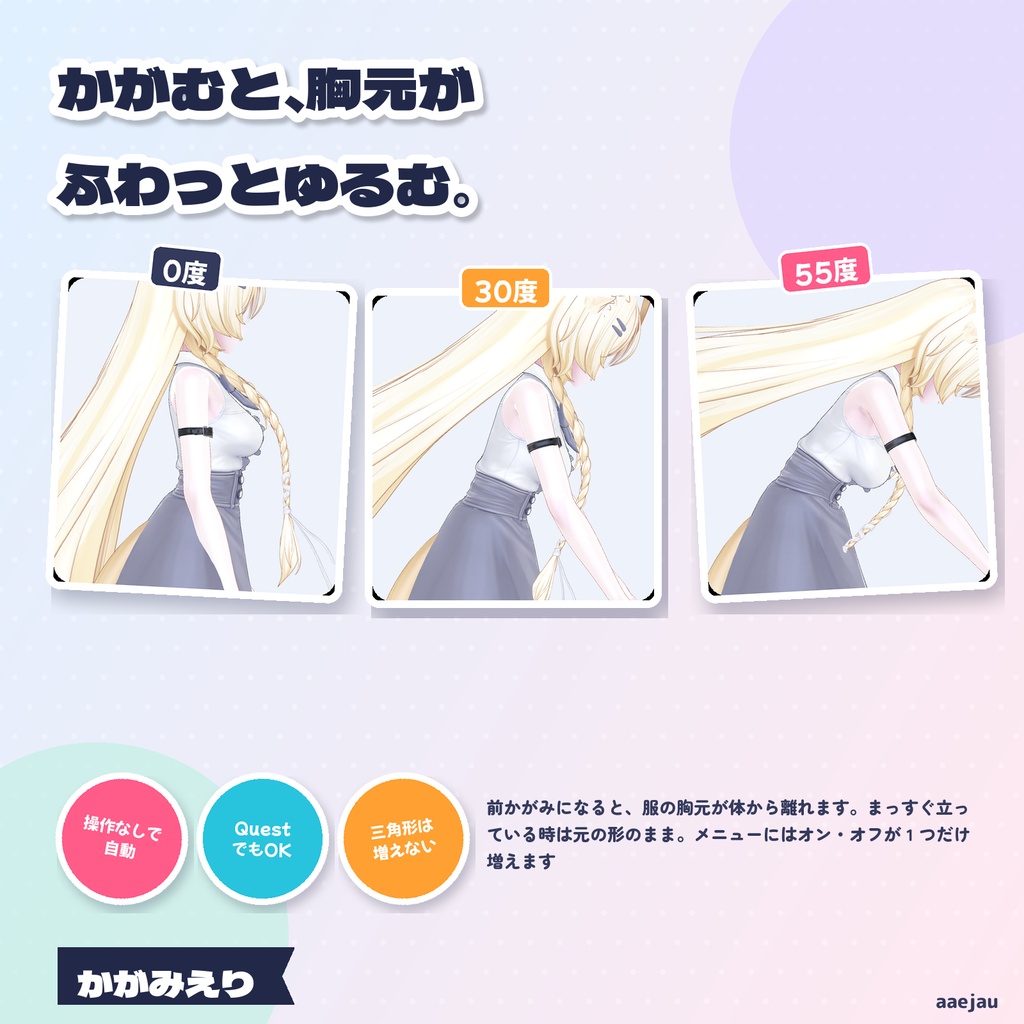
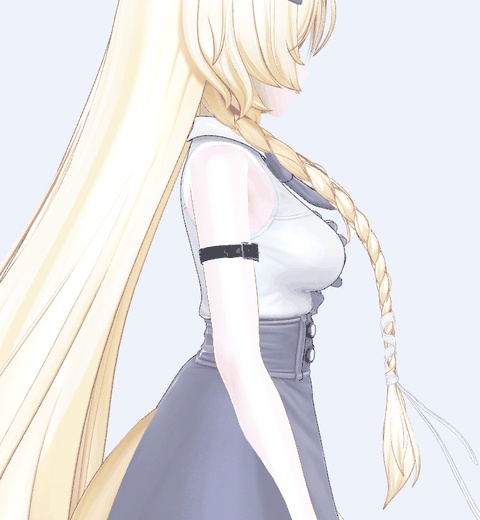
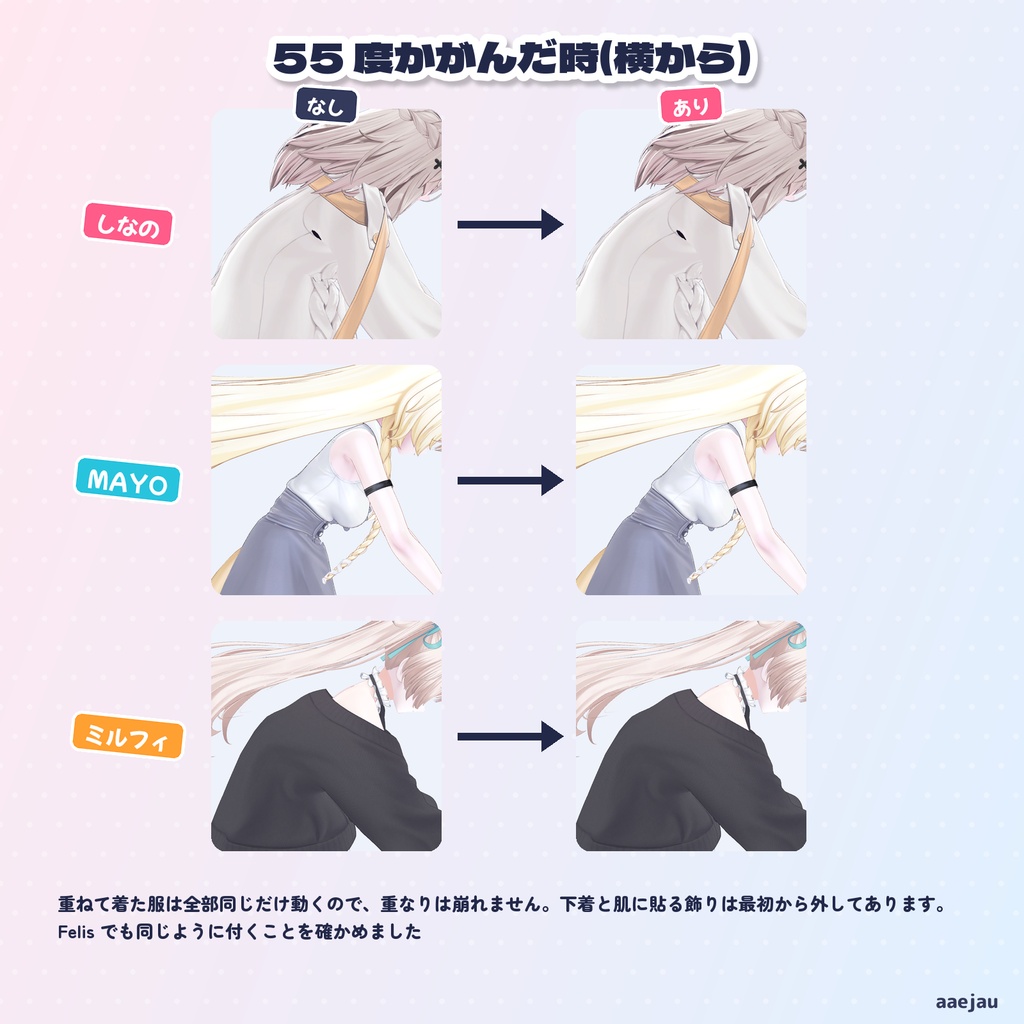
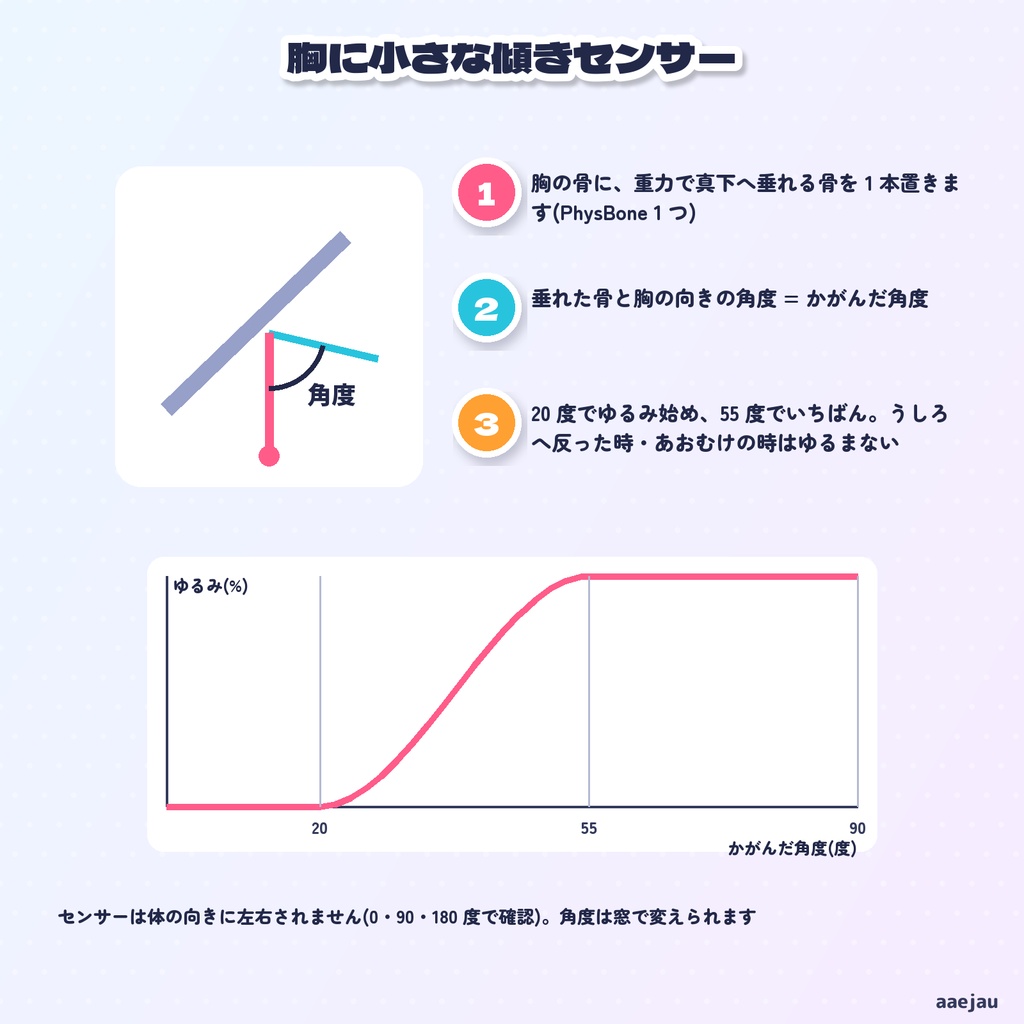
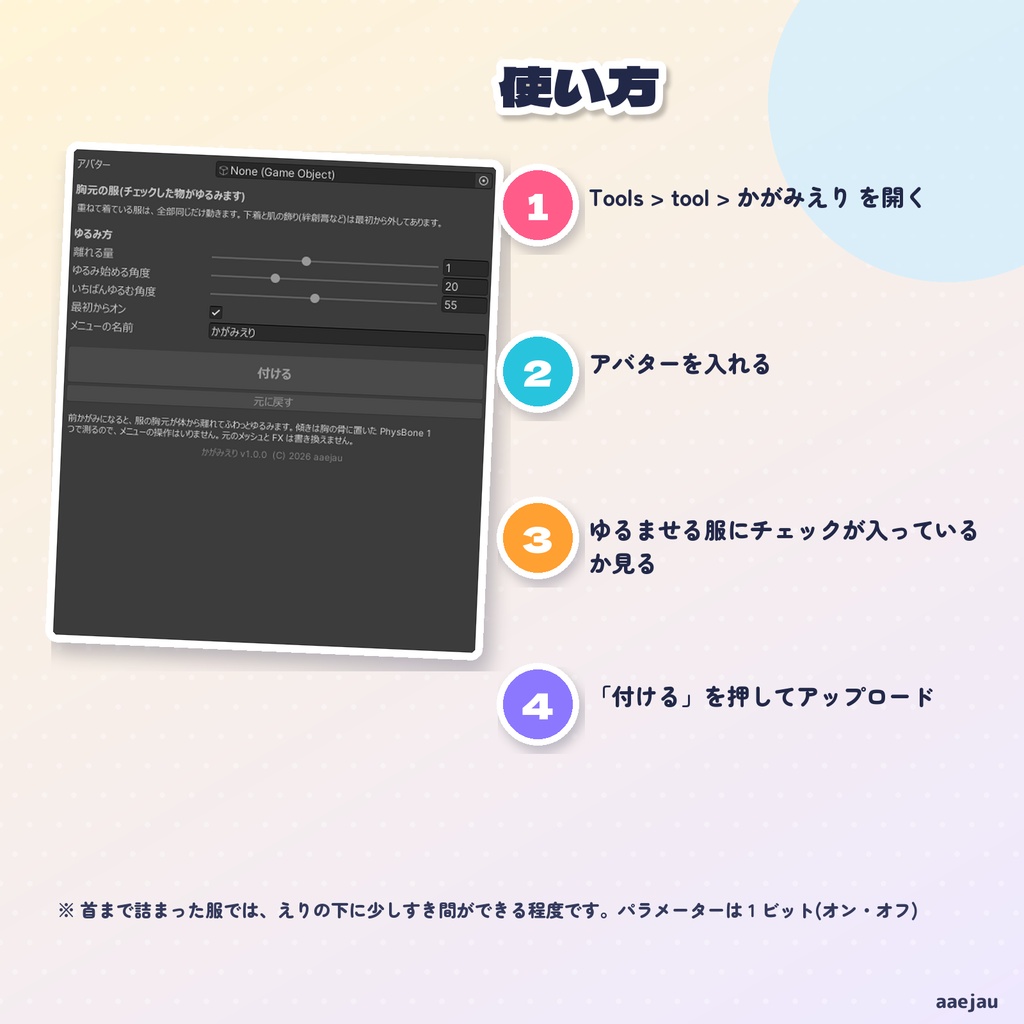
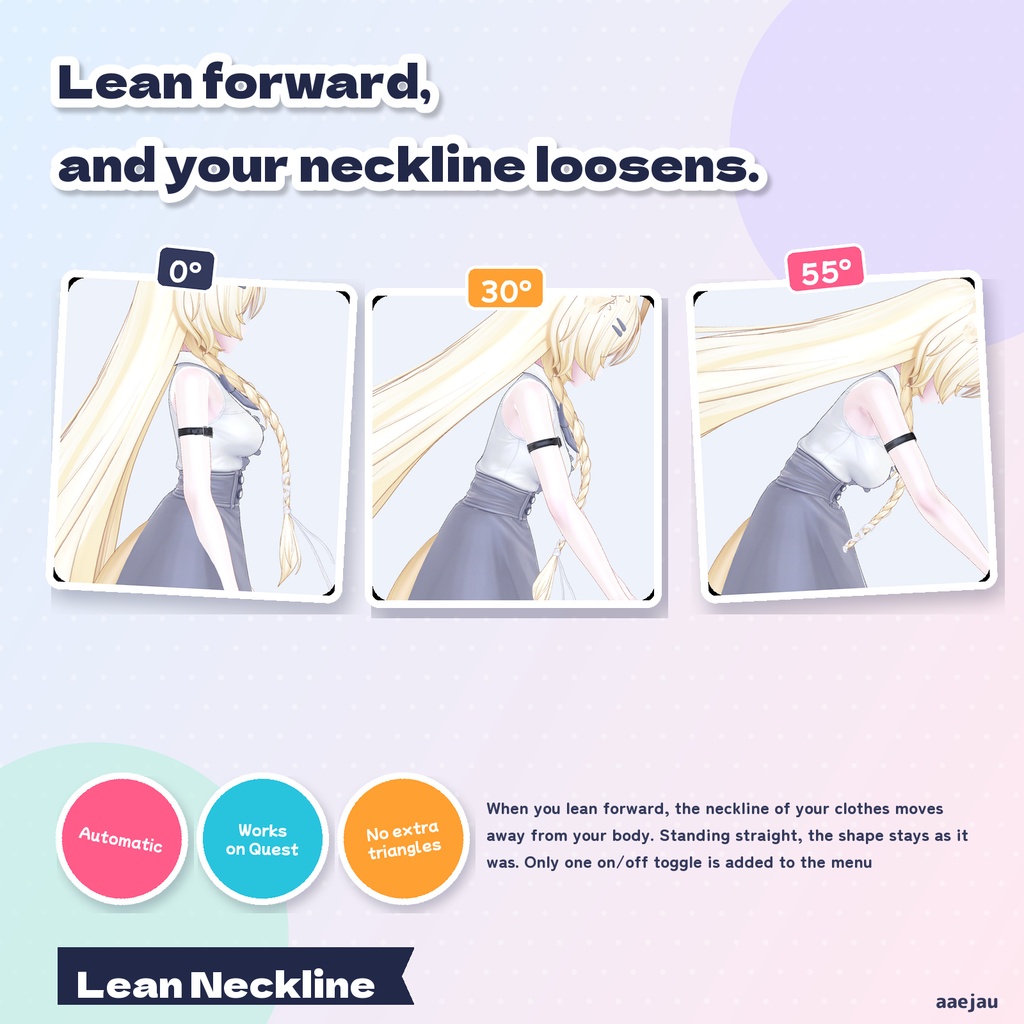
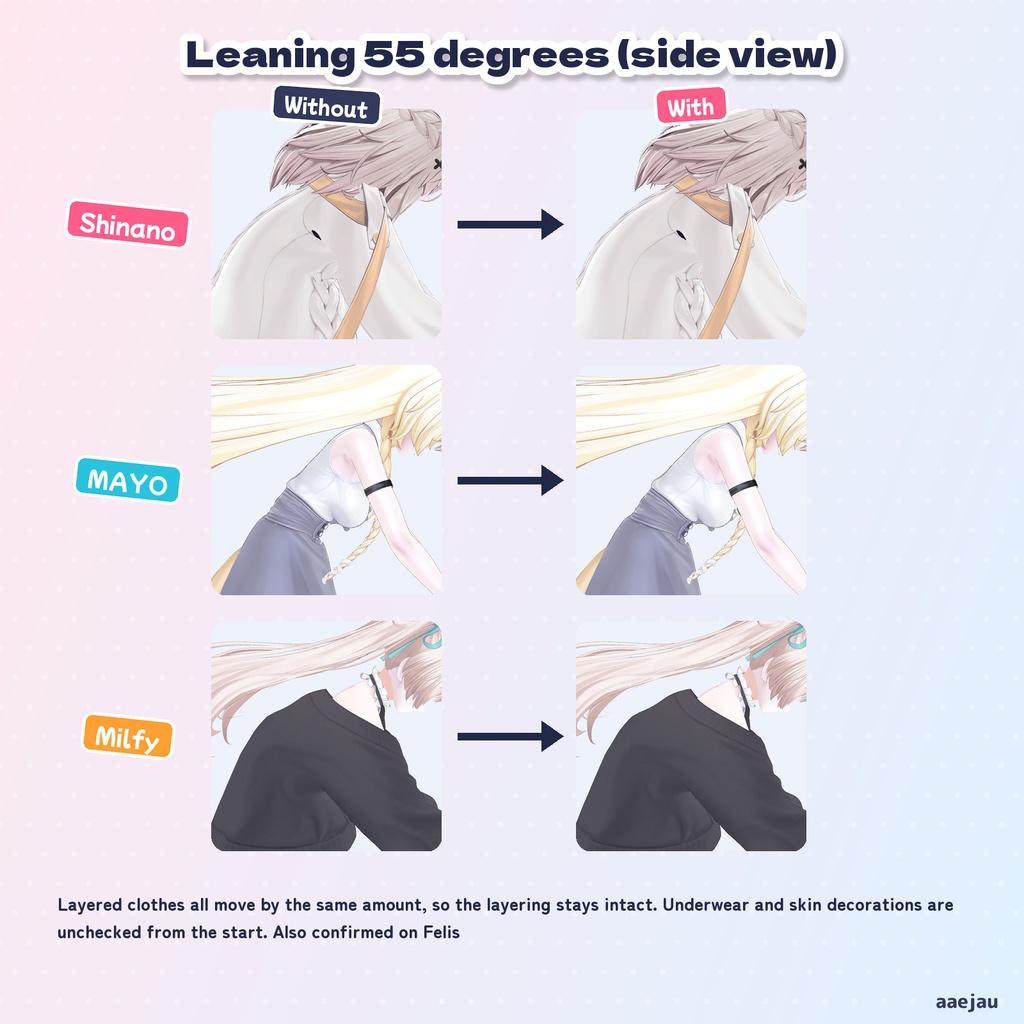
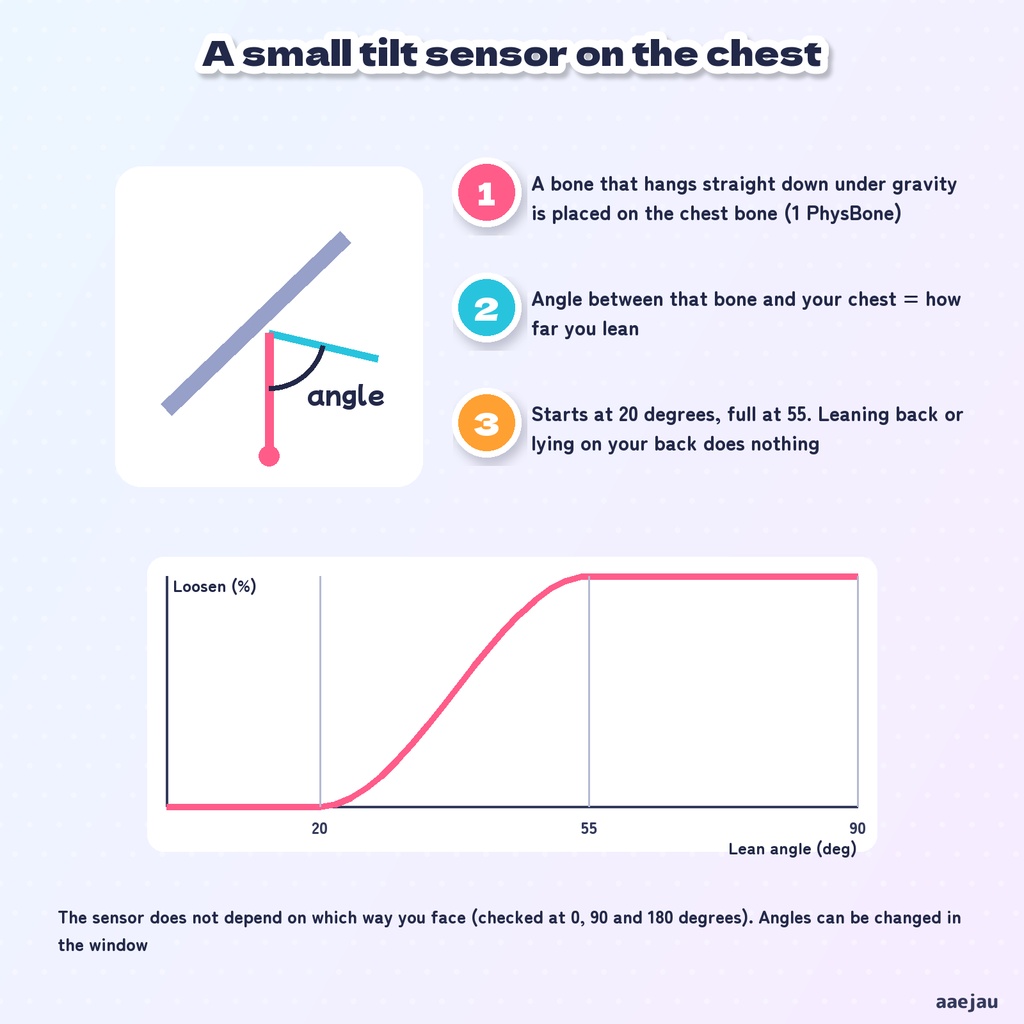
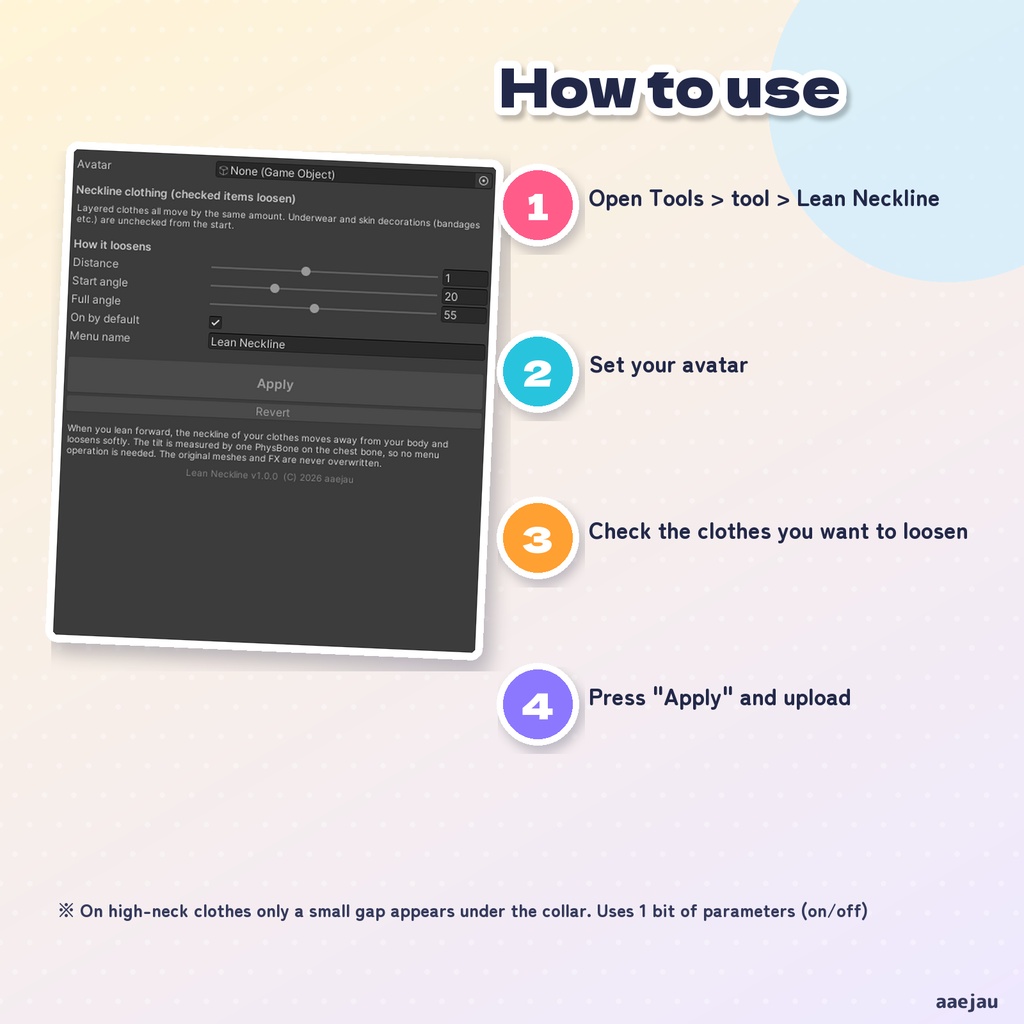
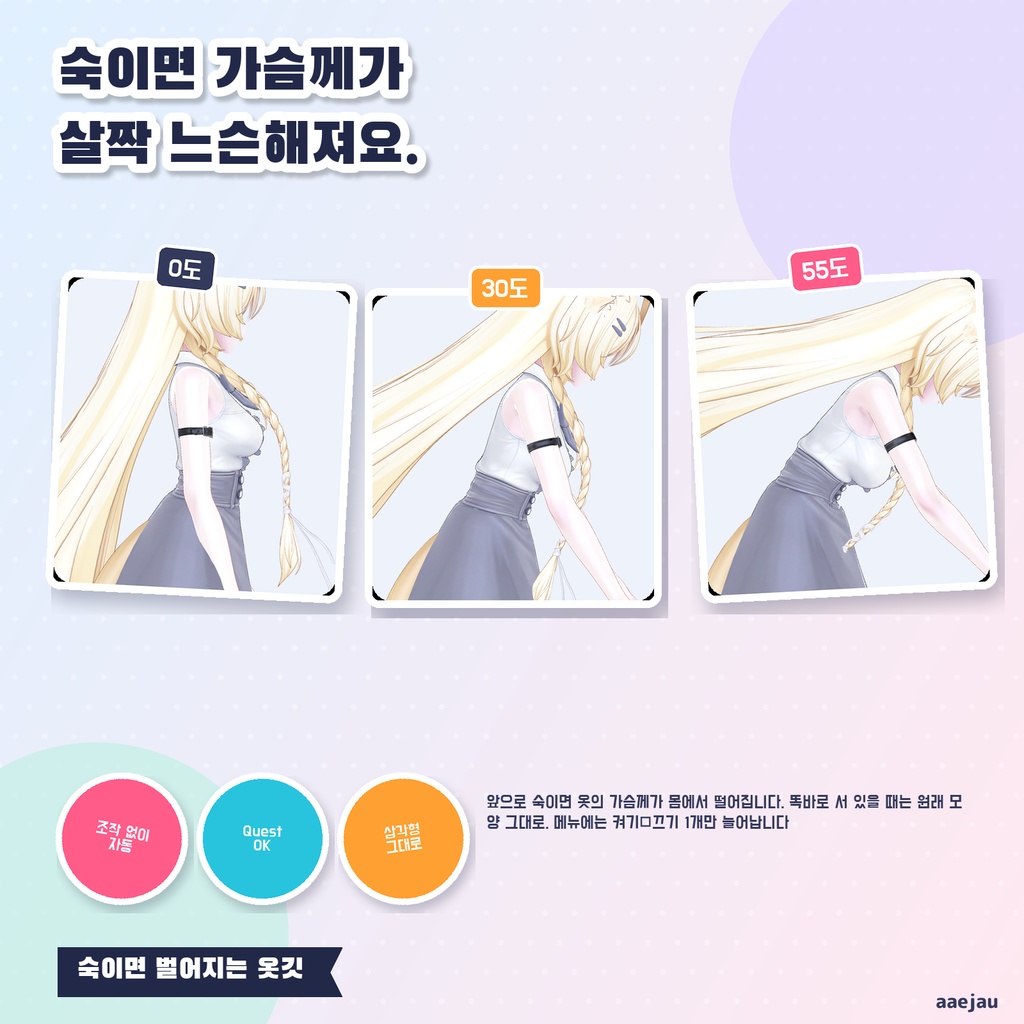
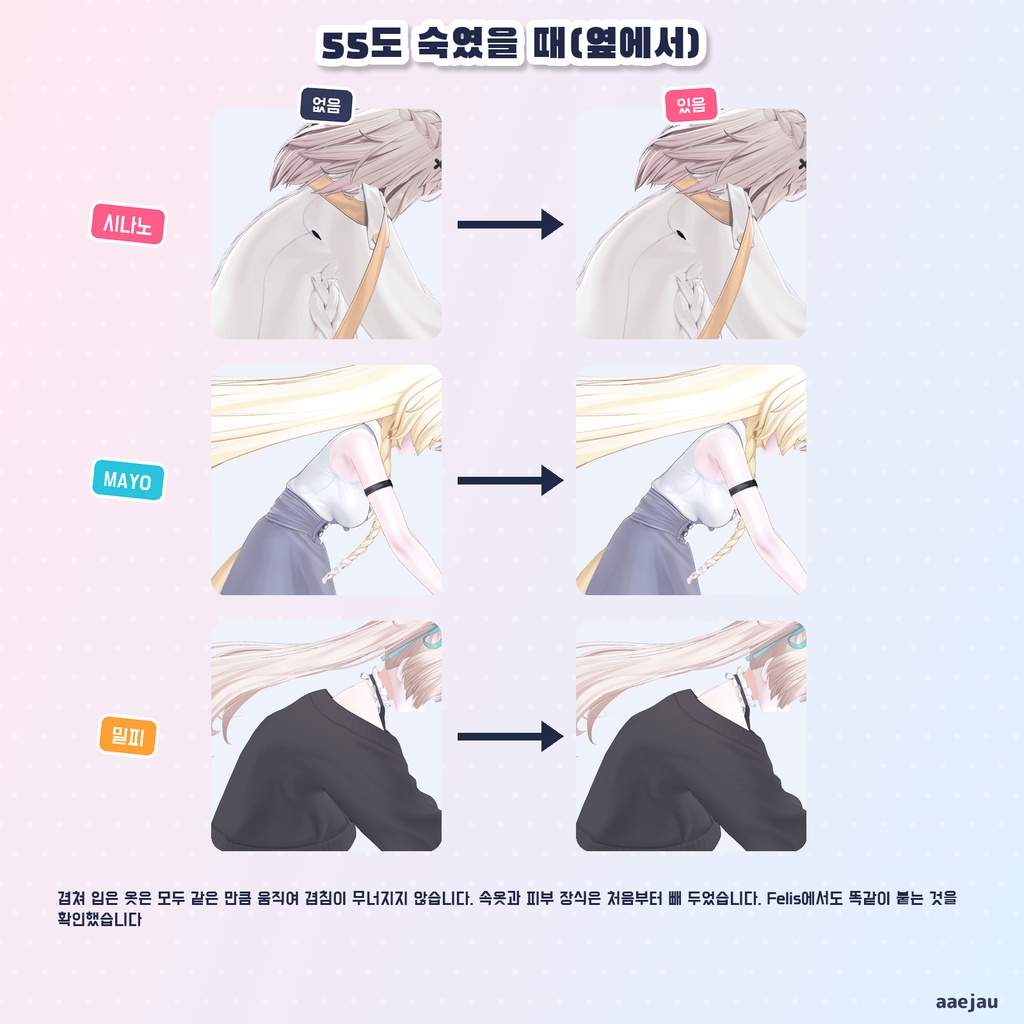
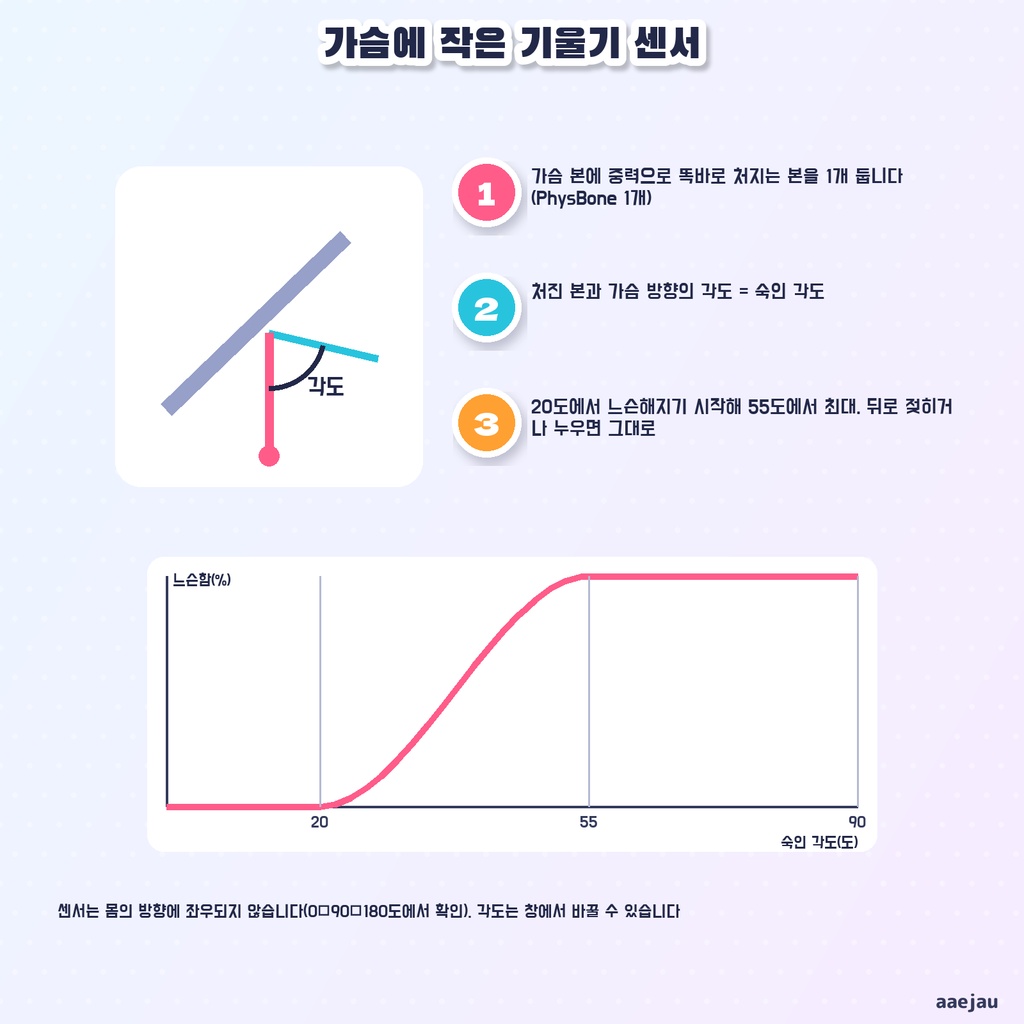
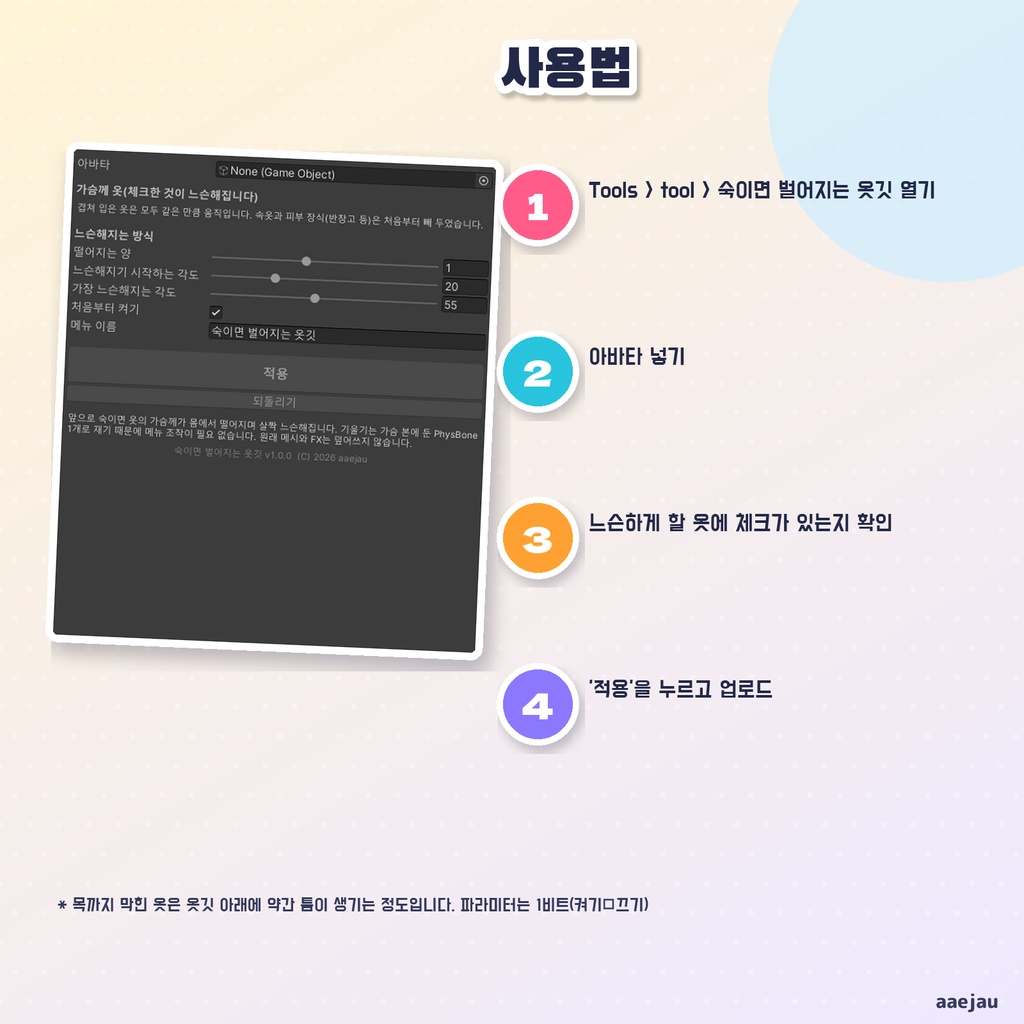


「かがんでも、服が体に貼りついたまま動かない」 かがみえりは、前かがみになると服の胸元が体から離れて、ふわっとゆるむようにする Unity Editor ツールです。メニューの操作はいりません。アバターを入れて「付ける」を押すだけで、シェイプキーもセンサーも FX のレイヤーも作ります。Blender は使いません。 ◆ 胸に小さな傾きセンサーを置きます 胸の骨に、重力で真下へ垂れる骨を 1 本置きます(PhysBone 1 つ)。垂れた骨と胸の向きの角度が、かがんだ角度です。体の向きには左右されません(0・90・180 度で確かめました)。 ◆ 20 度でゆるみ始め、55 度でいちばん まっすぐ立っている時と、うしろへ反った時、あおむけの時はゆるみません。始めといちばんの角度は窓で変えられます。 ◆ 動かすのは胸元の前だけです 胸のてっぺんから首の付け根までの前側を、体の前と少し下へ離します。背中・肩・首・胸の下は動かしません。首に巻くチョーカーやえりも動かしません。 ◆ 重ねて着た服は、全部同じだけ動きます 上着と中の服が同じだけ動くので、重なりは崩れません。下着と肌に貼る飾り(絆創膏など)は最初から外してあります。一覧のチェックで選び直せます。 ◆ 重くしません 服の複製にシェイプキーを 1 つ足すだけなので、三角形もマテリアルも増えません。PhysBone だけで測るので Quest 版でも動きます。使うパラメーターはオン・オフの 1 ビットです。Modular Avatar は使いません。 ◆ 元のファイルは書き換えません FX の複製とメッシュの複製を Assets/aaejau/KagamiEri/Generated/ に作ります。元のメッシュ・FX・メニューは書き換えません。「元に戻す」で付ける前に戻ります。 ◆ 使い方 1. メニューの Tools > tool > かがみえり を開く 2. 「アバター」にあなたのアバターを入れる 3. ゆるませる服にチェックが入っているか見る 4. 「付ける」を押して、アップロードする ◆ 4 体で確かめました しなの・MAYO・ミルフィ・Felis に付けました。4 体とも胸元の服を 2 つずつ選び、いちばん離れる所は 44〜49mm でした。付けただけでは頂点は 1 つも動きません。Unity の中で上体を 0〜75 度倒して、シェイプキーが角度どおりに動くことを確かめました。 ※ 首まで詰まった服では、えりの下に少しすき間ができる程度で、大きくは開きません ※ 服を前と少し下へ離すだけで、布のしわや垂れ方を計算するものではありません ※ 胸の前に服が無いアバターには付けられません ※ 体の傾きは素体の姿勢で数度ずれます(手元の 4 体で最大 7 度) ※ 胸の動きも付けたい時は、別売りの「おもみむね」と一緒に使えます 内容物: unitypackage / README / CHANGELOG / TEST_REPORT / LICENSE / 画面のスクリーンショット ━━━━━━━━━━━━━━━━━━━━ English ━━━━━━━━━━━━━━━━━━━━ "I lean forward, and my clothes stay glued to my body." Lean Neckline is a Unity Editor tool that makes the neckline of your clothes move away from your body and loosen softly when you lean forward. No menu operation is needed. Just set your avatar and press "Apply" - the shape key, sensor and FX layer are made for you. No Blender. ◆ A small tilt sensor on the chest A bone that hangs straight down under gravity is placed on the chest bone (1 PhysBone). The angle between it and your chest is how far you lean. It does not depend on which way you face (checked at 0, 90 and 180 degrees). ◆ Starts at 20 degrees, full at 55 Nothing happens while standing straight, leaning back or lying on your back. Both angles can be changed in the window. ◆ Only the front of the neckline moves The front between the top of the bust and the base of the neck moves forward and a little down. The back, shoulders, neck and the area under the bust do not move, and neither do chokers or collars. ◆ Layered clothes move together Outer and inner clothes move by the same amount, so the layering stays intact. Underwear and skin decorations are unchecked from the start. ◆ Light One shape key on a copy of the clothing mesh: no extra triangles or materials. PhysBone only, so it works on Quest. 1 bit of parameters (on/off). No Modular Avatar needed. Original meshes, FX and menu are never overwritten; "Revert" puts everything back. ◆ How to use 1. Open Tools > tool > Lean Neckline 2. Set your avatar in "Avatar" 3. Check the clothes you want to loosen 4. Press "Apply" and upload * On high-neck clothes only a small gap appears under the collar * It does not simulate cloth wrinkles or draping * It cannot be applied to avatars with nothing over the chest ━━━━━━━━━━━━━━━━━━━━ 한국어 ━━━━━━━━━━━━━━━━━━━━ "숙여도 옷이 몸에 딱 붙은 채로 움직이지 않는다" 숙이면 벌어지는 옷깃은 앞으로 숙이면 옷의 가슴께가 몸에서 떨어지며 살짝 느슨해지게 하는 Unity Editor 툴입니다. 메뉴 조작은 필요 없습니다. 아바타를 넣고 '적용'을 누르기만 하면 셰이프 키도 센서도 FX 레이어도 만들어 줍니다. Blender는 쓰지 않습니다. ◆ 가슴에 작은 기울기 센서 가슴 본에 중력으로 똑바로 처지는 본을 1개 둡니다(PhysBone 1개). 처진 본과 가슴 방향의 각도가 숙인 각도입니다. 몸의 방향에는 좌우되지 않습니다. ◆ 20도에서 시작해 55도에서 최대 똑바로 서 있을 때, 뒤로 젖힐 때, 누웠을 때는 느슨해지지 않습니다. 각도는 창에서 바꿀 수 있습니다. ◆ 가벼움 옷 복제에 셰이프 키 1개를 더할 뿐이라 삼각형도 머티리얼도 늘지 않습니다. PhysBone만 쓰므로 Quest에서도 움직입니다. 파라미터는 1비트. 원래 메시·FX·메뉴는 덮어쓰지 않고 '되돌리기'로 원래대로 돌아갑니다. ◆ 사용법 1. Tools > tool > 숙이면 벌어지는 옷깃 열기 2. '아바타'에 내 아바타 넣기 3. 느슨하게 할 옷에 체크가 있는지 확인 4. '적용'을 누르고 업로드 * 목까지 막힌 옷은 옷깃 아래에 약간 틈이 생기는 정도입니다 * 천의 주름이나 처짐을 계산하는 것은 아닙니다
