

かちこち石像 - トグルひとつで、足元から石になって固まる【JA,EN,KO】
- 日本語ダウンロード商品¥ 700
- Englishダウンロード商品¥ 700
- 한국어ダウンロード商品¥ 700
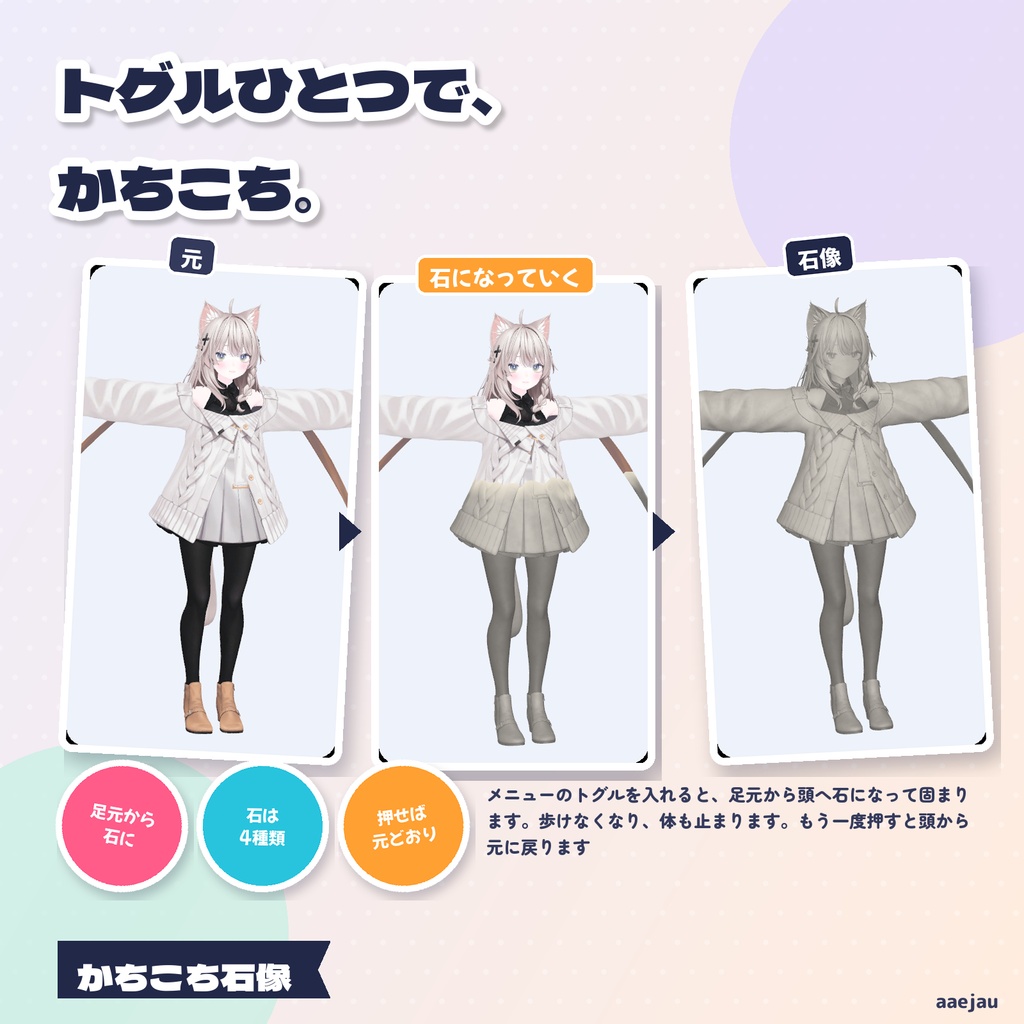
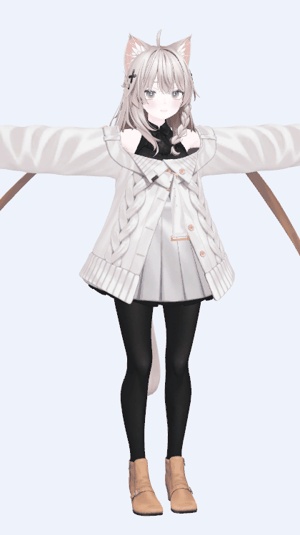
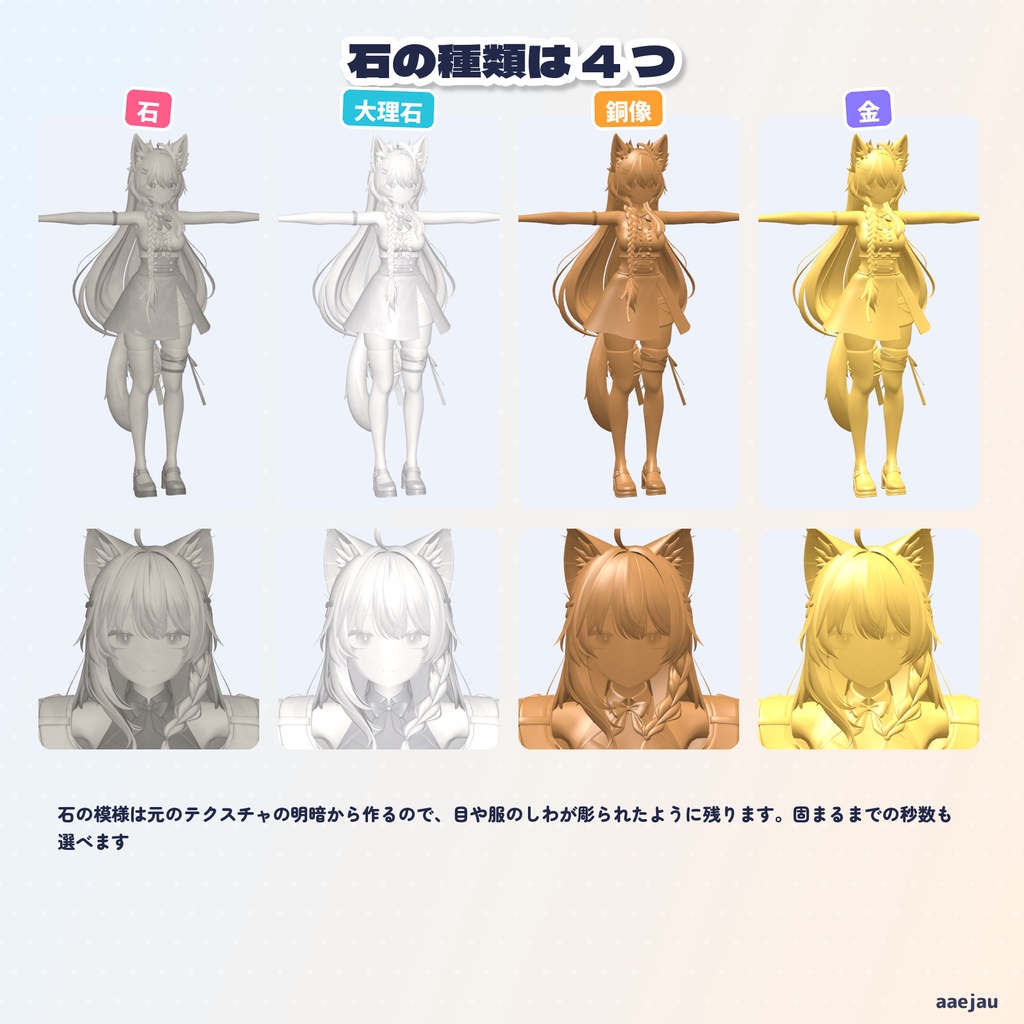
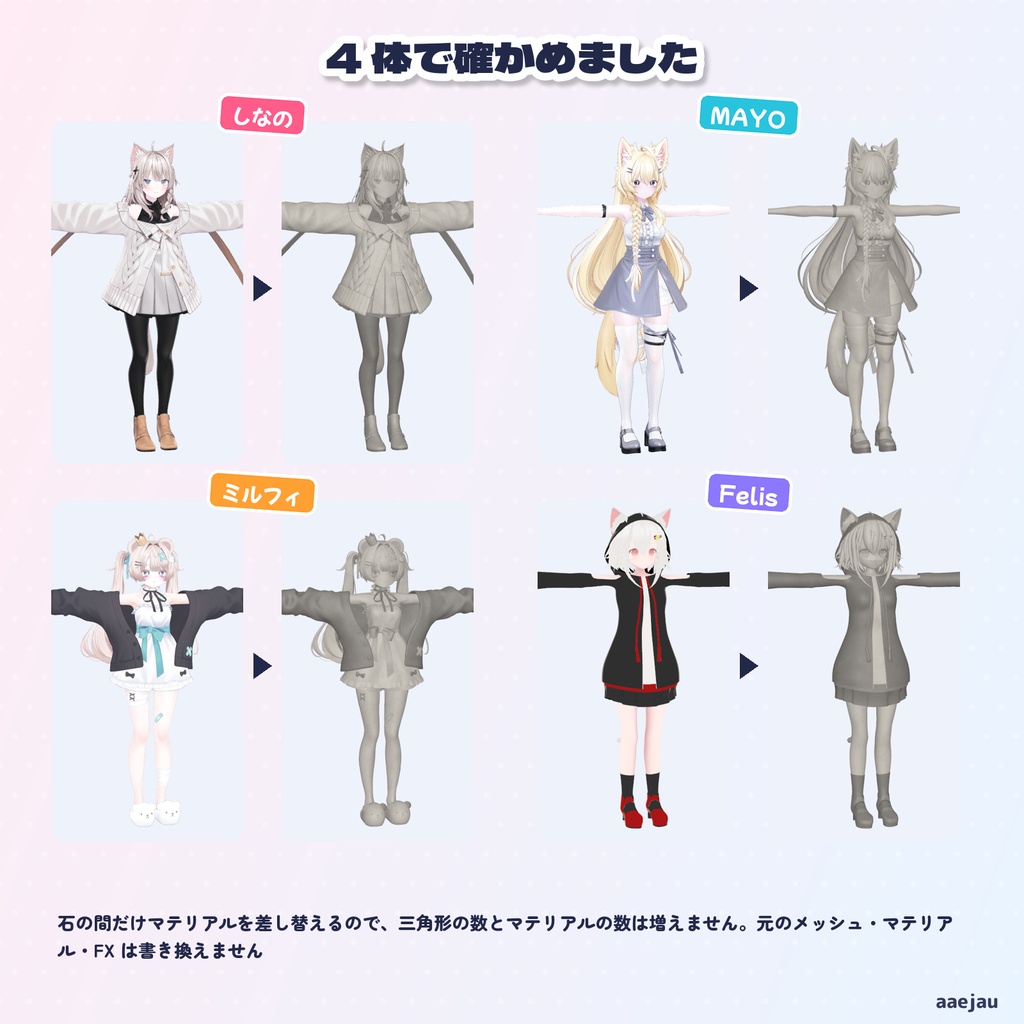
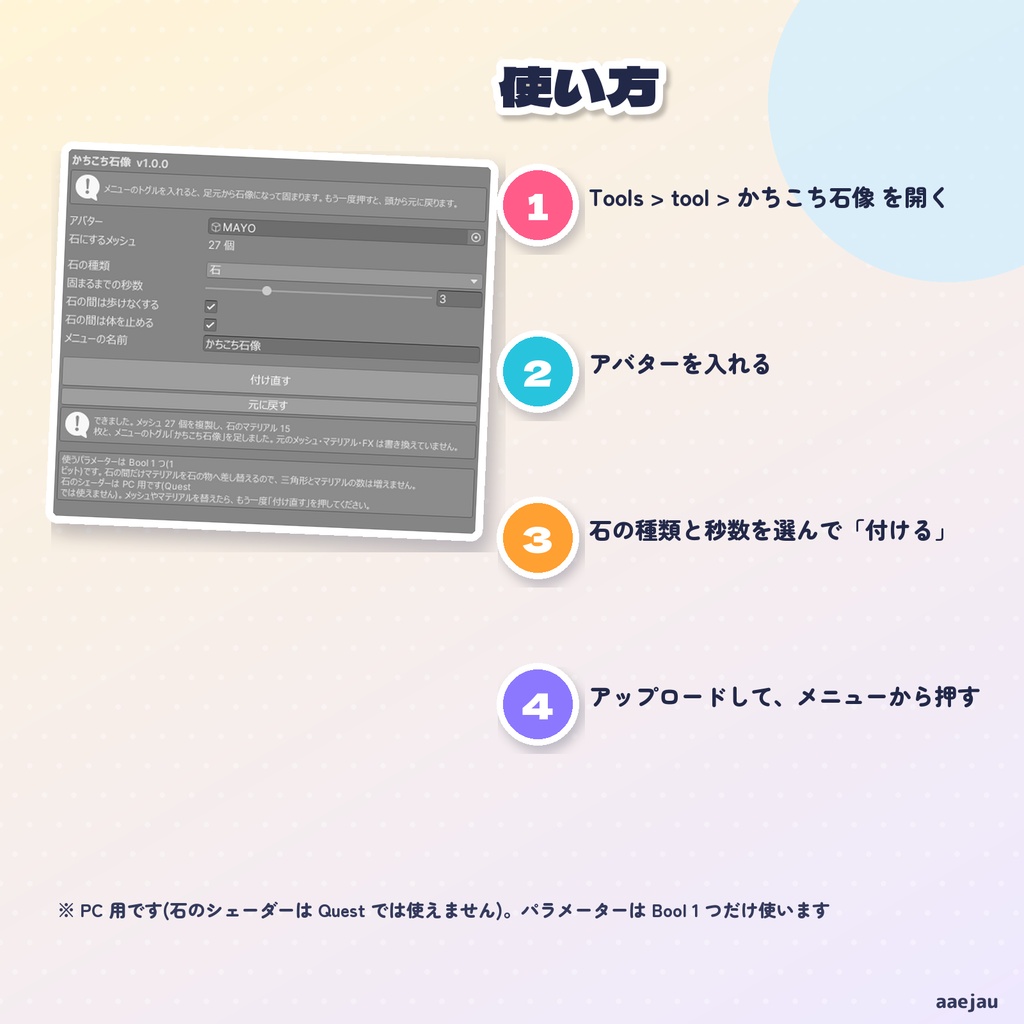
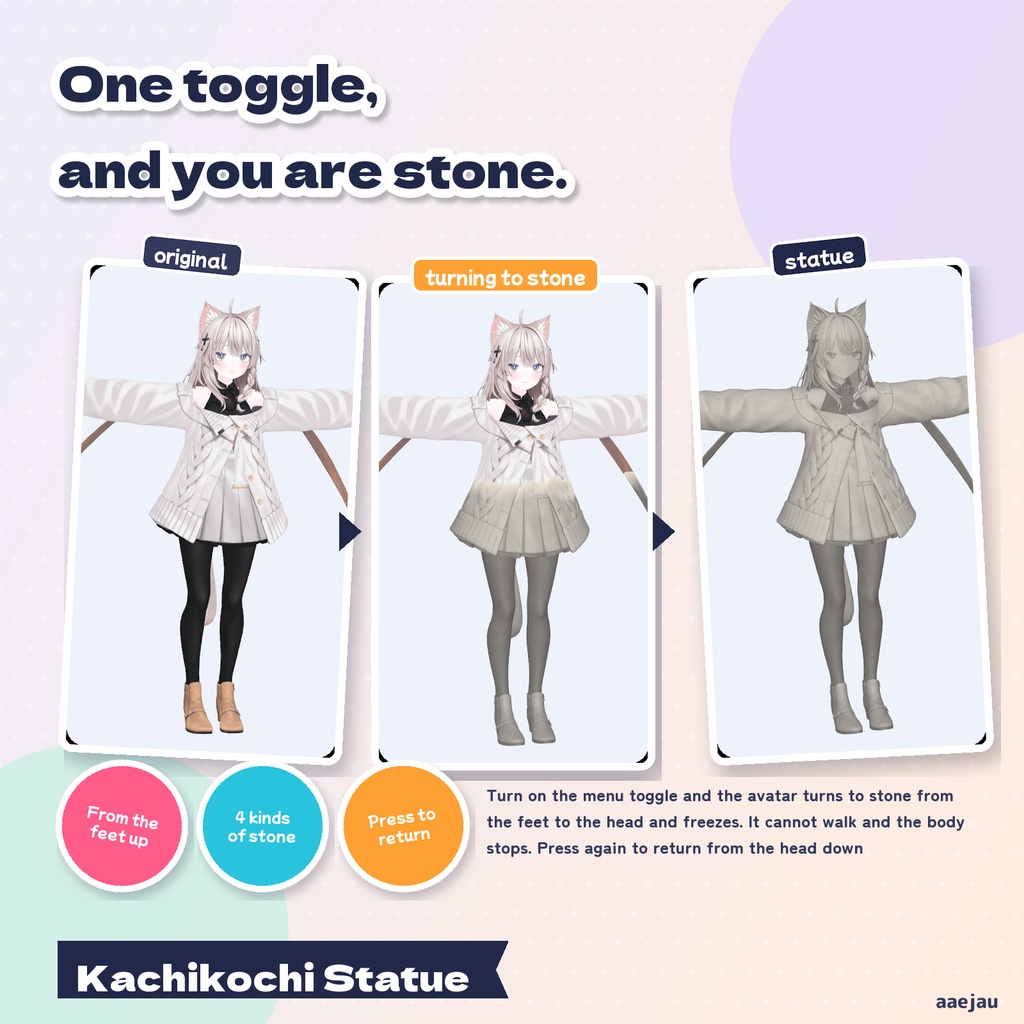
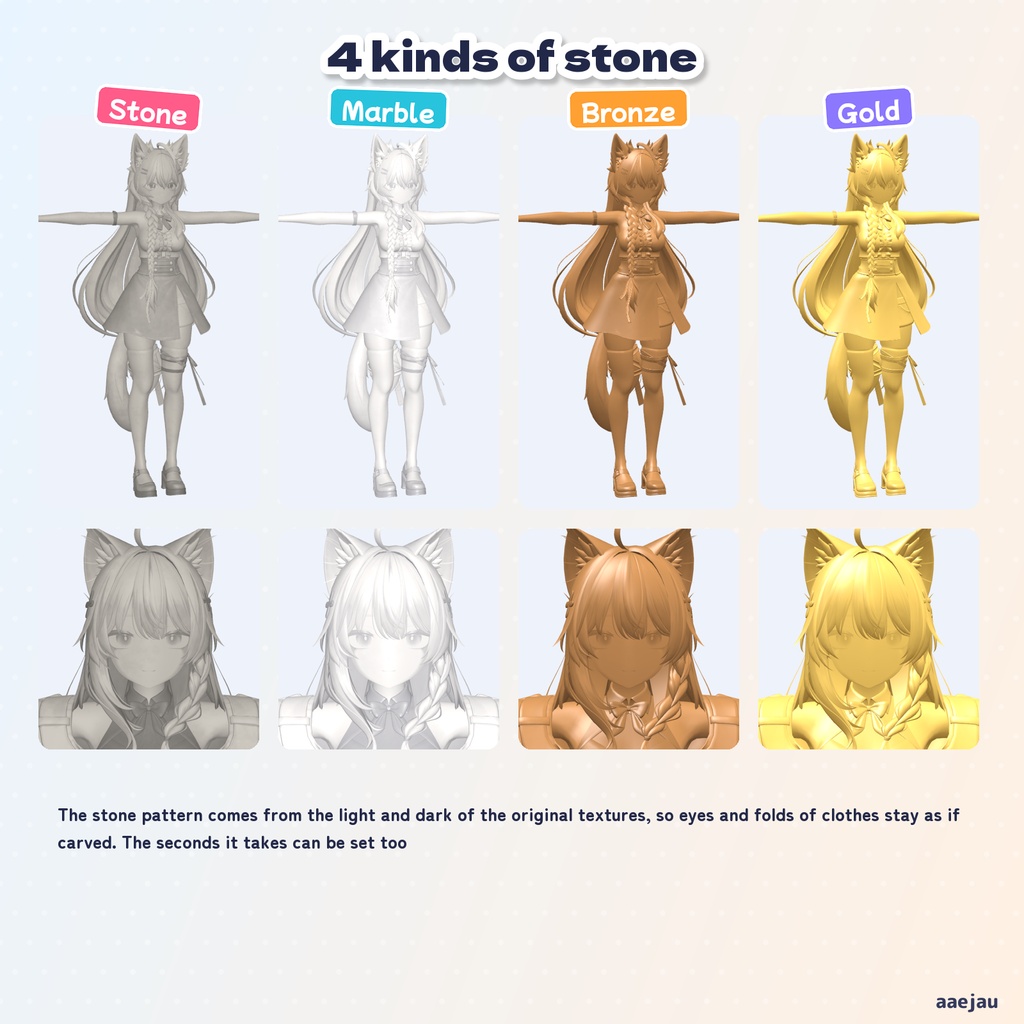
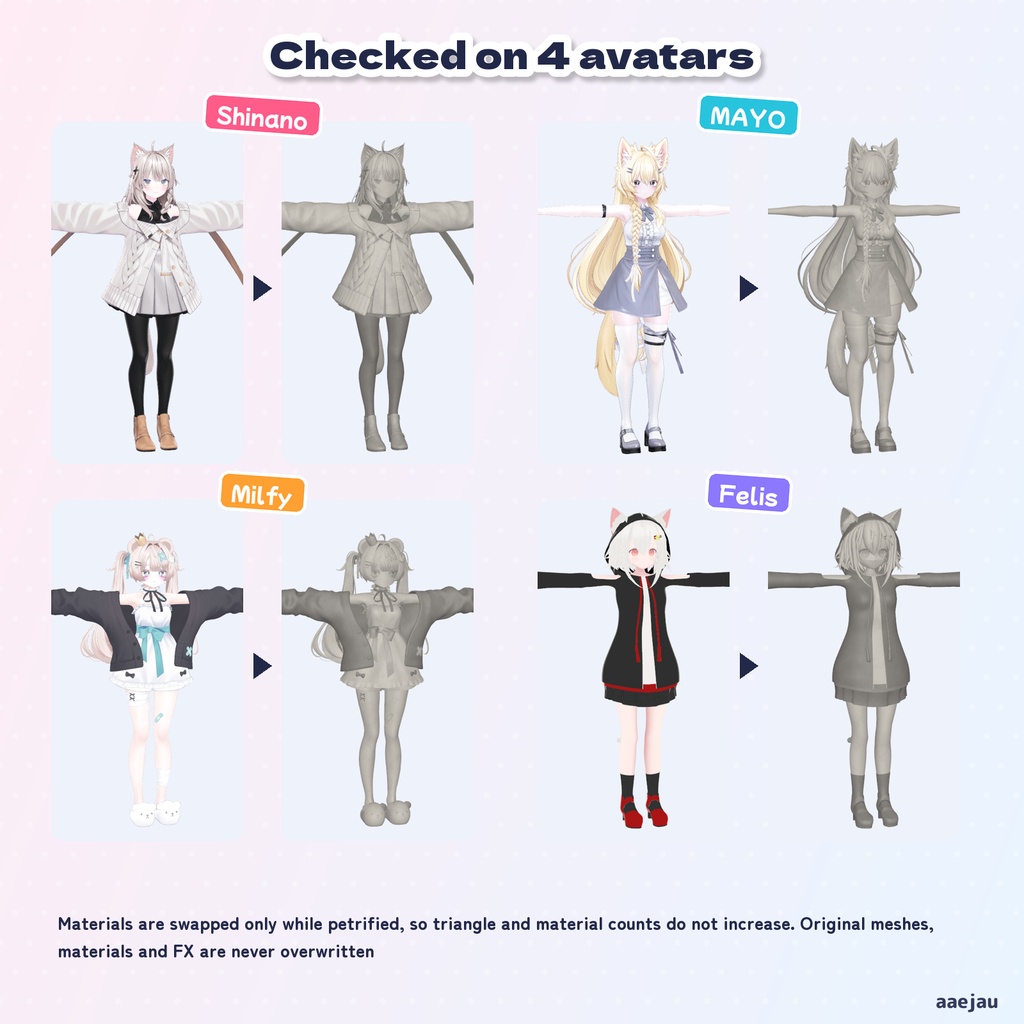
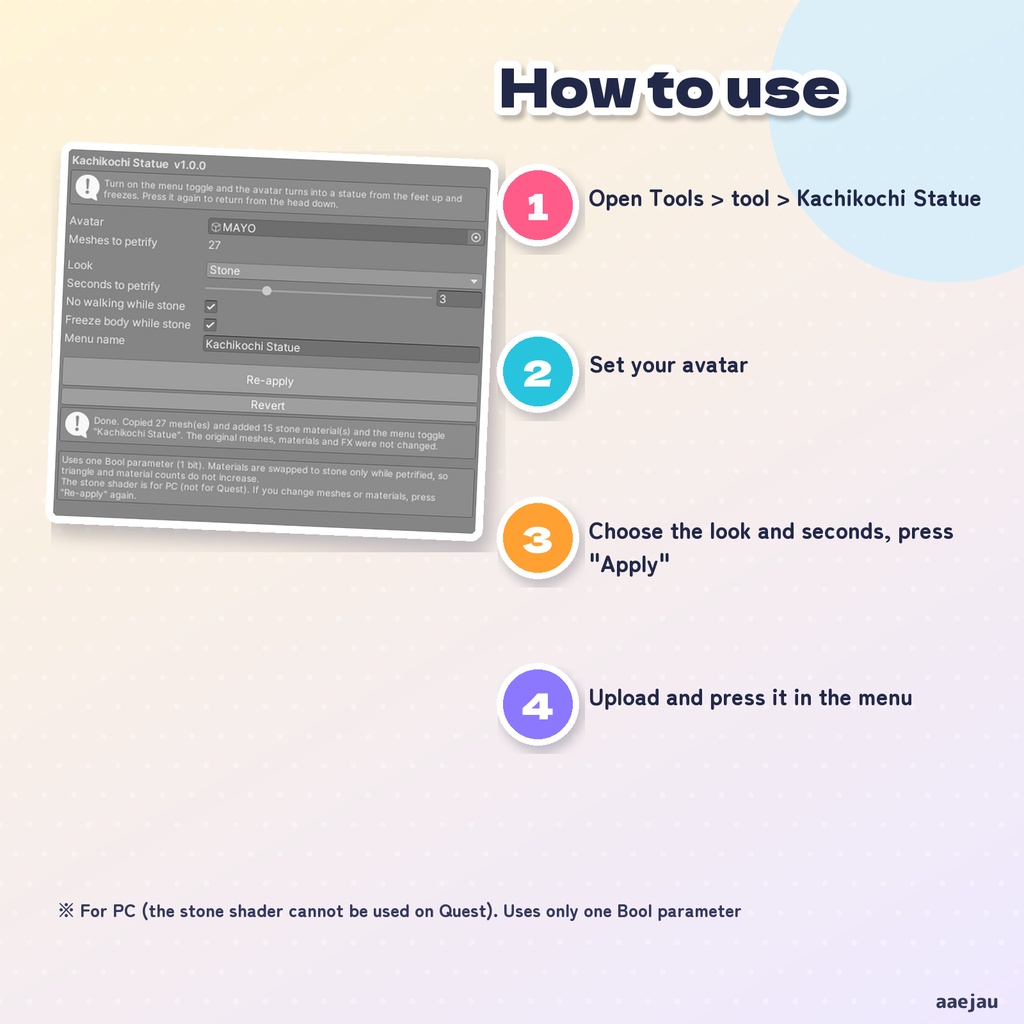
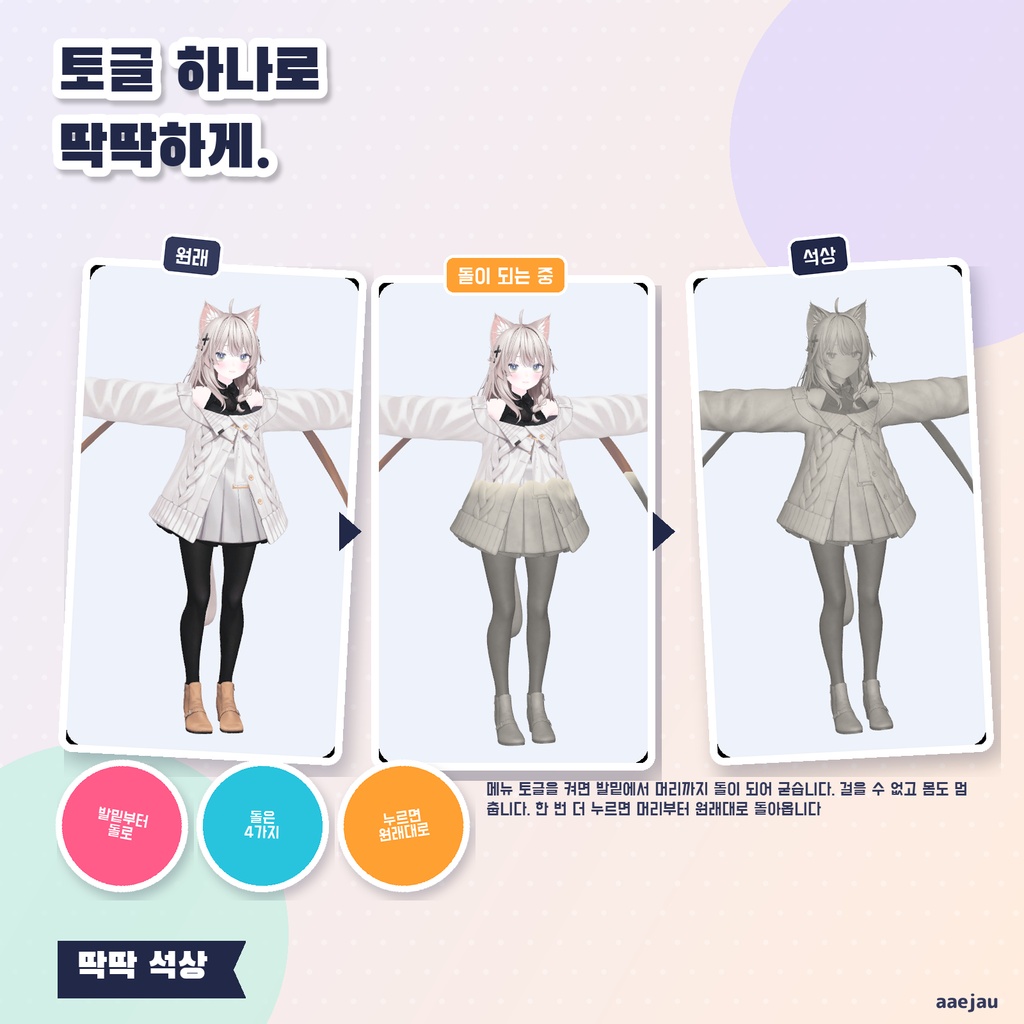
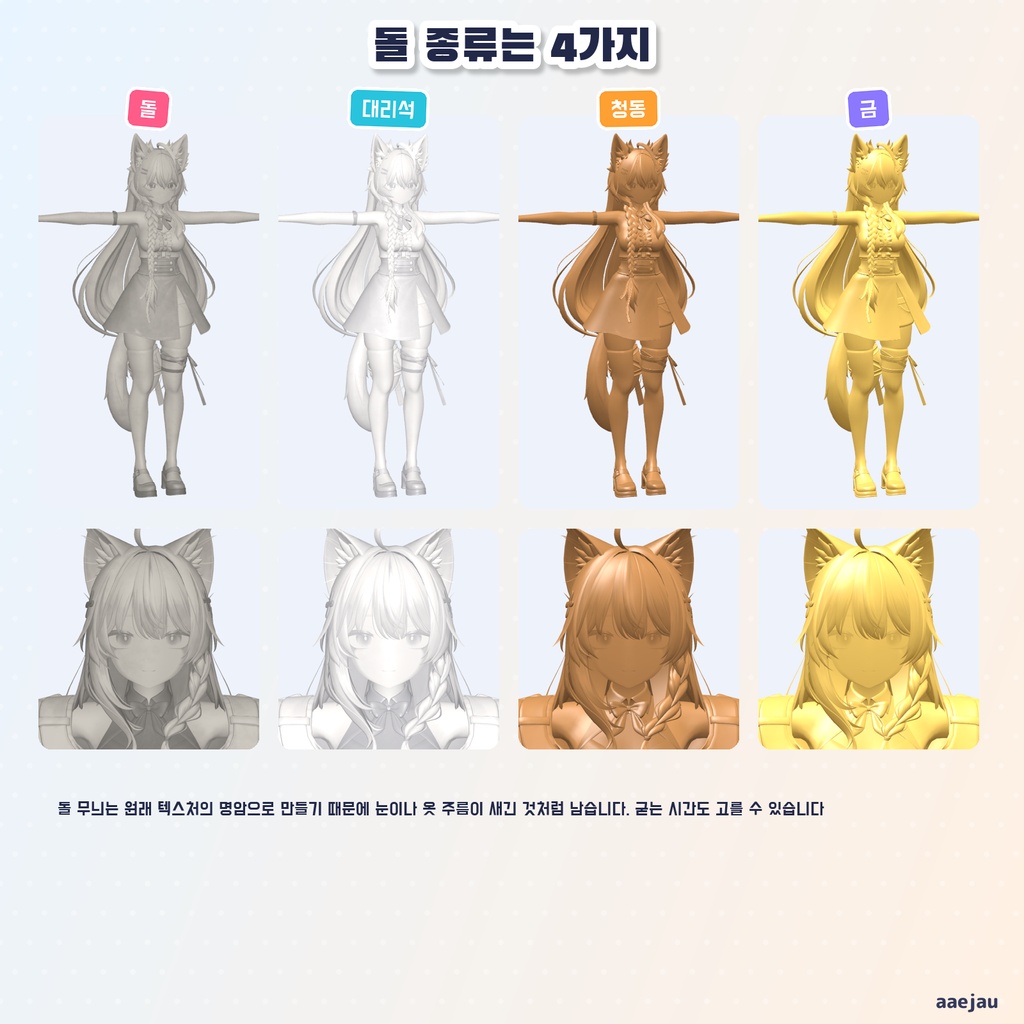
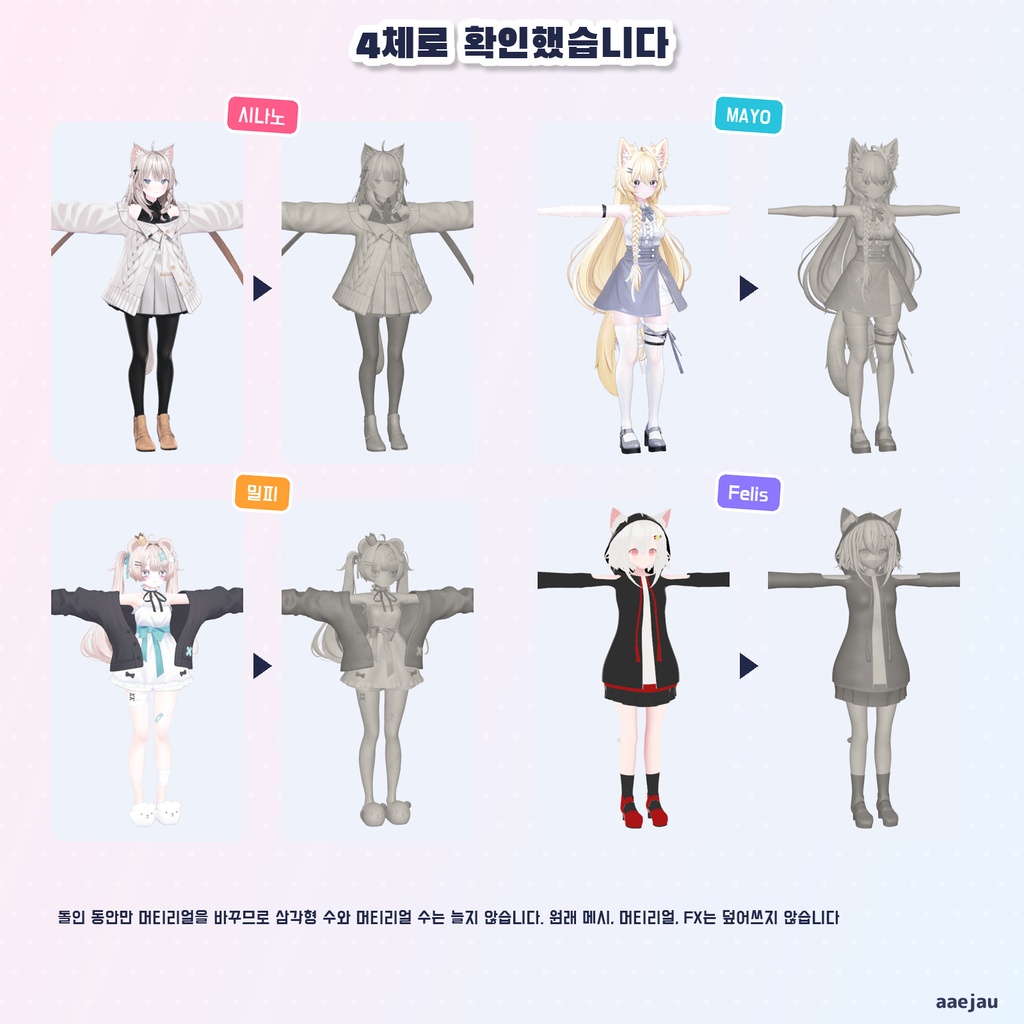
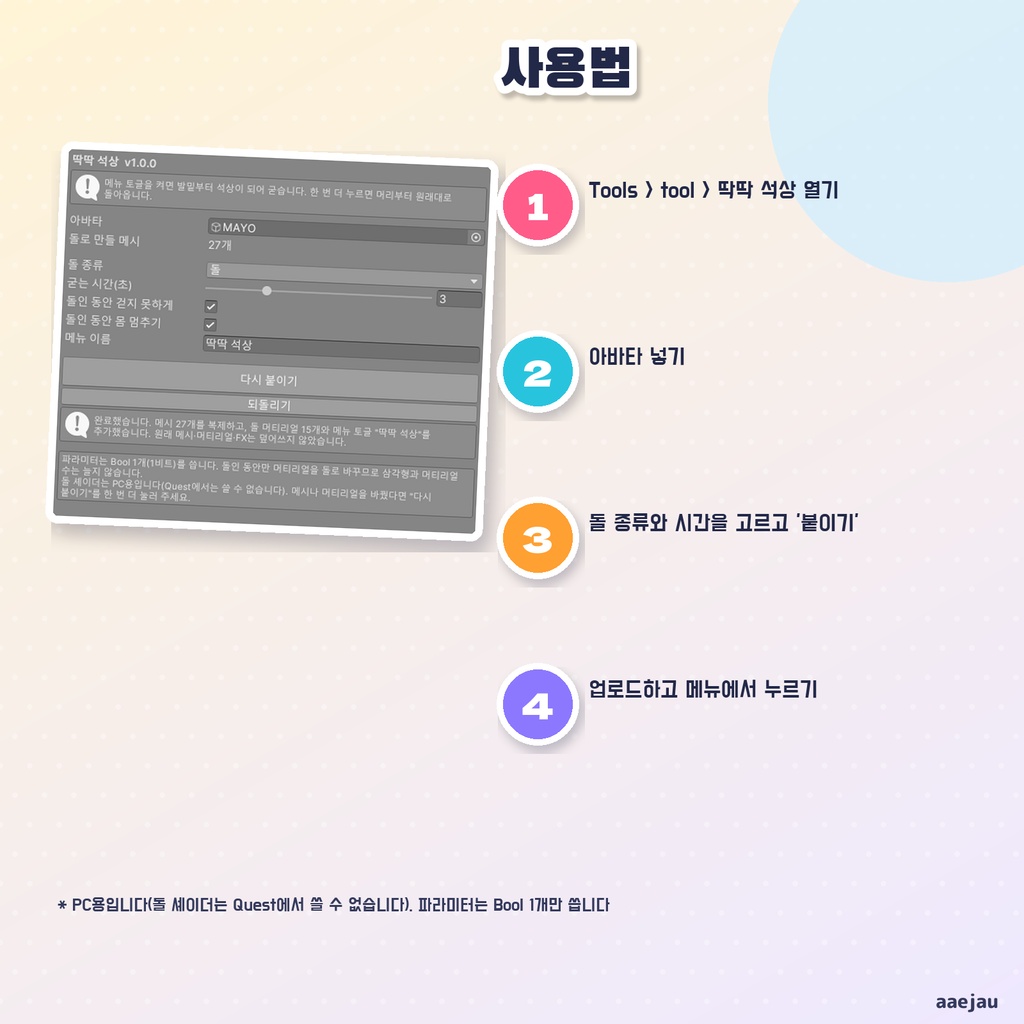


「トグルを押したら、足元からじわじわ石になって、そのまま動けなくなる」 かちこち石像は、あなたのアバターに石化のギミックを付ける Unity Editor ツールです。メニューのトグルを入れると、足元から頭へ向かってアバター全体が石になっていき、石になり終わると歩けなくなって体も止まります。もう一度押すと、頭から足元へ向かって元に戻ります。アバターを入れて「付ける」を押すだけで、アニメーションもメニューも作ります。 ◆ 足元から、じわじわ石に 石と元の境目が、足元から頭へ上がっていきます。境目は少し波打たせ、なりかけの所を明るい帯にしています。固まるまでの秒数は 0.5〜10 秒で選べます(既定は 3 秒)。 ◆ 目や服のしわは、彫られたように残ります 石の模様は元のテクスチャの明暗から作るので、目・前髪・服のしわが石に彫られたように残ります。lilToon のメイン 2・メイン 3 に入った目や頬も拾います。 ◆ 石は 4 種類 石・大理石・銅像・金から選べます。 ◆ 固まったら動けない 石の間は歩けなくなり(Locomotion Control)、体も止まります(Tracking Control)。どちらも切れます。 ◆ 重くしません 石の間だけマテリアルを同梱の石のシェーダーへ差し替えるので、三角形の数とマテリアルのスロットの数は増えません。使うパラメーターは Bool 1 つ(1 ビット)です。 ◆ 元のファイルは書き換えません メッシュの複製・石のマテリアル・FX の複製を Assets/aaejau/KachiKochi/Generated/ に作ります。元のメッシュ・マテリアル・FX は書き換えません。「元に戻す」で付ける前に戻ります。 ◆ 使い方 1. メニューの Tools > tool > かちこち石像 を開く 2. 「アバター」にあなたのアバターを入れる 3. 石の種類と秒数を選んで「付ける」を押す 4. アップロードして、メニューの「かちこち石像」を押す ◆ 4 体で確かめました しなの・MAYO・ミルフィ・Felis に付けて、Unity の中で Animator を動かしました。4 体とも、トグルを入れると全部のマテリアル(10〜31 枠)が石になり、切ると全部元のマテリアルに戻りました。途中で切っても元に戻ります。Write Defaults が ON のアバターでも OFF のアバターでも同じでした。 ※ PC 用です。石のシェーダーは Quest 版のアバターには使えません ※ 石になり始めてから終わるまでの数秒間、まだ石でない所は元のテクスチャを素直な陰で描きます(リムライトや光る所などは出ません) ※ 「体を止める」は、その場の姿勢ではなく、立ちポーズで止まります ※ メッシュやマテリアルを替えたら、もう一度「付け直す」を押してください ※ アップロード時にメッシュをまとめる道具が UV7 を消すと、石になる順番と模様が崩れます 内容物: unitypackage / README / CHANGELOG / TEST_REPORT / LICENSE / 画面のスクリーンショット ━━━━━━━━━━━━━━━━━━━━ English ━━━━━━━━━━━━━━━━━━━━ "Press the toggle, turn slowly to stone from the feet up, and be unable to move." Kachikochi Statue is a Unity Editor tool that adds a petrification gimmick to your avatar. Turn on the menu toggle and the whole avatar turns to stone from the feet to the head; once it is stone, it cannot walk and the body stops. Press it again and it returns from the head down. Just set your avatar and press "Apply" - the animations and the menu are made for you. ◆ Slowly to stone, from the feet up The border between stone and the original rises from the feet to the head. The border is slightly wavy and the part turning to stone glows as a light band. The time it takes can be set from 0.5 to 10 seconds (3 seconds by default). ◆ Eyes and folds of clothes stay as if carved The stone pattern comes from the light and dark of the original textures, so eyes, bangs and folds of clothes stay as if carved in stone. Eyes and cheeks in lilToon Main 2nd / 3rd are included. ◆ 4 kinds of stone Choose from Stone, Marble, Bronze and Gold. ◆ Frozen once it is stone While stone, walking is disabled (Locomotion Control) and the body stops (Tracking Control). Both can be turned off. ◆ Not heavier Materials are swapped to the included stone shader only while petrified, so triangle and material slot counts do not increase. It uses one Bool parameter (1 bit). ◆ Original files are never overwritten Copied meshes, stone materials and the copied FX are created in Assets/aaejau/KachiKochi/Generated/. The original meshes, materials and FX are not changed. "Revert" puts everything back. ◆ How to use 1. Open Tools > tool > Kachikochi Statue 2. Set your avatar in "Avatar" 3. Choose the look and seconds, then press "Apply" 4. Upload, then press "Kachikochi Statue" in the menu ◆ Checked on 4 avatars Applied to Shinano, MAYO, Milfy and Felis and ran the Animator in Unity. On all 4, turning the toggle on made every material (10-31 slots) stone, and turning it off returned every slot to the original material. Turning it off midway also returns. The same with Write Defaults ON and OFF avatars. * For PC. The stone shader cannot be used on Quest avatars * During the few seconds of the change, parts not yet stone are drawn with the original texture and simple shading (no rim light or emission) * "Freeze body" stops in the standing pose, not in the pose you were in * If you change meshes or materials, press "Re-apply" again * If a build-time mesh tool removes UV7, the order and the pattern break Contents: unitypackage / README / CHANGELOG / TEST_REPORT / LICENSE / screenshot ━━━━━━━━━━━━━━━━━━━━ 한국어 ━━━━━━━━━━━━━━━━━━━━ "토글을 누르면 발밑부터 천천히 돌이 되어 그대로 움직일 수 없게 된다" 딱딱 석상은 내 아바타에 석화 기믹을 붙이는 Unity Editor 도구입니다. 메뉴 토글을 켜면 발밑에서 머리를 향해 아바타 전체가 돌이 되어 가고, 다 굳으면 걸을 수 없고 몸도 멈춥니다. 한 번 더 누르면 머리에서 발밑을 향해 원래대로 돌아옵니다. 아바타를 넣고 붙이기를 누르기만 하면 애니메이션도 메뉴도 만들어 줍니다. ◆ 발밑부터 천천히 돌로 돌과 원래 모습의 경계가 발밑에서 머리로 올라갑니다. 경계는 살짝 물결치고, 돌이 되는 중인 곳은 밝은 띠로 빛납니다. 굳는 시간은 0.5~10초로 고를 수 있습니다(기본 3초). ◆ 눈이나 옷 주름은 새긴 것처럼 남습니다 돌 무늬는 원래 텍스처의 명암으로 만들기 때문에 눈·앞머리·옷 주름이 돌에 새긴 것처럼 남습니다. lilToon 메인 2·메인 3에 들어간 눈이나 볼도 담습니다. ◆ 돌은 4가지 돌·대리석·청동·금 중에서 고를 수 있습니다. ◆ 굳으면 움직일 수 없음 돌인 동안은 걸을 수 없고(Locomotion Control) 몸도 멈춥니다(Tracking Control). 둘 다 끌 수 있습니다. ◆ 무거워지지 않습니다 돌인 동안만 머티리얼을 함께 든 돌 셰이더로 바꾸므로 삼각형 수와 머티리얼 슬롯 수는 늘지 않습니다. 파라미터는 Bool 1개(1비트)를 씁니다. ◆ 원래 파일은 덮어쓰지 않습니다 메시 복제·돌 머티리얼·FX 복제를 Assets/aaejau/KachiKochi/Generated/ 에 만듭니다. 원래 메시·머티리얼·FX는 덮어쓰지 않습니다. 되돌리기로 붙이기 전으로 돌아갑니다. ◆ 사용법 1. Tools > tool > 딱딱 석상 열기 2. 아바타에 내 아바타 넣기 3. 돌 종류와 시간을 고르고 붙이기 누르기 4. 업로드한 뒤 메뉴의 딱딱 석상 누르기 ◆ 4체로 확인했습니다 시나노·MAYO·밀피·Felis에 붙여 Unity 안에서 Animator를 돌렸습니다. 4체 모두 토글을 켜면 모든 머티리얼(10~31칸)이 돌이 되고, 끄면 모두 원래 머티리얼로 돌아왔습니다. 도중에 꺼도 돌아옵니다. Write Defaults가 ON인 아바타도 OFF인 아바타도 같았습니다. * PC용입니다. 돌 셰이더는 Quest용 아바타에는 쓸 수 없습니다 * 돌이 되기 시작해서 끝날 때까지 몇 초 동안, 아직 돌이 아닌 곳은 원래 텍스처를 단순한 그림자로 그립니다(림라이트나 발광 등은 나오지 않습니다) * 몸 멈추기는 그 자리의 자세가 아니라 서 있는 자세로 멈춥니다 * 메시나 머티리얼을 바꿨다면 다시 붙이기를 한 번 더 눌러 주세요 * 업로드할 때 메시를 정리하는 도구가 UV7을 지우면 굳는 순서와 무늬가 깨집니다 내용물: unitypackage / README / CHANGELOG / TEST_REPORT / LICENSE / 스크린샷