

ぬれ肌 - 汗のつぶとすじをアバターのUVに合わせて焼くUnityツール【VRChat】【JA,EN,KO】
- 日本語ダウンロード商品¥ 700
- Englishダウンロード商品¥ 700
- 한국어ダウンロード商品¥ 700
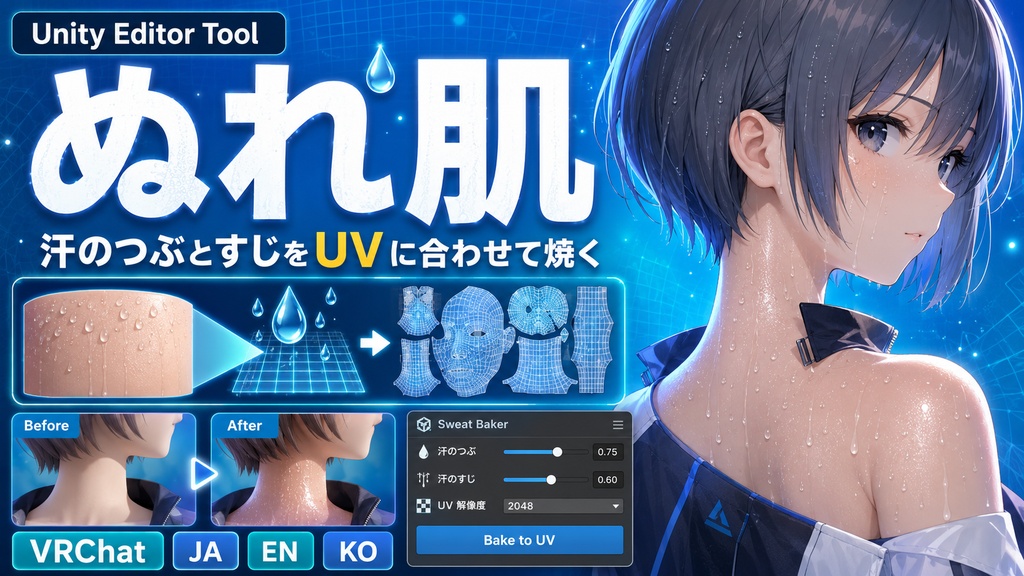
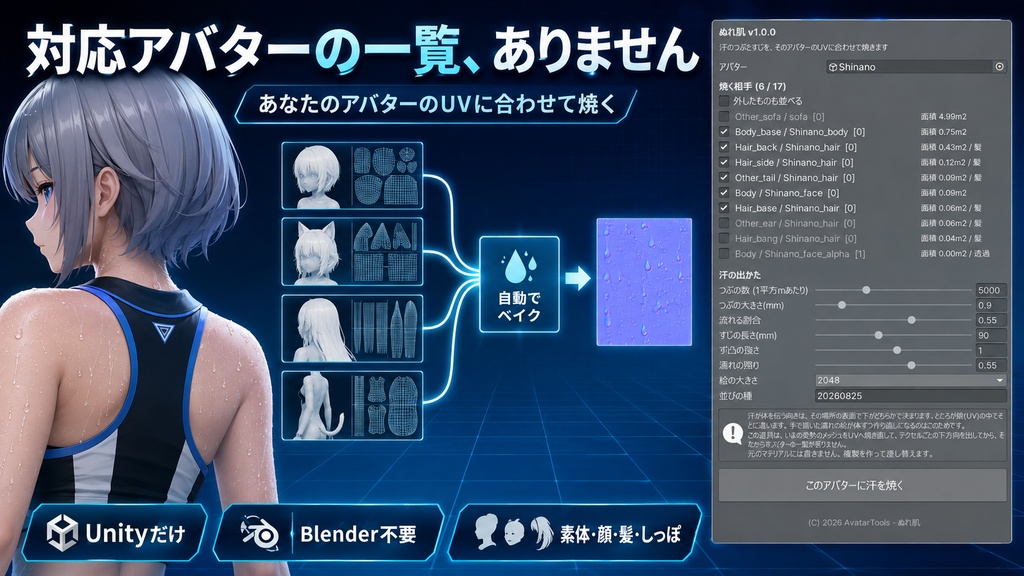
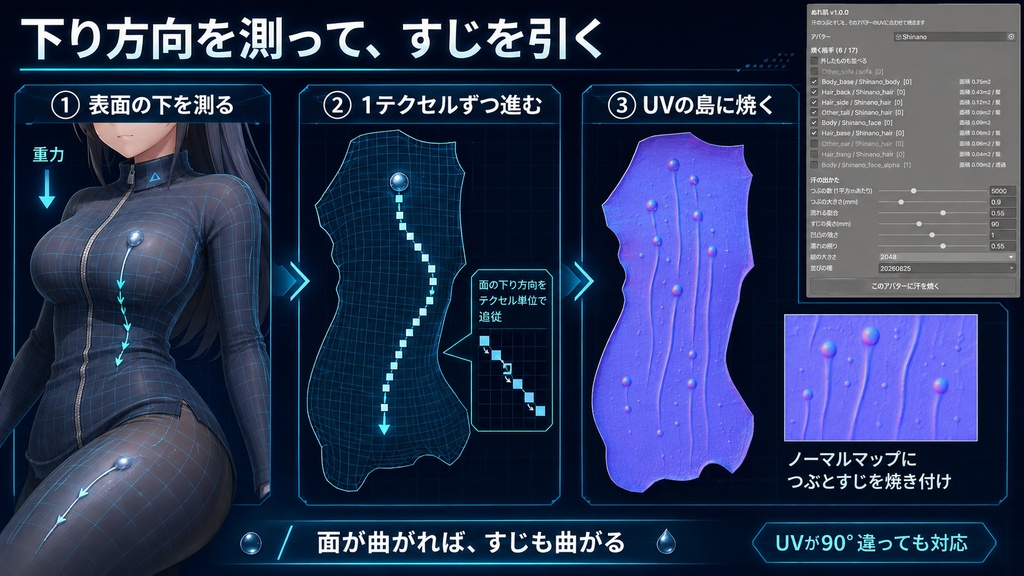
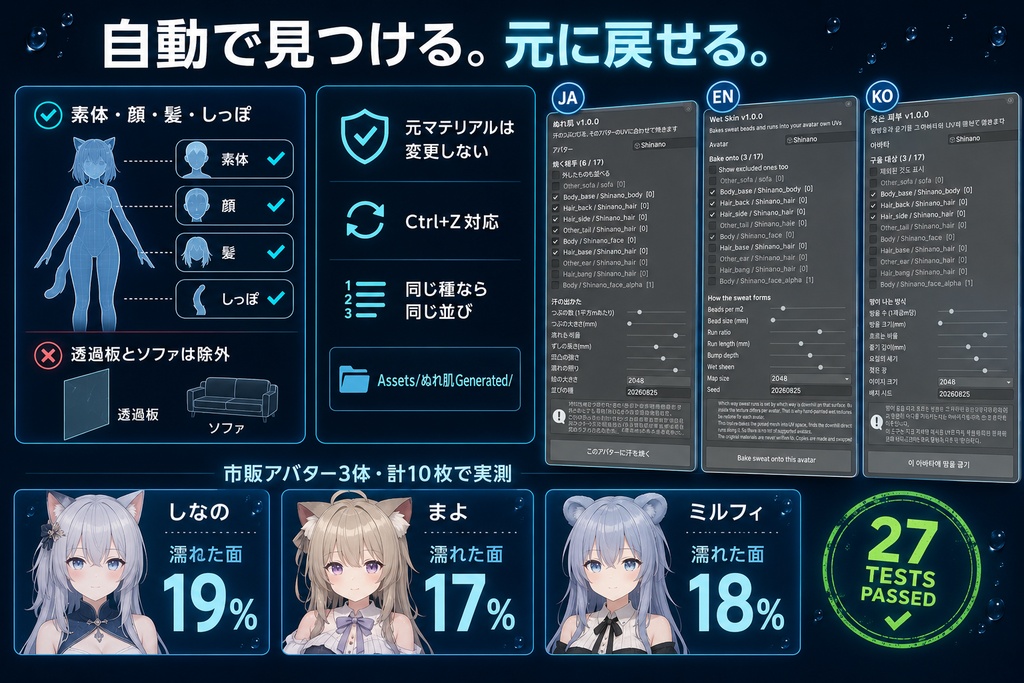


「濡れテクスチャを買おうとしたら、対応アバターの一覧に自分の子がいなかった」。 ぬれ肌は、汗のつぶとすじを、あなたのアバターのUVに合わせて焼くUnity Editorツールです。対応アバターの一覧を持ちません。Blenderは使いません。 ◆ 濡れの絵がアバターごとに作り直しになる理由 汗が体を伝って落ちる向きは、その場所の表面で「下がどちらか」で決まります。ところが絵(UV)の中でその向きがどこを指すかは、アバターごとに違います。同じ太ももでも、UVが90度回っていれば、すじも90度回さないと合いません。 だから手で描いた濡れの絵は1体ずつ作り直しになります。売られている濡れテクスチャの中には、2年かけて13体ぶんしか揃っていないものがあります。 ◆ 下り方向を測ってから、すじを引きます いまの姿勢でメッシュを焼き、それをUV空間へ焼き直して、テクセルごとに世界での位置・法線・接空間を持たせます。そこから重力の法線ぶんを抜いて「表面での下り方向」を出します。 すじは1歩1テクセルずつ進み、進むたびに下り方向を読み直します。面が曲がっていればすじも曲がり、UVの島から出たら止まります。 ◆ つぶの数は肌の実面積から決まります UVの1辺が実寸で何メートルぶんかを測って、必要なつぶの数を計算します。アバターの大きさやUVの取り方が違っても、汗の密度は変わりません。 ◆ 焼く相手は自動で見つけます 素体・顔・髪・しっぽを名前と面積から選びます。透過の重ね板は外します。名前の手がかりが無いものは選びません。AFK用のソファ(4.99平方m)は素体(0.75平方m)より広いですが、選ばれません。 ◆ 元に戻せます ・元のマテリアルには書き込みません。複製を作って差し替えます ・焼いた絵は Assets/ぬれ肌Generated/<アバター名>/ にまとまります ・Ctrl+Z で元に戻せます ・同じ「並びの種」なら、何度実行しても同じ並びになります ◆ 使い方 1. unitypackage を Import 2. Tools > tool > ぬれ肌 3. アバターをドラッグ(素体と髪は自動で見つけます) 4.「このアバターに汗を焼く」を実行 つまみは8つです。つぶの数 / つぶの大きさ / 流れる割合 / すじの長さ / 凹凸の強さ / 濡れの照り / 絵の大きさ / 並びの種。 ◆ 検証 Unity 2022.3.54f1 / VRChat SDK3 Avatars / lilToon。ユニットテスト27項目、出品ZIP同梱のunitypackageを別プロジェクトへ新規Importする検証3/3、いずれも全項目クリアしています。 実機の実測: 市販アバター3体(しなの / まよ / ミルフィ)の素体・顔・髪・しっぽ、計10枚に焼きました。対応アバターの一覧は持っていません。 しなの Body_base つぶ 3776個 / すじ 1623本 / 平均 43mm / 濡れた面 19% まよ MAYO_Body つぶ 2627個 / すじ 988本 / 平均 43mm / 濡れた面 17% ミルフィ Body_base つぶ 3495個 / すじ 1379本 / 平均 42mm / 濡れた面 18% 焼いた法線マップに光を当てた絵で、玉から尾が下へ伸びて、体の面に沿って曲がっていることを確認しました。素のままとの絵の変化は しなの 18.56% / まよ 28.47% / ミルフィ 5.12% です。 ※ lilToonが必要です。同梱していません(再配布になるため)。 https://booth.pm/ja/items/3087170 ※ lilToon以外のシェーダーでは、無い項目を飛ばすので壊れませんが、効果は限定されます。 ※ UVを持たないメッシュには焼けません。理由を画面に出します。 ※ 真上か真下だけを向いた面ではすじが流れません。そのときも画面で知らせます。 ※ 焼いた絵はアバターごとに作られます。2048pxで1枚あたり数MBです。 ※ すでにMatCapを使っているアバターでは、効く場所を絞るマスクを外してから載せます。 ※ アバター・lilToon・VRChat SDKは付属しません。最終確認は購入者環境で行ってください。 ※ デジタル商品のため、購入後の返品・返金はできません。 内容物: ・ぬれ肌 unitypackage ・濡れのMatCap 2枚(肌用 / 髪用) ・README ・TEST_REPORT ・CHANGELOG / LICENSE ・ツール画面のスクリーンショット --- English --- "I went to buy a wet texture and my avatar was not on the list." Wet Skin bakes sweat beads and runs into your own avatar UVs. No supported-avatar list. A Unity Editor tool. No Blender needed. Why hand-painted wet textures are redone per avatar Which way sweat runs is decided by which way is downhill on that surface, but where that direction points inside the texture differs per avatar - the same thigh with its UV rotated 90 degrees needs the runs rotated 90 degrees too. One wet texture on sale has covered 13 avatars in two years. It measures the downhill direction first The mesh is baked in its current pose, then re-baked into UV space so every texel carries its world position, normal and tangent frame. Gravity with the normal component removed gives the downhill direction. Each run advances one texel at a time and re-reads that direction, so a curved surface gives a curved run, and the run stops when it leaves the UV island. Bead count comes from the real surface area It measures how many meters one UV square covers, so the density holds whatever the size of the avatar or how the UVs were laid out. It finds what to bake onto Body, face, hair and tails, by name and by area. Transparent overlays are excluded and anything with no name evidence is skipped - an AFK sofa at 4.99m2 is larger than the body at 0.75m2 but is not selected. Everything is reversible The originals are never written to; copies are made and swapped in. The baked maps land in Assets/WetSkinGenerated/<avatar name>/. Ctrl+Z works, and the same seed gives the same arrangement. How to use Import, open Tools > tool > Wet Skin, drag your avatar in, press "Bake sweat onto this avatar". Eight sliders: bead count and size, run ratio and length, bump depth, wet sheen, map size and seed. Verification Unity 2022.3.54f1 / VRChat SDK3 Avatars / lilToon. 27 unit tests and a fresh import of the shipped unitypackage, 3 of 3, all passed. Measured on 3 commercial avatars across body, face, hair and tails - 10 maps, no supported-avatar list. Shinano Body_base 3776 beads / 1623 runs / mean 43mm / wet area 19% MAYO Body 2627 beads / 988 runs / mean 43mm / wet area 17% Milfy Body_base 3495 beads / 1379 runs / mean 42mm / wet area 18% Lighting the baked normal map shows a bead with a tail running down and curving along the surface. Pixels changed: 18.56% / 28.47% / 5.12%. Notes: lilToon is required and not included. https://booth.pm/en/items/3087170 On other shaders missing properties are skipped. A mesh without UVs cannot be baked, and the tool says so. Surfaces facing only straight up or down produce no runs. The baked maps are per avatar, a few MB each. Avatars and the SDK are not included. --- 한국어 --- "젖은 텍스처를 사려고 했더니 대응 아바타 목록에 우리 아이가 없었습니다." 젖은 피부는 땀방울과 줄기를 당신의 아바타 UV에 맞춰 굽는 Unity Editor 툴입니다. 대응 아바타 목록이 없습니다. Blender는 쓰지 않습니다. 손으로 그린 젖은 이미지가 아바타마다 다시 만들어지는 이유 땀이 흐르는 방향은 그 자리의 표면에서 아래가 어디인지로 정해집니다. 그런데 이미지 안에서 그 방향이 어디를 가리키는지는 아바타마다 다릅니다. 같은 허벅지라도 UV가 90도 돌아 있으면 줄기도 90도 돌려야 합니다. 내리막 방향을 측정한 뒤 줄기를 그립니다 지금 자세로 메시를 굽고 UV 공간으로 다시 구워, 텍셀마다 월드 위치·법선·접공간을 갖게 합니다. 중력에서 법선 성분을 빼면 내리막 방향이 나옵니다. 줄기는 한 걸음에 1텍셀씩 나아가며 매번 방향을 다시 읽으므로, 면이 휘면 줄기도 휩니다. 방울 수는 피부의 실제 면적에서 정해집니다 UV 한 변이 실제로 몇 미터인지 측정해 필요한 방울 수를 계산합니다. 아바타 크기가 달라도 땀의 밀도는 변하지 않습니다. 구울 대상을 자동으로 찾습니다 소체·얼굴·머리·꼬리를 이름과 면적으로 고릅니다. 투명한 겹침 판은 제외하며, 이름에 단서가 없는 것은 고르지 않습니다. AFK용 소파(4.99m2)는 소체(0.75m2)보다 넓지만 선택되지 않습니다. 되돌릴 수 있습니다 원래 머티리얼에는 쓰지 않고 복제를 만들어 교체합니다. 구운 이미지는 Assets/WetSkinGenerated/<아바타 이름>/ 에 모입니다. 같은 시드면 항상 같은 배치입니다. 사용법 Import 후 Tools > tool > Wet Skin 을 열고 아바타를 드래그, [이 아바타에 땀을 굽기]를 실행합니다. 검증 유닛 27항목, 출품 unitypackage의 신규 Import 검증 3/3 모두 통과. 실측: 시판 아바타 3체(시나노 / 마요 / 밀피)의 소체·얼굴·머리·꼬리 총 10장에 구웠습니다. 시나노 소체는 방울 3776개 / 줄기 1623개 / 평균 43mm / 젖은 면 19% 였습니다. ※ lilToon이 필요하며 동봉하지 않았습니다. https://booth.pm/ko/items/3087170 ※ 다른 셰이더에서는 없는 항목을 건너뜁니다. 효과는 제한됩니다. ※ UV가 없는 메시에는 구울 수 없습니다. 이유를 화면에 표시합니다. ※ 구운 이미지는 아바타마다 만들어지며 2048px에서 한 장당 수 MB입니다. ※ 아바타·lilToon·VRChat SDK는 포함되지 않습니다. 최종 확인은 구매자 환경에서 해 주세요. ※ 디지털 상품이므로 구매 후 반품·환불은 불가합니다.